
HOZO 228b233c-c9b6-4893-a966-af94cf5217ba
Contents
HOZO NeoRuler Digital Scale Ruler User Manual
Model: 228b233c-c9b6-4893-a966-af94cf5217ba
Introduction
The HOZO NeoRuler is a versatile digital scale ruler designed for precise measurements and drafting. This kit includes the NeoRuler, NeoReading module, NeoDrafting module, and a NeoCollection Case for organized storage and portability. It offers customizable scales, multiple units, and a 0.1mm resolution, making it suitable for various professional and hobbyist applications.
Product Components

Figure 1: The HOZO NeoRuler digital scale ruler shown with its various included modules: NeoReading, NeoDrafting, and the NeoCollection Case. This image provides an overview of the complete kit.

Figure 2: The NeoRuler's digital display showing a measurement in inches, alongside a smartphone screen displaying the companion mobile application. This highlights the digital interface and app connectivity.
NeoReading Kit

Figure 3: The NeoReading Kit, featuring the Neo Pointer (left) and the Neo Magnifier (right). These modules enhance measurement accuracy and readability.

Figure 4: A close-up of the Neo Magnifier being used on a blueprint, demonstrating its ability to magnify details for improved reading accuracy.
NeoDrafting Kit

Figure 5: The NeoDrafting Kit, showing the 0.8mm PenHolder (left) and the 1.2mm PenHolder (right). These allow for precise drawing and marking.
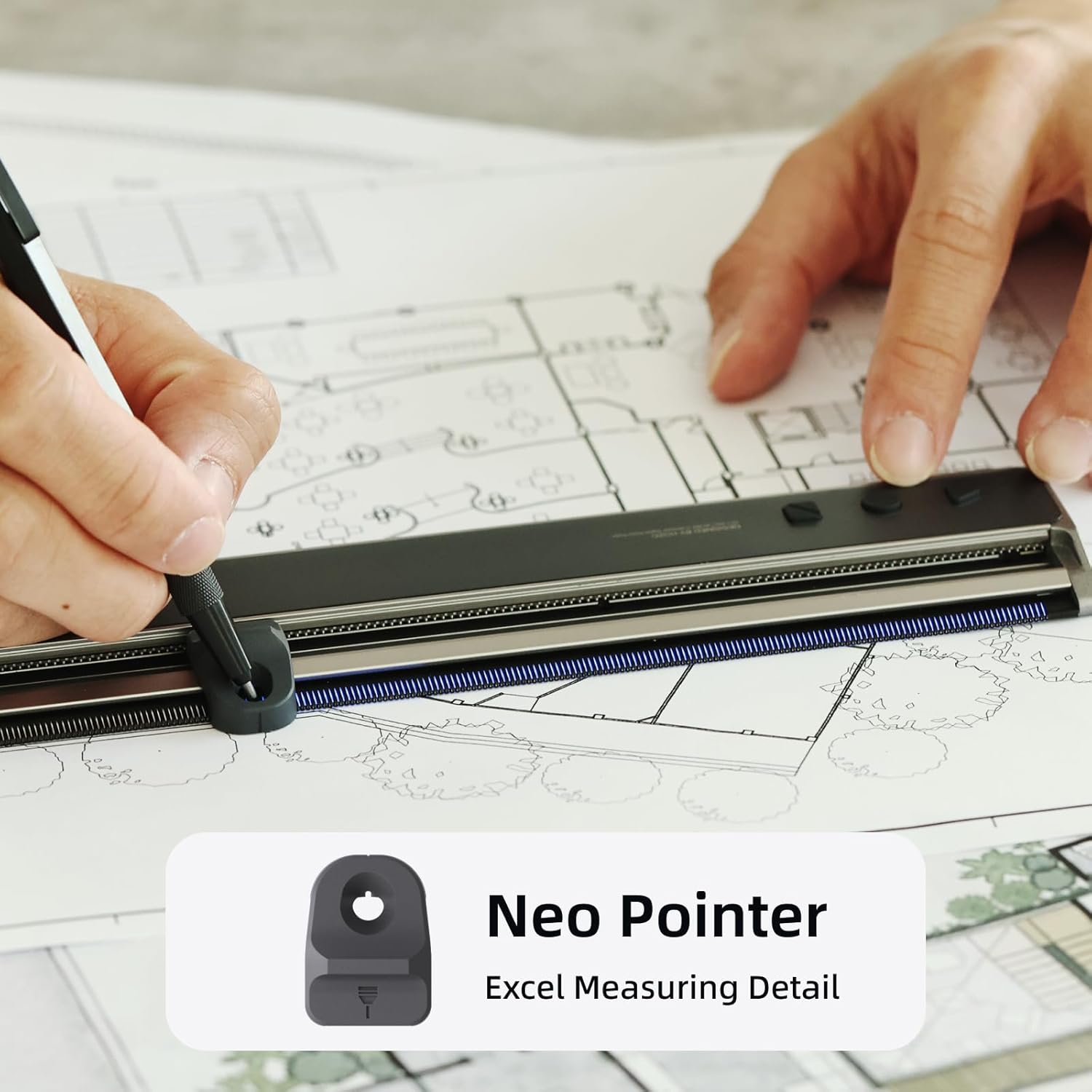
Figure 6: The Neo Pointer being used with the NeoRuler to mark or draw on a blueprint, illustrating its function in precise drafting.
NeoCollection Case

Figure 7: The NeoCollection Case open, showing the NeoRuler and its modules neatly stored inside. The case provides organized and secure storage.

Figure 8: A hand demonstrating the magnetic attachment feature by inserting a module into its designated slot within the NeoCollection Case.

Figure 9: The NeoRuler and its collection case being placed into a bag, illustrating its compact design and ease of portability.
Setup
- Battery Installation: The NeoRuler requires batteries (not included). Locate the battery compartment, typically on the underside or side of the ruler. Insert the specified battery type, ensuring correct polarity.
- Power On: Press the power button to turn on the NeoRuler. The digital display should illuminate.
- Initial Calibration (if applicable): Some digital rulers may require an initial zero-point calibration. Refer to the on-screen prompts or specific instructions in the quick start guide for your model.
- App Connection (Optional): For enhanced features, download the HOZO NeoRuler application from your device's app store. Follow the in-app instructions to pair your NeoRuler via Bluetooth. This allows for custom scale modes and data management.
Operating Instructions
Basic Measurement
- Selecting Units: Use the unit button on the NeoRuler to cycle through available measurement units (e.g., mm, inches).
- Taking a Measurement: Place the NeoRuler against the object to be measured. Slide the movable jaw or cursor along the ruler. The measurement will be displayed digitally.
- Zeroing: Press the zero button to reset the measurement to zero at any point, useful for differential measurements.
Using NeoReading Module (NeoMagnifier & NeoPointer)
- Attaching Modules: The NeoReading modules attach magnetically to the NeoRuler's cursor. Align the module with the cursor and allow the magnets to secure it.
- NeoMagnifier: Attach the NeoMagnifier to the cursor. This module provides enhanced visibility of the measurement scale, making it easier to read fine details or small text on blueprints.
- NeoPointer: Attach the NeoPointer to the cursor. This module allows for precise point marking or tracing along the ruler's edge, improving accuracy in detailed work.
Using NeoDrafting Module (PenHolders)
- Selecting PenHolder: Choose between the 0.8mm and 1.2mm PenHolders based on the desired line thickness for your pen or pencil.
- Inserting Pen: Insert your pen or pencil into the chosen PenHolder. Ensure it is securely seated.
- Attaching and Drafting: Attach the PenHolder to the NeoRuler's cursor. Use the ruler as a guide to draw precise lines or shapes. The PenHolder maintains a consistent distance from the ruler's edge.
Using the NeoCollection Case
- Storage: The NeoCollection Case is designed to securely hold the NeoRuler and up to three modules (NeoMagnifier and two PenHolders) using magnetic slots.
- Portability: When not in use, store all components in the case to protect them from damage and facilitate easy transport.
Maintenance
- Cleaning: Wipe the NeoRuler and its modules with a soft, dry cloth. For stubborn dirt, a slightly damp cloth can be used, but ensure no moisture enters the electronic components. Do not use abrasive cleaners or solvents.
- Storage: Always store the NeoRuler and its modules in the NeoCollection Case when not in use. This protects them from dust, scratches, and impacts. Store in a dry environment away from extreme temperatures.
- Battery Replacement: Replace batteries promptly when the low battery indicator appears on the display to ensure accurate operation. Dispose of old batteries responsibly.
Troubleshooting
| Problem | Possible Cause | Solution |
|---|---|---|
| Display not turning on. | Low or dead batteries; incorrect battery installation. | Replace batteries with new ones, ensuring correct polarity. |
| Inaccurate measurements. | Ruler not zeroed; debris on the measurement track; damaged sensor. | Press the zero button; clean the measurement track thoroughly; contact support if problem persists. |
| Modules not attaching securely. | Debris on magnetic surfaces; module misalignment. | Clean magnetic contact points on both the ruler and modules; ensure correct alignment during attachment. |
| App connection issues. | Bluetooth off; app not updated; ruler out of range. | Ensure Bluetooth is enabled on your device; update the app; bring ruler closer to your device. |
Specifications
- Brand: HOZO
- Model Number: 228b233c-c9b6-4893-a966-af94cf5217ba
- Material: Aluminum
- Color: Black
- Measuring Range: 0-150mm or 0-6 inches
- Resolution: 0.1mm
- International Protection Rating: IP54
- Water Resistance Level: Not Water Resistant
- Batteries Included: No
Warranty and Support
For warranty information, technical support, or service inquiries regarding your HOZO NeoRuler, please contact HOZO Design directly. Refer to the product packaging or the official HOZO website for the most current contact details and warranty terms.
Seller: HOZO Design
Ask a question about this manual
Ask about setup, troubleshooting, compatibility, parts, safety, or missing instructions. Manuals+ will review the question and use this page’s manual context to help answer it.