1. Introduction
Thank you for choosing the Kisonli LP-3S Bluetooth Speaker. This manual provides detailed instructions to help you understand and operate your new speaker effectively. Please read this manual thoroughly before use and retain it for future reference.

Image 1.1: Kisonli LP-3S Bluetooth Speaker with its ambient light glowing yellow.
2. Product Features
- Bluetooth connectivity for wireless audio streaming.
- 360-degree stereo sound with 8W output and deep bass.
- Hands-free voice calling with a built-in microphone.
- Six distinct RGB light modes for enhanced ambiance.
- Multiple playback options: AUX audio input, TF card, and USB.
- Integrated 1200mAh rechargeable battery providing 2-4 hours of playback.

Image 2.1: The Kisonli LP-3S speaker showcasing its key features including wireless Bluetooth, 360-degree stereo sound, deep bass, and RGB lighting.
3. Package Contents
Upon unpacking, please ensure all items are present:
- Kisonli LP-3S Bluetooth Speaker
- USB Charging Cable
- User Manual (this document)

Image 3.1: The product packaging and its contents, including the speaker, a USB charging cable, and the user manual.
4. Product Overview
Familiarize yourself with the speaker's buttons and ports:
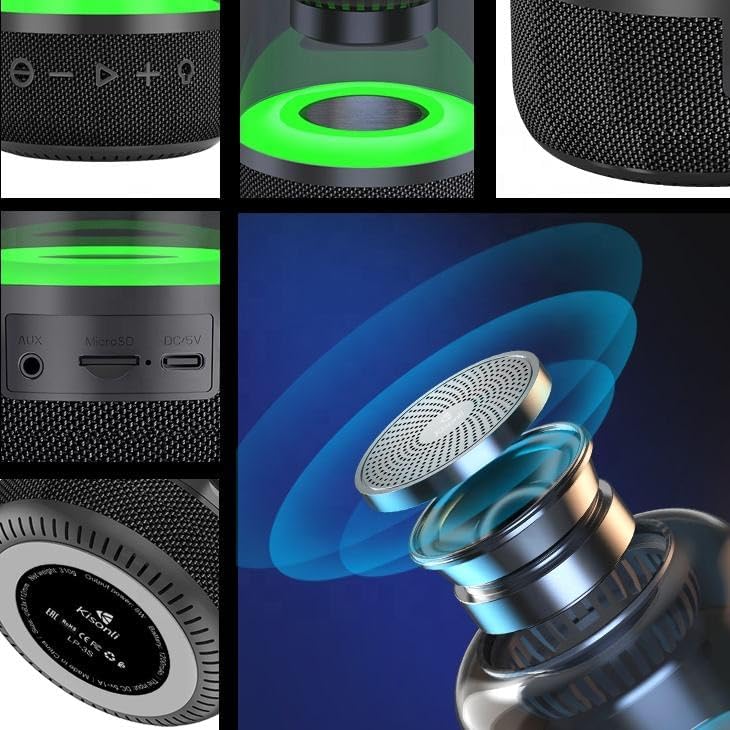
Image 4.1: A detailed view of the speaker's control panel, showing the buttons and the top speaker grille.

Image 4.2: A close-up of the speaker's rear panel, displaying the AUX input, MicroSD card slot, and DC/5V charging port.
4.1. Control Buttons
- Power Button (⏻): Press and hold to power on/off.
- Volume Down / Previous Track (−): Short press for volume down, long press for previous track.
- Play / Pause (▶): Short press to play/pause audio. In call mode, short press to answer/end call.
- Volume Up / Next Track (+): Short press for volume up, long press for next track.
- Light Mode Button (💡): Short press to cycle through RGB light modes.
4.2. Ports
- AUX Input: For connecting external audio devices via a 3.5mm audio cable.
- MicroSD Card Slot: For playing audio files directly from a TF (MicroSD) card.
- DC/5V Charging Port: For charging the speaker using the provided USB cable.
- USB Port: For playing audio files directly from a USB flash drive.
5. Setup
5.1. Charging the Speaker
- Connect the small end of the USB charging cable to the DC/5V port on the speaker.
- Connect the larger end of the USB cable to a USB power adapter (5V/1A recommended) or a computer's USB port.
- The charging indicator light will illuminate. Once fully charged (approximately 3 hours), the light may change color or turn off.
A full charge provides approximately 2.5 hours of playing time or 7.5 hours of hands-free call time.

Image 5.1: Visual representation of the speaker's battery capacity (1200mAh), playing time, hands-free call time, and charging duration.
5.2. Power On/Off
- To Power On: Press and hold the Power button (⏻) for a few seconds until you hear an audible prompt and the indicator light turns on.
- To Power Off: Press and hold the Power button (⏻) again for a few seconds until you hear an audible prompt and the indicator light turns off.
6. Operating Instructions
6.1. Bluetooth Pairing
- Ensure the speaker is powered on and in Bluetooth pairing mode (indicated by a flashing blue LED).
- Enable Bluetooth on your mobile device (smartphone, tablet, computer).
- Search for available Bluetooth devices. You should see "LP-3S" in the list.
- Select "LP-3S" to connect. Once paired, you will hear a confirmation sound, and the LED indicator will stop flashing and remain solid blue.
- The speaker will automatically reconnect to the last paired device when powered on, if the device's Bluetooth is active and within range.
6.2. Audio Playback
- Play/Pause: Short press the Play/Pause button (▶).
- Volume Control: Short press the Volume Up (+) or Volume Down (−) buttons.
- Next/Previous Track: Long press the Volume Up (+) for next track or Volume Down (−) for previous track.
6.3. Hands-Free Calling
- When a call comes in, the speaker will ring. Short press the Play/Pause button (▶) to answer the call.
- To end a call, short press the Play/Pause button (▶) again.
- To reject an incoming call, long press the Play/Pause button (▶).
6.4. AUX Input Mode
- Connect one end of a 3.5mm audio cable (not included) to the AUX port on the speaker.
- Connect the other end of the audio cable to the audio output jack of your external device.
- The speaker will automatically switch to AUX mode. Control playback from your connected device.
6.5. TF Card / USB Playback
- Insert a MicroSD (TF) card or a USB flash drive containing audio files into the respective slot/port on the speaker.
- The speaker will automatically detect the storage device and begin playing audio files.
- Use the Play/Pause, Volume Up/Down, and Next/Previous Track buttons to control playback.
6.6. RGB Light Modes
- Short press the Light Mode button (💡) to cycle through the six available RGB light effects.
- Continue pressing to find your preferred light mode or to turn the lights off.
7. Maintenance
- Clean the speaker with a soft, dry cloth. Do not use abrasive cleaners or solvents.
- Avoid exposing the speaker to extreme temperatures, direct sunlight, or high humidity.
- Do not immerse the speaker in water or any other liquids.
- Store the speaker in a cool, dry place when not in use for extended periods.
8. Troubleshooting
| Problem | Possible Solution |
|---|---|
| Speaker does not power on. |
|
| No sound from the speaker. |
|
| Bluetooth pairing fails. |
|
| RGB lights are not working. |
|
9. Specifications
| Feature | Detail |
|---|---|
| Model Name | LP-3S |
| Speaker Output Power | 8 Watts |
| Connectivity Technology | Bluetooth, Auxiliary, USB |
| Audio Output Mode | Stereo |
| Special Features | Bluetooth, Portable, RGB Light, Hands-Free Call |
| Battery Capacity | 1200mAh |
| Playing Time | 2-4 hours (approx.) |
| Charging Time | 3 hours (approx.) |
| Product Dimensions | 5 x 16 x 5 cm |
| Item Weight | 370 g |
| Material | Plastic or Metal |

Image 9.1: The Kisonli LP-3S speaker displaying its physical dimensions.
10. Warranty and Support
For warranty information and customer support, please refer to the documentation provided at the point of purchase or contact your retailer. The manufacturer provides a 30-day legal disclaimer regarding the product.


