
Product Overview
This manual provides instructions for the NewRixing Outdoor Portable Bluetooth Speaker, Model NR-8011D. This device features Bluetooth, AUX, and USB connectivity, along with FM radio functionality and colorful light effects, designed for outdoor and portable use.
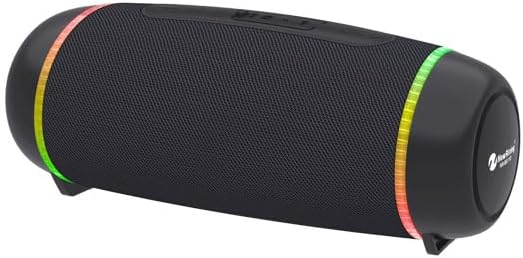
Figure 1: Front view of the NewRixing Outdoor Portable Bluetooth Speaker. The speaker is black with a textured grille, featuring colorful LED light rings on both ends. It has a cylindrical shape with small feet for stability.
Package Contents
- NewRixing Outdoor Portable Bluetooth Speaker (Model NR-8011D)
- Charging Cable (USB)
- AUX Cable (3.5mm)
Setup
Charging the Speaker
Before first use, fully charge the speaker. Connect the provided USB charging cable to the speaker's charging port and the other end to a compatible USB power source (e.g., computer USB port, USB wall adapter). The charging indicator light will illuminate during charging and turn off when fully charged.
Powering On/Off
Press and hold the power button (usually marked with ▶/██) for approximately 3 seconds to turn the speaker on or off. A sound prompt will indicate the power status.
Operating Instructions
Bluetooth Pairing
- Ensure the speaker is powered on and in Bluetooth pairing mode (indicated by a flashing LED, if applicable).
- On your device (smartphone, tablet, etc.), enable Bluetooth and search for available devices.
- Select "NewRixing NR-8011D" (or similar name) from the list.
- Once paired, the speaker will emit a confirmation sound, and the LED indicator will become solid.
AUX Mode
Connect an audio device to the speaker's AUX input port using the provided 3.5mm audio cable. The speaker will automatically switch to AUX mode or can be manually switched using the mode button.
USB Playback
Insert a USB flash drive containing audio files (e.g., MP3) into the USB port. The speaker will automatically detect and begin playing audio from the drive.
FM Radio
Switch to FM radio mode using the mode button. Press the play/pause button to auto-scan and save available stations. Use the volume/track buttons to navigate between saved stations.
Controlling Playback and Volume
- Play/Pause: Press the Play/Pause button.
- Next Track/Station: Short press the "+" button.
- Previous Track/Station: Short press the "-" button.
- Volume Up: Long press the "+" button.
- Volume Down: Long press the "-" button.
Light Effects
The speaker features colorful light effects. Press the dedicated light button (if available) or the mode button to cycle through different light modes or turn them off.
Maintenance
- Clean the speaker with a soft, dry cloth. Do not use abrasive cleaners, solvents, or harsh chemicals.
- Keep the speaker away from extreme temperatures, direct sunlight, and excessive moisture.
- Store in a cool, dry place when not in use for extended periods.
- Avoid dropping the speaker or subjecting it to strong impacts.
Troubleshooting
| Problem | Possible Cause | Solution |
|---|---|---|
| Speaker does not turn on. | Low battery; Power button not pressed correctly. | Charge the speaker fully; Press and hold the power button for 3 seconds. |
| Cannot pair via Bluetooth. | Speaker not in pairing mode; Device Bluetooth off; Too far from speaker. | Ensure speaker is in pairing mode; Enable Bluetooth on your device; Move device closer to speaker (within 10 meters). |
| No sound. | Volume too low; Incorrect mode selected; Audio cable not fully connected. | Increase volume on speaker and device; Switch to correct input mode (Bluetooth, AUX, USB, FM); Reconnect audio cable firmly. |
| FM radio reception is poor. | Weak signal; No external antenna. | Move speaker to an area with better reception; Connect an AUX cable (if applicable) to act as an external antenna. |
Specifications
- Model Name: NR-8011D
- Brand: Generic (Manufacturer: NewRixing)
- Connectivity Technology: Bluetooth
- Wireless Communication Technology: Bluetooth
- Speaker Type: Outdoor
- Special Feature: USB Port, Colorful Light
- Recommended Uses: For Smartphones or Tablets, For Outdoor Activities
- Compatible Devices: Desktop, Laptop, MP3 Player, Projector, Smartphone, Tablet, Television
- Controller Type: Button
- Audio Output Mode: Stereo
- Color: Black
- Included Components: Speaker
- Product Dimensions: 2"D x 6"W x 4"H
- Power Source: Battery Powered
- Speaker Size: 4 Inches
- Mounting Type: Tabletop Mount
- Style: Rugged, Color-changing Light
- Warranty Type: Limited
Warranty Information
This product comes with a Limited Warranty. Please refer to the product packaging or contact the manufacturer for specific terms and conditions regarding warranty coverage and duration. Keep your purchase receipt as proof of purchase for warranty claims.
Customer Support
For further assistance, technical support, or inquiries regarding your NewRixing Outdoor Portable Bluetooth Speaker, please contact the manufacturer or retailer where the product was purchased. Refer to the product packaging for contact details.
Note: Always ensure you have your product model number (NR-8011D) and purchase details ready when contacting support.