1. Introduction
This manual provides detailed instructions for the installation, operation, and maintenance of your Dans Clock Shop HD-1688 Sheng Bang MSF Atomic Quartz Pendulum Clock Movement. Please read these instructions carefully before proceeding to ensure proper function and longevity of your clock movement.
2. Package Contents
Verify that all the following components are present in your package:
- HD-1688 Quartz Clock Movement
- Radio-Controlled Pendulum Drive Unit
- Clock Hands (Hour, Minute, Second)
- Black Rubber Washer
- Gold Metal Washer
- Hex Nut
- Instruction Sheet
Note: A pendulum is not included with this unit and must be purchased separately. The movement is designed to swing a pendulum up to 100g in weight.

This image displays all components included in the Dans Clock Shop HD-1688 kit: the main quartz movement, the radio-controlled pendulum drive unit, a set of clock hands (hour, minute, second), and essential mounting hardware including a rubber washer, metal washer, and hex nut.

A close-up of the essential mounting hardware: a black rubber washer for cushioning, a gold metal washer for stability, and a gold hex nut for securing the movement to the clock face.
3. Product Overview
The HD-1688 is an automatic quartz movement featuring a British Atomic Ticking MSF time receiver. It is designed for wall clocks and operates on two AA batteries. The movement automatically synchronizes time and adjusts for daylight saving (summer/winter) changes.
Key Features:
- Fully automatic single band MSF time receiver.
- Automatic time synchronization and daylight saving adjustment.
- Designed to power a pendulum up to 100g.
- Battery operated (2 x AA batteries, not included).
Components:
- Quartz Movement: The main timekeeping mechanism.
- Pendulum Drive Unit: Attaches to the main movement to enable pendulum swing.
- Clock Hands: Hour, minute, and second hands for time display.
- Mounting Hardware: Secures the movement to the clock face.
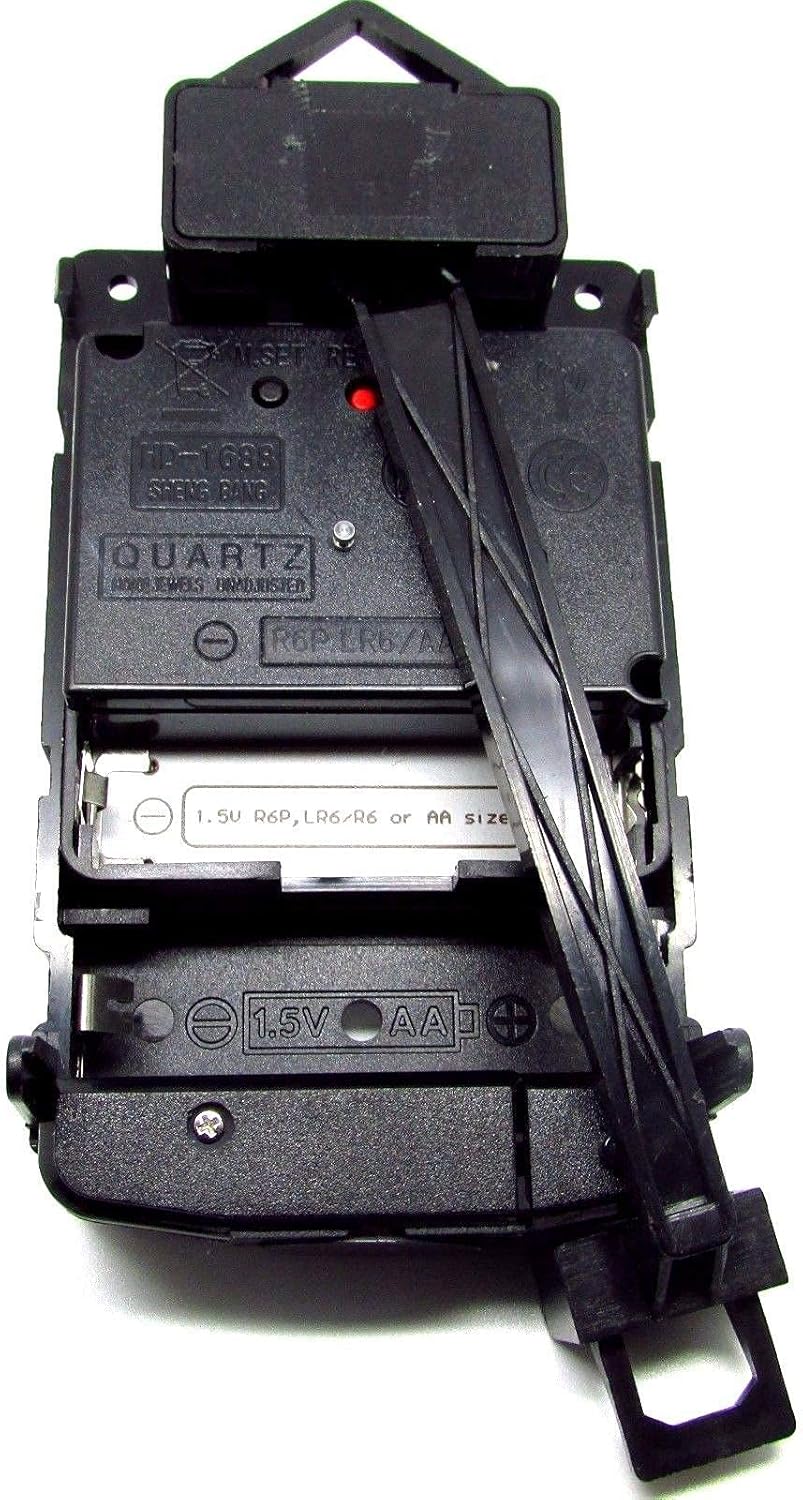
This image illustrates the HD-1688 quartz movement with the radio-controlled pendulum drive unit correctly slid into place, forming a complete pendulum mechanism. This unit is designed to swing a pendulum (not included) up to 100g.
4. Setup and Installation
Follow these steps to install your HD-1688 clock movement:
- Prepare the Clock Face: Ensure your clock face has a central hole suitable for the movement's shaft. The movement is suitable for clock faces up to 5mm thick.
- Insert Movement: Insert the threaded shaft of the quartz movement through the central hole of your clock face from the back.
- Secure Movement: Place the black rubber washer over the shaft from the front of the clock face, followed by the gold metal washer, and then tighten the hex nut to secure the movement. Do not overtighten.
- Attach Pendulum Drive Unit: The radio-controlled pendulum drive unit slides easily into the designated slot on the main quartz movement. Ensure it clicks securely into place.
- Install Clock Hands:
- Remove any protective seals from the hands before installation.
- Gently press the hour hand onto the shaft.
- Next, press the minute hand onto the shaft.
- Finally, press the second hand onto the smallest shaft. Ensure all hands are parallel to the clock face and do not touch each other. The hand adjustment size for this movement is 5mm+3.1mm.
- Insert Batteries: Open the battery compartment on the back of the movement. Insert two AA batteries (1.5V R6P, LR6/R6) according to the polarity indicators.
- Attach Pendulum (Optional): If using a pendulum, attach it to the hook on the pendulum drive unit.
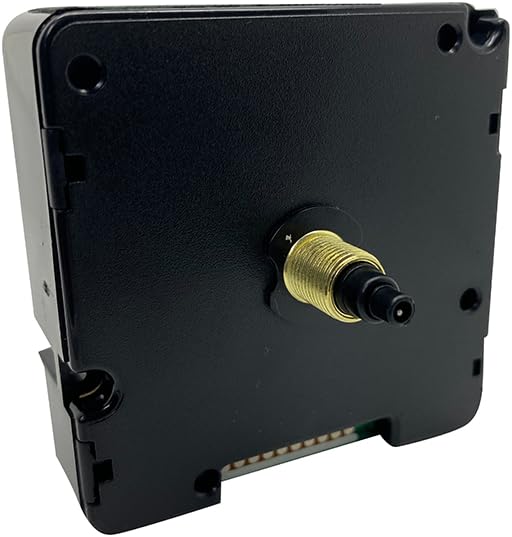
This image shows the rear of the HD-1688 quartz clock movement, highlighting the threaded shaft where the clock hands and mounting hardware are attached. The shaft length is 14mm with a 7mm thread.

A detailed view of the clock hands provided with the movement. It includes a red second hand, a black minute hand, and a black hour hand, each designed for precise time indication.
5. Operation
Once batteries are installed, the movement will begin to search for the MSF atomic time signal. This process can take several minutes to an hour, depending on your location and signal strength. Place the clock in an area with good reception, away from large metal objects or electronic interference.
Automatic Time Synchronization:
- The HD-1688 movement is equipped with a fully automatic single band MSF time receiver.
- It will automatically synchronize with the MSF signal, ensuring accurate time.
- Daylight Saving Time (DST) changes (summer/winter) are also handled automatically by the movement.
Control Buttons:
On the back of the movement, you will find three control buttons:
- M.SET: Manual Set button, typically used for initial time setting or manual adjustment if signal is lost.
- RESET: Resets the movement, often initiating a new search for the MSF signal.
- REC: Record/Receive button, used to manually trigger a signal reception attempt.

A top-down perspective of the HD-1688 movement, revealing the battery compartment designed for two AA batteries. Also visible are the 'M.SET', 'RESET', and 'REC' control buttons for manual time setting and signal reception.
6. Maintenance
The HD-1688 movement requires minimal maintenance.
- Battery Replacement: Replace the two AA batteries annually or when the clock hands stop moving or become erratic. Always replace both batteries at the same time.
- Cleaning: Use a soft, dry cloth to gently wipe the exterior of the movement if necessary. Avoid using liquid cleaners or solvents.
- Environment: Keep the movement in a dry environment, away from extreme temperatures and direct sunlight.
7. Troubleshooting
If you encounter issues with your clock movement, refer to the following common problems and solutions:
- Clock Not Running:
- Check if batteries are inserted correctly with correct polarity.
- Replace old batteries with new ones.
- Ensure hands are not touching each other or the clock face.
- Incorrect Time / Not Synchronizing:
- Ensure the clock is in an area with good MSF signal reception (e.g., near a window, away from electronics).
- Press the 'RESET' or 'REC' button to initiate a new signal search.
- Allow sufficient time (up to an hour) for the movement to receive and process the signal.
- Verify that the clock hands were installed correctly at the 12 o'clock position before initial setup.
- Pendulum Not Swinging:
- Ensure the pendulum drive unit is securely attached to the main movement.
- Check that the pendulum is correctly hooked and not obstructed.
- Verify the pendulum weight does not exceed 100g.
8. Specifications
| Model Number | HD-1688 |
| Brand | Dans Clock Shop |
| Movement Type | Quartz, MSF Atomic |
| Power Source | 2 x AA Batteries (1.5V) |
| Movement Dimensions (complete) | 140mm (H) x 58mm (W) x 30mm (D) |
| Total Shaft Length | 14mm |
| Thread Length | 7mm |
| Max Clock Face Thickness | 5mm |
| Hand Adjustment Size | 5mm + 3.1mm |
| Max Pendulum Weight | 100g |
| Material | Plastic |
| Item Weight | 3.53 ounces (approx. 100 grams) |
9. Warranty and Support
For warranty information or technical support, please contact Dans Clock Shop directly through their official channels. Keep your purchase receipt as proof of purchase.


