
VRURC T2047Q
VRURC Portable Charger 20000mAh User Manual
Model: T2047Q | Brand: VRURC
1. Introduction & Overview
The VRURC 20000mAh Portable Charger is a versatile power bank designed for fast and convenient charging of multiple devices. Featuring built-in cables for various device types and a high-capacity battery, it is an ideal companion for travel and daily use. This manual provides essential information for setting up, operating, maintaining, and troubleshooting your portable charger.
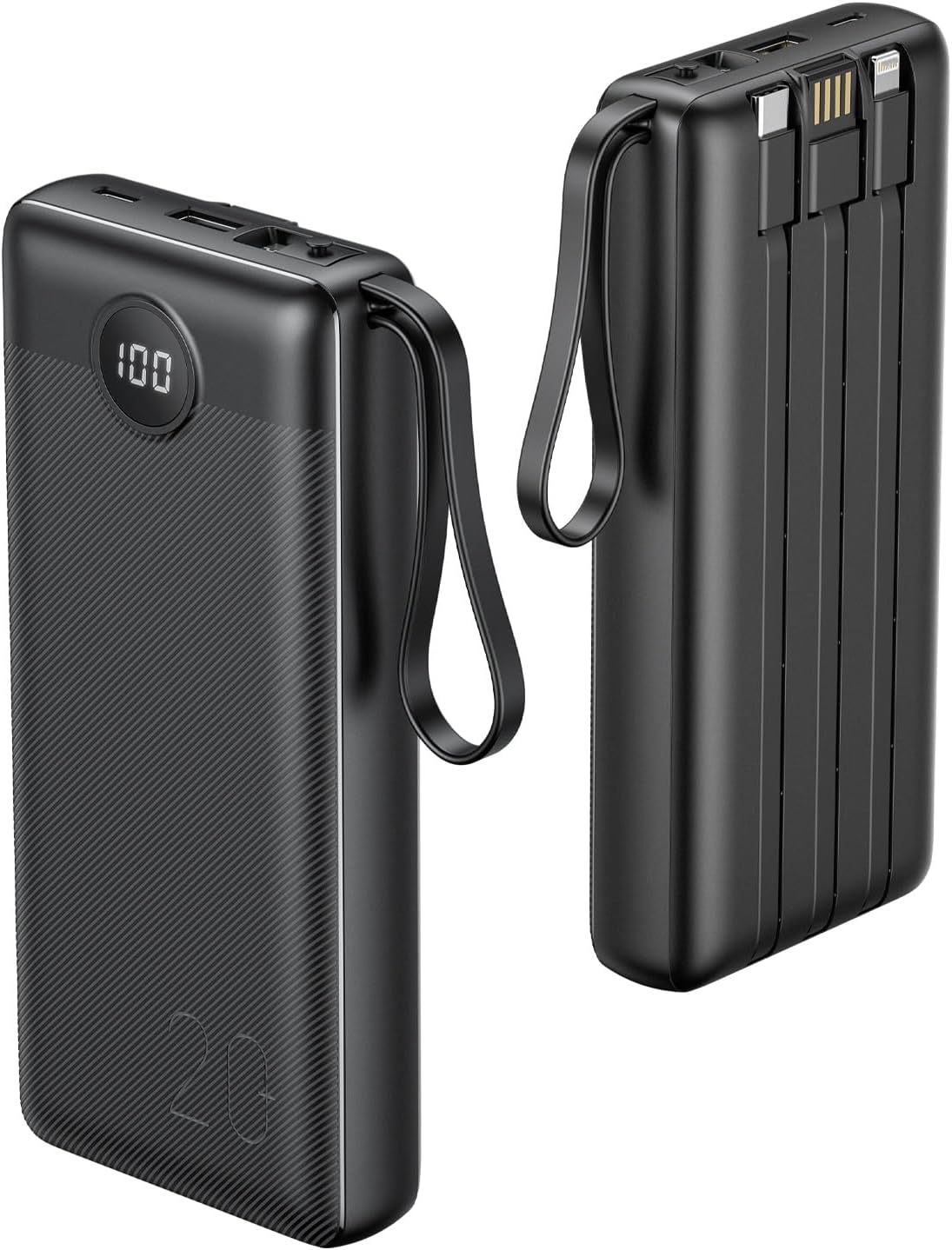
Figure 1: VRURC 20000mAh Portable Charger (Black)
2. Product Features
- Built-in Cables: Equipped with integrated Micro-USB, Type-C, and iPhone cables, eliminating the need to carry extra cords.
- Fast Charging: USB-A output port supports up to 22.5W fast charging. Built-in USB-C and iPhone cables support 18W fast charging.
- Simultaneous Charging: Capable of charging up to 4 devices concurrently using its multiple output options (Type-C cable, Micro cable, iPhone cable, USB-A port).
- Dual Recharge Options: Can be recharged via the 18W Type-C input port (approx. 6 hours for full charge) or the built-in USB-A charging input cable (approx. 11 hours for full charge).
- Durable & Portable Design: Features an anti-slip and drop-proof surface, compact dimensions (6.14 x 2.76 x 1.03 inches), and a weight of 13.96 oz. The built-in USB-A cable also functions as a convenient lanyard.
- LED Digital Display: Provides an accurate percentage display of the remaining battery life.

Figure 2: Key Advantages of the VRURC Power Bank
3. What's in the Box
Upon opening the package, you should find the following items:
- VRURC Portable Charger 20000mAh (1 unit)
- User Manual (This document)
4. Setup: Recharging the Power Bank
Before first use, it is recommended to fully charge your VRURC Portable Charger. The power bank offers two convenient methods for recharging:
- Using the Built-in USB-A Cable:
Locate the built-in USB-A cable (which also functions as a lanyard). Plug this cable directly into a standard USB-A wall adapter (not included) or a USB-A port on a computer. A full charge using this method takes approximately 11 hours.
- Using the USB-C Input Port:
For faster charging, connect a USB-C cable (not included) to the 18W Type-C input port on the power bank. Plug the other end of the USB-C cable into a compatible 18W (or higher) USB-C wall adapter (not included). A full charge using this method takes approximately 6 hours.
The LED digital display will show the charging progress, indicating the battery percentage as it recharges.

Figure 3: Two Ways to Recharge the Power Bank
Video 1: Demonstrates how to recharge the 20000mAh power bank using both the built-in USB-A cable and the USB-C input port.
5. Operating: Charging Your Devices
The VRURC Portable Charger is designed to charge a wide range of smartphones, tablets, and other USB-powered devices. It can charge up to four devices simultaneously.
- Using Built-in Cables:
Select the appropriate built-in cable (Micro-USB, Type-C, or iPhone) for your device. Plug the cable directly into your device's charging port. The power bank will automatically begin charging.
- Using the USB-A Output Port:
For devices requiring a standard USB-A connection, use your device's original USB charging cable. Plug the USB-A end of your cable into the power bank's USB-A output port, and the other end into your device.
The power bank supports fast charging for compatible devices, delivering up to 22.5W via the USB-A port and 18W via the built-in USB-C and iPhone cables. The LED display will show the remaining battery percentage of the power bank during use.

Figure 4: Charging Multiple Devices Simultaneously
Video 2: Overview of the VRURC Portable Charger, highlighting its built-in cables and multi-device charging capabilities.
6. Maintenance
To ensure the longevity and optimal performance of your VRURC Portable Charger, please follow these maintenance guidelines:
- Storage: Store the power bank in a cool, dry place away from direct sunlight and extreme temperatures.
- Cleaning: Use a soft, dry cloth to clean the surface of the power bank. Avoid using harsh chemicals or abrasive materials.
- Avoid Drops: While designed to be drop-proof, repeated drops or strong impacts can damage the internal components. Handle with care.
- Regular Charging: If not used for extended periods, recharge the power bank at least once every three months to maintain battery health.
- Cable Care: Ensure the built-in cables are properly tucked into their designated slots when not in use to prevent damage.
7. Troubleshooting
If you encounter any issues with your VRURC Portable Charger, please refer to the following common troubleshooting steps:
- Power Bank Not Charging:
- Ensure the charging cable (built-in USB-A or external USB-C) is securely connected to both the power bank and the power source.
- Verify that the wall adapter or USB port you are using is functional. Try a different adapter or port.
- Check if the power bank's LED display is showing any indication of charging.
- Device Not Charging from Power Bank:
- Confirm that the power bank has sufficient charge (check the LED display).
- Ensure the built-in cable or your external charging cable is correctly and firmly connected to both the power bank and your device.
- Try a different built-in cable or an external cable if available.
- Some devices may require a specific charging protocol; ensure your device is compatible with the power bank's output.
- Slow Charging:
- Ensure you are using a fast-charging compatible cable and adapter when recharging the power bank.
- When charging devices, verify that your device supports the fast charging protocols (PD/QC 3.0) offered by the power bank.
- Charging multiple devices simultaneously may reduce the charging speed for each individual device.
- LED Display Not Working:
- Press the power button briefly to activate the display.
- If the display remains off, the power bank might be completely depleted or require service.
If these steps do not resolve the issue, please contact VRURC customer support for further assistance.
8. Specifications
| Feature | Detail |
|---|---|
| Model Number | T2047Q |
| Battery Capacity | 20000 mAh |
| Product Dimensions | 6.14 x 2.75 x 1.08 inches |
| Item Weight | 14 ounces |
| Input (USB-C) | 18W (approx. 6h full charge) |
| Input (Built-in USB-A) | 10W (approx. 11h full charge) |
| Output (USB-A Port) | Up to 22.5W |
| Output (Built-in Cables) | 18W (USB-C, iPhone), Micro-USB |
| Special Features | 22.5W Fast Charging, Lanyard, Built-in 4 Cables, LED Display |
| Color | Black |
| Manufacturer | Dong guan Utopia-Originality Technology Co., Ltd |
| Country of Origin | China |
9. Warranty & Support
For warranty information and customer support, please refer to the documentation included with your product packaging or visit the official VRURC website. Typically, products come with a standard manufacturer's warranty covering defects in materials and workmanship. Additional protection plans may be available for purchase.
For technical assistance or inquiries, please contact VRURC customer service directly through their official channels.
Related documentsT2047Q


Ask a question about this manual
Ask about setup, troubleshooting, compatibility, parts, safety, or missing instructions. Manuals+ will review the question and use this page’s manual context to help answer it.