
Silonn SLIM01B-1-US
Silonn Countertop Ice Maker Instruction Manual
Model: SLIM01B-1-US | Brand: Silonn
Introduction
This manual provides detailed instructions for the safe and efficient operation, maintenance, and troubleshooting of your Silonn Countertop Ice Maker. Please read this manual thoroughly before first use and retain it for future reference.
The Silonn Countertop Ice Maker is designed for convenience, producing 9 bullet-shaped ice cubes in just 6 minutes and up to 26 lbs of ice per day. Its compact design and quiet operation make it ideal for home, office, parties, or dorms.
1. Setup
1.1 Unpacking and Inspection
Carefully unpack the ice maker and all accessories. Ensure all packing materials are removed from inside and outside the unit. Verify that all components are present and undamaged.
- Ice Maker Unit
- Ice Basket
- Ice Scoop
1.2 Placement
Place the ice maker on a flat, stable, and level surface. Ensure there is adequate ventilation around the unit (at least 5 inches of space from walls or other appliances) to allow for proper heat dissipation. Avoid placing the unit in direct sunlight or near heat sources like ovens or radiators.
1.3 Initial Preparation
Before plugging in the unit, allow it to stand upright for at least 24 hours. This allows the refrigerant to settle, which is crucial for optimal performance and longevity.
1.4 Initial Cleaning
Before first use, clean the interior of the ice maker. Wipe the water reservoir and ice basket with a soft cloth dampened with mild detergent. Rinse thoroughly with clean water. It is recommended to run a self-cleaning cycle (refer to Section 3.1) before making ice for consumption.

Figure 1: Silonn Countertop Ice Maker
2. Operating Instructions
2.1 Adding Water
Open the top lid of the ice maker. Fill the water reservoir with potable water up to the 'MAX' fill line. The reservoir has a 2-liter capacity. Do not overfill.

Figure 2: Detachable Ice Basket and Water Tank
2.2 Powering On and Selecting Ice Size
Plug the unit into a grounded electrical outlet. Press the 'ON/OFF/CLEAN' button to power on the ice maker. The 'POWER' indicator light will illuminate.
Press the 'SELECT' button to choose your desired ice cube size: 'S' for small or 'L' for large. The corresponding indicator light will illuminate.
- Small (S) Ice Cubes: Ideal for quickly chilling juice, soda, or for use in ice packs.
- Large (L) Ice Cubes: Recommended for whisky and cocktails, as they melt slower, reducing dilution.

Figure 3: Two Available Ice Cube Sizes
2.3 Ice Production and Collection
Once powered on and an ice size is selected, the ice maker will begin producing ice. The first batch of 9 ice cubes will be ready in approximately 6 minutes.

Figure 4: Rapid Ice Production (9 cubes in 6 minutes)
The 'ICE FULL' indicator light will illuminate when the ice basket is full, and the unit will automatically pause ice production. The ice maker will resume production once ice is removed from the basket.
Use the provided ice scoop to remove ice from the basket. The ice basket features an upgraded handle for easy removal and transfer of ice.

Figure 5: Overview of Effective Ice Making Features
3. Maintenance and Cleaning
Regular cleaning and maintenance are crucial to ensure the longevity and hygienic operation of your Silonn Ice Maker.
3.1 Self-Cleaning Function
The ice maker features a convenient self-cleaning function:
- Ensure the water reservoir is filled with clean water.
- Press and hold the 'ON/OFF/CLEAN' button for approximately 5 seconds until the 'POWER' indicator light starts blinking. This indicates the self-cleaning cycle has begun.
- The cycle will run for about 30 minutes. During this time, the unit will circulate water to clean internal components.
- Once the cycle is complete, the 'POWER' light will stop blinking. Unplug the unit and drain all water from the reservoir using the drain plug (usually located at the bottom/back of the unit).
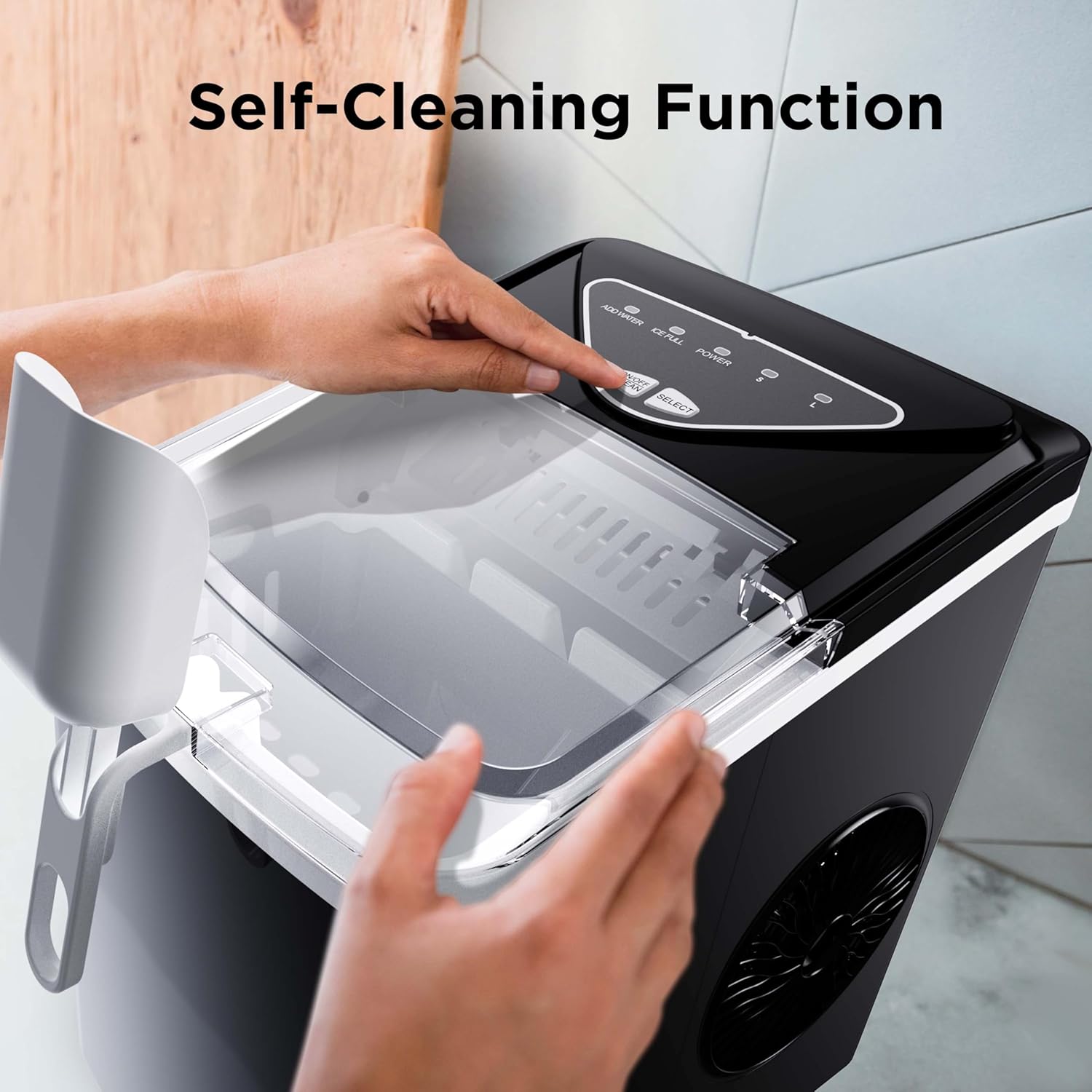
Figure 6: Activating Self-Cleaning Function
3.2 Manual Cleaning
For more thorough cleaning or if the unit has not been used for a long period:
- Unplug the ice maker from the power outlet.
- Remove the ice basket.
- Clean the interior of the water reservoir and the ice-making components (evaporator fingers) with a soft cloth and a solution of mild detergent and warm water.
- Rinse all internal parts thoroughly with clean water to remove any detergent residue.
- Wipe the exterior of the unit with a soft, damp cloth. Do not use harsh chemicals, abrasive cleaners, or solvents.
- Ensure all parts are completely dry before reassembling and storing or using the unit.
3.3 Storage
If the ice maker will not be used for an extended period, drain all water, clean the unit thoroughly, and store it in a cool, dry place away from direct sunlight.
4. Troubleshooting Guide
Before contacting customer support, please refer to the following troubleshooting guide for common issues.
| Problem | Possible Cause | Solution |
|---|---|---|
| Ice maker not producing ice. | No power; Water reservoir empty; Unit not settled. | Check power connection; Fill water reservoir; Allow unit to stand upright for 24 hours before plugging in. |
| 'ADD WATER' indicator light is on. | Water level is low. | Refill the water reservoir up to the 'MAX' line. |
| 'ICE FULL' indicator light is on. | Ice basket is full. | Empty the ice basket. The unit will resume production automatically. |
| Ice melts quickly in the basket. | This is a countertop ice maker, not a freezer. | Transfer ice to a freezer for long-term storage. Melted ice will be recycled to make new ice. |
| Unit is unusually noisy. | Unit not on a level surface; Internal components vibrating. | Ensure the unit is on a stable, level surface. Some operational noise is normal for ice makers. |
5. Product Specifications
| Feature | Specification |
|---|---|
| Model Number | SLIM01B-1-US |
| Brand | Silonn |
| Ice Production Capacity | Up to 26 lbs (11.8 kg) per 24 hours |
| Ice Production Speed | 9 cubes in 6 minutes |
| Water Tank Capacity | 2 Liters |
| Ice Cube Sizes | Small (S) and Large (L) bullet-shaped ice |
| Product Dimensions (W x D x H) | 8.86" x 11.81" x 12.2" (22.5 cm x 30 cm x 31 cm) |
| Weight | 15.87 lbs (7.2 kg) |
| Wattage | 160 watts |
| Self-Cleaning Function | Yes (30-minute cycle) |
| Noise Level | Whisper-quiet operation |

Figure 7: Product Dimensions
6. Warranty and Support
Your Silonn Countertop Ice Maker comes with a manufacturer's warranty. Please refer to the warranty card included in your product packaging for specific terms and conditions.
For technical support, troubleshooting assistance, or warranty claims, please contact Silonn Customer Service through the contact information provided on your warranty card or the official Silonn website.
An electronic version of the user manual can also be found at: Silonn Ice Maker User Manual (PDF)
Related documentsSLIM01B-1-US


Ask a question about this manual
Ask about setup, troubleshooting, compatibility, parts, safety, or missing instructions. Manuals+ will review the question and use this page’s manual context to help answer it.