
1. Introduction
This manual provides essential information for the safe and effective operation of your NICE-POWER DC Power Supply SPS-C3010. This professional switching power supply regulation device offers high-resolution voltage and current control, making it suitable for various laboratory, educational, and DIY electronics applications. Please read this manual thoroughly before use and retain it for future reference.

Figure 1: Front view of the NICE-POWER DC Power Supply SPS-C3010.
2. Safety Instructions
Your safety is paramount. This power supply is designed with multiple protection functions, but proper handling is crucial to prevent damage or injury.
- Input Voltage: This DC power supply is designed for 110V input, meeting US standard voltage. 220V input is NOT supported for this model.
- Protection Features: The device includes leakage, grounding terminal, over-voltage, over-current, over-power, over-load, over-temperature, and short-circuit protection. These features ensure stable performance and prolong product life.
- Proper Use: Always use the power supply under occupied conditions. Avoid violent impact or dropping the device.
- Connection: Ensure all connections, especially positive (+) and negative (-) terminals, are correct before activating the output. Incorrect connections can damage the load.
- Accuracy Measurement: To correctly measure accuracy, do not connect any load and ensure the multimeter is properly set to the DC voltage/current measurement range.

Figure 2: Overview of the safety protection features.
3. Product Features
- Precise 4-Digit LED Display: Shows real-time Voltage (V), Current (A), and Power (W) with a resolution of 0.01V and 0.001A. The backlit display ensures clear readability in various lighting conditions.
- Output Switch Control: An added OUTPUT button allows easy activation or deactivation of the output, preventing accidental damage to loads and saving energy.
- Multiple Protection Functions: Built-in safeguards against leakage, over-voltage, over-current, over-power, over-load, over-temperature, and short-circuits.
- 5V/2A USB Port: Conveniently located for quick charging of USB devices.
- Intelligent Cooling Fan: Activates when the internal temperature exceeds 122°F/50°C, ensuring efficient heat dissipation, reduced noise, and extended lifespan.
- Compact and Portable Design: Stable vertical design with shock-absorbing rubber feet. Dimensions: 8.4*3.3*5.5 inches, weight: 2.6 lbs.
- Stable Output & Automatic C.V./C.C. Conversion: Provides low noise, low ripple continuous output. Automatically switches between constant-voltage (C.V.) and constant-current (C.C.) modes based on load changes.
- Front Power Switch & Precise Adjustment Knobs: Power switch located on the front for convenience. Features coarse and fine adjustment knobs for precise voltage and current settings.

Figure 3: Detailed view of the power supply's controls and ports.
4. Package Contents
Upon unpacking, please verify that all items listed below are present and in good condition:
- DC Power Supply (all-metal body with ABS buttons) x1
- Output Power Cord x1
- Input Power Cord x1
- User Manual x1
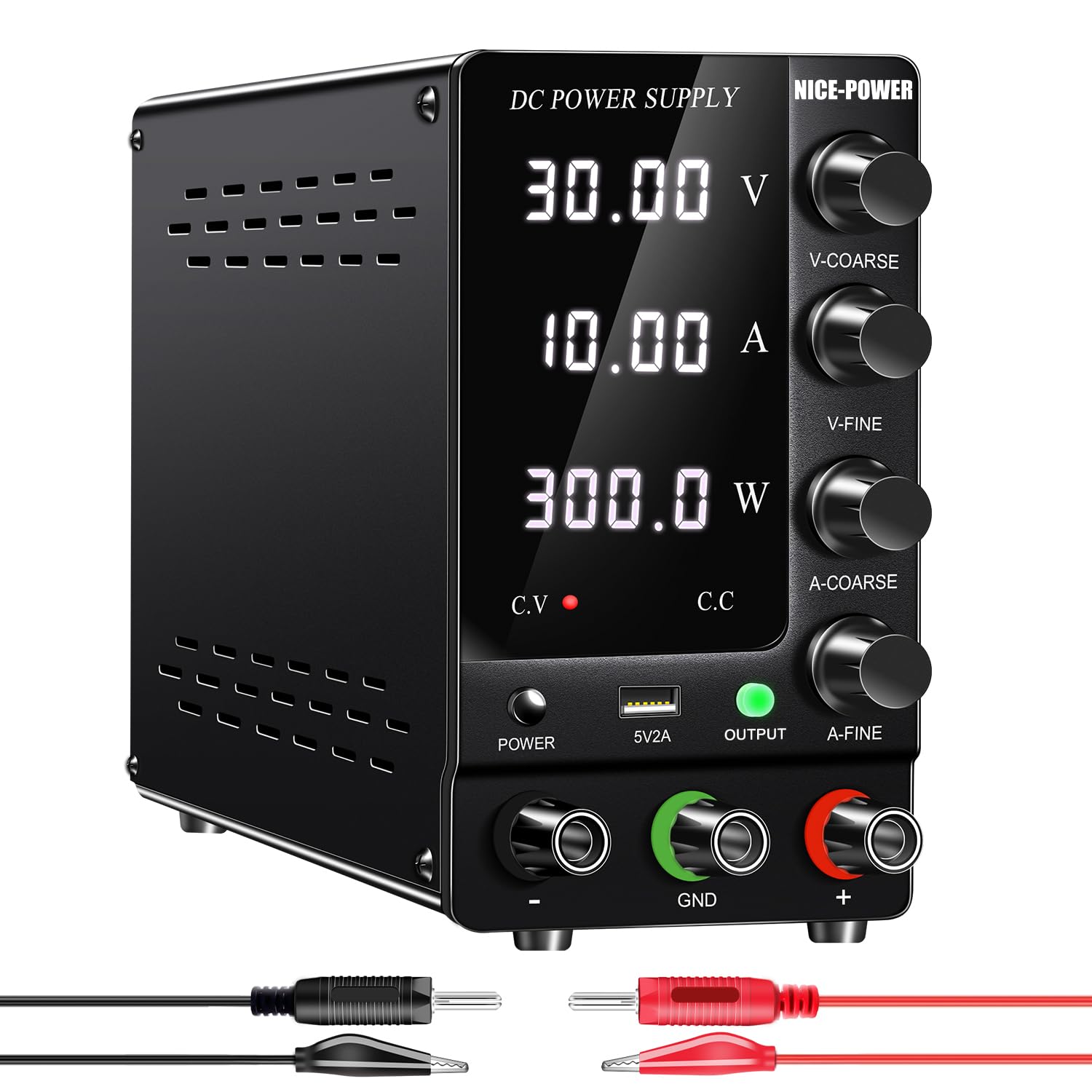
Figure 4: Output power cords included with the power supply.
5. Setup
- Unpacking: Carefully remove the power supply and all accessories from the packaging. Inspect for any signs of damage.
- Placement: Place the power supply on a stable, flat surface with adequate ventilation. Ensure the cooling fan at the rear is not obstructed.
- Connect Input Power: Plug the input power cord into the power supply's rear input socket, then into a standard 110V AC outlet.
- Connect Output Leads: Connect the provided output power cords to the corresponding terminals on the front panel: red to positive (+), black to negative (-), and green to ground (GND) if required by your application.
6. Operating Instructions
- Power On: Press the 'POWER' button on the front panel to turn on the device. The LED display will illuminate.
- Set Voltage and Current: Use the 'V-COARSE' and 'V-FINE' knobs to set the desired output voltage. Use the 'A-COARSE' and 'A-FINE' knobs to set the desired output current limit. The display will show the set values.
- Activate Output: Press the 'OUTPUT' button to enable the power output. The green indicator light next to the button will illuminate. The display will show the actual output voltage, current, and calculated power.
- C.V. / C.C. Mode: The power supply automatically operates in either Constant Voltage (C.V.) or Constant Current (C.C.) mode. The corresponding indicator (red LED) will light up to show the active mode.
- USB Port: The 5V/2A USB port is always active when the power supply is on, allowing you to charge compatible USB devices.
- Power Off: Press the 'OUTPUT' button to disable the output first, then press the 'POWER' button to turn off the device.

Figure 5: Coarse and fine adjustment knobs for precise control.
Video 1: Detailed information on the NICE-POWER DC power supply SPS-C Series, demonstrating its features and operation.
7. Maintenance
- Cleaning: Keep the unit clean and free from dust. Use a soft, dry cloth for cleaning. Do not use liquid cleaners or solvents.
- Ventilation: Ensure the cooling fan and ventilation slots are clear of obstructions to maintain optimal operating temperature.
- Storage: Store the power supply in a cool, dry place when not in use.

Figure 6: The compact design allows for easy handling and storage.
8. Troubleshooting
If you encounter issues with your power supply, please refer to the following common problems and solutions:
- No Output: Check if the 'OUTPUT' button is pressed (green indicator should be on). Verify input power connection.
- Incorrect Readings: Ensure all connections are secure. If using a multimeter for verification, ensure it's correctly set for DC voltage/current measurement and no load is connected to the power supply during calibration checks.
- Fan Not Running: The intelligent cooling fan only activates when the internal temperature exceeds 122°F/50°C. This is normal operation.
- Short Circuit Protection Activated: If a short circuit occurs, the power supply will automatically cut output and switch to C.C. mode (red LED). Disconnect the short, then re-enable output.
Video 2: Ripple testing of the NICE-POWER DC Power Supply SPS-C Series, demonstrating output stability.
9. Specifications
| Specification | Value |
|---|---|
| Model Name | SPS-C3010 |
| Product Dimensions | 3.3 x 8.4 x 5.5 inches |
| Item Weight | 2.6 Pounds |
| Output Wattage | 300 Watts |
| Cooling Method | Air (Intelligent Fan) |
| Connector Type | USB |
| Compatible Devices | Personal Computer, Tablet |
| Voltage Stability (C.V. state) | ≤1%+30mV |
| Load Stability (C.V. state) | ≤1%+30mV |
| Current Stability (C.C. state) | ≤1%+30mA |
| Load Stability (C.C. state) | ≤1%+30mA |
| Display Accuracy | 1% +5digits |
10. Warranty and Support
NICE-POWER is committed to providing high-quality products and excellent customer service. We inspect all power supplies and accessories before shipment to ensure quality.
- Quality Assurance: All lab power supplies are certified and built with premium electronic components and reliable circuit designs.
- Customer Service: If you have any questions about your variable power supply, please contact NICE-POWER customer service for efficient after-sales support and technical assistance.


