
Introduction
This manual provides detailed instructions for the safe and efficient use of your Fockety Portable MP3 Player. Please read this manual thoroughly before operating the device and retain it for future reference.
Package Contents
Verify that all items listed below are present in your package:
- 1 x Fockety MP3 Player
- 1 x Headphones
- 1 x USB Charging Cable

Image: Fockety MP3 Player, included headphones, and USB charging cable.
Product Overview
The Fockety MP3 Player is designed for portable music playback. It features a compact design, an LCD screen, and a clip for easy attachment.
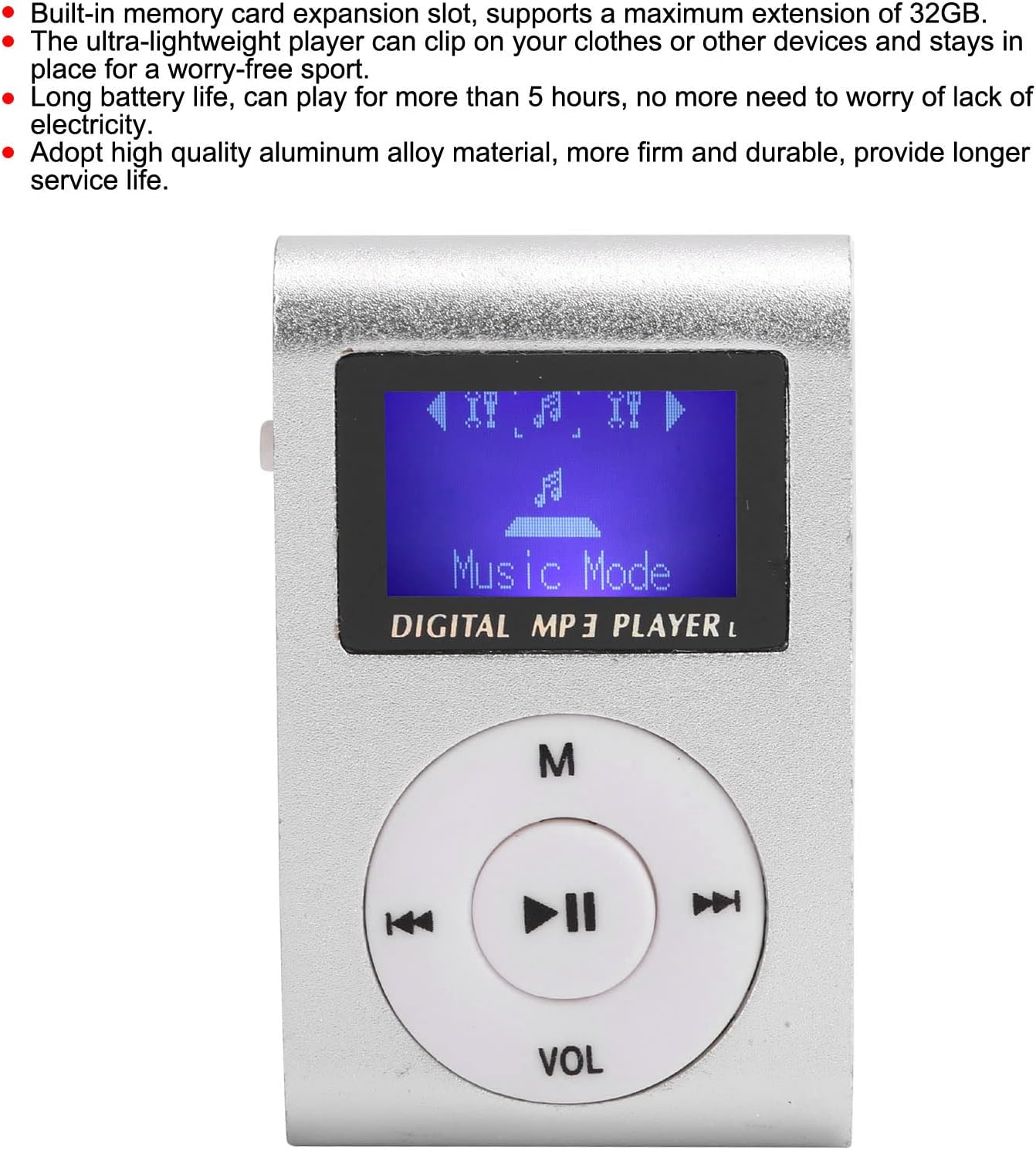
Image: Front view of the MP3 player, displaying the LCD screen and circular control panel with 'M', play/pause, skip, and 'VOL' buttons.
Key Features:
- Memory Card Expansion: Supports up to 32 GB via a memory card slot (memory card not included).
- Portable Design: Ultra-lightweight with a clip for secure attachment to clothing or other items.
- Extended Battery Life: Provides over 5 hours of continuous playback on a full charge.
- LCD Screen: Displays song progress and navigation information clearly.
- Durable Construction: Made from high-quality aluminum alloy for enhanced durability.
Device Layout
Familiarize yourself with the various ports and controls of your MP3 player.

Image: Side view of the MP3 player, highlighting the 3.5mm headphone jack, MicroSD card slot, and the On/Off power switch.
- 3.5mm Audio Jack: For connecting headphones.
- MicroSD Card Slot: Insert your memory card here.
- Power Switch: Slide to turn the device On or Off.
- Mini USB Port: Used for charging the device.
- Control Buttons: (M) Menu, Play/Pause, Skip Forward, Skip Backward, (VOL) Volume.
Setup
1. Inserting a Memory Card
- Ensure the MP3 player is powered off.
- Locate the MicroSD card slot on the side of the device.
- Gently insert a MicroSD card (up to 32GB, not included) into the slot until it clicks into place.
- To remove, gently push the card in again until it springs out.
2. Connecting Headphones
Plug the 3.5mm jack of your headphones into the audio port on the side of the MP3 player.
Operating Instructions
Powering On/Off
- To turn on: Slide the power switch to the "ON" position. The LCD screen will illuminate.
- To turn off: Slide the power switch to the "OFF" position. The screen will turn off.
Playing Music
- Ensure a memory card with MP3 files is inserted.
- Power on the device.
- The player should automatically enter "Music Mode" or display a menu. Use the skip buttons (<< / >>) to navigate through songs or menu options.
- Press the Play/Pause button (center button) to start or pause playback.
- Press the M button to access the menu for different modes or settings.
Volume Control
Press the VOL button. While the volume indicator is displayed on the screen, use the skip buttons (<< / >>) to adjust the volume level. Press VOL again or wait a few seconds for the volume indicator to disappear.
Charging the Device
The MP3 player has a built-in rechargeable lithium battery. When the battery is low, the device will indicate this on the screen or power off automatically.
- Locate the Mini USB port on the side of the MP3 player.
- Connect the smaller end of the provided USB charging cable to the Mini USB port on the player.
- Connect the standard USB-A end of the cable to a USB power adapter (not included) or a computer's USB port.
- The device will begin charging. A full charge provides over 5 hours of playback time.
Important Note: The USB port on this device is for charging only. It cannot be used to transfer files to or from a computer.

Image: The Fockety MP3 Player with its Mini USB charging port visible on the side.
Maintenance
- Keep the device dry. Avoid exposure to moisture or liquids.
- Clean the device with a soft, dry cloth. Do not use harsh chemicals or abrasive cleaners.
- Avoid dropping or subjecting the device to strong impacts.
- Store the device in a cool, dry place when not in use.
- Do not attempt to disassemble or repair the device yourself. This will void the warranty.
Troubleshooting
| Problem | Possible Solution |
|---|---|
| Device does not power on. |
|
| No sound from headphones. |
|
| Cannot find music files. |
|
| Device freezes or is unresponsive. |
|
Specifications
| Model Name | Fockety0aq9m3vb6e-11 |
| Brand | Fockety |
| Display | LCD Mini Screen |
| Memory Type | Memory Card (MicroSD) |
| Max. Expansion | 32 GB |
| Supported Audio Formats | MP3 |
| Interface | 1 x Mini USB (charging only), 1 x 3.5mm Audio Jack, 1 x Memory Card Slot |
| Battery Type | Built-in 250mAh Lithium Battery |
| Working Hours | Over 5 hours |
| Material | Aluminum Alloy |
| Item Weight | 47 Grams |
Warranty and Support
For warranty information or technical support, please refer to the documentation provided at the time of purchase or contact Fockety customer service directly. Keep your purchase receipt as proof of purchase.
Do not attempt to open or modify the device, as this may void your warranty.