1. Introduction
The UNI-T UT622 series handheld LCR meters are designed for precise measurement of inductance, capacitance, and resistance. These devices offer high accuracy, fast measurement speed, and extended standby time, making them suitable for various applications in laboratories, production lines, and maintenance operations. The UT622E model features a clear 2.8-inch TFT LCD display and a rechargeable battery, ensuring convenient and reliable measurements.
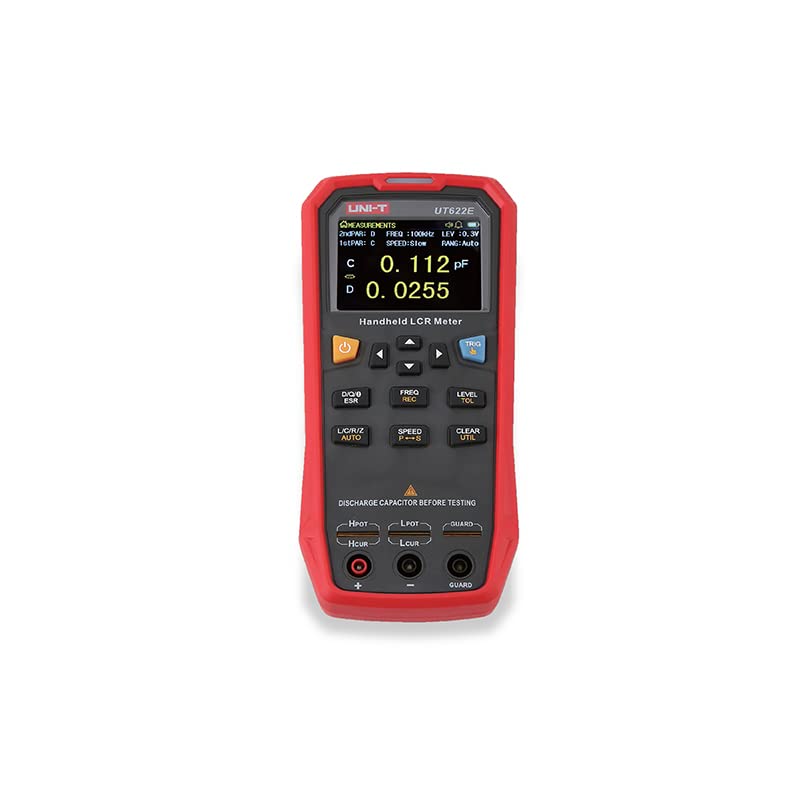
Image 1.1: Front view of the UNI-T UT622E Handheld LCR Meter.
2. Key Features
- High Accuracy: Up to 0.1% measurement accuracy.
- Wide Test Frequency Range: Maximum test frequency of 100kHz.
- Fast Test Rate: Up to 20 times/second (Fast mode).
- Display Count: 99999 display count for detailed readings.
- Display: 2.8-inch TFT LCD display for clear visibility.
- Connectivity: Mini-USB port for data transfer and charging.
- Battery: Large-capacity rechargeable lithium battery for long operation.
- Measurement Modes: Supports Tolerance mode for component sorting and Recording mode for data statistics.
- Automatic Identification: Auto LCR/Z mode for simplified measurements.
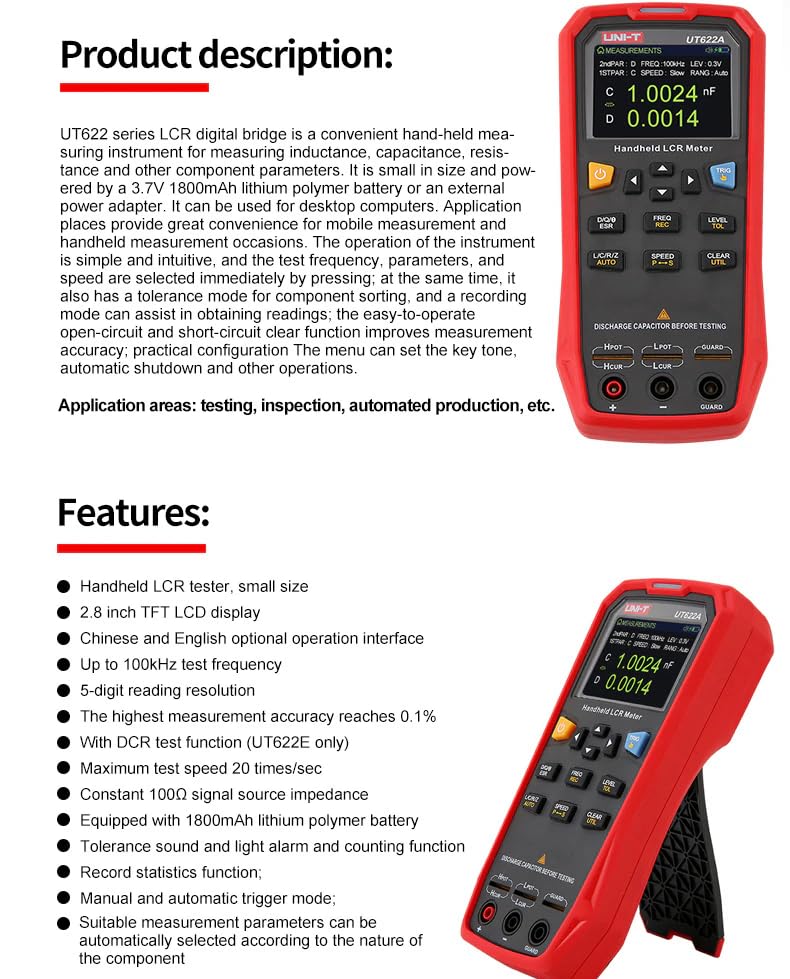
Image 2.1: Overview of the UT622 series features and product description.
3. Product Overview
3.1 Controls and Display
The UT622E features an intuitive button layout and a clear display for easy operation.
- Power Switch: Long press to turn on, short press to turn off.
- Arrow Keys: Used for menu navigation and selection.
- Trigger Key (TRIG): Initiates a measurement or selects trigger mode.
- D/Q/θ/ESR: Selects secondary measurement parameters.
- FREQ/REC: Selects test frequency (100Hz, 120Hz, 1kHz, 10kHz, 100kHz) and activates record mode.
- LEVEL/TOL: Selects test signal level (0.1V, 0.3V, 1V) and activates tolerance mode.
- L/C/R/Z/AUTO: Selects main measurement parameters and automatic identification mode.
- SPEED/P-S: Adjusts test speed (Fast, Medium, Slow) and equivalent mode.
- CLEAR/UTIL: Clears data and accesses the utility/configuration menu.

Image 3.1: Front panel of the UT622E showing controls and display in AUTO LCR mode.
4. Setup
4.1 Battery Installation and Charging
The UT622E comes with a pre-installed lithium metal battery. Ensure the battery is charged before first use. The device can be charged via the Mini-USB port.

Image 4.1: Back and side view indicating battery location and Mini USB port.
4.2 Connecting Test Leads
Connect the provided test leads to the appropriate terminals on the LCR meter. The UT622E uses four-terminal Kelvin test leads for accurate measurements, minimizing lead resistance effects.

Image 4.2: UT622E connected to a component using test leads.
5. Operating Instructions
5.1 Basic Measurement
- Power On: Long press the power switch to turn on the device.
- Select Main Parameter: Press the L/C/R/Z/AUTO button to cycle through Inductance (L), Capacitance (C), Resistance (R), Impedance (Z), or Auto mode. Auto mode automatically identifies the component type.
- Select Test Frequency: Press the FREQ/REC button to choose the desired test frequency (e.g., 100Hz, 120Hz, 1kHz, 10kHz, 100kHz).
- Select Test Level: Press the LEVEL/TOL button to set the test signal level (e.g., 0.1V, 0.3V, 1V).
- Adjust Test Speed: Press the SPEED/P-S button to select the test speed (Fast, Medium, or Slow).
- Connect Component: Connect the component to be measured to the test terminals.
- Trigger Measurement: Press the TRIG button to initiate a measurement. The results will be displayed on the screen.
5.2 Tolerance Mode
Tolerance mode is used for component sorting. It allows you to set a nominal value and tolerance limits. The meter calculates the percentage deviation of the measured value from the nominal value and displays GO/NG (Good/No Good) discrimination results.
- Activation: Press the LEVEL/TOL button to enter tolerance mode.
- Configuration: Set the nominal value, tolerance limit (1% to 20%), and alarm settings.
- Indication: The device provides visual (LED indicator) and audible (alarm) feedback for qualified and unqualified components.
5.3 Recording Mode
Recording mode is useful for data statistics, allowing you to dynamically obtain the average, maximum, minimum, and total number of records over a period.
- Activation: Press the FREQ/REC button to enter recording mode.
- Data Display: The display will show statistical data such as Average, Maximum, Minimum, and the count of measurements.
6. Specifications
The following table details the specifications for the UT622E LCR Meter:
| Feature | UT622E |
|---|---|
| Test Frequency | 100Hz, 120Hz, 1kHz, 10kHz, 100kHz |
| Test Level | 0.1Vrms, 0.3Vrms, 1Vrms |
| Output Impedance | 100Ω |
| Measurement Parameters | Primary: L/C/R/Z Secondary: D/Q/θ/ESR |
| Auto LCR | Yes |
| Test Ports | Three-terminal test jacks, five-terminal test sockets |
| Test Speed | Fast (20 times/s), Medium (5 times/s), Slow (2 times/s) |
| DCR Test Speed | Fast (20 times/s), Medium (5 times/s), Slow (2 times/s) |
| Range | Auto/Hold |
| Tolerance Range | 1%–20% |
| Equivalent Mode | Series/Parallel |
| Clearing Correction | Open/Short Circuit |
| Fuse of Test Ports | 0.1A/250V |
| Communication Interface | Mini-USB |
| LED Alarm for Tolerance | Pass: green; Fail: red |
| Max Reading of Primary Parameters | 99999 |
| Min Resolution | 0.0001 |
| Maximum Accuracy | 0.10% |
| L Range | 0.00µH–99.999H |
| C Range | 0.00pF–99.999mF |
| Z/R Range | 0.0000Ω–9.9999MΩ |
| ESR Range | 0.0000Ω–999.99Ω |
| D Range | 0.0000–9.9999 |
| Q Range | 0.0000–99999 |
| θ Range | -179.9°–179.9° |
| DCR Range | 0.01mΩ–20.000MΩ |
| Temperature Coefficient | 0.1×(specified accuracy)/°C (0°C–18°C or 28°C–40°C) |
| Power | 3.7V 1800mAh lithium polymer battery; Input: 220V (±10%), 50Hz (±1.5%); Mini-USB output: 5V, 1A |
| Display | 2.8" TFT LCD 320 × 240 |
| Product Net Weight | 420g |
| Product Size | 93mm × 192mm × 44mm |
| Standard Accessories | Short circuit board (UTR-001), USB cable, 5V 1A power adapter, Four-terminal Kelvin test leads (UTR-L10K-H) (UT622C/E), Alligator clip test leads with rubber plugs (UTR-002) (UT622A), English manual |

Image 6.1: Comprehensive specifications for the UT622 series, including UT622E.
7. Maintenance
7.1 Cleaning
To clean the device, use a soft, damp cloth. Do not use abrasive cleaners or solvents, as these may damage the casing or display.
7.2 Battery Care
To prolong battery life, avoid fully discharging the battery frequently. Charge the device regularly, especially if it will be stored for an extended period.
7.3 Safety Warning
WARNING: To avoid electrical shock, remove test leads before opening the case. Do not attempt to service the device yourself. Refer all servicing to qualified personnel.

Image 7.1: Back view of the UT622E, highlighting the battery compartment and safety warning.
8. Troubleshooting
If you encounter issues with your UT622E LCR Meter, consider the following general troubleshooting steps:
- Device not powering on: Ensure the battery is sufficiently charged. Connect the device to a power source using the Mini-USB cable.
- Inaccurate readings: Check that the test leads are properly connected and not damaged. Ensure the component is securely connected. Verify that the correct test frequency and level are selected for the component type. Perform an open/short circuit correction if necessary.
- Display issues: If the display is blank or flickering, try restarting the device. If the problem persists, contact customer support.
9. Warranty and Support
The UNI-T UT622E LCR Meter is manufactured by UNI-Trend. For specific warranty information, please refer to the warranty card or documentation included with your product. For technical support or service inquiries, please contact UNI-Trend customer service.
Manufacturer: UNI-Trend
Website: www.uni-trend.com.cn
Customer Service (China): 400-876-7822
You may also scan the QR code below for more information or support:

Image 9.1: Product box with manufacturer details and QR code for support.
QR Code Link: http://weixin.qq.com/r/Wkx2bgbEr1vQrUIN9xlI


