1. Introduction
The DetectTrek T22 is a professional-grade metal detector designed for adults, offering high accuracy and versatile detection capabilities. Equipped with an upgraded DSP chip, it provides enhanced responsiveness and superior anti-interference. This manual provides detailed instructions for assembly, operation, maintenance, and specifications to ensure optimal performance and a rewarding treasure hunting experience.

Figure 1: The DetectTrek T22 Professional Metal Detector.
2. What's in the Box
Your DetectTrek T22 package includes the following components:
- 1 × T22 Metal Detector (Main Unit)
- 1 × Bag + 1 × Belt Holster
- 1 × Digger (Military Shovel)
- 1 × Over-ear Headphones
- 4 × 1.5V AA Long-lasting Batteries

Figure 2: Included accessories with the T22 Metal Detector.
3. Setup and Assembly
The T22 metal detector features a retractable cam lock design for simple and fast assembly. Follow these steps to set up your device:
- Assemble Stems: Connect the stem sections by aligning the push-pins and inserting them until they click into place.
- Attach Search Coil: Secure the 12-inch search coil to the lower stem using the provided bolt and knob. Ensure it is firmly attached but allows for slight angle adjustment.
- Connect Coil Cable: Wrap the search coil cable neatly around the stem, ensuring it is not too tight or loose. Plug the cable connector into the control box port.
- Install Batteries: Open the battery compartment on the control box and insert the 4 x 1.5V AA batteries, observing the correct polarity. Close the compartment securely.
- Adjust Length: Customize the detector's length from 30" to 52" using the retractable cam lock mechanism for comfortable operation. Adjust the armrest for a secure fit.

Figure 3: Retractable cam lock for easy assembly and length adjustment.
Video 1: Step-by-step guide on how to assemble the DetectTrek T22 Professional Metal Detector.
4. Operating Instructions
4.1 Power On/Off and Display
Press the power button to turn the device on or off. The 1.5X spacious LCD display features a non-blinding white backlight for clear visibility in various lighting conditions. The display shows target identification, depth indication, sensitivity, volume levels, and battery status.
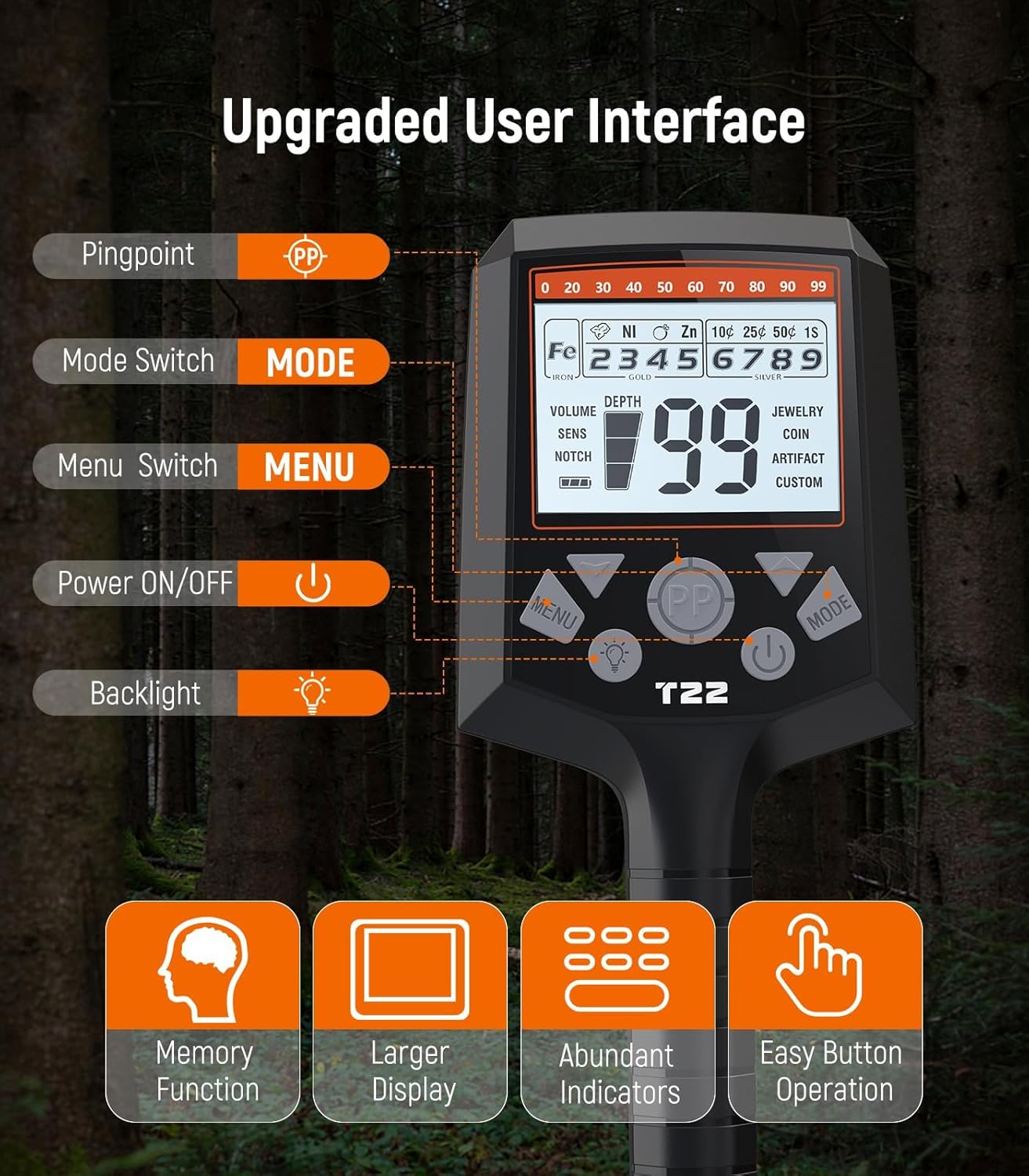
Figure 4: Upgraded user interface with memory function, larger display, abundant indicators, and easy button operation.
4.2 Detection Modes
The T22 offers 6 professional detection modes to suit various treasure hunting scenarios:
- JEWELRY Mode: Optimized for finding jewelry, automatically ignoring most nails and small iron pieces.
- COIN Mode: Focused on finding coins, with iron (Fe) and certain target categories (Foil, Aluminum) notched out.
- ARTIFACT Mode: Configured to detect artifacts, eliminating small ferrous objects while detecting larger ones.
- CUSTOM Mode: Allows you to program and customize tones (0=VCO, 1=bass, 2=low, 3=medium, 4=high) and target discrimination based on your preferences.
- NOTCH Mode: Enables you to reject a single ID or multiple IDs simultaneously, focusing on desired targets.
- PINPOINT Mode: Helps locate the specific location and depth of the detected target with precision.

Figure 5: Overview of the 6 professional detection modes.
4.3 Sensitivity and Volume Adjustment
- Sensitivity: Adjust the sensitivity across 10 levels to fine-tune detection based on ground conditions and target depth. Higher sensitivity increases detection range but may also pick up more ground noise.
- Volume: Adjust the volume across 20 levels. Individual ferrous (FE) volume adjustments are available to ensure clarity on desired treasures by setting ferrous targets lower than non-ferrous ones.

Figure 6: Adjusting sensitivity from 1 to 10 levels.

Figure 7: Adjusting volume from 0 to 20 levels.
4.4 Target Identification and Depth
The T22 features 9 types of target metal identification and a 0-99 digital target indication. The 4-tone ID system and LCD display guide you to the presence, classification, and location of objects. It can detect targets up to 10 inches deep, with 3 depth indication levels.

Figure 8: Target ID ranges for different metals (e.g., Iron 1-19, Gold 40-49, Silver 90-99).
Figure 9: The 12-inch search coil allows for detection up to 10 inches deep.
5. Maintenance
- Cleaning: After each use, wipe down the detector with a damp cloth. Ensure the search coil is clean, especially after use in wet or sandy conditions.
- Waterproof Coil: The 12-inch search coil is IP68 waterproof, allowing for exploration in water. However, the control box is not waterproof and should not be submerged.
- Storage: Store the metal detector in a dry, cool place. Remove batteries if storing for extended periods to prevent leakage.
- Cable Care: Ensure the coil cable is not kinked or damaged. Secure it properly around the stem to prevent strain.
6. Troubleshooting
If you encounter issues with your DetectTrek T22, consider the following:
- No Power: Check battery installation and ensure batteries are fresh.
- Erratic Signals: Adjust sensitivity settings. Ensure the search coil cable is securely connected and not damaged. Avoid areas with high electromagnetic interference.
- No Detection: Verify the selected detection mode is appropriate for the target type. Ensure the search coil is properly calibrated to the ground.
- Difficulty Pinpointing: Practice using the PINPOINT mode in a clear area with known targets to familiarize yourself with its operation.
For further assistance, refer to the Warranty & Support section.
7. Specifications
| Feature | Specification |
|---|---|
| Brand | DetectTrek |
| Model Number | T22 |
| Color | Black |
| Material | Metal, Premium ABS Plastic |
| Power Source | Battery Powered (4 x 1.5V AA) |
| Battery Average Life | 40 Hours |
| Extended Length | 52 Inches |
| Adjustable Length | Yes (30" to 52") |
| Operating Frequency | 7.69 KHz |
| Display Type | LCD |
| Item Weight | 2.6 Pounds |
| International Protection Rating | IP68 (Search Coil only) |
8. Safety Information
Keep out of reach of children. Use with caution to avoid injury. Follow instructions for proper use.
9. Warranty & Support
DetectTrek is committed to providing excellent customer service and product reliability:
- 12-Month Replacement: Replacement available within 12 months of purchase.
- 24-Hour Support: Expect a quick reply to inquiries within 24 hours.
- Lifetime Service: Lifetime service and technical support are provided for your DetectTrek T22 metal detector.
For support, please visit the official DetectTrek store or contact customer service through your purchase platform.

Figure 10: DetectTrek's commitment to customer satisfaction and support.