Introduction
This manual provides detailed instructions for the proper setup, operation, and maintenance of your GOWENIC ZK-1002T Bluetooth 5.0 Amplifier Board. This dual-channel HiFi subwoofer audio amplifier module offers 2x100W output with integrated treble and bass control, supporting both AUX and Bluetooth connectivity. Please read this manual thoroughly before using the product to ensure optimal performance and safety.

Figure 1: ZK-1002T Bluetooth 5.0 Amplifier Board with knobs, standoffs, and screwdriver.
Safety Information
- Ensure the power supply voltage is within the specified range (DC 12-24V). Using an incorrect voltage may damage the device.
- It is recommended to use an 18V-24V power supply with a current above 3A for optimal performance.
- Avoid exposing the amplifier board to moisture, extreme temperatures, or direct sunlight.
- Do not disassemble or modify the device. Refer all servicing to qualified personnel.
- Keep out of reach of children.
- The module incorporates protection mechanisms against overvoltage, undervoltage, overheat, DC detection, and short circuit. However, proper handling is still essential.
Package Contents
Please verify that all items are present in the package:
- ZK-1002T Stereo Bluetooth Power Amplifier Module
- Acrylic Shell (Top and Bottom plates)
- Knobs (3 pieces)
- 14mm Copper Columns (4 pieces)
- 5mm Copper Column Mats (4 pieces)
- 4mm Screws (8 pieces)
- Screwdriver (1 piece)
Product Overview and Port Diagram
Familiarize yourself with the various components and connection points of the ZK-1002T amplifier board.
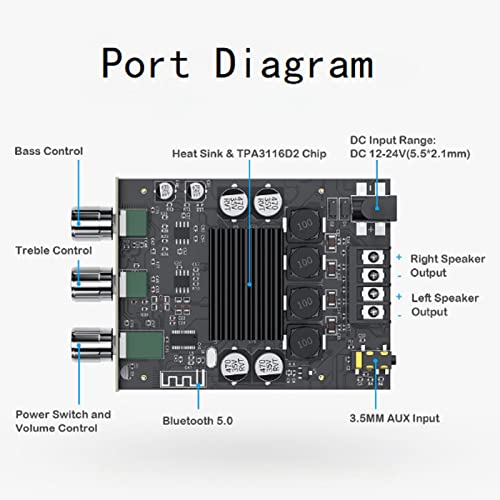
Figure 2: Detailed port diagram of the ZK-1002T amplifier board, indicating the location and function of each control and input/output port.
- Bass Control: Adjusts the low-frequency output.
- Treble Control: Adjusts the high-frequency output.
- Power Switch and Volume Control: Rotates to adjust volume and push to power on/off.
- Heat Sink & TPA3116D2 Chip: Central component for heat dissipation and audio processing.
- DC Input Range: Power input terminal (DC 12-24V, 5.5*2.1mm).
- Bluetooth 5.0 Module: For wireless audio input.
- 3.5MM AUX Input: For wired audio input.
- Right Speaker Output: Terminal for connecting the right channel speaker.
- Left Speaker Output: Terminal for connecting the left channel speaker.
Setup and Assembly
Follow these steps to assemble your amplifier board and prepare it for use.
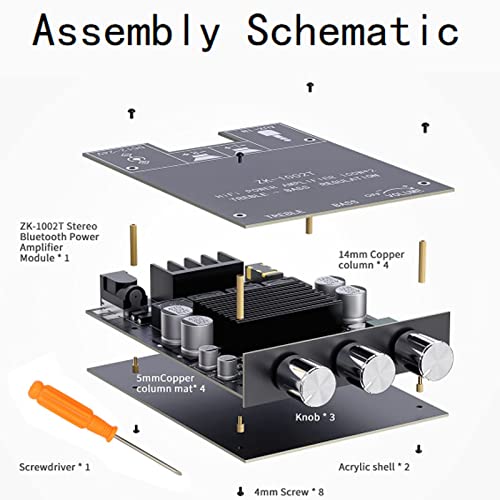
Figure 3: Exploded view of the ZK-1002T amplifier board assembly, illustrating the placement of the acrylic casing, standoffs, and knobs.
- Place the bottom acrylic shell.
- Attach the 5mm copper column mats to the bottom acrylic shell.
- Mount the ZK-1002T amplifier module onto the copper column mats, aligning the holes.
- Secure the module with the 14mm copper columns.
- Place the top acrylic shell over the module, aligning the holes.
- Fasten the top acrylic shell using the 4mm screws.
- Attach the three control knobs (Volume, Treble, Bass) to their respective potentiometers on the front panel.
- Power Connection: Connect a DC 12-24V power supply to the DC input terminal. Ensure correct polarity.
- Speaker Connection: Connect your passive speakers to the Left and Right Speaker Output terminals. Ensure correct polarity (+ and -).
Operating Instructions
Power On/Off and Volume Control
- To power on the device, rotate the leftmost knob (Power Switch and Volume Control) clockwise until it clicks.
- To adjust the volume, continue rotating the same knob. Clockwise increases volume, counter-clockwise decreases volume.
- To power off, rotate the knob counter-clockwise until it clicks off.
Bluetooth Connection
- Ensure the amplifier board is powered on.
- On your audio source device (e.g., smartphone, tablet), enable Bluetooth.
- Search for available Bluetooth devices. The amplifier board should appear as "ZK-1002T" or a similar identifier.
- Select "ZK-1002T" to pair. A confirmation sound may be heard from the speakers once connected.
- Once paired, you can play audio from your device through the amplifier.
AUX Input Connection
- Connect a 3.5mm audio cable from your audio source device to the 3.5MM AUX Input port on the amplifier board.
- The amplifier will automatically switch to AUX input when a cable is detected.
Treble and Bass Adjustment
- Use the "Treble Control" knob to adjust the high-frequency response of the audio.
- Use the "Bass Control" knob to adjust the low-frequency response of the audio. Rotating clockwise enhances bass, while counter-clockwise attenuates it.
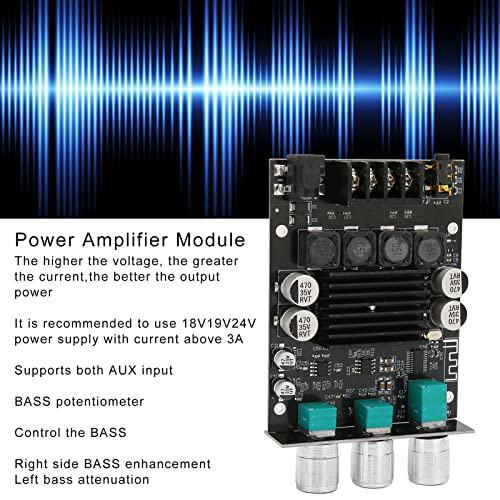
Figure 4: The amplifier module emphasizing recommended power supply voltage (18V-24V, >3A) and the function of the bass potentiometer for adjusting low frequencies.
Maintenance
- Cleaning: Use a soft, dry cloth to clean the surface of the amplifier board. Do not use liquid cleaners or solvents.
- Storage: When not in use for extended periods, store the amplifier in a cool, dry place away from direct sunlight and moisture.
- Ventilation: Ensure adequate ventilation around the amplifier board during operation to prevent overheating. Do not block the heat sink.
Troubleshooting
| Problem | Possible Cause | Solution |
|---|---|---|
| No power | Incorrect power supply voltage or polarity; power switch off. | Verify power supply (DC 12-24V) and polarity. Ensure the volume/power knob is clicked to the ON position. |
| No sound from speakers | Speakers not connected correctly; low volume; incorrect input source; faulty audio cable. | Check speaker connections and polarity. Increase volume. Ensure Bluetooth is paired or AUX cable is fully inserted. Test with a different audio cable. |
| Bluetooth not pairing | Amplifier not in pairing mode; device too far; interference. | Ensure amplifier is powered on. Move audio source closer. Turn off other Bluetooth devices to reduce interference. Restart both devices. |
| Distorted sound | Volume too high; weak power supply; faulty speakers or cables. | Reduce volume. Ensure power supply meets recommended specifications (18V-24V, >3A). Check speaker impedance and cable integrity. |
| Humming/Buzzing noise | Ground loop issue; power supply noise; interference. | Try a different power supply. Ensure all connections are secure. Keep audio cables away from power cables. |
Specifications
- Model: ZK-1002T
- Brand: GOWENIC
- Output Power: 2 x 100W (Stereo)
- Bluetooth Version: 5.0
- Input Voltage: DC 12-24V (Recommended 18V-24V, >3A)
- Audio Inputs: Bluetooth, 3.5mm AUX
- Controls: Volume, Treble, Bass
- Chip: TPA3116D2
- Protection Mechanisms: Overvoltage, Undervoltage, Overheat, DC Detection, Short Circuit
- Mounting Type: Surface Mount
- Material: PCB

Figure 5: The amplifier module highlighting its built-in protection mechanisms, including overvoltage, undervoltage, overheat, DC detection, and short circuit protection.
Warranty and Support
For warranty information or technical support, please refer to the documentation provided with your purchase or contact the retailer. GOWENIC products typically come with a standard manufacturer's warranty against defects in materials and workmanship. Please retain your proof of purchase for warranty claims.
For further assistance, you may visit the GOWENIC Store on Amazon.