
1. Introduction
Thank you for choosing the EBERTH Inverter Generator 2000W. This manual provides essential information for the safe and effective use of your generator. Please read it thoroughly before operating the device and keep it for future reference. This generator is designed to provide reliable power for various applications, including camping, job sites, and as an emergency power source.
2. Safety Information
Always prioritize safety when operating the generator. Failure to follow these instructions can result in serious injury or property damage.
- Carbon Monoxide Hazard: Never operate the generator indoors or in enclosed spaces. Exhaust fumes contain carbon monoxide, a colorless, odorless, and deadly gas.
- Fire Hazard: Gasoline is highly flammable. Refuel in a well-ventilated area with the engine off and cool. Do not smoke or allow open flames near the generator.
- Electrical Shock Hazard: Do not operate the generator in wet conditions. Ensure all connections are secure and dry. Never touch electrical components with wet hands.
- Hot Surfaces: The generator engine and muffler become very hot during operation and remain hot for some time after shutdown. Avoid contact to prevent burns.
- Children and Pets: Keep children and pets away from the generator during operation.
- Low Oil Shutdown: The generator is equipped with a low oil shutdown system to protect the engine. Do not bypass this safety feature.
3. Product Overview
The EBERTH Inverter Generator 2000W is a compact and powerful unit designed for portability and clean power delivery.
Key Features:
- Engine: 3 HP / 2.2 kW, air-cooled, 1-cylinder, 4-stroke gasoline engine with 79.8 cc displacement.
- Power Output: 2000 watts continuous, 2050 watts maximum.
- Inverter Technology: Provides stable, clean power suitable for sensitive electronics.
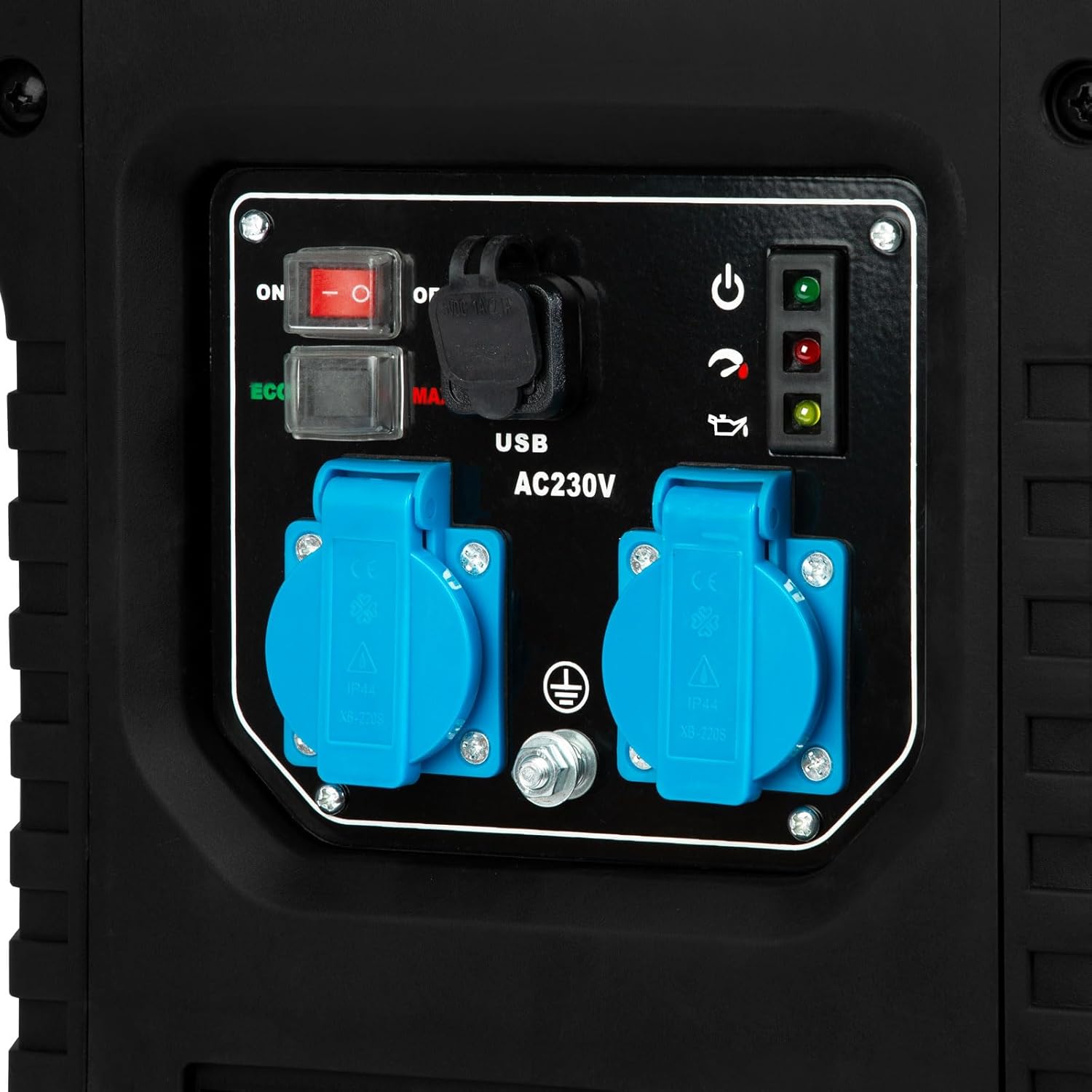
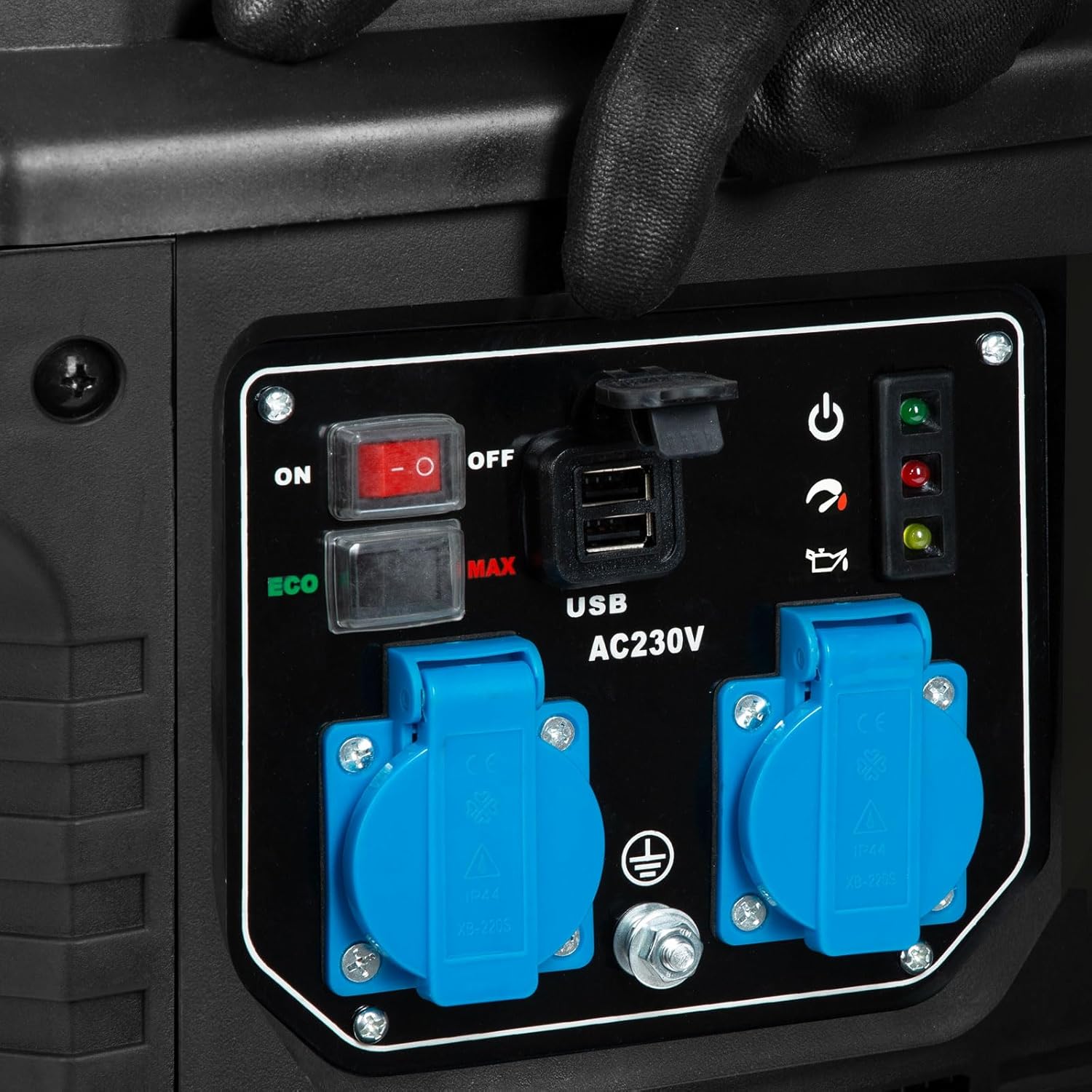
- Outlets: Two 230V AC outlets and two 12V USB ports.
- Modes: ECO mode for fuel efficiency and MAX mode for full power.
- Safety: Overload switch and low oil shutdown protection.
- Portability: Robust casing with an integrated carrying handle.
Components:

4. Setup
Before first use, the generator requires initial setup, including adding engine oil and fuel.
4.1 Add Engine Oil
The generator is shipped without engine oil. Fill the crankcase with the recommended oil type (e.g., SAE 10W-30) to the appropriate level. Refer to the oil cap/dipstick for markings.

4.2 Add Fuel
Fill the fuel tank with Super or Super Plus gasoline. The fuel tank capacity is 4 liters. Do not overfill. Ensure the fuel cap is securely tightened after refueling.

4.3 Placement
Place the generator on a firm, level surface outdoors, away from windows, doors, and vents to prevent carbon monoxide from entering occupied areas. Ensure adequate clearance around the generator for ventilation.
5. Operation
Follow these steps to start and operate your EBERTH Inverter Generator.
5.1 Starting the Generator
- Ensure the generator is on a level surface and has sufficient oil and fuel.
- Turn the fuel valve to the 'ON' position.
- Move the choke lever to the 'CHOKE' position (if the engine is cold).
- Turn the engine switch to the 'ON' position.
- Pull the recoil starter handle firmly until the engine starts.
- Once the engine starts, gradually move the choke lever to the 'RUN' position.

5.2 Connecting Electrical Devices
Once the generator is running, you can connect your electrical devices.
- Plug your 230V devices into the AC outlets.
- Plug your USB devices into the 12V USB ports.
- Ensure the total wattage of connected devices does not exceed the generator's continuous output of 2000W. The overload indicator will illuminate if overloaded.


5.3 ECO and MAX Modes
- ECO Mode: Reduces engine speed when the load is low, improving fuel efficiency and reducing noise. Ideal for light loads.
- MAX Mode: Operates the engine at full speed to provide maximum power output. Use for heavy loads or when starting high-demand appliances.
5.4 Shutting Down the Generator
- Disconnect all electrical devices from the generator.
- Turn the engine switch to the 'OFF' position.
- Turn the fuel valve to the 'OFF' position.
6. Maintenance
Regular maintenance ensures the longevity and reliable performance of your generator.
6.1 Fueling
The generator operates for approximately 5 to 6 hours on a full 4-liter tank, depending on the load. Always use fresh Super or Super Plus gasoline.
6.2 Oil Check and Change
Check the engine oil level before each use. Change the oil after the first 20 hours of operation, and then every 50-100 hours or annually, whichever comes first.
6.3 Air Filter Maintenance
Inspect the air filter regularly. Clean or replace the air filter element as needed, especially when operating in dusty conditions. A dirty air filter can reduce engine performance and increase fuel consumption.

6.4 Spark Plug
Inspect the spark plug annually or every 100 hours. Clean or replace if necessary to ensure easy starting and efficient engine operation.
7. Troubleshooting
This section provides solutions to common operational issues. For problems not listed here, please contact customer support.
| Problem | Possible Cause | Solution |
|---|---|---|
| Engine does not start | No fuel, low oil, choke incorrect, engine switch off, spark plug issue | Add fuel, check oil level, adjust choke, turn engine switch ON, inspect/clean spark plug |
| No power output | Overload switch tripped, device faulty, generator not running correctly | Reduce load, reset overload switch, check device, ensure stable engine operation |
| Engine runs rough | Dirty air filter, stale fuel, spark plug issue | Clean/replace air filter, drain old fuel and add fresh, inspect/clean spark plug |
| Overload indicator on | Too many devices connected, short circuit in connected device | Reduce electrical load, check connected devices for faults, restart generator |
8. Specifications
Detailed technical specifications for the EBERTH Inverter Generator 2000W.
| Feature | Specification |
|---|---|
| Model Number | GG1-IS2000 |
| Engine Type | 4-stroke, 1-cylinder, air-cooled gasoline engine |
| Engine Power | 3 HP / 2.2 kW |
| Displacement | 79.8 cc |
| Continuous Power Output | 2000 Watts |
| Maximum Power Output | 2050 Watts |
| Voltage | 230 Volts |
| Frequency | 50 Hz |
| AC Outlets | 2 x 230V |
| USB Ports | 2 x 12V |
| Fuel Type | Super or Super Plus Gasoline |
| Fuel Tank Capacity | 4 Liters |
| Run Time (full tank) | 5-6 hours (load dependent) |
| Ignition System | Mechanical (recoil start) |
| Noise Level (at 7m) | Approx. 69 dB |
| Dimensions (L x W x H) | 42 cm x 31 cm x 46 cm |
| Weight (without consumables) | 20 kg |

9. Warranty and Support
EBERTH is committed to providing quality products and support.
Repair Service: EBERTH offers repair services in Germany. Defective devices are repaired quickly and reliably at our return warehouse with a workshop, then returned to the customer free of charge. For service inquiries, please contact your retailer or EBERTH customer support directly.
Please retain your proof of purchase for warranty claims.
