
Introduction
This manual provides detailed instructions for the safe and efficient operation of your WUBEN X3 Mini Flashlight. Please read this manual thoroughly before use and retain it for future reference.

Image: The WUBEN X3 Mini Flashlight, showcasing its compact design, digital display, and 180-degree rotating head, alongside its charging box.
Package Contents
Verify that all items listed below are included in your package:
- WUBEN X3 Flashlight x1
- Rechargeable Charging Box (3000mAh) x1
- 2-in-1 Type-C Charging Lanyard x1
- User Manual x1

Image: A visual representation of the WUBEN X3 Mini Flashlight, its charging box, Type-C lanyard, and user manual as they appear in the product packaging.
Setup
1. Initial Charging
Before first use, fully charge the WUBEN X3 flashlight and its charging box.
- Charging the Flashlight: Insert the flashlight into the charging box. Ensure the charging coil on the front of the flashlight is centered on the wireless charging area of the box. The digital display on the flashlight will indicate charging status.
- Charging the Charging Box: Connect the Type-C charging lanyard or a standard Type-C cable to the charging box. The charging box has a 3000mAh capacity and can also function as a power bank.
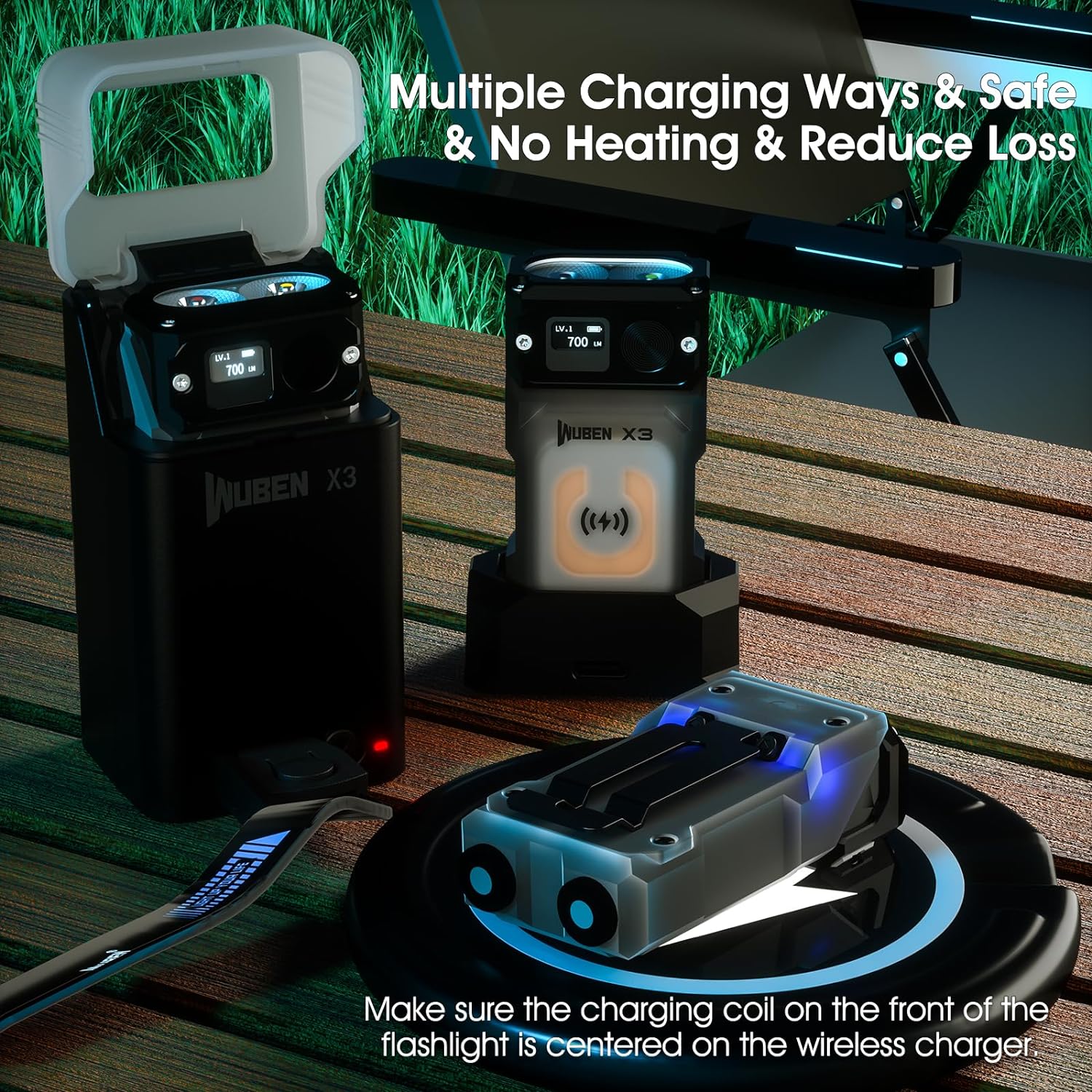
Image: Various charging methods for the WUBEN X3, including wireless charging within its case and direct Type-C charging for the case itself.
2. Attaching the Lanyard
Attach the provided 2-in-1 Type-C charging lanyard to the flashlight for convenient carrying and emergency charging.

Image: The Type-C charging lanyard, which can be used for carrying the flashlight and as a charging cable.
Operating Instructions
1. Basic Operation
- Power On/Off: Press and hold the main button to turn the flashlight on or off.
- Mode Cycling: While the flashlight is on, press the main button to cycle through white light brightness modes (Low, Medium, High, Turbo).
- Memory Function: The flashlight remembers the last used white light mode.
- Digital Display: The integrated OLED display shows the current lumen level and remaining battery power.
2. Special Modes
- Red Light: From off, press and hold the button to activate the red light. Press again to cycle between red light modes.
- SOS Mode: Triple-click the button to activate SOS mode.
- Strobe Mode: Double-click the button to activate strobe mode.
- Blue Body Light: Five consecutive clicks of the button will toggle the blue body light on or off.
- Camping Light Mode: When the flashlight is placed inside its charging box with the lid closed, it can function as a diffuse camping light.
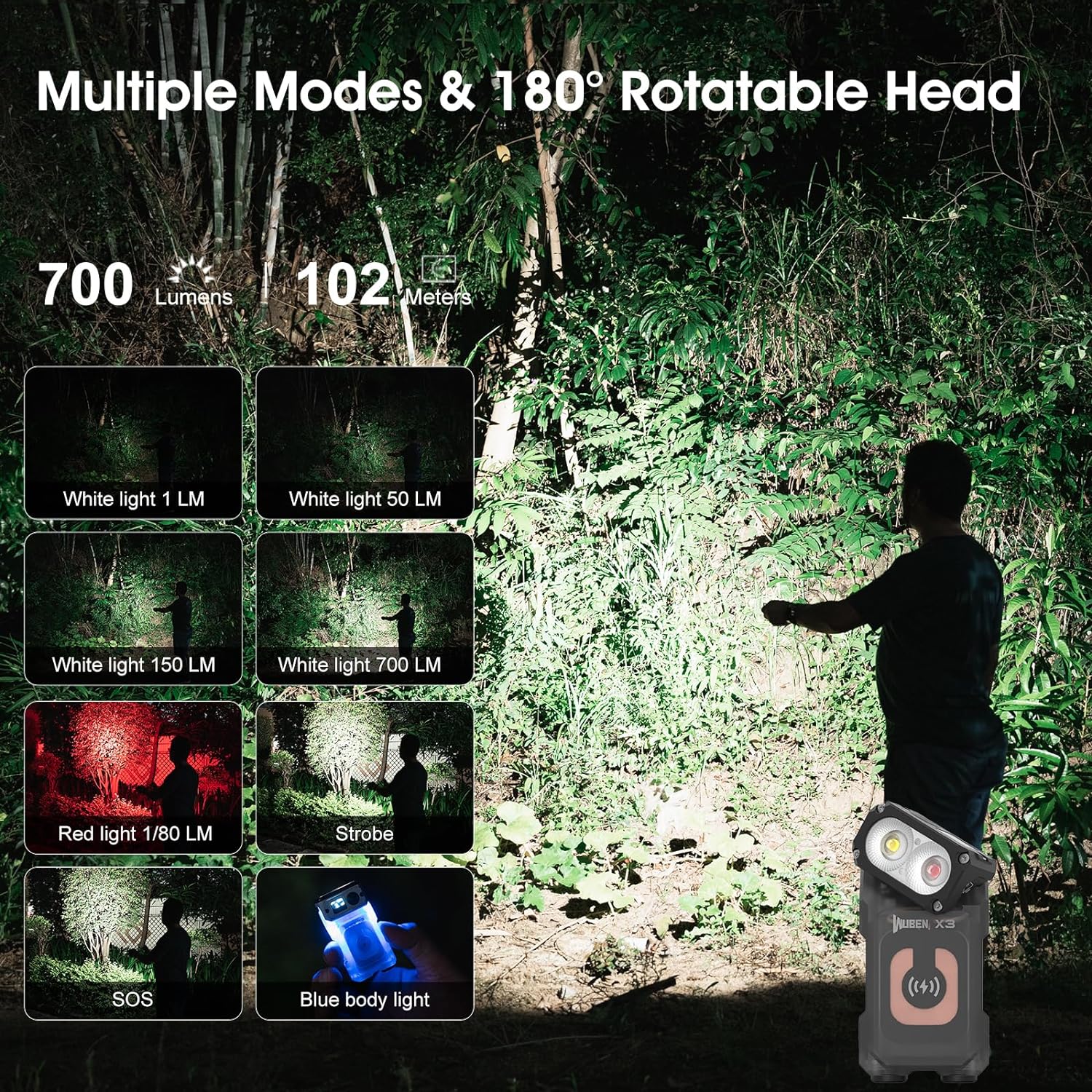
Image: A visual guide to the WUBEN X3's various light modes, including white light at different lumen levels, red light, strobe, SOS, and blue body light, along with its 180-degree rotatable head.

Image: The WUBEN X3 flashlight functioning as a diffuse light source, suitable for both outdoor camping and indoor use.
3. Rotatable Head and Magnetic Base
- 180-Degree Rotating Head: The flashlight head can be rotated 180 degrees to adjust the beam direction, providing versatile illumination for various tasks.
- Magnetic Base: The strong magnetic base allows the flashlight to be securely attached to metallic surfaces, enabling hands-free operation.
- Pocket Clip: Utilize the integrated pocket clip for secure attachment to clothing, hats, or gear.

Image: Examples of the WUBEN X3 in use, showcasing its magnetic base attached to a car hood and its clip used as a hat light or attached to a backpack strap, providing hands-free illumination.
Maintenance
- Cleaning: Wipe the flashlight and charging box with a soft, damp cloth. Avoid using abrasive cleaners or solvents.
- Water Resistance: The WUBEN X3 is IP65 waterproof, meaning it is protected against dust ingress and low-pressure water jets from any direction. Do not submerge the device.
- Impact Resistance: The flashlight is designed to withstand impacts from up to 1.0 meter.
- Storage: Store the device in a cool, dry place when not in use for extended periods.

Image: The WUBEN X3 flashlight being exposed to water splashes, illustrating its IP65 waterproof capability.
Troubleshooting
- Flashlight not turning on:
- Ensure the battery is charged.
- Check if the flashlight is locked (4 clicks to lock/unlock).
- Flashlight not charging:
- Verify the flashlight is correctly seated in the charging box.
- Ensure the charging box itself is charged or connected to a power source.
- Check the Type-C cable connection.
- Digital display not working:
- Ensure the flashlight has sufficient power.
- If the issue persists, contact customer support.
Specifications
| Feature | Detail |
|---|---|
| Brand | WUBEN |
| Model | X3 |
| White Brightness | Up to 700 Lumens |
| Light Source Type | LED |
| Power Source | Battery Powered (Lithium Ion) |
| Material | Aluminum |
| Product Dimensions | 2.75"D x 1.38"W x 0.83"H |
| Item Weight | Approximately 70g (flashlight only) |
| Water Resistance Level | IP65 Waterproof |
| Impact Resistance | 1.0 Meter |
| Special Features | Adjustable Light Modes, Blue Body Light, Impact Resistant, Rechargeable, Red Light, 180-degree Rotating Head, Magnetic Base, Digital Display |
| Charging Box Capacity | 3000mAh |

Image: A table detailing the WUBEN X3's performance parameters according to ANSI FL1 standard, including output, runtime, beam distance, and impact resistance.
Warranty Information
The WUBEN X3 Mini Flashlight comes with an extended warranty. For detailed information regarding warranty terms, conditions, and registration, please refer to the official WUBEN website or contact their customer support directly.
Customer Support
For further assistance, technical support, or inquiries, please visit the official WUBEN website or contact their customer service department. You can find more information at the WUBEN Store on Amazon.


