
Introduction
The VATOS 5-in-1 Baby Walker is designed to support your child's development through various stages, from sitting play to walking and scooting. This versatile product transforms into an activity board, play table, push walker, ride-on toy, and scooter, offering engaging activities and promoting motor skill development.

Figure 1: Overview of the VATOS 5-in-1 Baby Walker in its various configurations.
Safety Information
- Always supervise children when using the walker in any mode.
- Ensure all parts are securely assembled before each use.
- This product is made from non-toxic ABS material with no sharp edges. Regularly inspect for any damage or loose parts.
- The walker features anti-slip rubber rings on wheels for safety. Ensure these are intact and clean.
- To prevent tipping, ensure the weight box is filled as instructed for added stability, especially in walker and ride-on modes.
- Small parts can pose a choking hazard. Keep small components away from infants and ensure all detachable parts are securely attached when in use.
- Requires 3 AAA batteries (not included) for the music panel. Keep batteries out of reach of children.
Package Contents
Verify that all components are present before assembly. Refer to the image below for a visual guide of the parts included.

Figure 2: All parts included in the VATOS 5-in-1 Baby Walker package.
- Main Walker Body
- Adjustable Handle
- Detachable Activity Panel (Elephant Music Panel, Shape Sorters, Spin Rollers, Basket, Balls)
- Wheels with Anti-slip Rubber Rings
- Seat (for Ride-on mode)
- Scooter Base
- Weight Box (for stability)
- Assembly Screws/Fasteners
Assembly Instructions
Follow these steps to assemble the VATOS Baby Walker into its various modes. No extra tools are required for assembly or mode switching.
1. Activity Board (3+ months)
The activity panel can be used independently for floor play. Ensure the panel is placed on a flat, stable surface.

Figure 3: Detachable Activity Center for sit-down play.
The activity panel includes shape-sorters, colorful spin rollers, cubes, a basket, and balls. The elephant music panel is removable and features 4 modes: 5 key note sounds, 5 animal sounds, 10 music tracks, and free-play. It requires 3 AAA batteries (not included).
2. Play Table (6+ months)
Attach the activity panel to the provided table legs to create a standing activity table.
- Locate the four table legs.
- Align the connectors on the table legs with the corresponding slots on the underside of the activity panel.
- Press firmly until each leg clicks into place, ensuring a stable setup.

Figure 4: Activity panel assembled as a play table.
3. Push Walker (12+ months)
Assemble the main walker body and attach the activity panel and handle.
- Attach the two side supports (legs with wheels) to the main walker body. Ensure they click securely.
- Insert the adjustable handle into the top slot of the main walker body. Adjust the height as needed (see "Adjustable Height" in Operating Instructions).
- Attach the activity panel to the front of the walker body.
- For added stability, fill the removable weight box (located at the base of the walker) with water or sand.
- Ensure the wheel speed control is set appropriately for your child's walking ability (see "Speed Control" in Operating Instructions).

Figure 5: Push Walker mode, designed to encourage first steps and proper leg development.
4. Ride-on (18+ months)
Transform the walker into a ride-on toy by adjusting the main body and adding the seat.
- Detach the side supports from the main walker body.
- Reconfigure the main body to a horizontal position, forming the base of the ride-on.
- Attach the seat to the designated area on the reconfigured body.
- Reattach the side supports (now acting as the rear wheels) and the front wheel assembly.
- Unlock the steering lock for ride-on functionality.
- Ensure the weight box is filled for stability.

Figure 6: Ride-on mode, suitable for toddlers to propel themselves.
5. Scooter (36+ months)
Convert the ride-on into a scooter for older toddlers.
- Remove the seat from the ride-on configuration.
- Adjust the main body to form the scooter deck.
- Ensure the handle is at the appropriate height for scooting.
- Unlock the steering lock for full steering control.

Figure 7: Scooter mode, for developing balance and leg strength.
Operating Instructions
Activity Panel Functions
- Power On/Off: Locate the power switch on the elephant music panel.
- Battery Installation: Open the battery compartment on the back of the elephant music panel. Insert 3 AAA batteries, ensuring correct polarity. Close the compartment securely.
- Music Modes: The panel has 4 modes: key note sounds, animal sounds, music tracks, and free-play piano. Press the mode button to cycle through them.
- Volume Control: Use the designated buttons on the panel to adjust the volume.
- Interactive Elements: Engage with the shape-sorters, spinning blocks, and ball basket for sensory and motor skill development.
Video 1: Official product video demonstrating the 5-in-1 features and interactive elements of the VATOS Baby Walker.
Adjustable Height Handle
The handle height can be adjusted to accommodate your child's growth and different developmental stages. Locate the adjustment mechanism on the handle stem, press the release button, and slide the handle up or down to the desired position. Ensure it locks securely before use.

Figure 8: Adjustable handle for customized height.
Speed Control Wheels
The rear wheels feature a 2-level speed control mechanism. This allows you to adjust the wheel resistance, providing more stability for beginners and faster movement for more confident walkers. Rotate the dial on each rear wheel to select the desired speed setting. Ensure both wheels are set to the same level.

Figure 9: Speed control mechanism on the wheels.
Weight Box for Stability
For enhanced stability, particularly in push walker and ride-on modes, the integrated weight box can be filled. Open the cap, fill with water or sand, and securely close the cap. This helps prevent the walker from tipping over.

Figure 10: Weight box for improved stability.
Maintenance
- Cleaning: Wipe all surfaces with a damp cloth and mild soap. Do not immerse the electronic music panel in water.
- Storage: Store the walker in a cool, dry place away from direct sunlight when not in use.
- Battery Replacement: Replace AAA batteries in the music panel when sounds become distorted or lights dim.
- Inspection: Periodically check all screws, fasteners, and moving parts to ensure they are secure and functioning correctly. Inspect wheels for wear and tear.
Troubleshooting
| Problem | Possible Cause | Solution |
|---|---|---|
| Music panel not working. | Batteries are dead or incorrectly installed. | Replace with new AAA batteries, ensuring correct polarity. Check if the power switch is on. |
| Walker feels unstable or tips easily. | Weight box is empty or insufficient. | Fill the weight box with water or sand for added stability. Ensure all assembly points are secure. |
| Wheels are too fast or too slow. | Speed control setting is incorrect. | Adjust the 2-level speed control dials on the rear wheels to the desired setting. |
| Handle height cannot be adjusted. | Adjustment mechanism is stuck or not fully disengaged. | Ensure the release button is fully pressed. Check for any obstructions in the sliding mechanism. |
Specifications
- Brand: VATOS
- Model Number: N6032
- Color: Red
- Product Dimensions (L x W x H): 23.62" x 17.13" x 3" (Note: This seems to be package dimensions, actual assembled dimensions vary by mode. Refer to Figure 11 for detailed dimensions.)
- Item Weight: 3.26 Kilograms
- Maximum Height: 43 Centimeters (for handle)
- Material: Non-toxic ABS
- Battery Requirement: 3 x AAA batteries (not included) for music panel
- Recommended Age: 3 months to 36+ months (varies by mode)
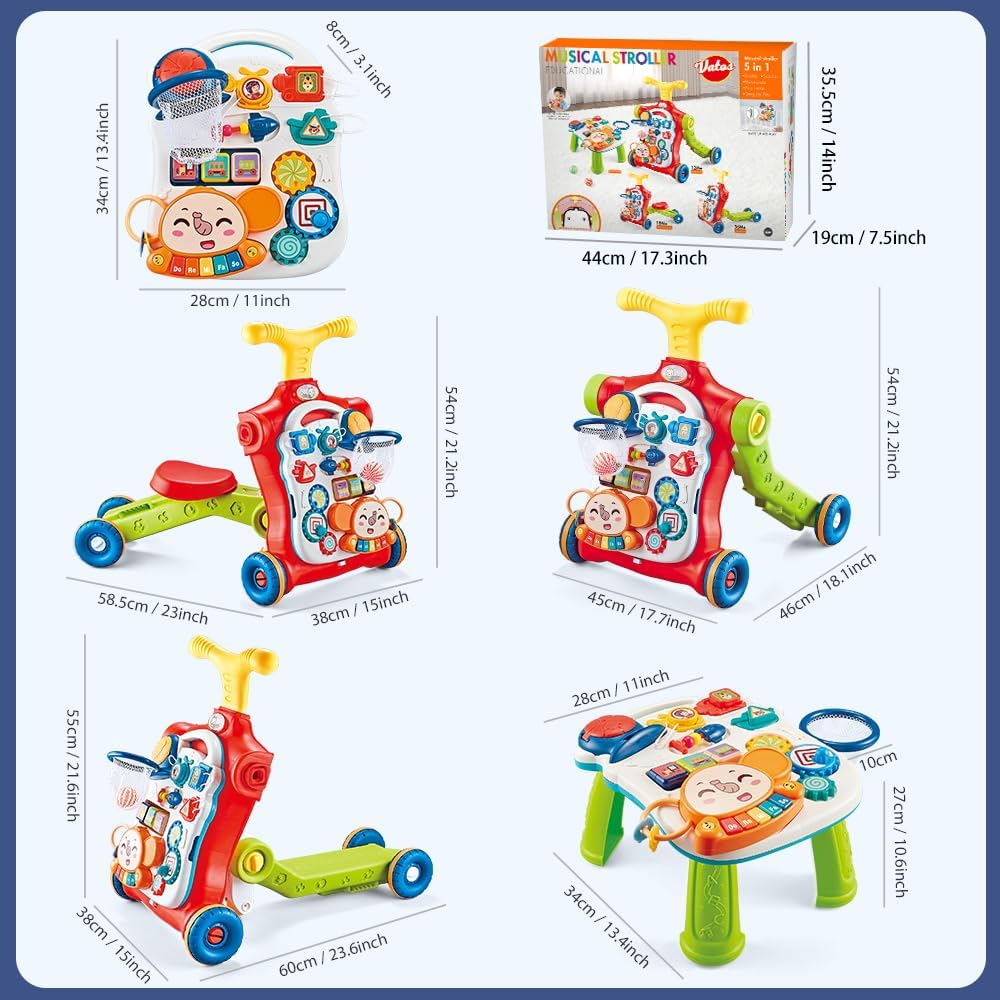
Figure 11: Product dimensions for various configurations.
Warranty and Support
For any missing accessories, product defects, or support inquiries, please contact VATOS customer support directly. Refer to your purchase documentation or the VATOS official website for contact information.
The product is covered by a standard return policy, allowing for refund or replacement within 90 days of purchase.