
realme RMA2021
Contents
realme Buds Air 5 Pro True Wireless Earphones User Manual
Model: RMA2021
Welcome
Thank you for choosing the realme Buds Air 5 Pro True Wireless Earphones. This manual provides detailed instructions on how to set up, operate, and maintain your new earphones to ensure the best possible audio experience. Please read this manual thoroughly before use.
Key Features
- Innovative coaxial dual driver acoustic architecture with an 11mm bass driver and a 6mm micro-planar tweeter, covering an ultra-wide frequency range of 20-40KHz.
- Industry's most innovative 6mm micro-planar tweeter with dual N52 magnets and 25µm ultra-thin planar diaphragm, delivering high frequencies up to 40KHz.
- Cinema-grade 3D spatial sound created with a self-researched algorithm based on the HRTF head function model.
- Advanced sound optimization technologies: Leakage Compensation, Ear Canal Compensation, and Personalized Sound, adapting to individual ear canal shape and listening sensations.
- Upgraded 50dB active noise reduction depth for effective noise cancellation in various environments.
Product Overview
Components
- realme Buds Air 5 Pro Earbuds (Left and Right)
- Charging Case
- USB Charging Cable
- Ear Tips (Multiple Sizes)
- User Manual
Visual Guide

The realme Buds Air 5 Pro earbuds shown with their charging case open, displaying both earbuds.
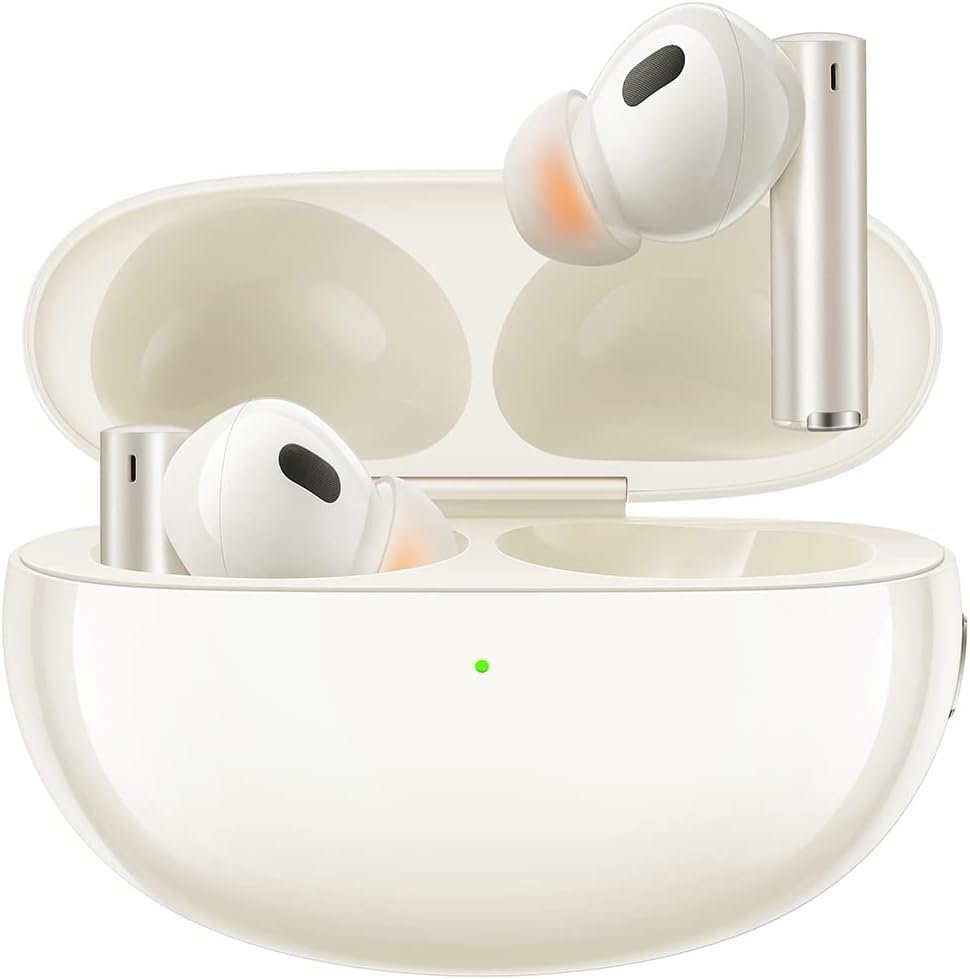
A closer view of the realme Buds Air 5 Pro earbuds resting inside their open charging case.

The realme Buds Air 5 Pro charging case shown empty with the lid open.

A detailed close-up of the two realme Buds Air 5 Pro earbuds, highlighting their design and ear tips.
Getting Started
Initial Charge
Before first use, place both earbuds into the charging case and connect the case to a power source using the provided USB cable. Ensure the earbuds and case are fully charged for optimal performance. The indicator light on the case will show charging status.
Pairing
- Open the charging case with the earbuds inside.
- Press and hold the function button on the charging case until the indicator light flashes white, indicating pairing mode.
- On your device (smartphone, tablet, laptop), enable Bluetooth and search for "realme Buds Air 5 Pro".
- Select the earphones from the list to connect. Once connected, the indicator light will turn solid white or off.
App Installation
For full functionality and personalized settings, download the "realme Link" app from your device's app store. Install the app and follow the on-screen instructions to add your realme Buds Air 5 Pro. This app allows for custom controls, sound optimization, and firmware updates.
Operating Instructions
Basic Controls (Touch)
- Double Tap: Play/Pause music, Answer/End call.
- Triple Tap: Next song.
- Press and Hold (one earbud): Switch between Noise Cancellation, Transparency Mode, and Normal Mode.
- Press and Hold (both earbuds): Enter/Exit Game Mode (low latency).
Active Noise Cancellation (ANC) and Transparency Mode
The realme Buds Air 5 Pro feature advanced 50dB Active Noise Cancellation to reduce ambient noise, allowing for an immersive listening experience. Use Transparency Mode to hear your surroundings without removing the earbuds, which is useful for safety or conversations. Toggle between these modes by pressing and holding one earbud, or through the realme Link app.
Spatial Sound
Experience cinema-grade 3D spatial sound for an immersive audio environment. This feature can be activated and customized via the realme Link app.
Personalized Sound Optimization
The earphones offer personalized sound profiles that adapt to your unique hearing and ear canal shape. Perform a quick 5-minute test in the realme Link app to create your optimized sound settings, including leakage and ear canal compensation.
Calls
The earbuds are equipped with microphones for clear call quality. Double-tap either earbud to answer or end a call.
Battery Life and Charging
The realme Buds Air 5 Pro provide extended playtime on a single charge. When the battery is low, place the earbuds back into the charging case. The case itself can be charged via the USB-C port. A quick charge feature allows for rapid power replenishment.
Official Product Video
An official product video showcasing the realme Buds Air 5 Pro Wireless Earphones and their features.
Care and Maintenance
- Cleaning: Regularly clean the earbuds, ear tips, and charging contacts with a soft, dry, lint-free cloth. Remove ear tips and clean them separately with mild soap and water if necessary, ensuring they are completely dry before reattaching.
- Storage: When not in use, always store the earbuds in their charging case to protect them and keep them charged.
- Water Resistance: The realme Buds Air 5 Pro are not water resistant. Avoid exposure to water, sweat, and high humidity to prevent damage.
- Temperature: Do not expose the earbuds or charging case to extreme temperatures (hot or cold) as this can affect battery life and performance.
Troubleshooting
| Problem | Solution |
|---|---|
| Earbuds not pairing. | Ensure earbuds are charged. Place them in the case, close and reopen the lid, then press and hold the function button until the indicator flashes white. Check your device's Bluetooth settings and try reconnecting. |
| No sound or low volume. | Check device volume. Ensure earbuds are properly seated in your ears. Clean ear tips and speaker mesh. Re-pair the earbuds. |
| Active Noise Cancellation not working effectively. | Ensure ear tips provide a good seal. Try different sized ear tips. Check ANC settings in the realme Link app. |
| Earbuds frequently disconnect. | Ensure your device is within the 10-meter Bluetooth range. Avoid obstacles between the earbuds and your device. Fully charge the earbuds and case. |
| Charging case not charging. | Check the USB cable and power adapter. Ensure charging contacts on the case and earbuds are clean. |
Technical Specifications
| Specification | Detail |
|---|---|
| Model Name | RMA2120 |
| Connectivity Technology | Wireless (Bluetooth 5.3) |
| Included Components | Charging Case |
| Specific Uses For Product | Music, Casual Use |
| Control Type | Media Control (Touch) |
| Water Resistance Level | Not Water Resistant |
| Frequency Range | 20-40KHz |
| Control Method | App (realme Link) |
| Audio Driver Type | Coaxial Dual Driver (11mm Bass, 6mm Micro-Planar Tweeter) |
| Bluetooth Range | 10 Meters |
| Item Weight | 4.6 ounces |
| Item Model Number | RMA2021 |
| Batteries | 1 Lithium Ion battery required (included) |
| Brand | realme |
| Color | White |
| Noise Control | Active Noise Cancellation (50dB) |
Warranty Information and Support
Your realme Buds Air 5 Pro are covered by a manufacturer's warranty. For detailed warranty terms and conditions, please refer to the warranty card included in your product packaging or visit the official realme website. For technical support, troubleshooting assistance, or service inquiries, please contact realme customer support through their official channels.
You can also find additional support and FAQs on the realme official website or through the realme Link app.
Ask a question about this manual
Ask about setup, troubleshooting, compatibility, parts, safety, or missing instructions. Manuals+ will review the question and use this page’s manual context to help answer it.