
MIPOW MHS01
Miffy Automatic Hand Soap Dispenser User Manual
Model: MHS01 | Brand: MIPOW
Introduction
This manual provides essential information for the safe and efficient operation of your Miffy Automatic Hand Soap Dispenser. Please read this manual thoroughly before using the product and retain it for future reference.
The Miffy Automatic Hand Soap Dispenser is designed for convenient and hygienic hand washing, featuring a touchless operation and a charming Miffy design.
Safety Information
- Do not immerse the entire unit in water. The unit is IPX5 waterproof, meaning it is protected against low-pressure water jets from any direction, but not full submersion.
- Keep out of reach of children unless supervised by an adult.
- Use only recommended soap types. Avoid detergents with solid particles, as they may clog the dispenser.
- Ensure the USB charging port is dry and properly sealed with the rubber plug before exposure to water.
- Do not attempt to disassemble or repair the unit yourself. Contact customer support for assistance.
Package Contents
Please check the package for the following items:
- Miffy Automatic Hand Soap Dispenser (Yellow)
- USB Charging Cable
- Wall Mount Bracket
- User Manual (this document)
Product Overview
Familiarize yourself with the main components of your Miffy Automatic Hand Soap Dispenser.

Figure 1: Front view of the Miffy Automatic Hand Soap Dispenser.

Figure 2: Miffy Automatic Hand Soap Dispensers in yellow and pink, highlighting the design.
- Dispenser Nozzle: Where the foam is dispensed.
- Infrared Sensor: Detects hand movement for automatic dispensing.
- Soap Reservoir: Holds the liquid soap, visible through the clear window with the Miffy character.
- Charging Port: USB port for recharging the internal battery.
- Indicator Light: Shows charging status (red when charging, white when fully charged).
Setup
1. Charging the Dispenser
Before first use, fully charge the dispenser. A full charge can last for approximately 2-3 months or 5000 uses.
- Locate the USB charging port, usually at the back or bottom of the unit.
- Connect the provided USB charging cable to the dispenser and a suitable power source (e.g., USB wall adapter, computer USB port).
- The indicator light will illuminate red during charging.
- Charge for 2-3 hours until the indicator light turns white, indicating a full charge.
2. Filling with Soap
The dispenser is compatible with both foam soap and liquid soap. Proper dilution is crucial for liquid soaps to ensure optimal foam production and prevent clogging.

Figure 3: The dispenser ready for use on a surface.
- For Foam Soap: Pour foam soap directly into the reservoir. No dilution is needed.
- For Liquid Soap (e.g., shampoo, face cleaner, dish detergent):
- Dilute the liquid soap with water at a ratio of 1:4 (1 part soap to 4 parts water). For example, if you add 50ml of liquid soap, add 200ml of water.
- Stir the mixture thoroughly until well combined.
- Carefully pour the diluted mixture into the dispenser's reservoir.
Important: Do not use sticky, creamy hand sanitizers, or detergents containing solid particles directly, as this will block the dispenser.
Video 1: Demonstrates the correct proportion of hand sanitizer to avoid foam issues, showing the dilution process for liquid soaps.
3. Wall Mounting (Optional)
A wall mount bracket is included to prevent splashing and keep your bathroom tidy.

Figure 4: The dispenser shown with its wall mount bracket.
- Clean and dry the desired wall surface.
- Attach the wall mount bracket to the wall using the adhesive backing or appropriate fasteners (not included for adhesive).
- Ensure the bracket is securely fixed before placing the dispenser.
- Carefully place the Miffy Automatic Hand Soap Dispenser onto the bracket.
Operating Instructions
Using your Miffy Automatic Hand Soap Dispenser is simple and hygienic.
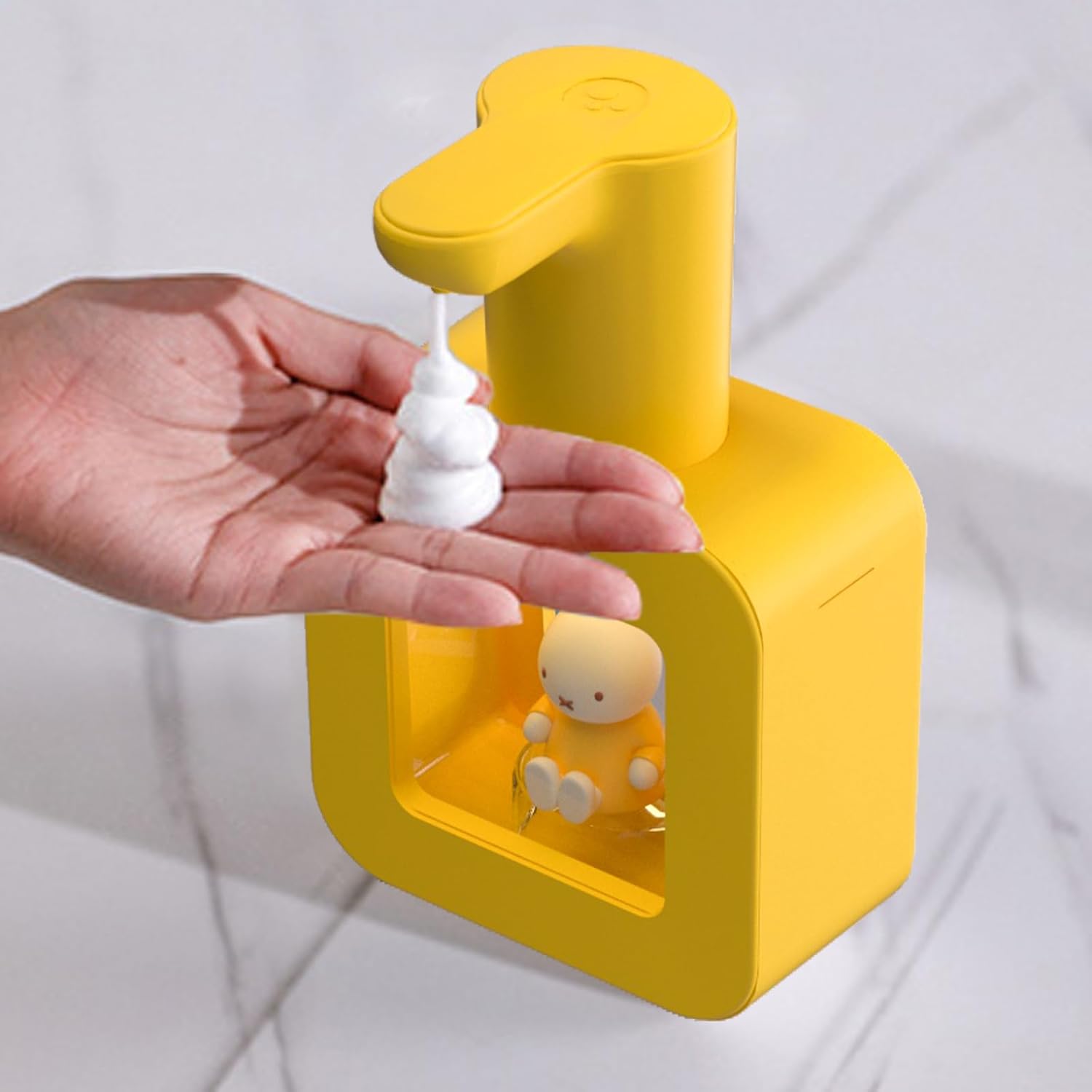
Figure 5: Hand placed under the sensor for foam dispensing.
- Ensure the dispenser is charged and filled with appropriate soap.
- Place your hand within the sensing area, typically directly under the nozzle.
- The high-precision infrared sensor will detect your hand and dispense foam in approximately 0.25 seconds.
- Remove your hand once the desired amount of foam is dispensed.
Maintenance
Regular cleaning ensures the longevity and optimal performance of your dispenser.
- Exterior Cleaning: Wipe the exterior of the dispenser with a soft, damp cloth. Do not use abrasive cleaners or solvents.
- Nozzle Cleaning: If the nozzle becomes clogged, gently wipe it with a damp cloth. Do not insert any objects into the nozzle.
- Soap Reservoir: If changing soap types or if the dispenser will not be used for an extended period, empty and rinse the reservoir with clean water. Dispense some clean water through the nozzle to clear any residue.
- Storage: When not in use for a long time, ensure the dispenser is clean, dry, and fully charged. Store it in a cool, dry place.
Troubleshooting
If you encounter issues with your dispenser, refer to the following common problems and solutions:
| Problem | Possible Cause | Solution |
|---|---|---|
| Dispenser does not dispense foam. | Low battery; No soap in reservoir; Sensor blocked; Soap too thick/clogged. | Charge the dispenser; Refill soap; Clear any obstruction from sensor; Dilute liquid soap or clean nozzle. |
| Foam is watery or inconsistent. | Incorrect soap dilution; Using non-foaming soap directly. | Adjust soap-to-water ratio (1:4 for liquid soap); Ensure you are using foam soap or properly diluted liquid soap. |
| Indicator light not working. | Unit not powered on; Charging cable not properly connected; Faulty unit. | Ensure unit is charged; Reconnect charging cable; Contact customer support if issue persists. |
Specifications
| Feature | Detail |
|---|---|
| Model Number | MHS01 |
| Brand | MIPOW |
| Color | Yellow |
| Material | Resin |
| Product Dimensions (L x W x H) | 4.8" x 2.3" x 7.8" |
| Item Weight | 1.21 pounds |
| Battery Capacity | 1200 mAh |
| Waterproof Rating | IPX5 |
| Dispensing Time | 0.25 seconds |
| Estimated Battery Life | 2-3 months (approx. 5000 uses) per full charge |
Warranty and Support
For warranty information or technical support, please refer to the contact details provided on the product packaging or visit the official MIPOW website. Keep your purchase receipt as proof of purchase.
For further assistance, you may also contact the seller directly through the platform where the product was purchased.
Ask a question about this manual
Ask about setup, troubleshooting, compatibility, parts, safety, or missing instructions. Manuals+ will review the question and use this page’s manual context to help answer it.