
Introduction
The COOSPO HW9 Heart Rate Monitor Armband is an optical heart rate sensor designed to provide accurate heart rate and calorie burn data for various fitness activities. It features advanced optical technology, Bluetooth 5.0 and ANT+ connectivity for broad compatibility, and a comfortable armband design. This manual provides essential information for setting up, operating, maintaining, and troubleshooting your HW9 device.

Setup
Charging the Device
Before first use, fully charge your COOSPO HW9. The device provides up to 35 hours of battery life on a single charge. Use the provided magnetic charging cable and connect it to a DC 5V power adapter or a computer USB port. The LED indicator will show charging status.

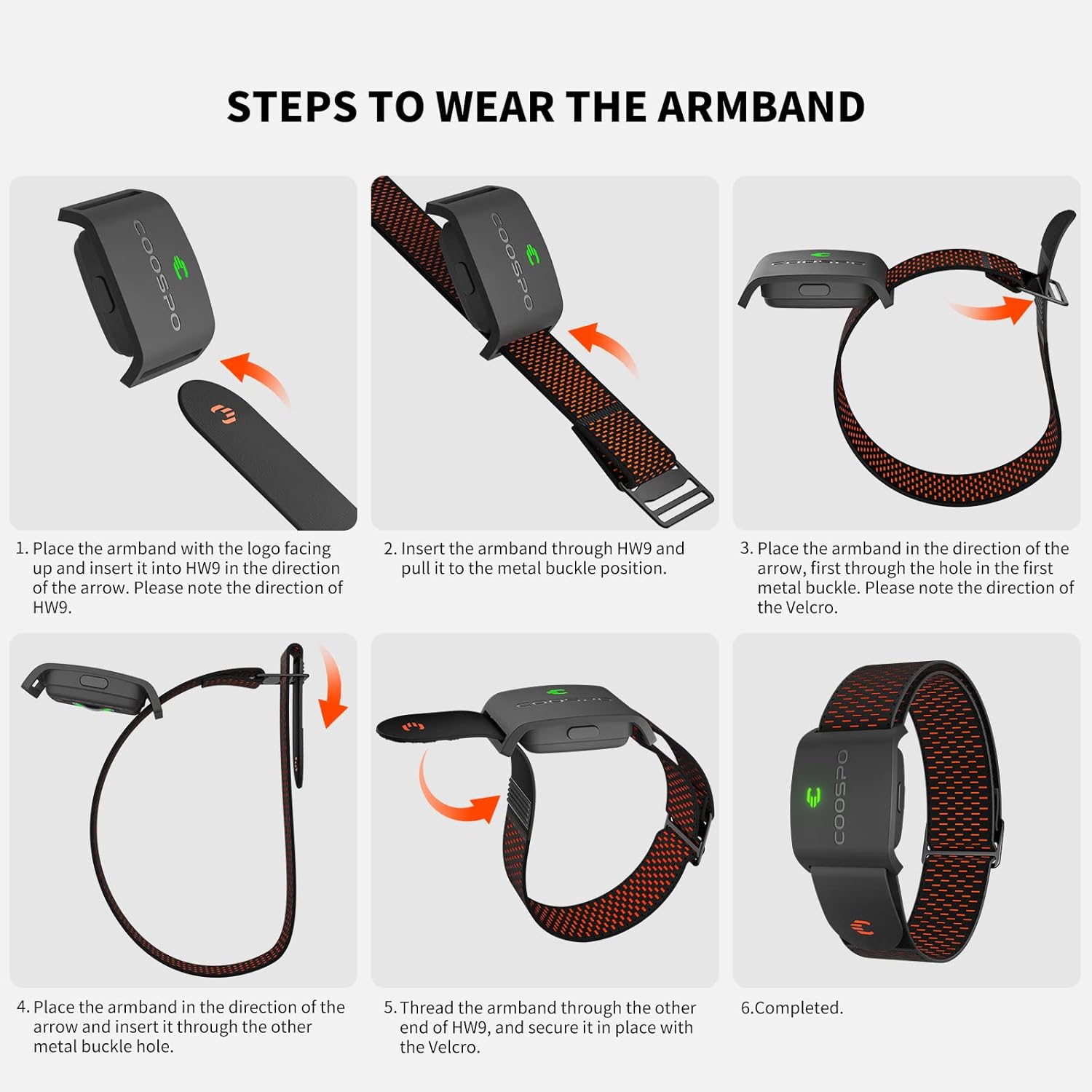
Wearing the Armband
For optimal accuracy, wear the armband on your forearm or bicep. Ensure the sensor is in direct contact with your skin and the armband is snug but comfortable. Avoid wearing it over clothing.

Power On/Off
- To power on: Short press the button on the device.
- To power off: Long press the button on the device.
Operating Instructions
Connectivity (Bluetooth & ANT+)
The COOSPO HW9 supports both Bluetooth 5.0 and ANT+ protocols, allowing connection to a wide range of devices simultaneously. You can connect to GPS bike computers, fitness apps, fitness devices, and running watches. The latest technology enables two simultaneous Bluetooth connections.

Heart Rate Zone Monitoring & HRV Function
The HW9 features a 5-color LED indicator light that visually represents your current heart rate zone, allowing you to quickly assess and optimize your workout intensity. The device also supports Heart Rate Variability (HRV) function, providing additional data for advanced training analysis.

Max Heart Rate Customization & Vibration Alert
Through the Heartool or Coosporide App, you can customize your maximum heart rate value. This ensures that the device's heart rate zone calculations are tailored to your personal physiology. The HW9 armband includes a vibration warning feature that activates when your heart rate exceeds your set maximum value, providing a safety alert during intense training.

Recommended Applications
The COOSPO HW9 is compatible with over 200 popular fitness applications, including Wahoo Fitness, Strava, Polar Beat, Peloton, Zwift, DDP Yoga, HR monitor, CooSporide, and Elite HRV. These applications enhance your training experience by providing detailed data analysis and tracking.
Maintenance
Cleaning and Care
After each use, especially after intense workouts, gently wipe the sensor and the armband with a soft, damp cloth. Ensure the device is dry before storing or charging. Avoid using harsh chemicals or abrasive materials for cleaning.
Water Resistance
The COOSPO HW9 has an IP67 waterproof rating, meaning it is resistant to sweat and splashes. It can withstand immersion in water up to 1 meter for 30 minutes. However, it is not recommended for use in swimming or prolonged submersion.

Troubleshooting
- Device not powering on: Ensure the device is fully charged. Short press the button to power on.
- Inaccurate heart rate readings: Ensure the armband is worn snugly on the forearm or bicep, with the sensor in direct contact with the skin. Clean the sensor area. Avoid excessive movement of the armband during activity.
- Connectivity issues (Bluetooth/ANT+): Ensure Bluetooth/ANT+ is enabled on your connecting device. Try restarting both the HW9 and the connecting device. Re-pair the devices if necessary. Ensure no other devices are interfering with the connection.
- Vibration alert not working: Check the settings in the Heartool or Coosporide App to ensure the maximum heart rate alert is enabled and set to your desired value.
- Battery not holding charge: Ensure you are using a DC 5V power adapter or a computer USB port for charging. If issues persist, contact customer support.
Specifications
| Feature | Detail |
|---|---|
| Model Number | COOSPO Armband Heart Rate Monitor HW9 |
| Dimensions | 10 x 7 x 3 cm |
| Weight | 10 g |
| Battery Type | Lithium Ion (included) |
| Battery Life | Up to 35 hours |
| Sensor Type | Optical |
| Connectivity | Bluetooth 5.0, ANT+ |
| Waterproof Rating | IP67 (not for swimming) |
| Material | Plastic |
Warranty and Support
The COOSPO HW9 Heart Rate Monitor Armband is backed by COOSPO's 1-year exchange warranty and lifetime technical support. For any problems, questions, or assistance, please feel free to reach out to our customer support team. Contact information can typically be found on the product packaging or the official CooSpo website.