1. Introduction
Thank you for choosing the Hodozzy 9-inch Android Double Din Car Stereo. This manual provides detailed instructions for the installation, operation, and maintenance of your new car multimedia system. Please read this manual thoroughly before use to ensure proper functionality and to maximize your user experience.
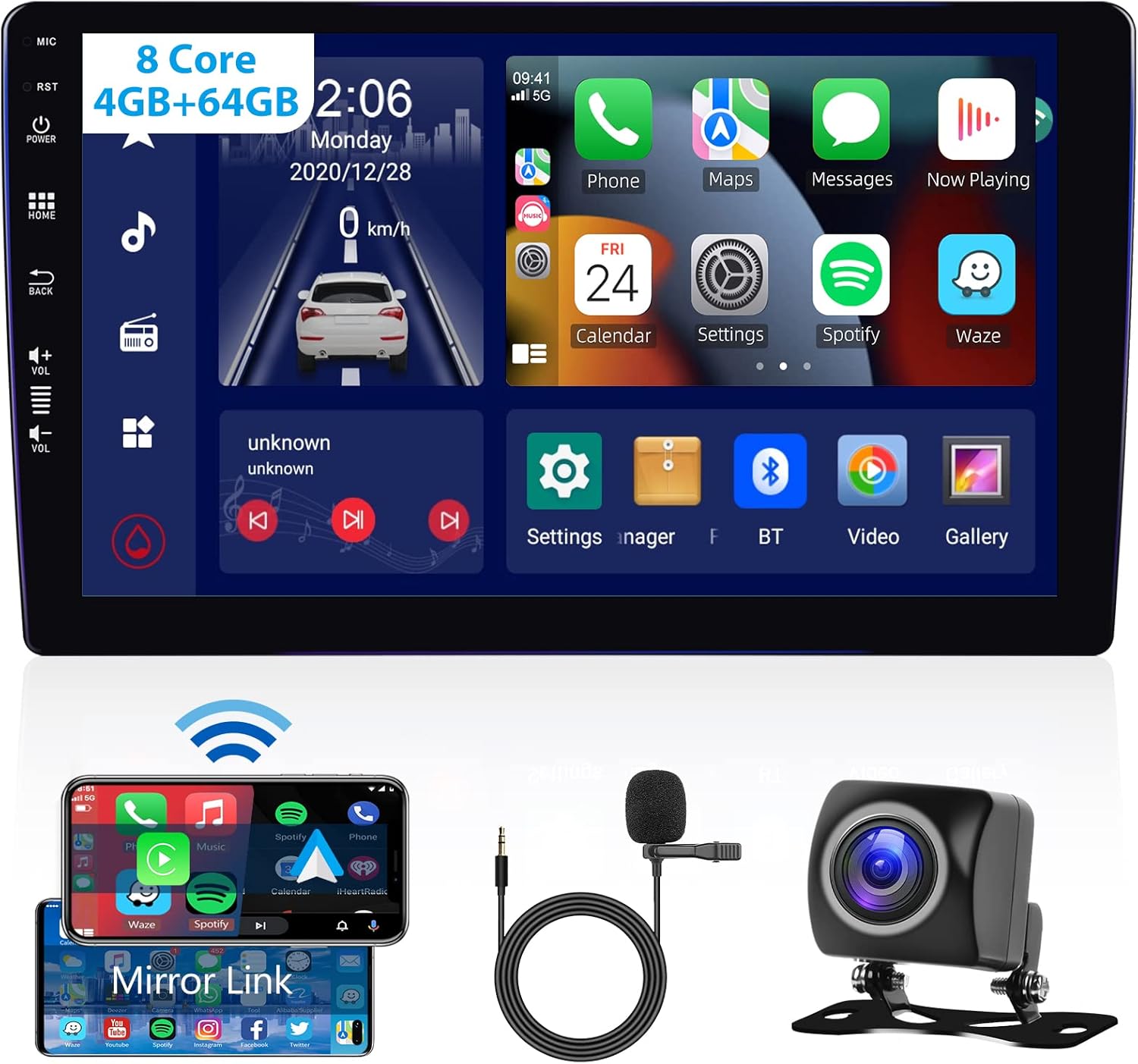
Figure 1.1: Hodozzy Car Stereo Overview
2. Key Features
- CarPlay & Android Auto: Supports wireless and wired Apple CarPlay and Android Auto with Siri/Google Voice Control.
- Built-in WIFI & 4G: Connect to Wi-Fi or insert a SIM card for internet access and online navigation.
- GPS Navigation: Supports offline navigation and Google Maps.
- FM/AM/RDS Radio: High-end radio chip with 30 preset stations, noise reduction, and RDS function.
- Bluetooth 5.1: Hands-free calling, music playback, and automatic phone book loading.
- DSP (Digital Sound Processor): Adjustable frequency, 36-band equalization, and sound type selection for enhanced audio quality.
- Rearview & SWC: Supports AHD/CVBS reversing input with backup camera and steering wheel controls.
- IPS Touchscreen: 9-inch IPS display with 1024x600 resolution.
- Split Screen Function: Allows simultaneous display of two applications.

Figure 2.1: Android 12 System Features
3. Setup and Installation
Professional installation is highly recommended for this product. Incorrect wiring or installation can damage the device or your vehicle. Refer to the included wiring diagrams and consult a qualified technician if you are unsure about any steps.
3.1 Package Contents
Before installation, verify that all components are present in the package:
- Hodozzy Car Stereo Unit
- GPS Antenna
- USB Cable
- Power Cable
- RCA Cable
- 4G Module (if applicable)
- AHD Rear Camera
- Microphone (MIC)
- Mounting Brackets
- User Manual
- ISO Power Cord
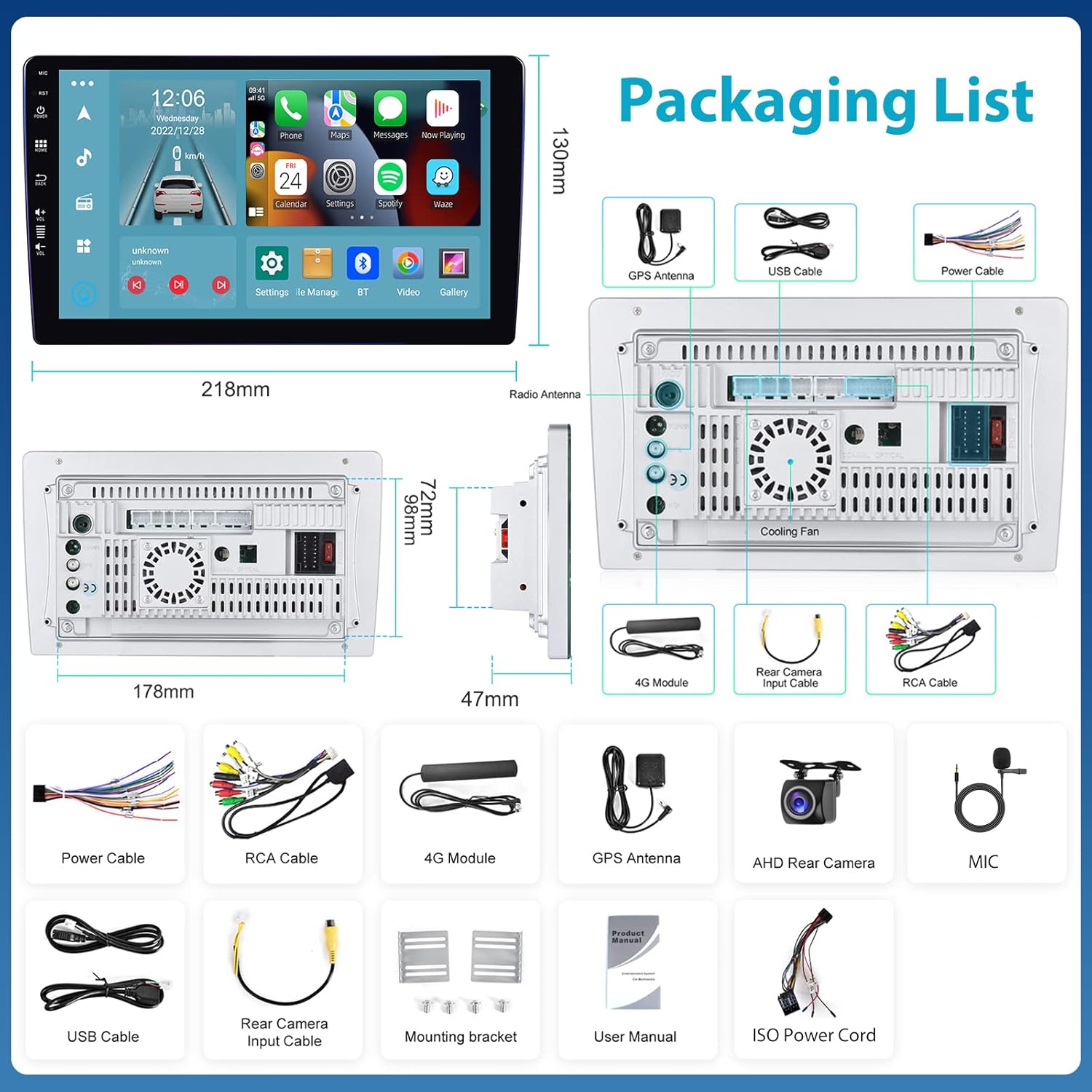
Figure 3.1: Packaging List
3.2 Wiring Diagram
Connect the power, speaker, and accessory wires according to the provided wiring diagram. Ensure all connections are secure to prevent short circuits or damage.

Figure 3.2: Rear Panel Connections
3.3 Mounting
Use the included mounting brackets to secure the stereo unit in your vehicle's double DIN slot. Ensure the unit is firmly in place to prevent vibrations and movement during driving.
4. Operating Instructions
4.1 Basic Operation
- Power On/Off: Press the power button on the front panel or use the vehicle's ignition.
- Volume Control: Use the physical volume buttons or the on-screen controls.
- Home Screen: Tap the 'Home' icon to return to the main interface.
- Navigation: Swipe left/right on the screen to access different application pages.
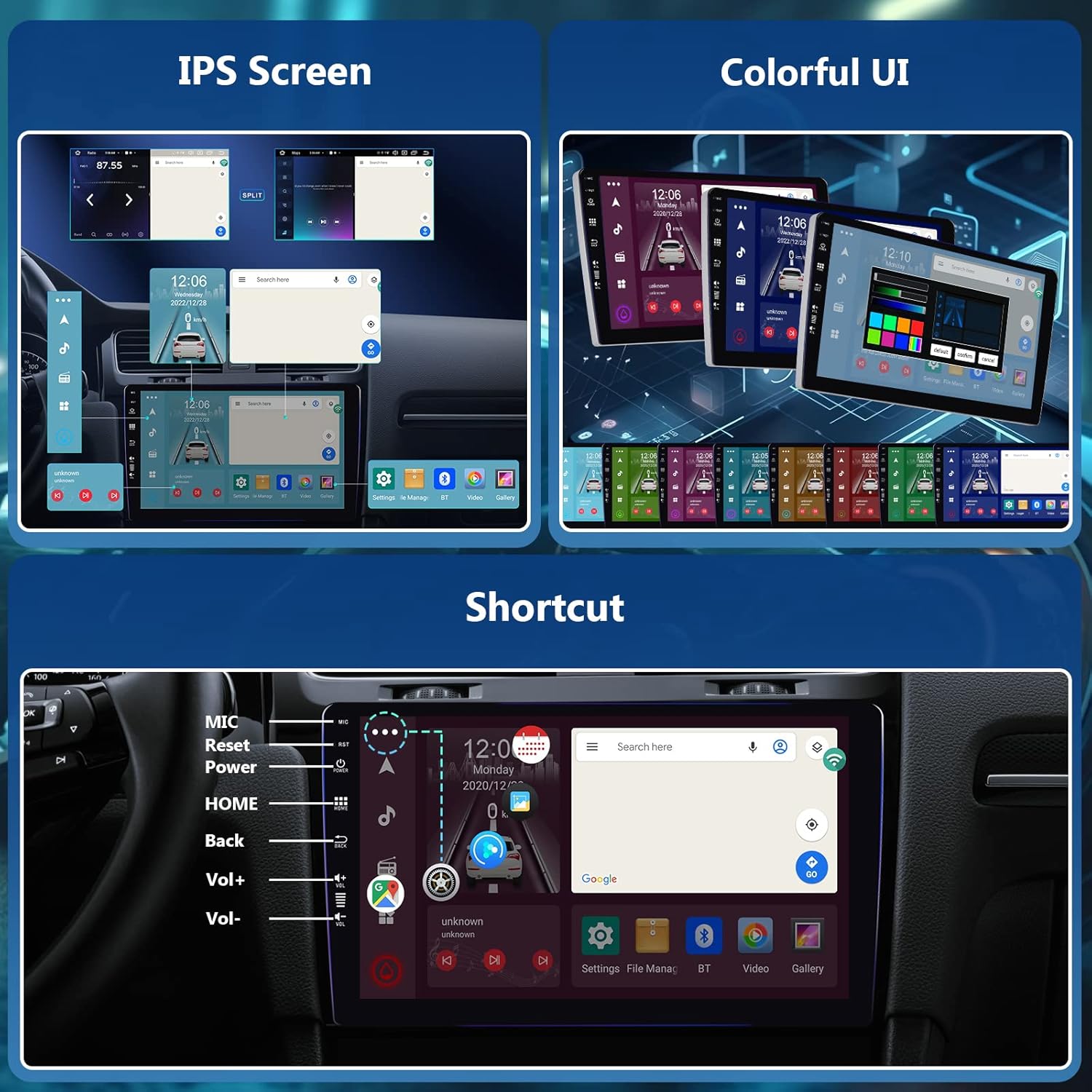
Figure 4.1: User Interface and Shortcuts
4.2 CarPlay & Android Auto
This unit supports both wireless and wired Apple CarPlay and Android Auto. Connect your smartphone via USB or wirelessly via Bluetooth and Wi-Fi. Once connected, you can access navigation, music, messages, and other compatible apps directly from the stereo's screen using voice commands (Siri/Google Assistant) or touch.

Figure 4.2: CarPlay, Android Auto, and Mirror Link
4.3 Bluetooth 5.1
Pair your mobile phone with the stereo via Bluetooth for hands-free calling and audio streaming. Navigate to the Bluetooth settings on the stereo, enable Bluetooth on your phone, and select the stereo from the list of available devices. The system supports automatic loading of your phone book.

Figure 4.3: Bluetooth and DSP Interface
4.4 WIFI & 4G Connectivity
Connect the stereo to a Wi-Fi hotspot or insert a 4G SIM card (if the 4G module is installed) to access online features such as app downloads from the Play Store, online navigation, and streaming services.
4.5 GPS Navigation
The built-in GPS module allows for precise navigation. You can use pre-installed navigation apps or download others from the Play Store. Connect to Wi-Fi or use 4G for real-time traffic updates and online map services.
4.6 FM/AM/RDS Radio
Access local radio stations using the FM/AM tuner. The RDS (Radio Data System) function displays station information, song titles, and other data where available. Use the auto-scan feature to find and save available stations.

Figure 4.4: Radio Interface and Steering Wheel Controls
4.7 DSP Audio Processing
The Digital Sound Processor allows for advanced audio customization. Access the DSP settings to adjust frequency response, use the 36-band or 10-band equalizer, and select various sound types (Jazz, Rock, Pop, Classic, etc.) to optimize your listening experience.
4.8 Rearview Camera Function
The stereo supports AHD/CVBS reversing input. When the vehicle is put into reverse gear, the display will automatically switch to the rearview camera feed, providing a clear view of the area behind your vehicle. Ensure the camera is properly connected and powered.
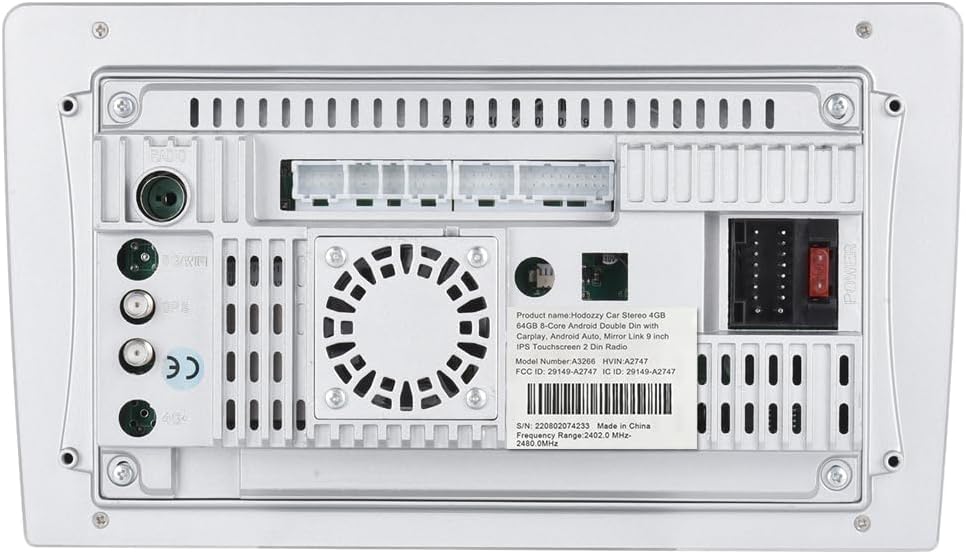
Figure 4.5: AHD Reversing Camera Connection
4.9 Steering Wheel Control (SWC)
If your vehicle supports it and the Canbus connection is successful, you can program the steering wheel buttons to control various functions of the stereo, such as volume, track skipping, and call answering. Refer to the stereo's settings menu for SWC configuration.
5. Maintenance
- Cleaning: Use a soft, dry cloth to clean the screen and unit. Avoid abrasive cleaners or solvents.
- Software Updates: Periodically check for software updates to ensure optimal performance and access to new features. Updates can usually be found on the manufacturer's website or through the device's settings.
- Temperature: Avoid exposing the unit to extreme temperatures, which can affect its performance and lifespan.
6. Troubleshooting
| Problem | Possible Cause | Solution |
|---|---|---|
| No Power | Incorrect wiring; Blown fuse; Vehicle battery issue. | Check power connections; Inspect fuses; Verify vehicle battery voltage. |
| No Sound | Speaker wires disconnected; Volume too low; Mute enabled. | Check speaker connections; Increase volume; Disable mute function. |
| Bluetooth Not Connecting | Bluetooth not enabled; Incorrect pairing mode; Interference. | Ensure Bluetooth is on for both devices; Re-pair the devices; Move away from interference sources. |
| GPS Signal Lost | GPS antenna obstructed or disconnected; Poor satellite coverage. | Check GPS antenna connection and placement; Move to an open area. |
| Touchscreen Unresponsive | System crash; Dirt on screen. | Restart the unit; Clean the screen. |
7. Specifications
| Feature | Detail |
|---|---|
| Brand | Hodozzy |
| Model | 9109 |
| Operating System | Android 12 |
| Processor | 8-Core |
| Memory Storage Capacity | 64 GB |
| Screen Size | 9 Inches |
| Display Type | IPS LCD |
| Resolution | 1024 x 600 |
| Bluetooth Version | 5.1 |
| Tuner Technology | DAB, FM, AM |
| Audio Output Mode | Stereo |
| Speaker Surround Sound | 5.1 Channel |
| Output Wattage | 180 Watts (Max), 45 Watts (RMS) |
| Connectivity | Bluetooth, Wi-Fi, USB, RCA |
| Compatible Devices | Smartphone, Speaker |
| Media Format | WMA, WAV, AVI, MKV, MP4, RMVB |
| Item Dimensions | 31.6 x 24.99 x 10.39 cm; 1.46 kg |
8. Warranty and Support
Hodozzy products are designed and manufactured to the highest quality standards. For warranty information and technical support, please refer to the warranty card included with your product or visit the official Hodozzy website. If you encounter any issues not covered in this manual, please contact Hodozzy customer service for assistance.
For additional resources and product information, you may visit the Hodozzy store on Amazon: Hodozzy Store