1. Introduction
Thank you for choosing the Mujocooker Folding Mobility Scooter. This manual provides essential information for the safe and effective operation, maintenance, and care of your new mobility device. Please read this manual thoroughly before using the scooter to ensure proper function and to maximize its lifespan.
This compact and lightweight mobility scooter is designed for ease of travel, featuring a foldable design, adjustable speed settings, and a powerful motor, making it suitable for various environments including shopping, vacations, and daily use.

Image: A user enjoying the Mujocooker Folding Mobility Scooter.
2. Setup and Initial Preparation
2.1 Unpacking and Assembly
The Mujocooker Folding Mobility Scooter comes largely pre-assembled (approximately 95%). No complex assembly is required. Simply unpack the scooter from its packaging.

Image: Components included in the scooter package.
2.2 Folding and Unfolding
The scooter is designed for quick and easy folding. To unfold, simply lift the seat and extend the front bar until it locks into place. The scooter folds to the size of a suitcase for convenient storage and transport.

Image: Visual guide for folding and unfolding the scooter.
2.3 Battery Installation and Charging
The scooter is equipped with a demountable 8AH lithium battery. Ensure the battery is fully charged before first use.
- Locate the battery compartment, typically under the seat.
- Insert the battery securely into its slot.
- Connect the charger to the scooter's charging port and then to a standard electrical outlet.
- Allow 4-5 hours for a full charge. The battery indicator on the display will show charging status.

Image: Details of the rechargeable battery.
3. Operating Instructions
3.1 Controls Overview
Familiarize yourself with the scooter's intuitive controls located on the handlebars.

Image: Detailed view of the scooter's control panel and functions.
3.2 Starting and Driving
- Insert the key into the keyhole (10) and turn it to the 'ON' position.
- Adjust the handlebar height (if needed) using the tool-free adjustment mechanism. The handlebar is adjustable from 13.8" to 21.7" to fit users from 5ft to 6.5ft.
- Select your desired speed setting using the three-speed adjustable button (5). The maximum speeds are 3.73 mph (low), 6.21 mph (medium), and 9.32 mph (high).
- To move forward, gently press the accelerator lever on the right handle. To move backward, use the D/R (Drive/Reverse) button (1) to switch to reverse mode, then apply the accelerator.
- To stop, release the accelerator and apply the brake lever (9).
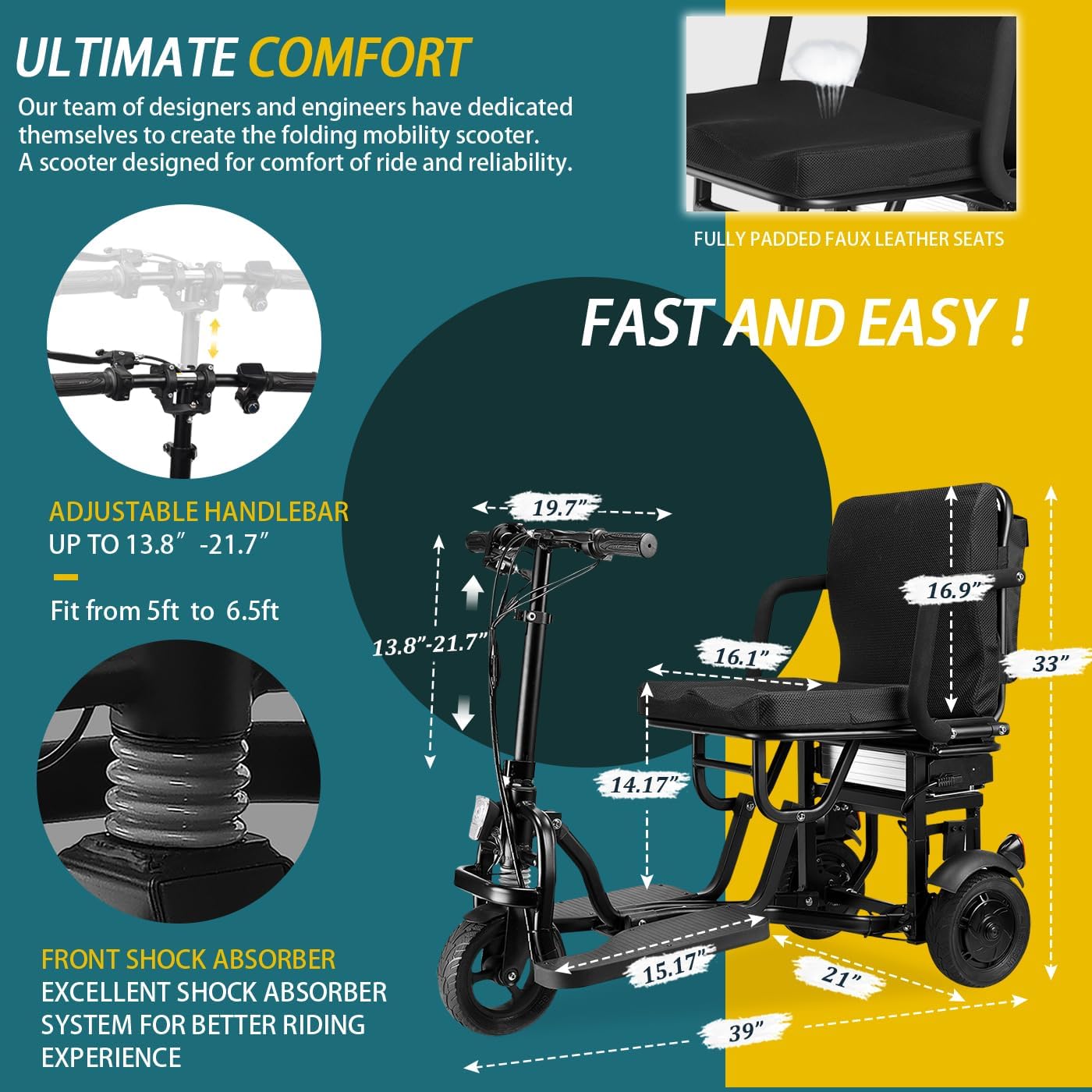
Image: Tool-free handlebar adjustment.
3.3 Cruise Control
Activate the cruise control system (4) to maintain a constant speed without continuously holding the accelerator, reducing driving fatigue during long trips.

Image: Using the cruise control feature.
3.4 Lights and Turn Signals
The scooter is equipped with a bright front LED light and flashing turn signals for enhanced visibility and safety, especially in low-light conditions or when turning.
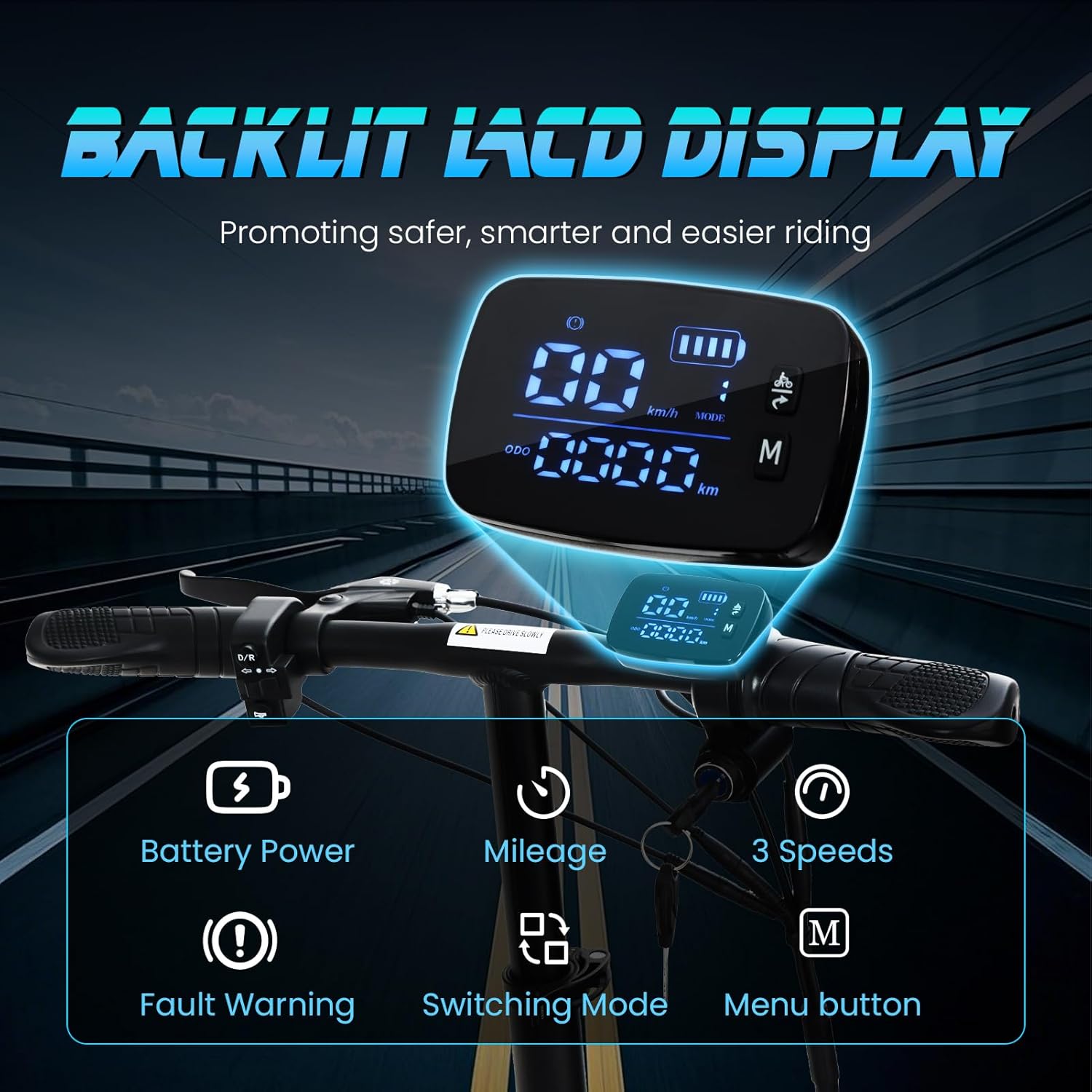
Image: Left and Right Turn Indicators in action.
Video: Demonstration of the scooter's turn signals and lights.
3.5 Horn
Use the horn button (3) to alert pedestrians or other vehicles of your presence.
4. Maintenance
4.1 Battery Care
- Always charge the battery fully after each use, even if only used for a short period.
- Do not allow the battery to completely discharge.
- Store the scooter and battery in a cool, dry place when not in use.
- If storing for an extended period, charge the battery at least once a month.
4.2 General Cleaning
- Wipe down the scooter with a damp cloth after use to remove dirt and dust.
- Avoid using abrasive cleaners or solvents that could damage the finish.
- Keep the wheels and motor area free of debris.
5. Troubleshooting
5.1 Common Issues and Solutions
| Problem | Possible Cause | Solution |
|---|---|---|
| Scooter does not turn on. | Battery is not charged or not properly installed. Key is not in 'ON' position. | Ensure battery is fully charged and securely installed. Turn the key to the 'ON' position. |
| Scooter moves slowly or loses power. | Low battery charge. Overload. | Recharge the battery. Ensure the weight capacity (300 lbs) is not exceeded. |
| Unusual noises during operation. | Loose components or debris in wheels/motor. | Inspect for loose parts and tighten if necessary. Clear any debris from wheels and motor area. If noise persists, contact customer support. |
| Handlebars are difficult to adjust. | Adjustment mechanism is stiff or dirty. | Clean the adjustment mechanism. Apply a small amount of silicone lubricant if needed. |
6. Specifications
- Model: B0CDNNQ39R (3 wheels, 8AH)
- Product Dimensions: 33.9"D x 19.7"W x 39"H
- Folded Dimensions: Approximately the size of a suitcase
- Item Weight: 48 lbs (net weight) / 49 lbs (shipping weight)
- Maximum Weight Capacity: 300 lbs
- Motor: Powerful 300W Brushless motor
- Battery: 1 x 8AH Lithium Ion battery (removable)
- Charging Time: 4-5 hours
- Maximum Speed: 9.32 mph (adjustable to 3.73 mph, 6.21 mph, 9.32 mph)
- Travel Range: Up to 20 miles per charge
- Climbing Angle: Up to 9 degrees
- Tires: 8-inch solid tires (front and rear)
- Brakes: Mechanical brakes
- Features: Cruise control, adjustable handlebar, bright front LED light, turn signals, horn, reverse gear, padded seat backrest, detachable front basket.

Image: Scooter's weight capacity and tire details.
7. Warranty and Support
Mujocooker provides comprehensive customer support and warranty for your mobility scooter:
- Frame Warranty: 1 year
- Motor Warranty: 1 year
- Joystick Controller Warranty: 1 year
- Battery Warranty: 3 months
If you encounter any issues with your scooter within 365 days of signing for it, please contact our professional customer service team. We aim to provide email support within 24 hours.
Contact Email: mujocooker@163.com

Image: Mujocooker customer support.
8. Safety Guidelines
Your safety is paramount. Please adhere to the following guidelines:
- Always read and understand the entire manual before operating the scooter.
- Do not exceed the maximum weight capacity of 300 lbs.
- Operate the scooter only on suitable surfaces. Be cautious on slopes, uneven terrain, and near obstacles.
- Use the turn signals and lights, especially in low visibility conditions or when changing direction.
- Always use the horn to alert others when necessary.
- Avoid operating the scooter under the influence of alcohol or medication that may impair your judgment.
- Ensure the scooter is fully charged before long trips to avoid running out of power.
- Do not attempt to modify the scooter in any way, as this may void the warranty and compromise safety.
- Always engage the brake buckles when parking to prevent unintended rolling.

Image: Scooter features for safe driving at night.


