1. Introduction
Thank you for purchasing the Generic Merodith R-2055BT Portable AM/FM/SW Radio Bluetooth Speaker. This device combines classic aesthetics with modern functionality, offering multiple audio playback options. This manual provides essential information for safe and effective use of your new radio.
2. Safety Instructions
- Read all instructions carefully before operating the device.
- Keep the device away from water, moisture, and direct sunlight.
- Do not expose the device to extreme temperatures.
- Avoid dropping or subjecting the device to strong impacts.
- Use only the provided charging cable or a compatible power adapter.
- Do not attempt to disassemble or repair the device yourself. Contact qualified service personnel.
- Ensure proper ventilation when operating the device.
3. Package Contents
- Generic Merodith R-2055BT Radio
- Charging Cable
- User Manual (this document)
4. Product Overview
Familiarize yourself with the main components and controls of your radio.

Figure 4.1: Front view of the Merodith R-2055BT radio, highlighting the main controls and antenna.

Figure 4.2: Detailed view of the control panel, including the AM/FM/SW frequency dial, volume control, and media playback buttons.
Controls and Ports:
- Volume Knob: Adjusts the audio output level.
- Tuning Knob: Selects radio frequencies in AM, FM, or SW modes.
- Mode Button: Switches between FM, AM, SW, Bluetooth, USB, and TF card modes.
- USB Port: For USB drive playback and charging external devices.
- TF Card Slot: For TF (MicroSD) card playback.
- Antenna: Extendable antenna for improved radio reception.
- Power Switch: Turns the device on or off.
5. Setup
5.1. Charging the Battery
The radio is equipped with a rechargeable 1200 mAh lithium-ion battery. Before first use, it is recommended to fully charge the device.
- Connect the provided charging cable to the radio's charging port.
- Connect the other end of the cable to a compatible USB power adapter (not included) or a USB port on a computer.
- The charging indicator light will illuminate. Once fully charged, the light may change color or turn off.
- A full charge typically takes several hours.
The device also supports solar panel charging (solar panel not included) and can be powered via AC 110V/220V-60Hz/50Hz.
5.2. Initial Power On
Locate the Power Switch and slide it to the 'ON' position. The radio will power on, typically defaulting to the last used mode or FM radio.
6. Operating Instructions
6.1. Power On/Off and Volume Control
- To turn the radio ON, slide the Power Switch to the 'ON' position.
- To turn the radio OFF, slide the Power Switch to the 'OFF' position.
- Rotate the Volume Knob clockwise to increase volume and counter-clockwise to decrease volume.
6.2. Radio Mode (AM/FM/SW)

Figure 6.1: Icons representing the various playback modes available on the radio.
- Press the Mode Button repeatedly until you hear the radio mode (FM, AM, or SW).
- Extend the telescopic antenna for optimal reception, especially for FM and SW bands.
- Rotate the Tuning Knob slowly to scan for radio stations. The frequency dial will indicate the current band and frequency.
- Adjust the antenna position for clearer reception if needed.
6.3. Bluetooth Mode
- Press the Mode Button until you hear an audible prompt indicating Bluetooth mode (e.g., "Bluetooth Mode" or a pairing tone).
- On your mobile device, enable Bluetooth and search for available devices.
- Select "R-2055BT" (or similar name) from the list of found devices to pair.
- Once paired, you can play audio from your mobile device through the radio speaker.
- Use the playback control buttons (Play/Pause, Next/Previous) on the radio or your mobile device to manage audio.
6.4. USB and TF Card Playback
- Insert a USB flash drive into the USB Port or a TF (MicroSD) card into the TF Card Slot.
- Press the Mode Button until the radio automatically switches to USB or TF card playback mode. If it doesn't switch automatically, press the Mode Button until the correct mode is selected.
- The radio will automatically begin playing audio files (e.g., MP3) from the inserted storage device.
- Use the playback control buttons (Play/Pause, Next/Previous) to navigate tracks.
6.5. Mobile Charging Function
The USB port on the radio can also be used to charge compatible mobile devices.
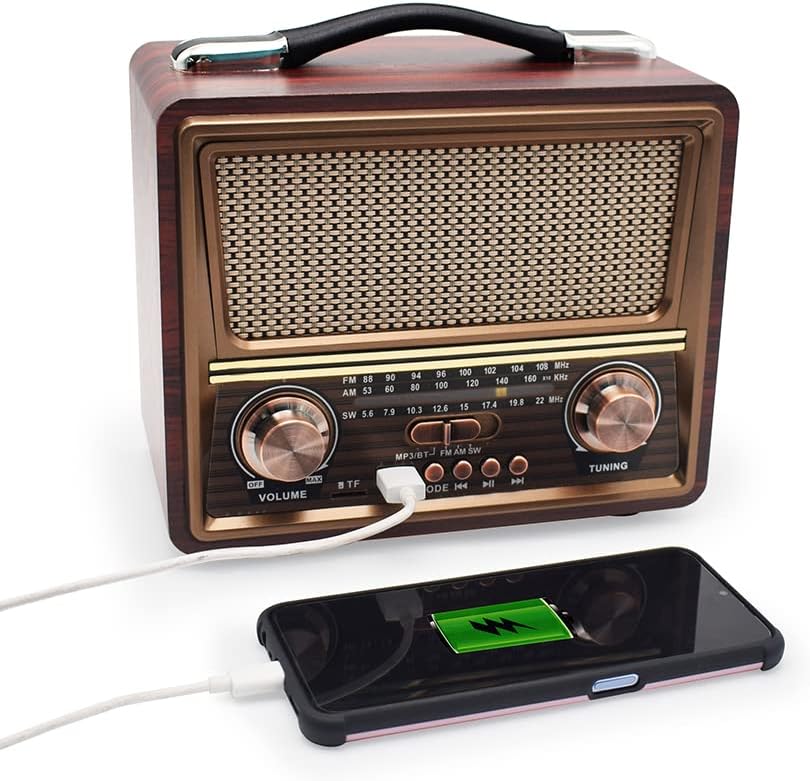
Figure 6.2: The radio's USB port can be used to charge external devices like smartphones.
- Ensure the radio is powered on and has sufficient battery charge.
- Connect your mobile device to the radio's USB port using your device's charging cable.
- The mobile device should begin charging.
7. Maintenance
- Cleaning: Use a soft, dry cloth to clean the exterior of the radio. Do not use abrasive cleaners or solvents.
- Storage: When not in use for extended periods, store the radio in a cool, dry place, away from direct sunlight and extreme temperatures.
- Battery Care: To prolong battery life, avoid fully discharging the battery frequently. Charge the battery regularly, even if the radio is not in use.
8. Troubleshooting
| Problem | Possible Cause | Solution |
|---|---|---|
| No power | Battery is discharged; Power switch is off. | Charge the battery; Slide the power switch to 'ON'. |
| Poor radio reception | Antenna not extended; Weak signal; Interference. | Extend the antenna fully; Adjust antenna position; Move radio to a different location. |
| Bluetooth not pairing | Radio not in Bluetooth mode; Device too far; Bluetooth not enabled on mobile device. | Press Mode button to select Bluetooth; Ensure devices are within range; Enable Bluetooth on your mobile device. |
| USB/TF card not playing | Incorrect mode selected; Incompatible file format; Corrupted storage device. | Press Mode button to select USB/TF mode; Ensure files are MP3 format; Try a different USB/TF card. |
| Low volume or distorted sound | Volume too low; Weak signal; Speaker obstruction. | Increase volume; Improve radio reception; Check for obstructions on speaker grille. |
9. Specifications

Figure 9.1: Dimensions of the Merodith R-2055BT radio.
- Model: R-2055BT (QG-R-2055BT)
- Radio Bands: FM/AM/SW (3-Band)
- Speaker: 4Ω3W
- Connectivity: Bluetooth, USB, TF Card
- Battery: 1200 mAh Rechargeable Lithium-Ion
- Power Input: AC 110V/220V-60Hz/50Hz, Solar Panel Charge Support
- Product Dimensions: 21.2 x 13.5 x 19.5 cm (8.26 x 5 x 7.5 inches)
- Item Weight: Approximately 1.25 kg (2.76 pounds)
- Special Features: Vintage Look, Good Sound Quality, Long Battery Duration, Rechargeable, Mobile Charger function.
10. Warranty and Support
This product comes with a standard manufacturer's warranty. For specific warranty details, please refer to the documentation provided at the time of purchase or contact your retailer. For technical support or service inquiries, please contact the seller or manufacturer directly.


