Introduction
Welcome to your AVID Products AE-711 Over-Ear Headphones. These headphones are designed to provide high-quality audio for various applications, including home, office, education, travel, and music listening. This manual provides essential information for setting up, operating, and maintaining your headphones.
What's in the Box:
- AVID Products AE-711 Over-Ear Headphones
- Integrated 3.5mm Audio Cable
- User Manual (this document)
- Ear Cushions (pre-installed)
Product Features
- Over-Ear Design: Provides a comfortable fit and effective sound isolation for an immersive audio experience.
- Dynamic Drivers: Equipped with 27mm dynamic drivers and neodymium magnets for clear and powerful audio across a frequency response of 20 Hz to 20 kHz.
- Wide Compatibility: Features a standard 3.5mm audio output jack and 32 ohm impedance, making them compatible with a broad range of devices.
- Adjustable Headband: Allows for a personalized and secure fit for different head sizes.
- Padded Earpads: Vinyl-padded earpads ensure long-lasting comfort during extended use.
- Long Cable: A 5-foot cord offers ample range of motion and flexibility.
- Foldable Design: Earcups fold inward for compact storage and enhanced portability.
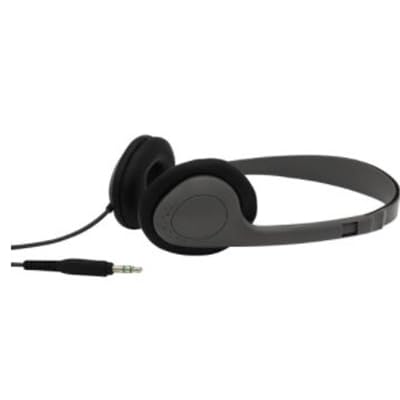
Image: AVID Products AE-711 Over-Ear Headphones, showcasing their design and wired connection.
Setup
1. Connecting to a Device:
- Locate the 3.5mm audio output jack on your device (e.g., laptop, tablet, smartphone, desktop computer, smart speaker, television).
- Insert the 3.5mm plug of the headphone cable firmly into the device's audio jack.
- Ensure the connection is secure to prevent audio interruptions.
2. Adjusting the Fit:
- Gently extend or retract the headband on both sides to fit your head comfortably.
- Position the earpads over your ears, ensuring they fully cover your ears for optimal sound isolation and comfort.
Operating Instructions
Audio Playback:
- Once connected, audio from your device will be routed through the headphones.
- Control the volume directly from your connected device.
- To pause or play audio, use the controls on your connected device.
Maintenance
Cleaning:
- Wipe the headphones and earpads with a soft, dry cloth.
- Do not use harsh chemicals, cleaning solvents, or strong detergents.
Storage:
- When not in use, fold the earcups inward to reduce their size for compact storage.
- Store in a clean, dry place away from extreme temperatures.
Cable Care:
- Avoid sharp bends or excessive pulling on the audio cable to prevent damage.
- Do not wrap the cable too tightly around the headphones.
Troubleshooting
No Sound:
- Ensure the 3.5mm audio jack is fully inserted into your device.
- Check the volume level on your connected device and ensure it is not muted.
- Test the headphones with another device to rule out a device-specific issue.
Distorted Sound:
- Verify that the audio cable is securely connected.
- Adjust the volume on your device; excessively high volume can cause distortion.
- Ensure the audio source is of good quality.
Uncomfortable Fit:
- Adjust the headband length until the earcups rest comfortably over your ears.
- Ensure the earpads are correctly positioned.
Specifications
| Feature | Detail |
|---|---|
| Model Name | AE-711 |
| Brand | Avid |
| Ear Placement | Over Ear |
| Form Factor | Over Ear |
| Connectivity Technology | Wired (3.5 mm Jack) |
| Impedance | 32 Ohms |
| Frequency Response | 20 Hz - 20 kHz |
| Audio Driver Type | Dynamic Driver (27mm) |
| Special Features | Neodymium Magnets, Adjustable Headband, Comfortable Ear Pads |
| Material | Vinyl (earpads) |
| Cable Length | 5 feet |
| Color | Gray |
| Item Weight | 1 pounds |
| Package Dimensions | 7 x 6 x 2 inches |
Warranty and Support
AVID Products stands behind the quality of its products. For specific warranty details and to register your product, please refer to the warranty card included in your packaging or visit the official AVID Products website.
If you encounter any issues or have questions regarding your AE-711 headphones, please contact AVID Products customer support through their official channels. Keep your purchase receipt for warranty claims.


