
Product Overview
The AODK AD48-V Computer Desk is designed for home and office use, offering a functional workspace with integrated power solutions and storage. This desk features a durable construction and a versatile design suitable for various environments.

Image: The AODK 48-inch computer desk, showcasing its spacious top surface, integrated power strip, and two-tier storage shelves on both sides. A laptop, lamp, and charging devices are visible on the desk surface, with books and decorative items on the shelves.
Setup and Assembly
Assembly of the AODK AD48-V desk is designed to be straightforward. All necessary tools and detailed instructions are included in the package. Each part is clearly labeled to facilitate the assembly process. Follow the step-by-step guide provided to ensure correct and stable construction.

Image: An assembly diagram illustrating the four main steps for constructing the AODK desk: first, assembling the side shelves; second, attaching the desktop; third, securing the steel frame; and finally, installing the power outlet.
For visual guidance, please refer to the official product video below, which demonstrates the desk's features and setup in various settings.
Video: An official product video from AODK-US showcasing the desk's design, features, and how it fits into different room configurations. The video highlights the integrated power outlets and storage capabilities.
Operating Instructions
Integrated Power Outlets
The desk is equipped with a built-in power strip for convenient access to electricity. This includes:
- 3 AC Outlets (125V/12A)
- 1 USB Charging Port (5V/2A)
- 1 Type-C Charging Port (5V/2A)
To use, simply plug the desk's main power cord into a wall outlet. You can then connect your electronic devices such as laptops, smartphones, and other peripherals directly to the integrated ports for charging and power supply.

Image: A detailed view of the integrated power strip on the desk, illustrating the three AC outlets, one USB port, and one Type-C port in use, with various devices connected for charging.
Storage Shelves
The desk features two-tier open storage shelves on both sides. These shelves provide space for organizing books, office supplies, and other items. The middle shelf board on each side is removable, allowing for customization of storage space to accommodate taller items or different organizational needs.
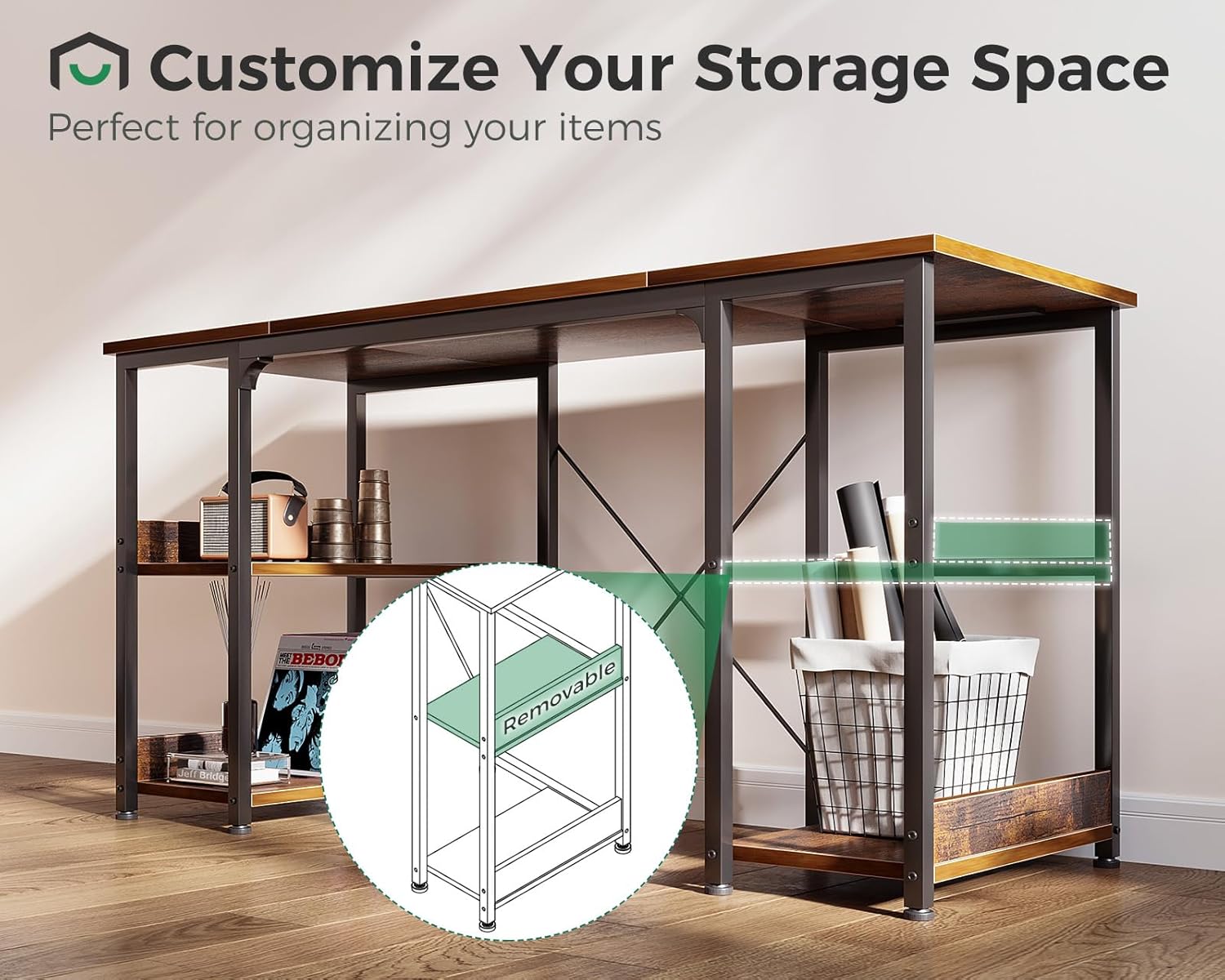
Image: A visual representation highlighting the removable middle shelf within the desk's side storage unit. This feature allows users to adjust the shelf height or remove it entirely to create larger storage compartments.
Maintenance
To ensure the longevity and appearance of your AODK AD48-V desk, follow these maintenance guidelines:
- Cleaning: The desktop surface is designed to be waterproof and scratch-resistant. Wipe the surface regularly with a soft, damp cloth. Avoid abrasive cleaners or harsh chemicals that could damage the finish.
- Stability: Periodically check all screws and connections to ensure they remain tight. Retighten if necessary to maintain the desk's stability.
- Leveling: The desk is equipped with adjustable non-slip foot pads. Adjust these pads as needed to level the desk on uneven surfaces and prevent scratching your floor.

Image: A close-up view of one of the desk's adjustable foot pads. The image highlights the pad's design, which allows for minor height adjustments to ensure desk stability and protect flooring from scratches.
Troubleshooting
If you encounter any issues with your AODK AD48-V desk, consider the following:
- Wobbling: Ensure all assembly screws are securely tightened. Adjust the non-slip foot pads to compensate for uneven flooring.
- Power Outlets Not Working: Verify that the desk's main power cord is firmly plugged into a functional wall outlet. Check if the devices you are trying to charge are properly connected and functional.
For further assistance or issues not resolved by these steps, please contact AODK customer service.
Specifications
Key specifications for the AODK AD48-V Computer Desk:
| Brand | AODK |
| Model Number | AD48-V |
| Product Dimensions (D x W x H) | 15.8"D x 47.2"W x 30"H |
| Item Weight | 13.31 Kilograms |
| Maximum Weight Recommendation | 49.9 Kilograms (110 lbs) |
| Material | Engineered Wood (Top), Alloy Steel (Base) |
| Color | Vintage |
| Power Outlets | 3 AC Outlets (125V/12A) |
| USB Ports | 1 USB-A (5V/2A), 1 USB-C (5V/2A) |
| Number of Shelves | 4 (2 per side, middle shelf removable) |
| Assembly Required | Yes (Tools included) |

Image: A detailed diagram illustrating the precise dimensions of the AODK 48-inch computer desk, including the overall length, width, height, and the measurements of the individual storage shelves.
Customer Service and Support
AODK is committed to providing reliable customer service. If you have any questions, concerns, or require assistance with your product before or after purchase, please do not hesitate to contact our professional customer support team. We are available to assist you within 24 hours.
For contact information, please visit the official AODK store page: AODK Store


