
SANODESK QS11160
SANODESK Electric Standing Desk User Manual
Model: QS11160
1. Introduction
Thank you for choosing the SANODESK Electric Standing Desk. This manual provides detailed instructions for assembly, operation, and maintenance to ensure safe and optimal use of your new desk. Designed for comfort and productivity, this adjustable height desk allows you to effortlessly switch between sitting and standing positions throughout your workday.
2. Safety Warnings
WARNING: KEEP DESK AWAY FROM CHILDREN WHEN THE MOTOR IS IN OPERATION. UNPLUG DESK WHEN NOT IN USE. FOLLOW INSTRUCTIONS FOR AUTOMATIC SHUT-OFF FEATURE TO PREVENT INJURY.
Always ensure the area around the desk is clear before adjusting its height. Do not place hands or objects near moving parts during operation. If any unusual noise or movement occurs, immediately stop operation and unplug the desk. This desk is designed for indoor use only.
3. Package Contents
Please verify that all components are present before beginning assembly. If any parts are missing or damaged, please contact customer support.
- Desk Frame (Legs and Crossbar)
- Desktop Surface
- Control Panel with LED Display
- Power Adapter and Cable
- Cup Holder
- Headphone Hook
- Cable Management Tray/Organizer
- Assembly Hardware (screws, tools)
- User Manual

Image: All components of the SANODESK Electric Standing Desk, including the desktop, frame, control panel, cup holder, headphone hook, and cable management accessories.
4. Assembly Instructions
Follow these general steps for assembling your SANODESK Electric Standing Desk. Refer to the included assembly diagram for detailed illustrations.
- Unpack all components and lay them out on a clean, flat surface.
- Attach the lifting columns to the desk feet using the provided screws.
- Connect the crossbar to the lifting columns.
- Secure the desktop surface to the assembled frame.
- Mount the control panel to the underside of the desktop in an easily accessible location.
- Install the cup holder, headphone hook, and cable management tray as desired.
- Connect all motor and control panel cables to the control box, then connect the power adapter.

Image: Two SANODESK standing desks, demonstrating their presence in a modern office setting, ready for use after assembly.

Image: A visual comparison showing the desk setup before and after implementing the cable management solution, highlighting a tidier workspace.
5. Operating Instructions
5.1. Height Adjustment
The SANODESK Electric Standing Desk features an advanced LED control panel for easy height adjustments. The desk can be adjusted from 73.5 cm (28.9 inches) to 118 cm (46.5 inches).
- Up/Down Buttons: Use the up (▲) and down (▼) arrows on the control panel to manually raise or lower the desk to your desired height. The current height will be displayed on the LED screen.

Image: A detailed view of the desk's LED control panel, showing the digital height display, up/down buttons, and memory preset buttons (1, 2, 3, 4).

Image: An illustration demonstrating the minimum (73.5cm) and maximum (118cm) height adjustments of the SANODESK, with two desks at different heights.
5.2. Memory Presets
The intelligent LED control panel offers 4 memory preset buttons (1, 2, 3, 4) to store your preferred sitting and standing heights.
- Adjust the desk to your desired height using the up/down buttons.
- Press and hold one of the memory buttons (1, 2, 3, or 4) until the LED display shows 'S-' or a similar confirmation, indicating the height has been saved.
- To recall a saved height, simply press the corresponding memory button. The desk will automatically move to the stored position.
5.3. Anti-Collision System
For your safety, the desk is equipped with an anti-collision system. If the desk encounters an obstacle during height adjustment, it will automatically stop and reverse slightly to prevent damage or injury. Ensure the area is clear before resuming adjustment.
6. Key Features
6.1. Smart Memory Panel
The advanced LED control panel provides 4 memory preset keys, allowing you to easily adjust your working or sitting position. With a height range from 73.5 cm to 118 cm, this desk adapts to your needs, promoting comfort and productivity throughout the day.
6.2. Quiet Operation
Experience a quiet and distraction-free work environment thanks to the ultra-quiet motor, which operates below 50 dB. This low noise level ensures you can concentrate on your tasks without interruption.

Image: A visual representation of the desk's quiet operation, featuring a cat sleeping undisturbed on the desktop, with a noise level comparison chart.
6.3. Robust Construction & Load Capacity
With its solid construction and a load capacity of 70 kg (154 lbs), this desk offers stability and durability for all your work essentials. It is built to reliably support your equipment for years of use.

Image: A graphic highlighting the 70KG load capacity of the SANODESK, emphasizing its robust design and stability.
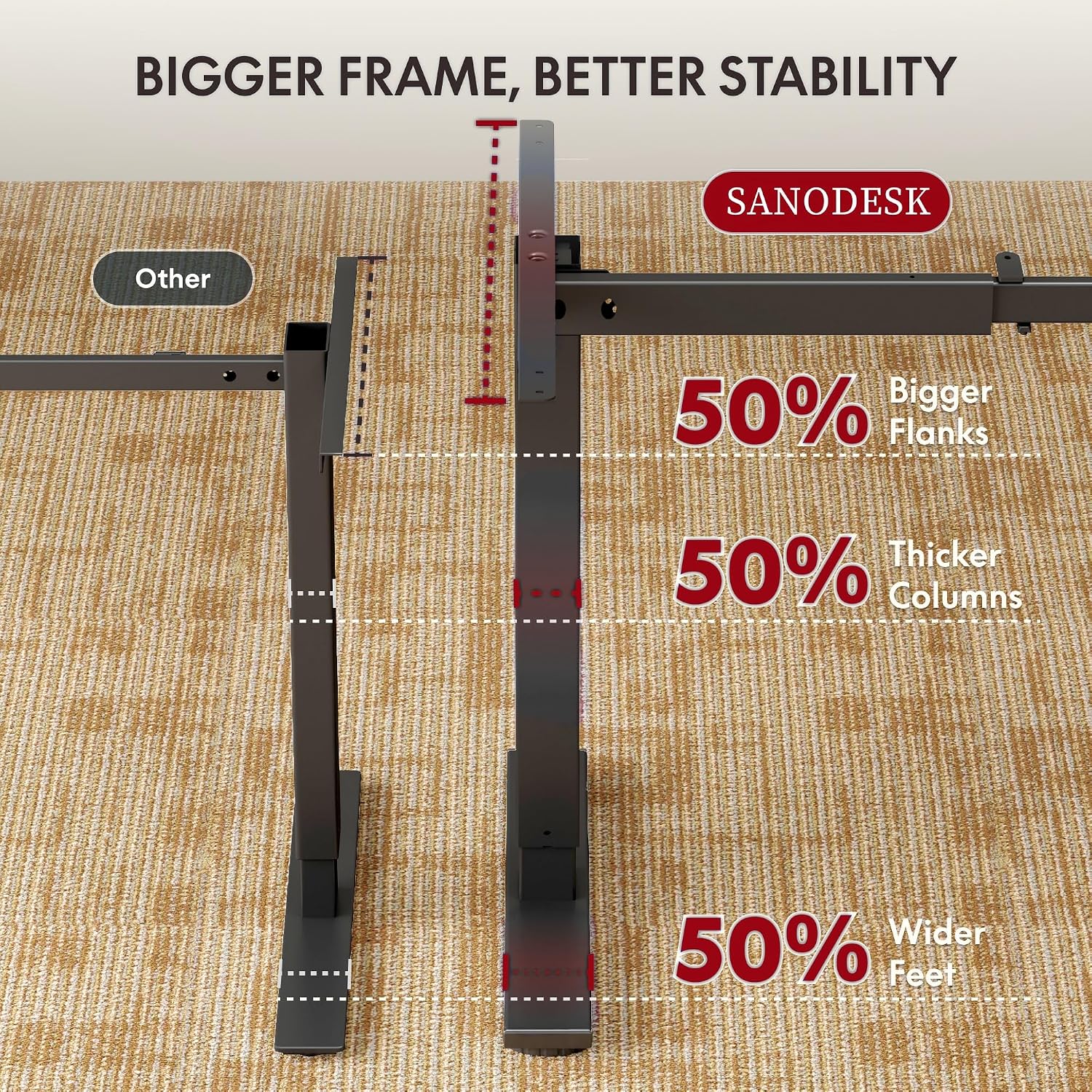
Image: A comparative diagram illustrating the SANODESK's enhanced stability features, including a bigger frame, thicker columns, and wider feet compared to other desks.
6.4. Useful Accessories
The desk comes with practical accessories including a cup holder, a hook, a storage shelf, and a cable organizer to optimize your workspace. The cup holder and hook keep daily items within reach, while the shelf provides additional space. The cable organizer prevents clutter, keeping your desk tidy. These thoughtful accessories enhance the order, efficiency, and comfort of your SANODESK product.

Image: A close-up view of the integrated cup holder on the SANODESK, designed for convenient access to beverages.
7. Maintenance
To ensure the longevity and proper functioning of your SANODESK Electric Standing Desk, follow these maintenance guidelines:
- Cleaning: Wipe the desktop and frame with a soft, damp cloth. Avoid using harsh chemicals or abrasive cleaners that could damage the finish.
- Cable Management: Periodically check that all cables are securely routed and not pinched or tangled.
- Motor Care: The motor is designed for maintenance-free operation. Do not attempt to lubricate or disassemble the motor unit.
- Regular Checks: Occasionally check all screws and fasteners to ensure they are tight. Retighten if necessary.
8. Troubleshooting
If you encounter any issues with your SANODESK Electric Standing Desk, please refer to the following common troubleshooting steps:
- Desk Not Moving:
- Check if the power cable is securely plugged into both the desk and the wall outlet.
- Ensure all cables connecting the control panel to the motor and control box are properly connected.
- Try unplugging the desk for 30 seconds and then plugging it back in to reset the system.
- Uneven Movement:
- Ensure the desk is placed on a flat, level surface.
- Check that all assembly screws are tightened evenly.
- Error Codes on LED Display:
- Refer to the specific error code in the detailed manual (if provided with the product) or contact customer support for assistance.
- Anti-Collision System Triggering Frequently:
- Ensure there are no obstacles in the path of the desk's movement.
- Check if the desk is overloaded beyond its 70kg capacity.
If these steps do not resolve the issue, please contact SANODESK customer support for further assistance.
9. Product Specifications
| Feature | Specification |
|---|---|
| Brand | SANODESK |
| Model Number | QS11160 |
| Color | Black and Black |
| Product Dimensions (L x W x H) | 110P x 54l x 118H centimeters (approx. 60 x 110 x 71 cm packaged) |
| Adjustable Height Range | 73.5 cm to 118 cm |
| Material | Engineered Wood (Desktop), Metal (Base) |
| Weight Capacity | 70 kg (154 lbs) |
| Special Features | Ergonomic, Height Adjustable, Electric, Anti-Collision System, Memory Presets |
| Noise Level | Below 50 dB |
| Item Weight | 23.5 Kilograms |
10. Warranty and Support
SANODESK is committed to providing high-quality products and customer satisfaction. For warranty information, technical support, or any inquiries regarding your Electric Standing Desk, please refer to the warranty card included with your product or visit the official SANODESK website. You may also contact the seller directly through your purchase platform.
Please retain your proof of purchase for any warranty claims.
Ask a question about this manual
Ask about setup, troubleshooting, compatibility, parts, safety, or missing instructions. Manuals+ will review the question and use this page’s manual context to help answer it.