
1. Introduction
This manual provides comprehensive instructions for the safe and effective operation of your Pulsar Talion Thermal Riflescope XG35. Please read this manual thoroughly before using the device to ensure proper functionality and to prevent damage.

Figure 1.1: Pulsar Talion Thermal Riflescope XG35 overview.
2. Key Features
- Night-Time Focus Adjustment: Precision adjustment integrates a fin lever matching the riflescope housing's ridge at 76 yards, the night-time focal point. Enables swift, accurate focusing without needing to visually check the riflescope.
- 3 Sensitivity Levels: Advanced signal amplification options and precise brightness/contrast adjustments ideal for hunters. Perfect for long-range game detection in various weather conditions.
- Long Operation Time: Talion powered by Pulsar APS 5T interchangeable, rechargeable battery. Single charge provides up to 7 hours of active scope use for hunting. Battery cover design aids easy replacement in complete darkness by touch alone.
- Stream Vision 2 with Wi-Fi: Built-in Wi-Fi connects the device to Android/iOS smartphones via Stream Vision 2 app. Update device software, transfer real-time images to mobile screens, and remotely control digital functions.
- HD Thermal Sensor: Features an HD thermal sensor for incredibly detailed images.
- Wide Field of View (FOV): 12.5° FOV for enhanced situational awareness.
- Detection Range: Ability to detect heat signatures up to 1750m.
- Multiple Zeroing Profiles: Store up to 5 zeroing profiles, each with 50 distance coordinates.

Figure 2.1: Key features of the Pulsar Talion XG35 Thermal Riflescope.
3. Setup
3.1 Unpacking and Initial Inspection
Carefully remove all components from the packaging. Verify that all items listed in the "Included Components" section of the specifications are present and undamaged. If any items are missing or damaged, contact customer support immediately.
3.2 Battery Installation
The Talion XG35 uses a Pulsar APS 5T interchangeable, rechargeable battery pack. To install the battery:
- Locate the battery compartment on the riflescope.
- Open the battery cover. The design allows for easy replacement by touch, even in darkness.
- Insert the APS 5T battery pack, ensuring correct orientation. The battery should click securely into place.
- Close the battery cover firmly.
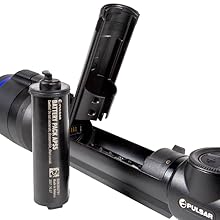
Figure 3.1: Battery installation for the APS 5T battery pack.
3.3 Mounting the Riflescope
The Talion XG35 comes with a Picatinny mount. Follow these steps to securely mount the riflescope:
- Ensure your rifle's Picatinny rail is clean and free of debris.
- Position the riflescope mount onto the Picatinny rail.
- Tighten the mounting screws evenly until the riflescope is firmly secured. Do not overtighten.
- Verify that the riflescope is aligned properly and does not wobble.
4. Operating Instructions
4.1 Powering On/Off
To power on the device, press and hold the power button (refer to Figure 4.1 for button layout) until the Pulsar logo appears. To power off, press and hold the power button again until the screen shuts down.

Figure 4.1: Control buttons on the Pulsar Talion XG35.
4.2 Focus Adjustment
The Talion XG35 features a precision focus adjustment with a fin lever. For optimal clarity, especially at night, align the fin lever with the riflescope housing's ridge, which corresponds to the 76-yard focal point. Adjust as needed for different distances.
4.3 Sensitivity Levels and Image Adjustment
The device offers 3 sensitivity levels. Access the menu to adjust brightness and contrast settings to suit various environmental conditions and target detection needs. Experiment with these settings to achieve the best image quality for your specific situation.

Figure 4.2: Example of detailed thermal image from the HD sensor.

Figure 4.3: High-resolution thermal image capture.
4.4 Stream Vision 2 Connectivity
The Talion XG35 features built-in Wi-Fi for connection to the Stream Vision 2 app on Android and iOS devices. This app allows you to:
- Update device software.
- Transfer real-time images to your mobile screen.
- Remotely control digital functions of the riflescope.
Download the Stream Vision 2 app from your device's app store and follow the in-app instructions to connect to your Talion XG35.

Figure 4.4: Stream Vision 2 app displaying ballistic calculations on screen.
4.5 Zeroing Profiles
The Talion XG35 can store up to 5 zeroing profiles, each with 50 distance coordinates. This allows for quick switching between different rifle setups or ammunition types. Refer to the on-screen menu for instructions on creating and managing zeroing profiles.

Figure 4.5: Illustration of the multiple zeroing profiles feature.
5. Maintenance
5.1 Cleaning the Optics
Use the provided lens-cleaning cloth to gently wipe the objective and eyepiece lenses. For stubborn smudges, use a specialized optical cleaning solution applied to the cloth, not directly to the lens. Avoid abrasive materials or excessive force.
5.2 Battery Care
Always use the original APS battery charger for recharging. Store batteries in a cool, dry place when not in use. Avoid fully discharging batteries for extended periods to prolong their lifespan.
5.3 Storage
When storing the riflescope for extended periods, remove the battery. Store the device in its carrying case in a dry environment, away from extreme temperatures and direct sunlight.
6. Troubleshooting
| Problem | Possible Cause | Solution |
|---|---|---|
| Device does not power on. | Battery discharged or improperly installed. | Charge the battery. Ensure the battery is inserted correctly and securely. |
| Image is blurry or out of focus. | Focus adjustment needed. | Adjust the focus fin lever until the image is clear. |
| Wi-Fi connection issues with Stream Vision 2. | Incorrect Wi-Fi settings; app not updated. | Ensure Wi-Fi is enabled on both devices. Restart the app and riflescope. Check for app updates. |
| Device shuts off after a shot (recoil related). | Battery contact issue under recoil. | Ensure battery is fully seated. Some users have reported adding a small piece of tape behind the battery to ensure tighter contact, though this is not an official solution. If problem persists, contact Pulsar support. |
7. Specifications
| Attribute | Detail |
|---|---|
| Brand | Pulsar |
| Model Name | Talion |
| Color | XG35 |
| Item Weight | 1.5 Pounds (0.68 kg) |
| Material | Magnesium Alloy |
| Magnification Minimum | 2 x |
| Compatible Devices | Rifle |
| Mounting Type | Picatinny Mount |
| Night Vision | No (Thermal Imaging) |
| Reticle Type | Crosshair |
| UPC | 810119010346 |
| Item Dimensions (LxWxH) | 12.9 x 2.2 x 2.6 inches (32.77 x 5.59 x 6.6 cm) |
| Included Components | Mount, Thermal Imaging Riflescope, Rechargeable APS5 Battery Pack, APS battery charger, USB cable, Carrying case, Lens-cleaning cloth, Quick User Manual, Warranty card |
8. Warranty and Support
8.1 Warranty Information
The Pulsar Talion Thermal Riflescope XG35 comes with a 3 Year Limited Warranty. Please retain your proof of purchase for warranty claims. For detailed terms and conditions, refer to the warranty card included with your product or visit the official Pulsar website.
8.2 Customer Support
For technical assistance, troubleshooting, or service inquiries, please contact Pulsar customer support. You can also utilize the Stream Vision 2 app for software updates and additional support resources.
EXPORT CONTROL NOTICE: This product is controlled for export and in-country transfer under the International Traffic in Arms Regulations (ITAR). Diversion contrary to U.S. law is prohibited.


