
ASHATA ASHATA93fkrxg8bw-13
ASHATA BT5.0 Wireless Foldable Headphones Instruction Manual
Model: ASHATA93fkrxg8bw-13
Introduction
Thank you for purchasing the ASHATA BT5.0 Wireless Foldable Headphones. This manual provides detailed instructions on how to set up, operate, and maintain your headphones to ensure optimal performance and longevity. Please read this manual carefully before using the product and retain it for future reference.
Product Overview
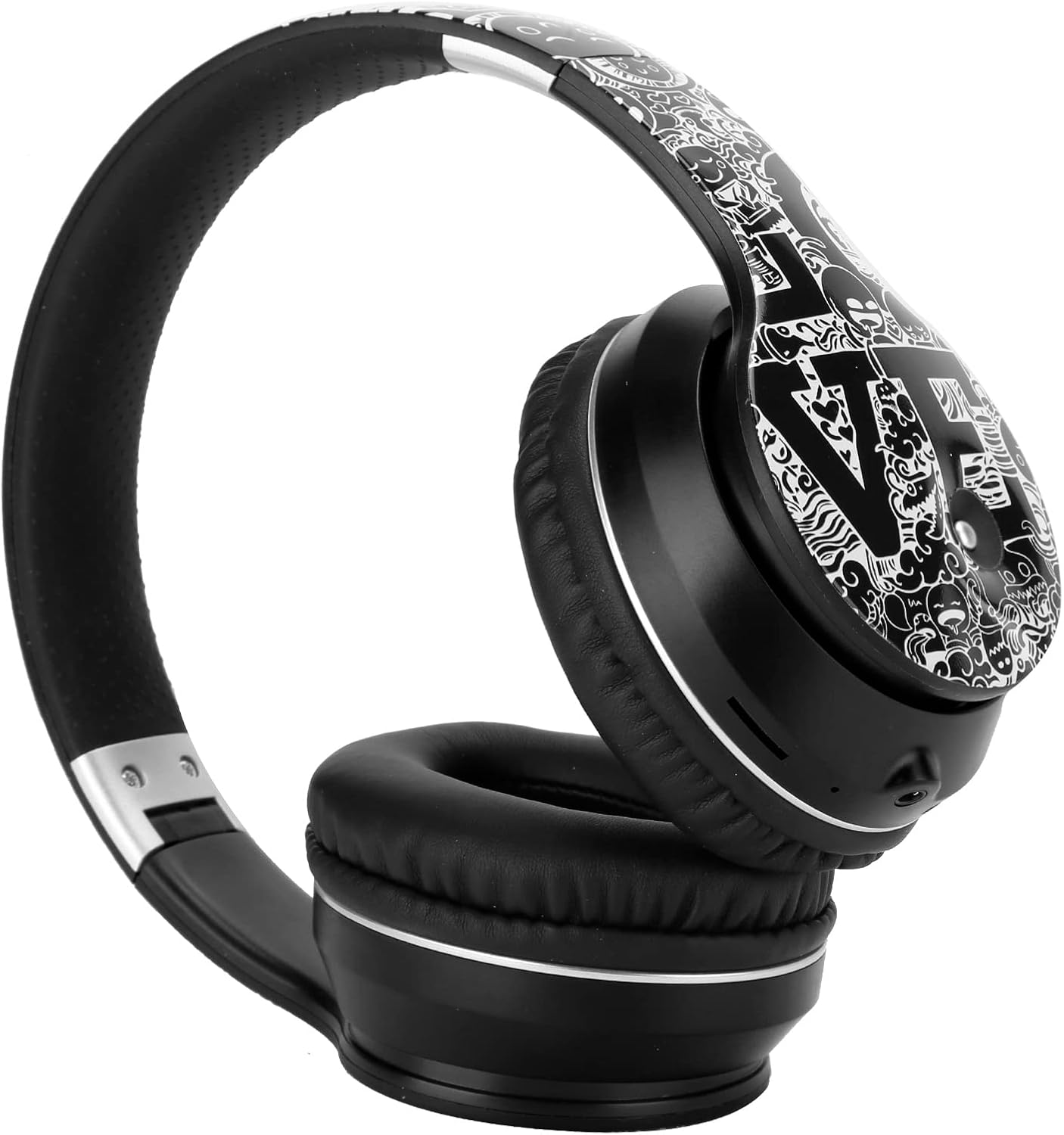
Image: The ASHATA BT5.0 Wireless Foldable Headphones in black and silver, showcasing their over-ear design and foldable headband.
The ASHATA BT5.0 Wireless Foldable Headphones are designed for a superior audio experience with features such as Bluetooth 5.0 connectivity, noise reduction, and a foldable design for portability. They also include an FM radio function and support for AUX audio input.
Package Contents
Please check the package for the following items:
- 1 x ASHATA Wireless Headphones
- 1 x USB Charging Cable
- 1 x AUX Audio Cable
- 1 x User Manual

Image: The ASHATA headphones displayed alongside the USB charging cable and 3.5mm AUX audio cable.
Setup
1. Charging the Headphones
Before first use, fully charge the headphones. Connect the supplied USB charging cable to the charging port on the headphones and to a DC5V power source (e.g., a computer USB port or a USB wall adapter). The charging indicator light will typically turn red during charging and turn off or change color when fully charged.
- Charging Time: Approximately 2 hours
- Charging Power Supply: DC5V
2. Powering On/Off
To Power On: Press and hold the Power button (usually marked with a power icon) for a few seconds until you hear a power-on prompt or see an indicator light flash.
To Power Off: Press and hold the Power button again for a few seconds until you hear a power-off prompt or the indicator light turns off.
3. Bluetooth Pairing
After powering on, the headphones will automatically enter pairing mode if they are not connected to a previously paired device. The indicator light will typically flash blue and red alternately, or rapidly blue, indicating it's ready to pair.
- Ensure your device (smartphone, tablet, laptop) has Bluetooth enabled.
- Search for Bluetooth devices on your device.
- Select "ASHATA Headphones" or a similar name from the list of available devices.
- Once paired, the indicator light will usually flash blue slowly or remain solid blue, and you will hear a confirmation tone.
The headphones support Bluetooth v5.0 for a stable connection up to an unobstructed distance of 10 meters.
Operating Instructions

Image: A detailed view of the control buttons located on the side of the ASHATA headphones, including play/pause, volume, and track skip.
1. Basic Controls
- Power Button: Press and hold to power on/off. Short press may play/pause or answer/end calls.
- Volume Up (+): Short press to increase volume. Long press may skip to the next track.
- Volume Down (-): Short press to decrease volume. Long press may skip to the previous track.
- Play/Pause Button: Short press to play or pause music.
2. Making/Receiving Calls
- Answer Call: Short press the Play/Pause button when a call comes in.
- End Call: Short press the Play/Pause button during a call.
- Reject Call: Press and hold the Play/Pause button for 2 seconds when a call comes in.
3. FM Radio Mode
The headphones feature a built-in FM radio. To activate:
- Switch to FM mode (refer to specific button on your device, often a mode button or a long press of the Play/Pause button).
- Press the Play/Pause button to auto-scan and save available FM stations.
- Use the Volume Up/Down buttons to navigate between saved stations.
4. AUX Audio Input
To use the headphones with non-Bluetooth devices or when the battery is depleted, connect the supplied 3.5mm AUX audio cable to the headphone's AUX port and to your audio source. The headphones will automatically switch to AUX mode.
Maintenance
- Cleaning: Use a soft, dry cloth to clean the headphones. Do not use abrasive cleaners or solvents.
- Storage: When not in use, store the headphones in a cool, dry place, away from direct sunlight and extreme temperatures. The foldable design allows for compact storage.
- Battery Care: To prolong battery life, avoid fully discharging the headphones frequently. Charge them regularly, even if not used for extended periods.

Image: The ASHATA headphones shown in their folded configuration, demonstrating their portability and ease of storage.
Troubleshooting
| Problem | Solution |
|---|---|
| Headphones do not power on. | Ensure the headphones are fully charged. Connect to a power source and try again after 10-15 minutes. |
| Cannot pair with device. | Make sure Bluetooth is enabled on your device and the headphones are in pairing mode. Move the headphones closer to your device. Try restarting both devices. |
| No sound or low volume. | Check the volume levels on both the headphones and your connected device. Ensure the headphones are properly paired. If using AUX, ensure the cable is fully inserted. |
| Bluetooth connection is unstable. | Ensure there are no obstructions between the headphones and your device. Avoid strong electromagnetic interference. Keep within the 10-meter range. |
Specifications
| Feature | Detail |
|---|---|
| Brand | ASHATA |
| Model Number | ASHATA93fkrxg8bw-13 |
| Bluetooth Version | v5.0 |
| Bluetooth Frequency Range | 2.4 GHz |
| Bluetooth Distance | Unobstructed 10M |
| Driver Diameter | Approx. 40mm |
| Impedance | 32 OHM |
| Frequency Response | 20-2000Hz |
| Battery Capacity | 250mAh (polymer lithium battery) |
| Charging Time | About 2 hours |
| Call Time | About 10-12 hours |
| Music Time | About 10-12 hours |
| Standby Time | About 120 hours |
| Charging Power Supply | DC5V |
| Material | ABS, Plastic |
| Headphones Jack | 3.5 mm Jack |
| Weight | Approx. 405g |
| Compatible Systems | Android / iOS / Symbian (99% mobile phone function) |
Warranty and Support
Specific warranty details are not provided in this manual. For warranty information, technical support, or service inquiries, please refer to the documentation included with your purchase or contact ASHATA customer support directly through their official website or the retailer where the product was purchased.
Ask a question about this manual
Ask about setup, troubleshooting, compatibility, parts, safety, or missing instructions. Manuals+ will review the question and use this page’s manual context to help answer it.