Berrcom Digital Thermometer DT008 and Disposable Probe Covers DT100TZ User Manual
Model: DT008 (Thermometer), DT100TZ (Probe Covers)
1. Introduction
This manual provides detailed instructions for the safe and effective use of your Berrcom Digital Thermometer DT008 and Berrcom Disposable Probe Covers DT100TZ. This bundle is designed for accurate and hygienic temperature measurement for adults, children, and infants. Please read this manual thoroughly before use and retain it for future reference.

Image 1.1: Berrcom Digital Thermometer DT008 and Disposable Probe Covers DT100TZ.
2. Product Components
The Berrcom Digital Thermometer DT008 and Disposable Probe Covers DT100TZ bundle includes the following items:
- 1 x Berrcom Digital Thermometer DT008
- 1 x Set of 100 Berrcom Disposable Digital Thermometer Probe Covers DT100TZ
- 1 x LR41 Battery (pre-installed or included separately)
- 1 x Storage Case for Thermometer
- 1 x Instruction Manual (this document)

Image 2.1: Visual representation of the included components: thermometer, probe covers, battery, storage case, and manual.
3. Safety Information
- Do not use the thermometer for self-diagnosis or self-treatment. Consult a medical professional for health concerns.
- Keep the thermometer and probe covers out of reach of small children to prevent choking hazards.
- Do not bite the thermometer.
- Avoid dropping the thermometer or subjecting it to strong shocks.
- Do not expose the thermometer to direct sunlight, high temperatures, or extreme humidity.
- Only use Berrcom Disposable Probe Covers DT100TZ to ensure hygienic use and accurate readings.
- Dispose of used probe covers immediately after each use.
4. Setup
4.1 Battery Installation
The thermometer uses one LR41 button cell battery. If the display shows a low battery indicator or does not turn on, replace the battery:
- Gently slide off the battery cover at the end of the thermometer.
- Remove the old battery and insert a new LR41 battery with the positive (+) side facing up.
- Replace the battery cover securely.
4.2 Switching Between Celsius (°C) and Fahrenheit (°F)
To change the temperature unit:
- Ensure the thermometer is turned off.
- Press and hold the ON/OFF button for approximately 3-5 seconds until the display shows the desired unit (°C or °F).
- Release the button to confirm the selection. The thermometer will now display temperatures in the chosen unit.

Image 4.1: Illustration of the process to switch temperature units between Celsius and Fahrenheit.
5. Operating Instructions
5.1 Applying a Probe Cover
For hygienic use and to prevent cross-contamination, always use a disposable probe cover:
- Take one probe cover from the DT100TZ box.
- Carefully insert the thermometer tip into the probe cover.
- Ensure the cover is securely fitted over the entire probe tip.

Image 5.1: Steps for applying a disposable probe cover to the thermometer tip.
5.2 Taking a Temperature Measurement
The Berrcom DT008 thermometer can be used for oral, rectal, or underarm measurements. Always use a new, disposable probe cover for each measurement.
- Press the ON/OFF button to turn on the thermometer. A short beep will sound, and the last measured temperature will be displayed briefly, followed by 'Lo' and the flashing °C or °F symbol, indicating it's ready for measurement.
- Position the thermometer according to the desired measurement method:
- Oral Use: Place the probe tip under the tongue, ensuring good contact. Keep the mouth closed.
- Rectal Use: Gently insert the probe tip into the rectum (approximately 0.5 inches). This method is generally recommended for infants and young children.
- Underarm (Axillary) Use: Place the probe tip in the armpit, ensuring the arm is pressed firmly against the body. This method is less accurate than oral or rectal.
- Hold the thermometer in place until a series of beeps indicates the measurement is complete (approximately 10-30 seconds, depending on the measurement site).
- Read the temperature displayed on the LCD screen.
- Press the ON/OFF button to turn off the thermometer, or it will automatically shut off after approximately 10 minutes of inactivity to conserve battery life.
- Remove and dispose of the used probe cover immediately.

Image 5.2: Examples of oral, rectal, and underarm temperature measurement using the thermometer.
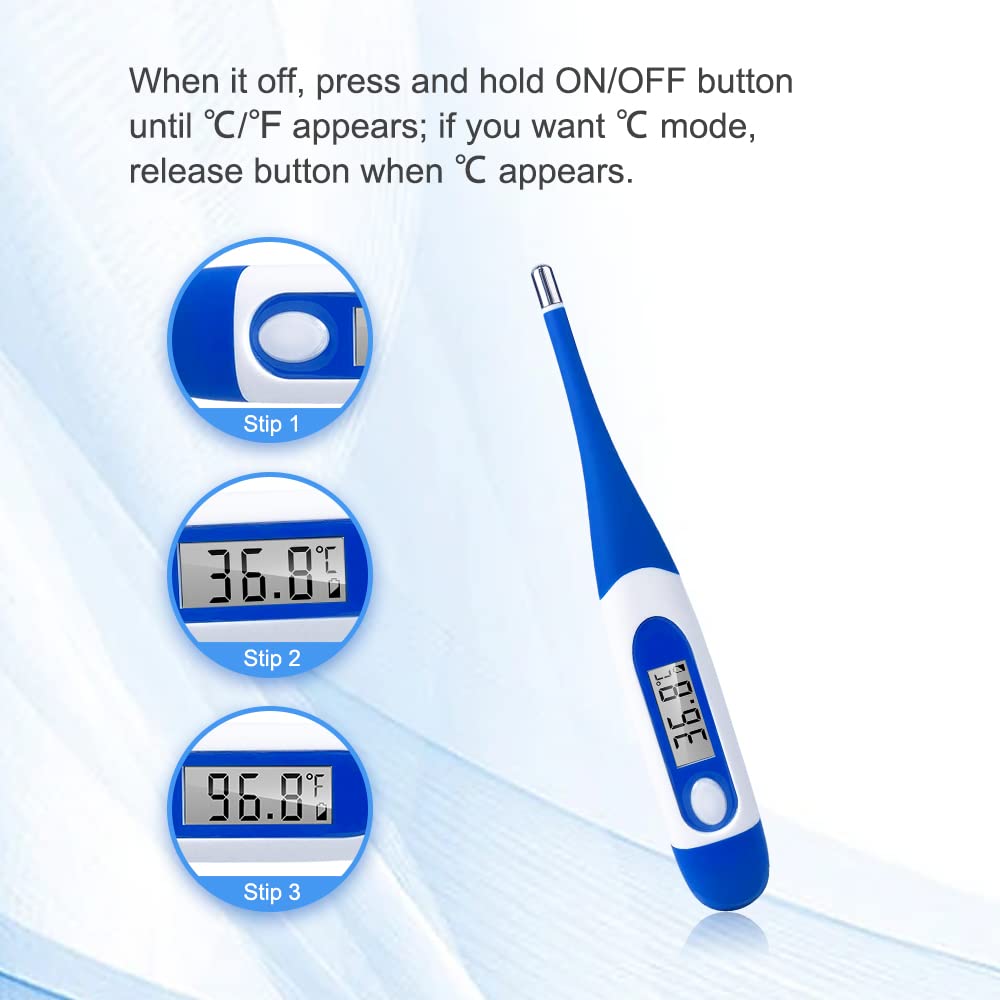
Image 5.3: Disposable probe covers ensure hygiene for oral, armpit, and rectal temperature readings.
5.3 Last Reading Memory
The thermometer automatically stores the last temperature reading. To recall it, simply press the ON/OFF button to turn on the thermometer, and the last reading will be displayed briefly before showing 'Lo'.
5.4 Fever Alarm
If a temperature of 37.8°C (100.0°F) or higher is detected, the thermometer will emit a rapid series of beeps to indicate a fever. For temperatures below this threshold, a single long beep will sound upon completion of the measurement.

Image 5.4: The thermometer indicates a fever with a specific alarm sound and display.
6. Maintenance and Cleaning
6.1 Thermometer Cleaning
The Berrcom DT008 thermometer features a waterproof tip, making it easy to clean:
- After each use and disposal of the probe cover, wipe the thermometer tip with a soft cloth moistened with rubbing alcohol (70% isopropyl alcohol) or an antiseptic solution.
- Do not immerse the entire thermometer in water or any cleaning solution.
- Allow the thermometer to air dry before storing.

Image 6.1: The waterproof tip allows for easy and hygienic cleaning of the thermometer.
6.2 Storage
Store the thermometer in its protective storage case in a cool, dry place, away from direct sunlight and extreme temperatures.
7. Troubleshooting
Refer to the table below for common issues and their solutions:
| Error Icon | Problem | Solution |
|---|---|---|
| Lo | Temperature lower than 32°C (90°F) | Turn off and wait 1 minute, then take a new temperature measurement. Ensure the tip has tight contact with the measurement site. |
| Hi | Temperature higher than 42°C (109°F) | Turn off and wait 1 minute, then take a new temperature measurement. Ensure the person has sufficient rest before re-measuring. |
| Err | Functioning improperly | Remove the battery and wait 1 minute, then reinstall the battery and turn it on. If the issue persists, contact customer support. |
| Battery Icon Flashing | Low Battery | Replace the battery with a new LR41 battery. |

Image 7.1: Troubleshooting guide for common thermometer errors.
8. Specifications
| Feature | Detail |
|---|---|
| Model Name | DT008 |
| Brand | Berrcom |
| Display Type | Digital LCD |
| Power Source | Battery Powered (LR41) |
| Special Feature | Waterproof Tip, Flexible Tip, Fever Alarm, Last Reading Memory, Auto-Off |
| Measurement Accuracy | ±0.1°C / ±0.2°F |
| Outer Material | Silicone |
| Age Range (Description) | Kid (Suitable for all ages: babies, kids, adults) |
| Product Care Instructions | Hand Wash Only (tip) |
9. Warranty and Support
For warranty information, technical support, or any questions regarding your Berrcom Digital Thermometer DT008 or Disposable Probe Covers DT100TZ, please contact Berrcom customer service. Refer to the product packaging or the official Berrcom website for contact details.


