
POWLAND inverter
Contents
POWLAND 4000W Solar Hybrid Inverter
User Manual
This manual provides essential information for the safe and efficient operation of your POWLAND 4000W Solar Hybrid Inverter. Please read it thoroughly before installation and use.
1. Important Safety Instructions
Please adhere to all safety warnings and instructions provided in this manual. Improper installation or operation can result in electric shock, fire, or serious injury.
- Ensure all wiring is performed by qualified personnel and complies with local electrical codes.
- Do not disassemble the inverter. There are no user-serviceable parts inside.
- Keep the inverter away from water, moisture, and flammable materials.
- Ensure adequate ventilation around the unit to prevent overheating.
- Always disconnect all power sources (solar, battery, utility) before performing any maintenance or wiring.
2. Product Overview
The POWLAND 4000W Solar Hybrid Inverter is a versatile power solution designed for off-grid and backup power applications. It integrates a pure sine wave inverter, a 140A MPPT solar charge controller, and a battery charger into a single unit.
- Premium Glass LCD Display: Features a large 6.25-inch LCD screen with intuitive touch buttons for real-time data and status monitoring.
- High Power & Fast Charging: Delivers 4000W continuous / 8000W peak surge pure sine wave AC power. The integrated 140A MPPT charge controller supports rapid charging with max. 5600W solar input (350VDC).
- Pure Sine Wave & Battery Flexibility: Provides stable, clean power for sensitive electronics. Compatible with 24V AGM, Gel, Lead-acid, Lithium-ion, or LiFePO4 batteries. Can operate battery-free during sunny days.
- Enhanced Safety & Reliability: Equipped with triple cooling fans and comprehensive protection features including overload, overheat, over-current, and short circuit protection.
- True Hybrid Energy Management: Intelligently prioritizes solar, battery, or grid power for charging and output, maximizing solar use and providing reliable backup.

Figure 2.1: Front view of the POWLAND 4000W Solar Hybrid Inverter, showcasing its sleek design and LCD display.

Figure 2.2: Key features of the 4000W Solar Inverter, highlighting its 140A MPPT controller, 4000W rated power, and 350VDC maximum PV voltage.
3. Setup and Installation
3.1 Unpacking
Carefully remove the inverter from its packaging. Inspect the unit for any shipping damage. Retain the packaging for future transport or storage.
3.2 Mounting
Mount the inverter vertically on a solid surface, ensuring sufficient clearance for ventilation. Avoid direct sunlight, high temperatures, and dusty environments. The unit features dual intelligent cooling fans for optimal heat dissipation.

Figure 3.1: The inverter's intelligent design includes a dust-proof cover and dual intelligent cooling fans for enhanced efficiency and safety.
3.3 Wiring Connections
Follow the connection diagram carefully. Ensure all connections are secure and correctly polarized. Use appropriate wire gauges for all connections.
- Battery Connection: Connect your 24V battery bank (AGM, Gel, Lead-acid, Lithium-ion, or LiFePO4) to the designated battery terminals. Ensure correct polarity.
- Solar Panel Connection: Connect your solar panel array to the PV input terminals. The inverter supports a maximum PV input power of 5600W and a maximum PV open circuit voltage of 350VDC.
- AC Input (Utility/Generator): Connect the AC input from your utility grid or generator to the AC input terminals.
- AC Output (Loads): Connect your household appliances or loads to the AC output terminals. The inverter provides 4000W of pure sine wave AC power.
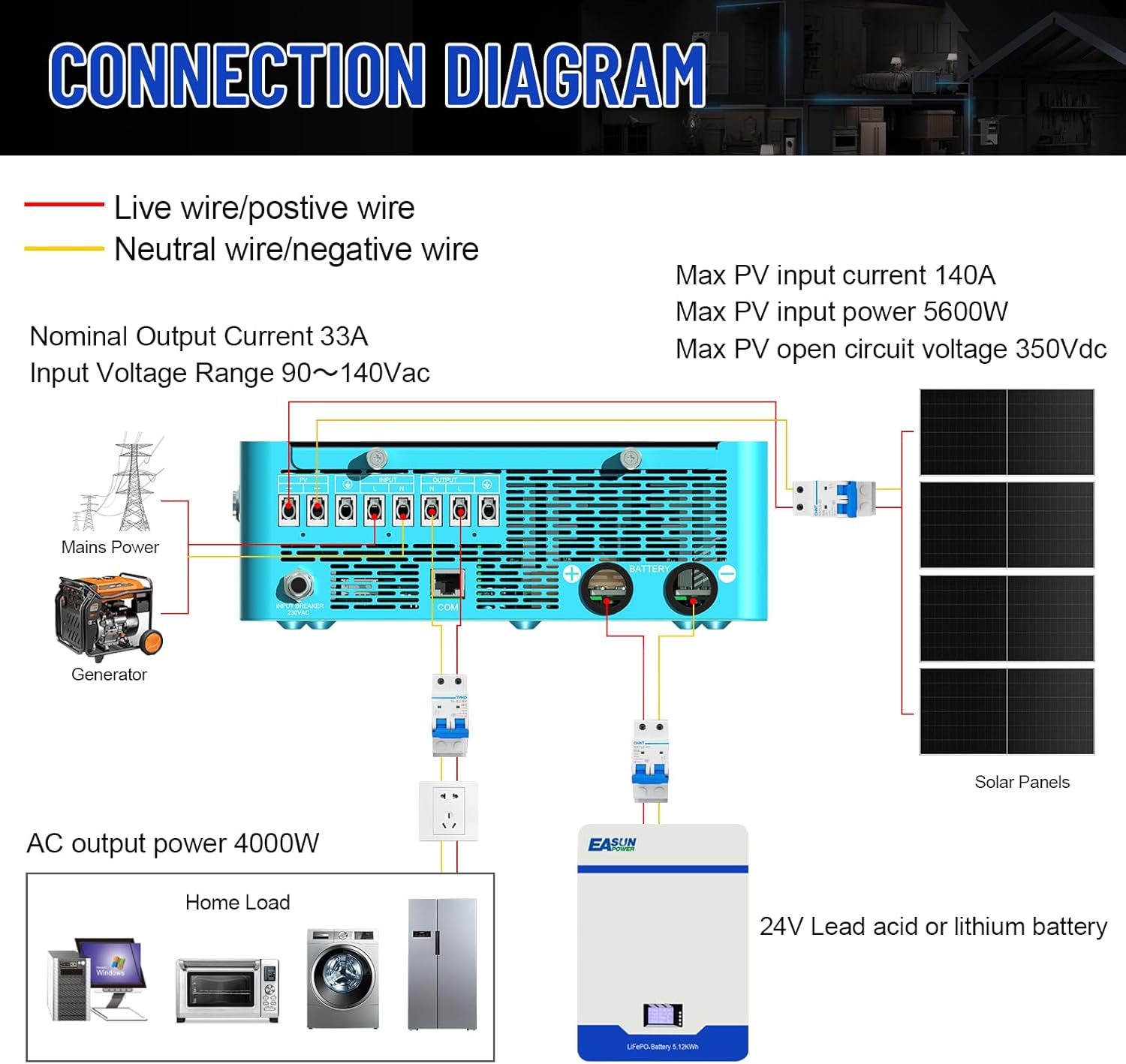
Figure 3.2: Detailed connection diagram illustrating the wiring for solar panels, battery bank, mains power/generator, and home loads to the inverter.
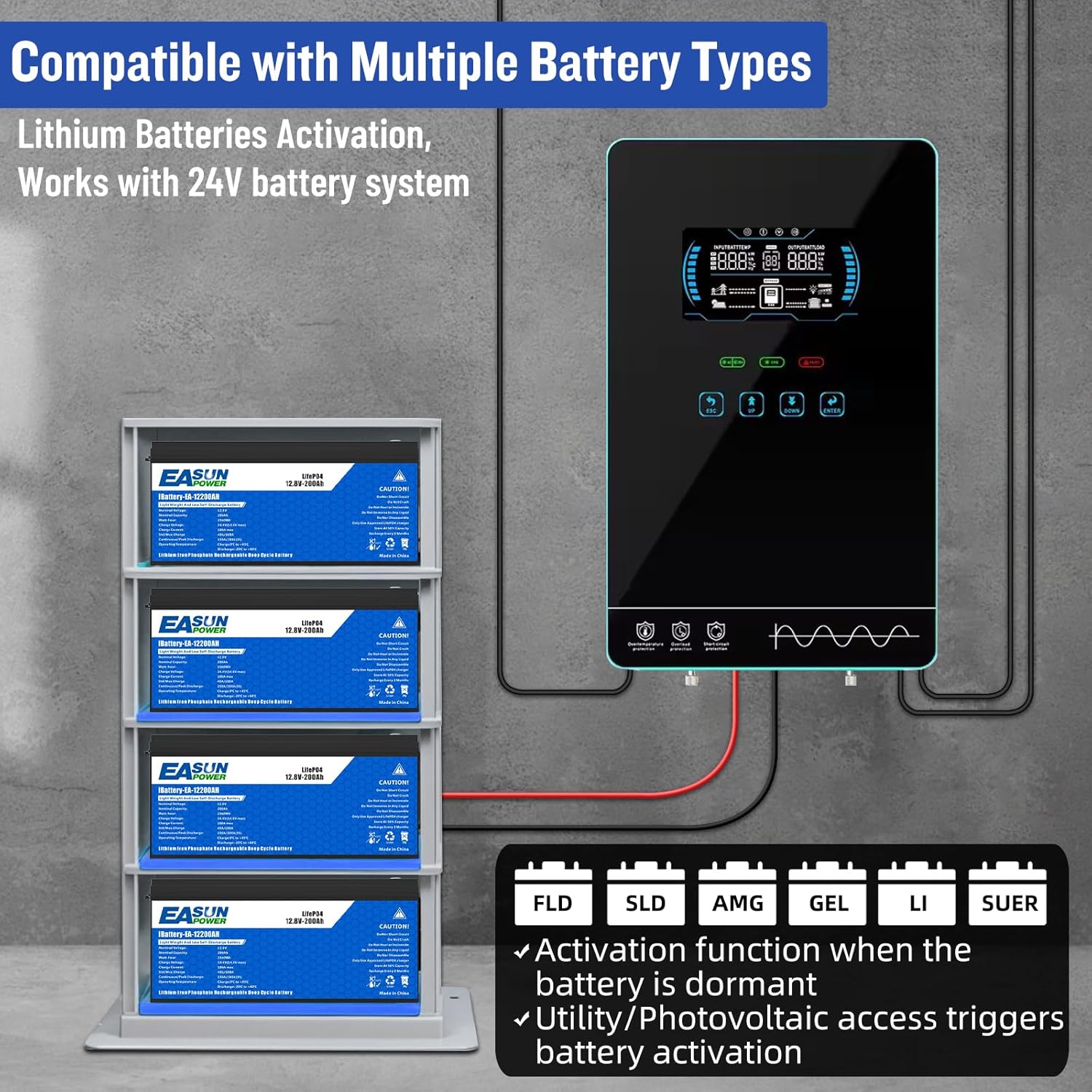
Figure 3.3: The inverter is compatible with various 24V battery types, including FLD, SLD, AGM, GEL, Lithium-ion (LI), and LiFePO4 (SUER), with activation functions for dormant batteries.
3.4 Initial Power-Up
After all connections are verified, switch on the battery breaker first, then the AC input breaker (if applicable), and finally the inverter's power switch. Observe the LCD display for status indicators.
4. Operating Modes and Settings
The inverter features a user-friendly LCD display and touch buttons for navigating settings and monitoring system status.
4.1 LCD Display Navigation
Use the 'ESC', 'UP', 'DOWN', and 'ENTER' buttons to navigate through the menu options on the LCD screen. The display provides real-time information on input/output voltage, battery status, load percentage, and charging/output modes.
4.2 Charging Modes
The inverter supports various charging priority settings:
- Solar First: Prioritizes solar power for charging batteries.
- Mains First: Prioritizes utility/grid power for charging batteries.
- Hybrid Charge: Utilizes both solar and utility/grid power for charging.
- Only Solar: Charges batteries exclusively from solar power.
4.3 Output Modes
The inverter offers flexible output priority settings:
- Inverter First: Prioritizes power from the battery bank. If battery power is insufficient, it switches to mains.
- Hybrid Output: Intelligently combines solar, battery, and utility/grid power to supply loads.

Figure 4.1: Overview of the four charging modes and four output modes, demonstrating the inverter's flexible energy management capabilities.

Figure 4.2: The inverter provides a pure sine wave output of 4000W, making it compatible with a wide range of household appliances.
5. Maintenance
Regular maintenance ensures the longevity and optimal performance of your inverter.
- Cleaning: Periodically clean the exterior of the inverter with a dry cloth. Ensure ventilation openings are free from dust and debris.
- Connections Check: Annually inspect all electrical connections for tightness and corrosion.
- Cooling Fans: The inverter is equipped with dual intelligent cooling fans. Ensure they are not obstructed and operate quietly. Unusual noises may indicate an issue.
6. Troubleshooting
This section provides solutions to common issues you might encounter. For problems not listed here, contact customer support.
| Problem | Possible Cause | Solution |
|---|---|---|
| Inverter does not power on | Low battery charge; Battery Management System (BMS) shutdown; Loose battery connections. | Charge batteries via generator or other source; Check BMS status; Verify battery cable connections. |
| PV Overvoltage error | Solar panel array voltage exceeds inverter's maximum input. | Reduce the number of solar panels in series or reconfigure the array to stay within the 350VDC limit. |
| AC output randomly stops | Temporary overload; Internal protection triggered; Communication issue. | Reduce load; Check for error codes on display; Perform a one-button reset if available; Ensure proper ventilation. |
| Fans are excessively loud | High load; High ambient temperature; Dust accumulation. | This is normal under high load. Ensure adequate ventilation and clean dust from vents. |
7. Technical Specifications
Below are the detailed technical specifications for the POWLAND 4000W Solar Hybrid Inverter.
| Feature | Specification |
|---|---|
| Model Name | POWLAND 4000W Solar Hybrid Inverter |
| Rated Power | 4000W |
| Peak Power | 8000W |
| Input Voltage (DC) | 24 Volts |
| Output Voltage (AC) | 110V/120V (Pure Sine Wave) |
| MPPT Charge Controller | Built-in 140A |
| Max. Solar Input Power | 5600W |
| Max. PV Open Circuit Voltage | 350VDC |
| Efficiency | 98% (MPPT) |
| Compatible Battery Types | AGM, Gel, Lead-acid, Lithium-ion, LiFePO4 |
| Item Weight | 15.4 pounds |
| Package Dimensions | 18.5 x 12 x 6 inches |

Figure 7.1: Detailed specifications for the inverter's output mode, including waveform, power ratings, voltage, and frequency.

Figure 7.2: The built-in 140A MPPT controller features optimized technology for 99.9% efficiency and comprehensive safety protections.
8. Warranty and Customer Support
POWLAND products are designed for reliability and performance. For warranty information, please refer to the documentation included with your purchase or contact your retailer.
For technical assistance or support, please reach out to POWLAND customer service. Ensure you have your product model number and purchase details ready when contacting support.
Documents and downloads
Ask a question about this manual
Ask about setup, troubleshooting, compatibility, parts, safety, or missing instructions. Manuals+ will review the question and use this page’s manual context to help answer it.