
FUNMILY treadmil with desk 68
FUNMILY Folding Treadmill with Desk & Adjustable Height User Manual
1. Introduction
This manual provides detailed instructions for the safe and effective use, assembly, and maintenance of your FUNMILY Folding Treadmill with Desk & Adjustable Height. Please read this manual thoroughly before operating the treadmill and retain it for future reference.
The FUNMILY treadmill is designed to offer a versatile exercise experience, combining walking or running with a functional workstation. Its adjustable height desk and foldable design make it suitable for various users and living spaces.
2. Important Safety Instructions
WARNING: To reduce the risk of burns, fire, electric shock, or injury to persons, read the following important precautions and information before operating the treadmill.
- Always place the treadmill on a level surface.
- Keep children and pets away from the treadmill during operation.
- Ensure the emergency stop key is properly attached before starting the treadmill. In case of emergency, pull the key to stop the machine immediately.
- Do not exceed the maximum user weight capacity of 300 lbs (136 kg).
- Wear appropriate exercise clothing and athletic shoes.
- Consult a physician before starting any exercise program.
- Unplug the treadmill from the power outlet when not in use, before cleaning, and before performing maintenance.
- Keep the power cord away from heated surfaces.
- Do not operate the treadmill if it has a damaged cord or plug, if it is not working properly, or if it has been dropped or damaged.
3. Package Contents
Please check the contents of your package against the list below. If any items are missing or damaged, contact customer support.
- FUNMILY Folding Treadmill (main unit)
- Adjustable Desk Workstation
- User Manual
- Assembly Tools (screws, wrench, etc.)
- Lubricant Oil
- Emergency Stop Key
4. Assembly and Initial Setup
The FUNMILY Folding Treadmill arrives approximately 95% pre-assembled, simplifying the setup process. Most users can complete assembly within a short time by following these steps.
4.1 Unfolding the Treadmill
Carefully remove the treadmill from its packaging. Place it on a flat, stable surface. The treadmill features a soft-drop system for safe unfolding. Gently press with your foot to release the folding mechanism, allowing the running deck to lower slowly and safely.

Figure 4.1: Illustration of the treadmill's soft-drop folding system and wheels for effortless movement.
4.2 Attaching the Desk and Uprights
Raise the uprights and secure them according to the instructions provided in the included assembly guide. Attach the desk workstation to the top of the uprights. This typically involves securing a few screws (approximately 6 screws, some with washers) using the provided tools.

Figure 4.2: The FUNMILY treadmill with the desk workstation in use.
4.3 Power Connection
Connect the power cord to a grounded electrical outlet. Ensure the power switch on the treadmill is in the 'OFF' position before plugging it in.
5. Operating Instructions
5.1 Adjusting Desk Height
The workstation desk height is adjustable, accommodating users from approximately 4.5 to 6.5 feet tall. The height can be set between 33 inches and 50 inches (maximum). To adjust, locate the adjustment knobs or levers on the uprights, loosen them, set the desk to your desired height, and then securely tighten the knobs/levers.

Figure 5.1: Demonstrating the adjustable desk height for different user heights and activities.
5.2 Manual Incline Adjustment
The treadmill offers a 3-level manual incline. To adjust the incline, you must manually change the position of the incline feet located at the rear of the treadmill. Ensure the treadmill is off and unplugged before making any incline adjustments. Refer to the specific instructions in your assembly guide for detailed steps on adjusting the incline feet.
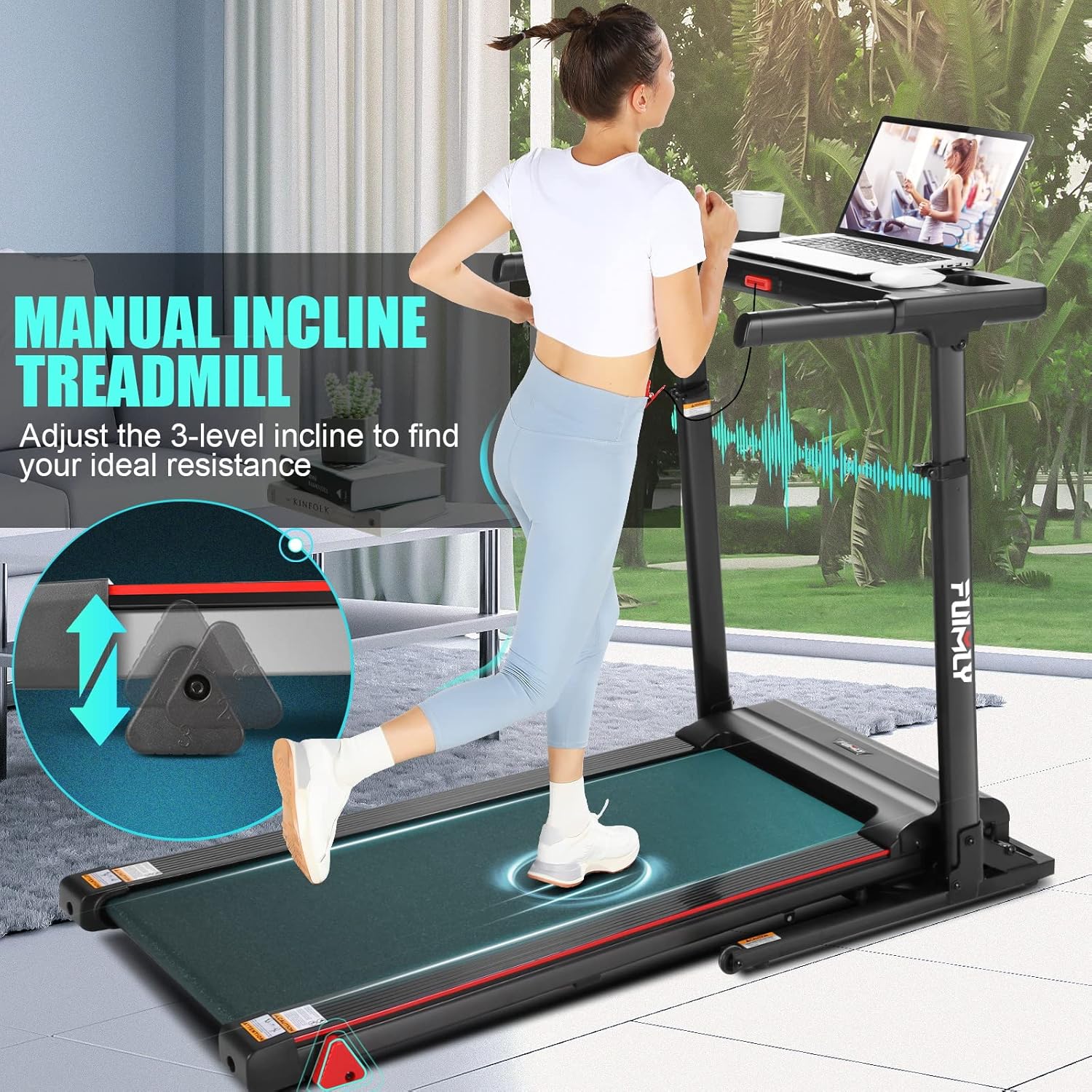
Figure 5.2: Close-up of the manual incline adjustment points.
5.3 Using the Control Panel and LCD Display
The treadmill features an LCD display that shows key workout metrics such as time, distance, speed, and calories burned. The control panel includes buttons for starting, stopping, adjusting speed, and selecting preset programs.

Figure 5.3: The LCD display and control panel for monitoring workout data.
5.4 App Control and Bluetooth Speaker
Enhance your workout experience by connecting your smartphone or tablet via Bluetooth to the treadmill. The integrated fitness app (FitShow App) allows for customized training, progress tracking, and access to 24 preset programs that simulate various outdoor running scenarios. The treadmill also features built-in Bluetooth speakers for audio playback.
- Downloading the App: Scan the QR code on the treadmill's console or visit fitshow.com/qr to download the FitShow App.
- Connecting via Bluetooth: Enable Bluetooth on your device and pair it with the treadmill.

Figure 5.4: App control and Bluetooth speaker functionality.
5.5 Child Mode
The treadmill includes a 'Child Mode' for safety. When activated, the maximum speed is limited to 4 MPH, and only the START and STOP buttons are functional. App Bluetooth control is disabled in this mode. To enter Child Mode, press the designated button. To release, press and hold the button for 3 seconds.

Figure 5.5: Explanation of the Child Mode safety feature.
5.6 Pause Function
A useful pause function is available to temporarily halt your workout without losing your progress. Press the 'PAUSE' button to pause and press it again to resume.
6. Maintenance
Regular maintenance ensures the longevity and optimal performance of your treadmill.
6.1 Lubrication
The running belt requires periodic lubrication to reduce friction and wear. Use the provided lubricant oil.
- Turn off and unplug your treadmill.
- Expose the deck by slightly lifting the running belt.
- Apply the lubricant evenly under the center of the running belt.
- Plug in and start the treadmill at a low speed (e.g., 1-3 MPH) for a few minutes to distribute the lubricant.
- Unplug again and clean any excess lubricant from the belt edges.
Lubrication Schedule:
| Usage Frequency | Maintenance Frequency |
|---|---|
| <3 Hours/Week | Every 6 Months |
| 3-5 Hours/Week | Every 3 Months |
| ≥5 Hours/Week | Every 2 Months |

Figure 6.1: Treadmill lubrication process and schedule.
6.2 Cleaning
Regularly clean the treadmill to prevent dust and debris buildup. Use a soft, damp cloth to wipe down the surfaces. Avoid using abrasive cleaners or solvents.
7. Troubleshooting
If you encounter any issues with your FUNMILY treadmill, refer to the following common solutions. If the problem persists, contact customer support.
- Treadmill does not start: Ensure the power cord is securely plugged into a working outlet and the power switch is ON. Check that the emergency stop key is correctly placed.
- Belt slipping or uneven: The running belt may need adjustment or lubrication. Refer to the maintenance section for lubrication instructions. For belt tension or alignment, consult the detailed assembly guide or contact customer support.
- Unusual noises: Turn off the treadmill immediately. Check for any loose parts or foreign objects under the belt. If the noise continues, discontinue use and contact customer support.
- Display not working: Ensure all connections to the display panel are secure. If the issue persists, contact customer support.
8. Product Specifications
| Feature | Specification |
|---|---|
| Brand | FUNMILY |
| Model Name | treadmil with desk 68 |
| Product Dimensions (LxWxH) | 53.5"D x 26.2"W x 48"H |
| Item Weight | 100 Pounds |
| Material | Alloy Steel |
| Maximum Speed | 7.5 Miles per Hour |
| Maximum Horsepower | 2.5 Horsepower |
| Maximum Incline Percentage | 3 Levels (Manual) |
| Maximum Weight Recommendation | 300 Pounds |
| Deck Length | 50 Inches |
| Display Type | LCD |
| Power Source | Corded Electric |
| Special Features | Adjustable Height Desk, Manual Incline, App Control, Bluetooth Speaker, Child Mode, Pause Function, Soft-drop Folding System |
9. Warranty and Customer Support
The FUNMILY Folding Treadmill with Desk & Adjustable Height comes with a 2-year warranty, providing full product protection. For any questions, concerns, or warranty claims, please contact FUNMILY customer support through the retailer where you purchased the product or visit the official FUNMILY store page.
For additional information and support, you may visit the FUNMILY Store on Amazon.
Ask a question about this manual
Ask about setup, troubleshooting, compatibility, parts, safety, or missing instructions. Manuals+ will review the question and use this page’s manual context to help answer it.