
Introduction
Thank you for choosing the CREWORKS 1.8L Digital Ultrasonic Cleaning Machine. This device utilizes ultrasonic cavitation to provide thorough and efficient cleaning for a variety of items, including jewelry, glasses, tools, and more. Please read this manual carefully before operation to ensure proper use, optimal performance, and safety.
Safety Instructions
To prevent injury or damage to the unit, always adhere to the following safety guidelines:
- Do not disassemble the unit. Refer all servicing to qualified personnel.
- Do not use unattended. Always supervise the cleaning process.
- Always ensure there is sufficient fluid in the tank before operating the machine. Operating without fluid can damage the unit.
- Unplug the machine from the power outlet before filling, draining, or performing any maintenance.
- Keep the unit away from children and pets.
- Do not immerse the main body of the unit in water or other liquids.
- Use only appropriate cleaning solutions or water. Avoid flammable, corrosive, or abrasive liquids.
- Ensure the power cord is not damaged and is properly connected to a grounded outlet.
Product Overview
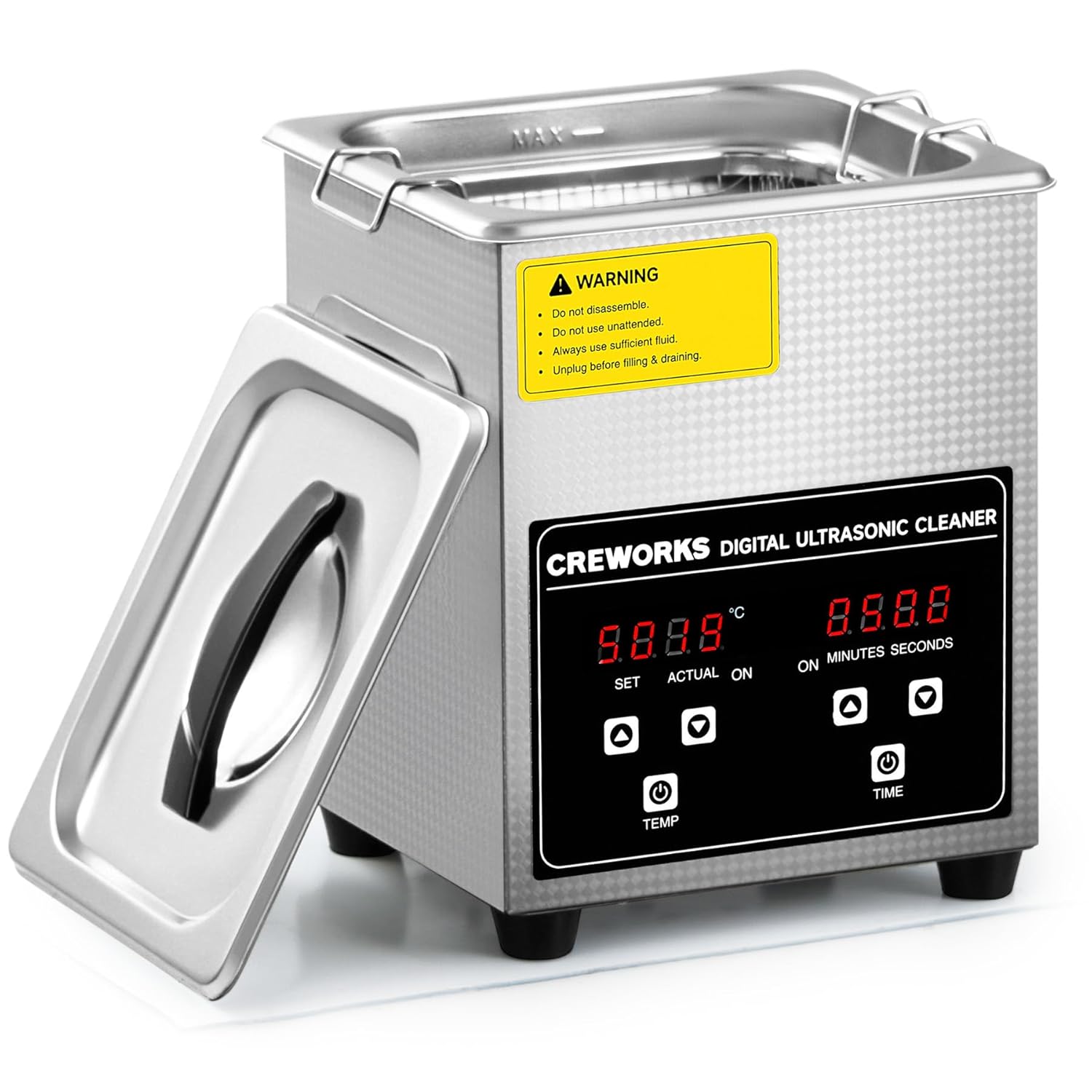
The CREWORKS JX-010S is a robust ultrasonic cleaner designed for various applications. It features a durable 304 stainless steel tank and housing, a digital control panel for precise temperature and timer settings, and recessed handles for easy portability.
Components
- Main Unit: Houses the ultrasonic transducer, heating element, and control circuitry.
- Stainless Steel Tank: The reservoir for cleaning fluid.
- Lid: Helps contain heat and reduce noise during operation.
- Mesh Basket: Used to hold items during cleaning, preventing them from resting directly on the tank bottom.
- Power Cord: For connecting to an electrical outlet.

Control Panel
The digital control panel allows for easy adjustment of cleaning parameters.

- Temperature Display: Shows set and actual temperatures in Celsius.
- Temperature Buttons (SET/ACTUAL, Up/Down): Adjust the desired heating temperature.
- Timer Display: Shows set and actual cleaning time in minutes and seconds.
- Timer Buttons (ON/OFF, Up/Down): Adjust the desired cleaning duration.
- Power Button (TEMP/TIME): Initiates or stops the heating/cleaning cycle.
Setup
- Unpack: Carefully remove the ultrasonic cleaner and all accessories from the packaging. Inspect for any damage.
- Placement: Place the unit on a stable, level, and dry surface. Ensure adequate ventilation around the machine.
- Fill Tank: Open the lid and fill the stainless steel tank with water or a suitable ultrasonic cleaning solution. Do not exceed the 'MAX' fill line. Ensure the fluid level is sufficient to cover the items to be cleaned.
- Connect Power: Plug the power cord into a grounded electrical outlet.
Operating Instructions
- Prepare Items: Place the items to be cleaned into the mesh basket. Avoid overcrowding the basket to ensure effective cleaning.
- Insert Basket: Carefully lower the mesh basket containing the items into the cleaning tank. Ensure the items are fully submerged in the cleaning fluid.
- Set Temperature (Optional): Press the 'TEMP' button. Use the 'Up' and 'Down' arrows to set the desired cleaning temperature (range: 20-80°C or 68-176°F). The machine will begin heating.
- Set Timer: Press the 'TIME' button. Use the 'Up' and 'Down' arrows to set the desired cleaning duration (range: 1-30 minutes).
- Start Cleaning: Press the 'ON/OFF' button (usually associated with the timer) to start the ultrasonic cleaning cycle. The display will show the remaining time.
- Monitor Process: The machine will generate high-frequency sound waves, creating microscopic bubbles that implode (cavitation) to dislodge dirt and grime.
- Completion: Once the timer counts down to zero, the machine will automatically stop.
- Remove Items: Carefully lift the mesh basket from the tank. Rinse the cleaned items with clean water and dry them thoroughly.

Maintenance
Regular maintenance ensures the longevity and optimal performance of your ultrasonic cleaner.
- Draining: After each use, especially if using cleaning solutions, unplug the unit and carefully drain the fluid from the tank.
- Cleaning the Tank: Wipe the inside of the stainless steel tank with a soft cloth. For stubborn residue, use a mild, non-abrasive cleaner. Rinse thoroughly.
- Exterior Cleaning: Wipe the exterior of the unit with a damp cloth. Do not use abrasive cleaners or immerse the unit in water.
- Storage: Store the ultrasonic cleaner in a cool, dry place when not in use. Ensure the tank is empty and dry.
Troubleshooting
If you encounter issues with your CREWORKS ultrasonic cleaner, refer to the following common problems and solutions:
| Problem | Possible Cause | Solution |
|---|---|---|
| Unit does not power on | No power supply; damaged power cord; internal fuse tripped. | Check power connection and outlet. Inspect power cord for damage. If fuse is tripped, contact customer support. |
| No ultrasonic action (no sound/vibration) | Insufficient fluid; unit malfunction. | Ensure tank has sufficient fluid. If problem persists, contact customer support. |
| Poor cleaning results | Incorrect cleaning solution; insufficient cleaning time; items too dirty or overcrowded. | Use appropriate cleaning solution. Increase cleaning time. Clean heavily soiled items in multiple cycles or pre-clean. Do not overcrowd basket. |
| Heating not working | Heating element malfunction. | Contact customer support for assistance. |
Specifications
| Feature | Specification |
|---|---|
| Model Number | JX-010S |
| Product Dimensions | 8.46 x 7.56 x 9.84 inches |
| Weight | 5.18 Pounds |
| Tank Volume | 1.8 Liters (0.5 Gallons) |
| Ultrasonic Power | 60W |
| Heating Power | Up to 100W |
| Ultrasonic Frequency | 40 kHz |
| Temperature Range | 20-80°C (68-176°F) |
| Timer Range | 1-30 minutes |
| Tank Material | 304 Stainless Steel |
| Manufacturer | CREWORKS |
Warranty and Support
CREWORKS products are manufactured to high-quality standards. For warranty information, technical support, or any questions regarding your CREWORKS 1.8L Digital Ultrasonic Cleaning Machine, please contact CREWORKS customer service. Details can typically be found on the product packaging or the official CREWORKS website.
Please retain your proof of purchase for warranty claims.


