
1. Product Overview
The Anker SOLIX C1000 Portable Power Station with 200W Solar Panel is a versatile and robust power solution designed for various applications, including home backup, outdoor camping, and emergency power during outages. It features a high-capacity 1056Wh LiFePO4 battery and an 1800W inverter, capable of delivering up to 2400W with SurgePad technology to power 99% of common appliances. The included 200W solar panel offers efficient recharging and IP67 weatherproof protection.

Figure 1.1: Anker SOLIX C1000 Portable Power Station and 200W Solar Panel.
Key Features:
- UltraFast Recharging: Achieves 80% charge in 43 minutes (100% in 58 minutes) via AC input, controllable through the Anker app.
- Long Lifespan: Built with LiFePO4 batteries, offering over 3,000 battery cycles for a 10-year lifespan.
- High Power Output: 1800W continuous output with SurgePad technology for up to 2400W peak power, featuring 11 total ports.
- Efficient Solar Charging: 200W solar panel with 1.5X higher conversion efficiency (up to 23%) and adjustable angles (30°, 40°, 50°, 80°) for maximum sunlight absorption.
- Durable Design: IP67 weatherproof protection for resistance against heavy rain, dust storms, and extreme temperatures.
- Seamless UPS Transfer: Provides uninterruptible power supply with less than 20ms switchover time.
- Smart App Control: Customize settings, monitor battery levels, and view real-time status via the Anker app (Wi-Fi or Bluetooth).
- Built-In LEDs: Convenient lighting for various situations.
2. What's in the Box
Upon unboxing your Anker SOLIX C1000 Portable Power Station with 200W Solar Panel, please verify that all components listed below are present and in good condition. Note that the power station and solar panel may ship separately.
- Anker SOLIX C1000 Portable Power Station
- Anker SOLIX PS200 Solar Panel (200W)
- Solar Charging Cable
- 9.84ft Solar Charging Cable
- AC Charging Cable
- Car Charging Cable
- User Guide
3. Setup Instructions
Initial Charging:
Before first use, it is recommended to fully charge the Anker SOLIX C1000. Connect the provided AC charging cable to the power station's AC input port and plug it into a standard wall outlet. The display will indicate charging status. For fastest charging, ensure UltraFast recharging is enabled via the Anker app.
Connecting the Solar Panel:
To utilize solar charging, follow these steps:
- Locate the MC4 ports on the back of your solar panel.
- Use an extension cable (if necessary) to connect the MC4 ports to the MC4 to XT-60 solar charging converter.
- Connect the XT-60 end of the converter to the XT-60 port on your Anker SOLIX C1000 power station.

Figure 3.1: Solar Panel Connection Diagram. Ensure all cables are securely connected.
Position the solar panel to maximize sunlight exposure. The panel can be adjusted to 30°, 40°, 50°, or 80° angles for optimal performance throughout the day or season.

Figure 3.2: Adjustable Solar Panel Angles.
4. Operating Instructions
Powering On/Off:
Press and hold the main power button on the front panel to turn the power station on or off. The display will illuminate, showing battery level and output information.
Using AC Outlets:
The Anker SOLIX C1000 features 6 AC outlets. To use them, ensure the AC output is enabled (usually indicated by a light or icon on the display). Plug your devices into the outlets. The power station can deliver up to 1800W continuously and 2400W with SurgePad technology for short bursts.
Using DC and USB Ports:
The unit includes various DC and USB ports (USB-A, USB-C). Simply plug your compatible devices into the appropriate ports. These ports are always active when the power station is on.
Anker App Control:
Download the Anker app from your smartphone's app store. Connect to your Anker SOLIX C1000 via Wi-Fi or Bluetooth. The app allows you to:
- Monitor real-time power input and output.
- Check battery level and estimated remaining runtime.
- Adjust AC recharging speed (e.g., enable UltraFast charging).
- Control individual output ports.
- Update firmware.

Figure 4.1: Anker App Interface for Power Control.
UPS Functionality:
When the power station is connected to an AC wall outlet and devices are plugged into its AC outputs, it can function as an Uninterruptible Power Supply (UPS). In case of a power outage, the unit will automatically switch to battery power within 20 milliseconds, ensuring continuous operation for connected devices like computers or medical equipment.

Figure 4.2: Seamless UPS Transfer in action.
5. Maintenance
Proper maintenance ensures the longevity and optimal performance of your Anker SOLIX C1000 and solar panel.
Battery Care:
- The LiFePO4 battery is designed for 3,000 charge cycles, equivalent to approximately 10 years of use under normal operating conditions.
- Avoid fully discharging the battery frequently. Recharge it when the level drops below 20%.
- Store the power station in a cool, dry place, ideally between 0°C and 40°C (32°F and 104°F). For long-term storage, charge the unit to about 50-60% every 3-6 months.
Cleaning:
- Wipe the exterior of the power station and solar panel with a soft, dry cloth.
- For the solar panel, ensure the surface is clean from dust, dirt, or debris to maintain optimal conversion efficiency. Use a damp cloth if necessary, then dry thoroughly.
Weather Protection:
The Anker SOLIX C1000 and PS200 Solar Panel feature IP67 weatherproof protection, meaning they are resistant to dust ingress and can withstand immersion in water up to 1 meter for 30 minutes. While durable, avoid prolonged exposure to extreme conditions or intentional submersion.
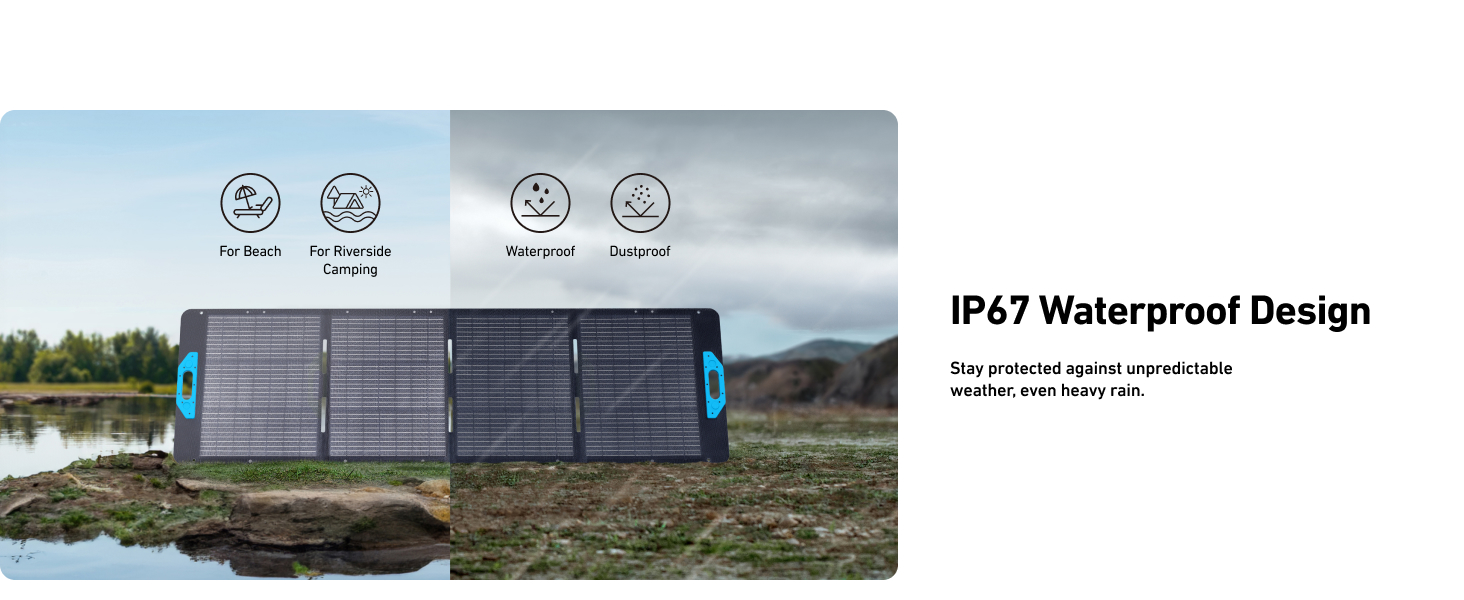
Figure 5.1: IP67 Weatherproof Design.
6. Troubleshooting
If you encounter issues with your Anker SOLIX C1000, refer to the following common problems and solutions:
| Problem | Possible Cause | Solution |
|---|---|---|
| Power Station not turning on. | Battery is completely depleted. | Connect to AC power and charge for at least 10 minutes before attempting to power on. |
| No output from AC outlets. | AC output not enabled; Overload protection activated. | Ensure AC output button is pressed. Reduce connected load if exceeding 1800W (or 2400W peak). Restart the unit. |
| Solar panel not charging. | Insufficient sunlight; Incorrect connection; Panel surface dirty. | Ensure panel is in direct sunlight and angled correctly. Check all cable connections. Clean the solar panel surface. |
| App not connecting to device. | Bluetooth/Wi-Fi off; Device too far; App needs restart. | Ensure Bluetooth/Wi-Fi is enabled on your phone. Bring phone closer to the power station. Close and reopen the Anker app. |
| Unusual noise or smell. | Internal malfunction. | Immediately power off the unit and disconnect all devices. Contact Anker customer support. |
If the problem persists after attempting these solutions, please contact Anker customer support for further assistance.
7. Specifications
| Attribute | Detail |
|---|---|
| Brand | Anker |
| Model Name | B17611A3 (Product Model Number: A1761) |
| Battery Type | LiFePO4 (Lithium Iron Phosphate) |
| Battery Capacity | 1056Wh |
| AC Output Wattage (Rated) | 1800W |
| AC Output Wattage (SurgePad) | Up to 2400W |
| Total Power Outlets | 11 (including 6 AC outlets) |
| Recharging Time (AC) | 80% in 43 minutes, 100% in 58 minutes |
| Solar Panel Wattage | 200W |
| Solar Conversion Efficiency | Up to 23% |
| Ingress Protection (IP) Rating | IP67 (Weatherproof) |
| Item Weight | 27.59 Pounds |
| Product Dimensions | 14.8"L x 8.07"W x 10.39"H |
| Color | Gray |
| UPC | 194644154462 |
8. Warranty and Support
Anker stands behind the quality of the SOLIX C1000 Portable Power Station and 200W Solar Panel. The product is designed for a 10-year lifespan with over 3,000 battery cycles, ensuring long-term reliability.
Customer Support:
For technical assistance, warranty claims, or any questions regarding your Anker SOLIX C1000, please visit the official Anker support website or contact their customer service team. Keep your purchase receipt and product serial number handy for faster service.
You can find more information and support resources on the Anker Store on Amazon.