
Moman Moman H2Pro
Moman H2Pro Motorcycle Helmet Headset User Manual
Model: Moman H2Pro
1. Introduction
The Moman H2Pro is a wireless helmet communication system designed to enhance your riding experience. It features Bluetooth 5.1 technology for stable connections, a 1000m intercom range for two riders, and high-quality audio with DSP and CVC noise cancellation. The device is built to withstand various weather conditions with an IP65 waterproof rating and offers convenient control through an intuitive knob and buttons.

Image 1.1: Moman H2Pro Motorcycle Helmet Headset, showcasing its design and orange accents.

Image 1.2: Overview of Moman H2Pro functions including Wireless 5.1, Full Duplex Intercom, AI Voice Assistant, Music Share, FM Radio, CVC&DSP Noise Cancellation, IP65 Waterproof, and 900mAh Battery.
2. Package Contents
Please verify that all items listed below are included in your package. If any items are missing or damaged, please contact customer support.
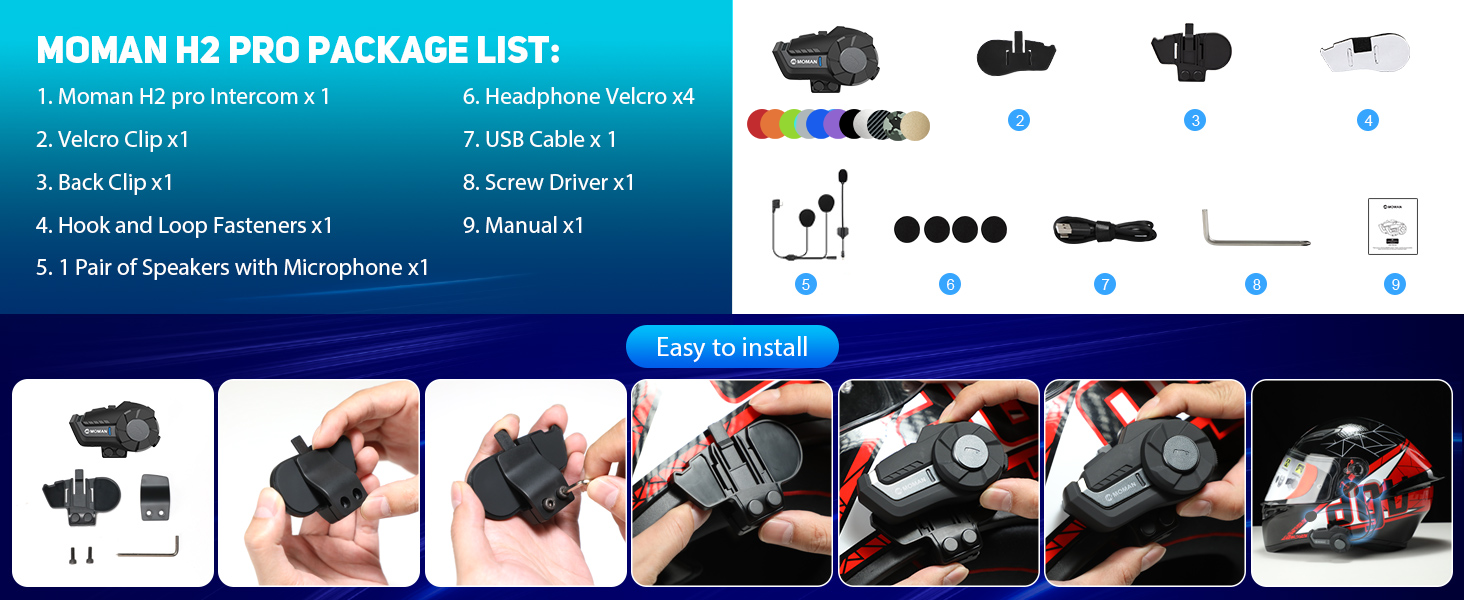
Image 2.1: Visual representation of the Moman H2Pro package contents and installation accessories.
- Moman H2Pro Intercom Unit x 1
- Velcro Clip x 1
- Back Clip x 1
- Hook and Loop Fasteners x 1
- Pair of Speakers with Microphone x 1
- Headphone Velcro x 4
- USB Charging Cable x 1
- Screwdriver x 1
- User Manual x 1
3. Product Overview
Familiarize yourself with the main components and controls of your Moman H2Pro headset.

Image 3.1: Diagram illustrating the On/Off Key, Function Key, Knob, Indicator Light, and Charging Interface of the Moman H2Pro.
- On/Off Key: Used for power on/off, language change, and last call redial.
- Function Key: Controls music playback (play/pause), music sharing, ending/rejecting calls, FM radio activation, and voice assistant.
- Knob: Adjusts volume (up/down), navigates between songs (next/previous), and changes FM channels.
- Indicator Light: Provides status feedback (e.g., pairing, charging, power).
- Charging Interface: USB Type-C port for charging the device.
4. Setup and Installation
The Moman H2Pro can be easily installed onto most helmets using either a back clip or magic tape.

Image 4.1: Step-by-step visual guide for installing the Moman H2Pro onto a motorcycle helmet.
4.1. Choosing an Installation Method
Select the method that best suits your helmet type and personal preference:
- Back Clip: Provides a secure, semi-permanent attachment to the helmet edge. Requires a screwdriver for installation.
- Magic Tape (Adhesive Mount): Offers a strong adhesive bond for helmets where the clip cannot be used or for a cleaner look.
4.2. Speaker and Microphone Placement
- Attach the headphone Velcro pads inside the helmet, ensuring they are positioned over your ears.
- Secure the speakers to the Velcro pads. Ensure the speakers are centered over your ears for optimal audio quality.
- Position the microphone in front of your mouth, inside the helmet, ensuring it is close enough to pick up your voice clearly but not obstructing your vision or comfort. Use the provided hook and loop fasteners to secure the microphone cable.
- Route all cables neatly within the helmet lining to prevent interference and ensure comfort.
5. Operating Instructions
5.1. Power On/Off
- Power On: Press and hold the On/Off Key until the indicator light illuminates.
- Power Off: Press and hold the On/Off Key until the indicator light turns off.
5.2. Bluetooth Pairing with Mobile Device
- Ensure the Moman H2Pro is powered off.
- Press and hold the On/Off Key for approximately 5-7 seconds until the indicator light flashes red and blue alternately, indicating pairing mode.
- On your mobile device, enable Bluetooth and search for available devices.
- Select "Moman H2Pro" from the list. Once connected, the indicator light will flash blue slowly.
5.3. Intercom Communication (2 Riders)
The Moman H2Pro supports full-duplex intercom communication up to 1000 meters between two paired units.

Image 5.1: Illustration of the Moman H2Pro's 1000-meter communication range for two riders.
- Ensure both Moman H2Pro units are powered on and not connected to any other Bluetooth devices.
- On one unit, press and hold the Function Key for approximately 3 seconds until the indicator light flashes red and blue rapidly.
- On the second unit, briefly press the Function Key. The units will search for each other and automatically connect.
- Once connected, the indicator lights on both units will flash blue slowly, and you will hear a confirmation tone.
5.4. Music Playback and Sharing

Image 5.2: Depiction of Moman H2Pro features including Music Share, FM Radio, AI Voice Assistant, and Call Answer.
- Play/Pause Music: Briefly press the Function Key.
- Next Song: Rotate the Knob clockwise.
- Previous Song: Rotate the Knob counter-clockwise.
- Music Share: While music is playing, briefly press the Function Key twice to initiate music sharing with a paired intercom unit.
5.5. FM Radio
- Activate FM Radio: Briefly press the Function Key three times.
- Change FM Channels: Rotate the Knob clockwise or counter-clockwise.
- Deactivate FM Radio: Briefly press the Function Key three times again.
5.6. Voice Assistant
- Activate Voice Assistant: Briefly press the Function Key four times. This will activate your phone's AI voice assistant (e.g., Siri, Google Assistant).
5.7. Phone Calls
- Answer Call: Briefly press the Function Key.
- End/Reject Call: Press and hold the Function Key for 2 seconds.
- Redial Last Number: Briefly press the On/Off Key twice.
5.8. Volume Adjustment
- Increase Volume: Rotate the Knob clockwise.
- Decrease Volume: Rotate the Knob counter-clockwise.
6. Maintenance and Care
Proper maintenance ensures the longevity and optimal performance of your Moman H2Pro headset.
- Cleaning: Wipe the unit with a soft, damp cloth. Do not use harsh chemicals or abrasive cleaners.
- Water Resistance: The device is IP65 waterproof, meaning it is protected against dust and low-pressure water jets. Avoid submerging the unit in water. Ensure the charging port cover is securely closed when not charging.
- Storage: Store the headset in a cool, dry place when not in use. Avoid extreme temperatures.
- Battery: To maintain battery health, charge the device fully before long periods of storage and recharge every few months if not in regular use.

Image 6.1: Visual representation of the Moman H2Pro's IP65 waterproof and dustproof capabilities, suitable for various weather conditions.
7. Troubleshooting
If you encounter issues with your Moman H2Pro, refer to the following common problems and solutions.
| Problem | Possible Cause | Solution |
|---|---|---|
| Device does not power on. | Low battery. | Charge the device using the provided USB cable. |
| Cannot pair with mobile device. | Device not in pairing mode; Bluetooth off on phone; too many paired devices. | Ensure the H2Pro is in pairing mode (flashing red/blue). Check phone's Bluetooth settings. Clear previous pairings if necessary. |
| Intercom connection unstable or not connecting. | Units too far apart; interference; incorrect pairing procedure. | Ensure units are within 1000m range. Re-attempt intercom pairing procedure. Avoid strong electromagnetic interference. |
| Poor audio quality or noise. | Microphone/speaker placement; environmental noise; low volume. | Adjust speaker position over ears. Ensure microphone is close to mouth. Increase volume. DSP&CVC noise cancellation is active, but extreme noise may still affect clarity. |
| FM Radio not working. | Weak signal; incorrect activation. | Move to an area with better FM signal. Ensure FM radio is activated correctly (three presses of Function Key). |
8. Specifications
Technical specifications for the Moman H2Pro Motorcycle Helmet Headset.
| Feature | Detail |
|---|---|
| Model Name | Moman H2Pro |
| Bluetooth Version | 5.1 |
| Intercom Range | Up to 1000 meters (for 2 riders) |
| Battery Capacity | 900mAh |
| Working Time | Up to 20 hours (music/call) |
| Standby Time | Up to 300 hours |
| Charging Time | Approximately 2 hours |
| Water Resistance | IP65 (Waterproof and Dustfree) |
| Operating Temperature | -20℃ to 50℃ (-4°F to 122°F) |
| Speaker Size | 40mm Dynamic Driver |
| Noise Cancellation | DSP & CVC Technology |
| Control Method | Physical Knob and Buttons, Voice Assistant |
| Weight | 340 Grams (approx. 12 ounces) |

Image 8.1: Details on the Moman H2Pro's 900mAh battery, offering 300 hours standby, 20 hours working/music/call time, and 2 hours charging time via Type-C.
9. Warranty and Support
Moman products are designed for reliability and performance. For warranty information, technical support, or service inquiries, please refer to the official Moman website or contact their customer service directly. Keep your purchase receipt as proof of purchase for warranty claims.
Online Support: Visit the official Moman website for FAQs, product registration, and support resources.
Contact Customer Service: Refer to the contact information provided on the product packaging or the official Moman website for direct assistance.
Related documentsMoman H2Pro


Ask a question about this manual
Ask about setup, troubleshooting, compatibility, parts, safety, or missing instructions. Manuals+ will review the question and use this page’s manual context to help answer it.