Introduction
This manual provides comprehensive instructions for the assembly, operation, and maintenance of your new Indulgear 500lbs Big and Tall Office Chair. Designed for heavy-duty use, this high-back executive desk chair offers adjustable lumbar support and quiet rubber wheels for enhanced comfort and durability. Please read this manual thoroughly before assembly and use to ensure proper function and safety.

Figure 1: Indulgear 500lbs Big and Tall Office Chair, showcasing its robust design and high weight capacity.
Important Safety Information
Please observe the following safety guidelines to prevent injury or damage to the product:
- Maximum Weight Capacity: Do not exceed the weight capacity of 500lbs. Overloading the chair can lead to structural failure and injury.
- Lumbar Support: Properly adjust the lumbar support to prevent discomfort or injury. Incorrect adjustment may strain your back.
- Floor Protection: Use the chair on appropriate flooring surfaces to prevent damage. The rubber wheels are designed to be quiet and floor-friendly, but extreme conditions may still cause wear.
- Ensure all screws and bolts are securely tightened before use. Periodically check and re-tighten fasteners.
- Do not stand on the chair.
- Keep hands and fingers clear of moving parts during adjustment.
- Use only as an office chair.
Parts List
Before beginning assembly, ensure all parts are present and undamaged. If any parts are missing or damaged, please contact customer support.
| Part | Description | Quantity |
|---|---|---|
| Chair Backrest | High backrest with integrated headrest. | 1 |
| Seat Cushion | Thick padded seat with breathable leather. | 1 |
| Armrests | Upholstered armrests. | 2 |
| Base | Heavy-duty metal 5-star base. | 1 |
| Casters (Wheels) | Quiet rubber wheels. | 5 |
| Gas Lift Cylinder | 4-level gas lift for height adjustment. | 1 |
| Gas Lift Cover | Protective cover for gas lift. | 1 |
| Mechanism Plate | Under-seat control mechanism. | 1 |
| Hardware Pack | Screws, washers, Allen wrench. | 1 |
Setup and Assembly
Assembly typically takes about 20 minutes. Follow these steps carefully:
- Assemble the Base:
- Insert the five casters into the holes at the end of each leg of the chair base. Push firmly until they click into place.
- Insert the gas lift cylinder into the center hole of the assembled base. Place the gas lift cover over the cylinder.

Figure 2: Illustration of the chair's heavy-duty metal base and silent rubber wheels.
- Attach the Mechanism Plate to the Seat:
- Align the mechanism plate with the pre-drilled holes on the underside of the seat cushion. Ensure the "FRONT" arrow on the mechanism points towards the front of the seat.
- Secure the mechanism plate using the provided screws and Allen wrench. Tighten all screws evenly.
- Connect Seat to Base:
- Carefully place the assembled seat onto the gas lift cylinder, ensuring the center hole of the mechanism plate aligns with the top of the gas lift. Press down firmly to secure.
- Attach Armrests:
- Attach the armrests to the sides of the seat cushion using the provided screws. Do not fully tighten yet.
- Attach the armrests to the chair backrest.
- Once both armrests are attached to both the seat and backrest, fully tighten all armrest screws.
- Connect Lumbar Support Cables (if applicable):
- If your model includes adjustable lumbar support, connect the cables from the lumbar support mechanism to the corresponding levers on the chair. Ensure they are securely fastened.
For a visual guide, please refer to the official installation video:
Video 1: Step-by-step installation guide for the Indulgear big and tall office chair. This video demonstrates the assembly process from unboxing to final setup.
Operating Instructions
Your Indulgear office chair is equipped with several adjustable features to enhance your comfort and support:
- Height Adjustment: Locate the lever on the right side under the seat. Pull the lever up to raise the seat. To lower the seat, remain seated and pull the lever up. Release the lever at your desired height.
- Tilt/Recline Function: The chair features a tilt mechanism. Pull the lever on the left side under the seat outwards to unlock the tilt function. Lean back to recline. Push the lever inwards to lock the chair in an upright position.
- Tilt Tension Control: The round knob under the front of the seat controls the tilt tension. Turn clockwise to increase tension (making it harder to recline) or counter-clockwise to decrease tension (making it easier to recline).
- Adjustable Lumbar Support: Your chair has built-in adjustable lumbar support. Use the knob or lever located on the side of the backrest (depending on model) to adjust the firmness and position of the lumbar support to fit your lower back curve.

Figure 3: Detailed view of the adjustable lumbar support mechanism, showing how to customize back comfort.
- Armrests: The upholstered armrests provide comfortable support. While not height-adjustable, their design is integrated for stability and comfort.

Figure 4: Overview of the chair's multiple adjustment functions, including recline angles and tension control.
Maintenance
Proper maintenance will extend the life and appearance of your office chair:
- Cleaning: Wipe clean with a damp cloth. For tougher stains, use a mild soap solution and wipe dry immediately. Avoid harsh chemicals or abrasive cleaners.
- Regular Inspection: Periodically check all bolts and screws to ensure they are tight. Re-tighten if necessary.
- Caster Care: Keep the casters free of hair and debris to ensure smooth rolling and prevent floor damage.
- Leather Care: The breathable leather upholstery is designed for durability. Avoid prolonged exposure to direct sunlight to prevent fading.
Troubleshooting
If you encounter any issues with your chair, refer to the following common problems and solutions:
| Problem | Possible Cause | Solution |
|---|---|---|
| Chair does not raise or lower. | Gas lift cylinder not properly installed or damaged. | Ensure gas lift is fully inserted into the base and mechanism. If still not working, contact support for replacement. |
| Chair wobbles or feels unstable. | Loose screws or uneven assembly. | Check and tighten all assembly screws, especially those connecting the mechanism to the seat and armrests to the backrest. Ensure the base is flat on the floor. |
| Casters not rolling smoothly. | Debris caught in casters. | Turn the chair over and remove any hair, dust, or debris from the caster wheels. |
| Lumbar support not adjusting. | Cable disconnected or mechanism jammed. | Check if the lumbar support cables are securely connected. Gently try to operate the adjustment mechanism. If it remains stuck, contact support. |
Specifications
| Feature | Detail |
|---|---|
| Brand | Indulgear |
| Model Name | neboc |
| Color | Black |
| Product Dimensions (D x W x H) | 27.16"D x 27.55"W x 48.42"H |
| Maximum Weight Recommendation | 500 Pounds |
| Material | Breathable Leather, High-Density Memory Foam, Sponge Fill |
| Base Type | Heavy Duty Metal 5-star base |
| Casters | Quiet Rubber Wheels (BIFMA 100,000 rolling test passed) |
| Gas Lift | SGS-Certified Class 4 Gas Lift |
| Adjustments | Adjustable Lumbar Support, Height Adjustment, Tilt/Recline, Tilt Tension |
| Item Weight | 57 pounds |
| UPC | 748743853155 |
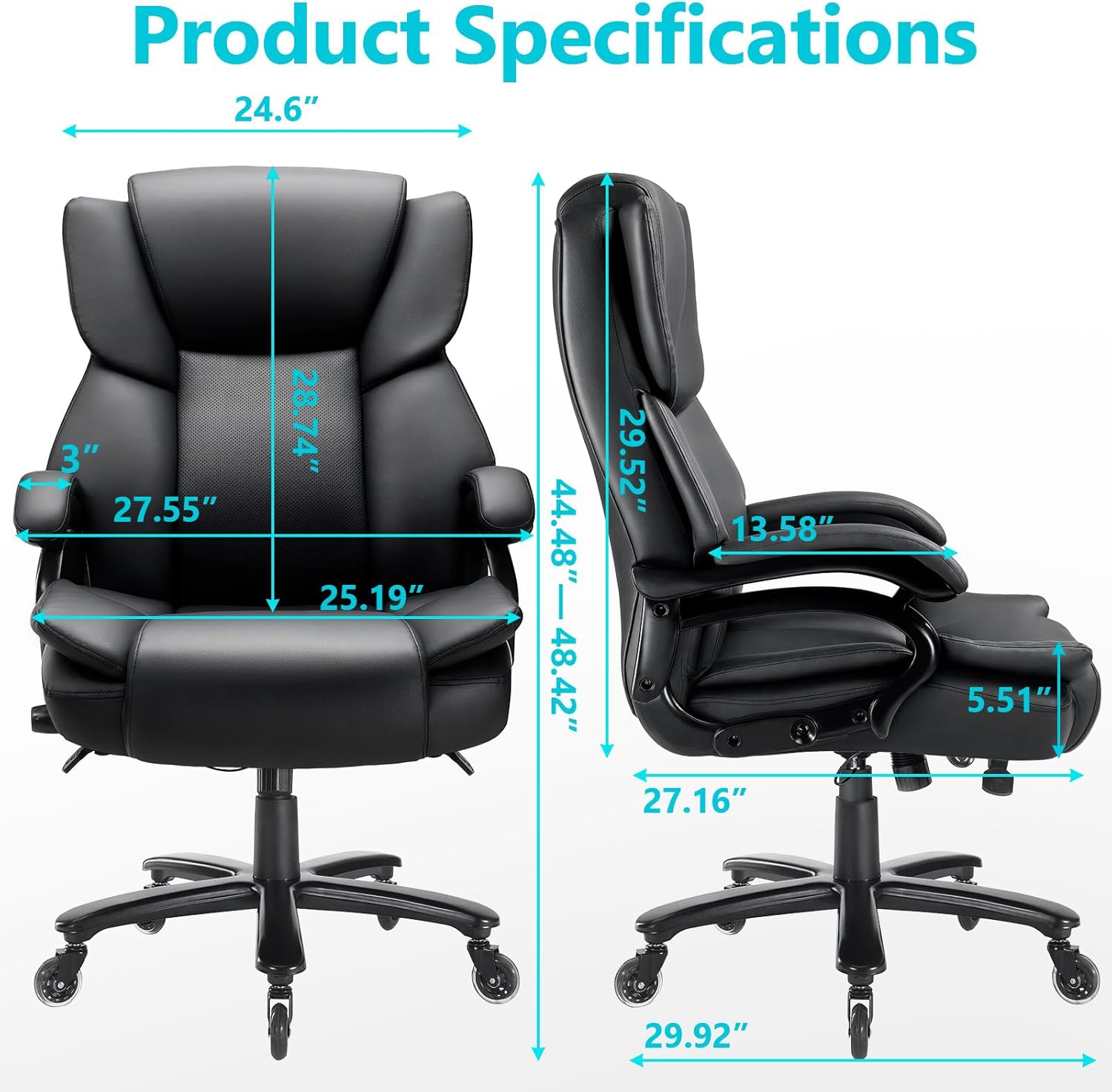
Figure 5: Detailed product dimensions for the Indulgear office chair.
Warranty and Support
We provide detailed instruction, with assembly taking only 20 minutes. If you have any questions, please feel free to contact us for a satisfactory solution.
For warranty claims or technical assistance, please contact Indulgear customer service through the retailer's platform or visit our official website (if available, otherwise omit this part).
Thank you for choosing Indulgear!