Introduction
Welcome to the De'Longhi Rivelia EXAM440.35.B, an advanced automatic coffee machine designed to bring a premium coffee experience to your home. This manual provides essential information for the safe and efficient operation, maintenance, and troubleshooting of your new appliance. Please read it thoroughly before first use and keep it for future reference.
The De'Longhi Rivelia EXAM440.35.B coffee machine elevates your coffee experience, offering access to a new world of coffee beans. Its innovative Bean Switch system allows easy switching between different bean types with simple controls. The integrated Bean Adapt Technology ensures optimal aroma extraction. Prepare up to 8 different coffee beverages, from espresso to Americano, and enjoy creamy milk foam with the classic milk frother. This advanced automatic coffee machine is De'Longhi's most compact. The intuitive 3.5-inch touch screen guides users with rich animations and friendly sounds. The new Coffee Routines feature learns your coffee preferences and adapts your menu throughout the day.
Safety Information
Before using the appliance, carefully read all safety warnings and instructions. Failure to follow these instructions may result in electric shock, fire, or serious injury.
- Ensure the voltage indicated on the appliance corresponds to your mains voltage.
- Do not immerse the appliance, power cord, or plug in water or other liquids.
- Keep the appliance out of reach of children.
- Always unplug the appliance from the power outlet before cleaning, maintenance, or if it is not in use for an extended period.
- Do not operate the appliance if it has a damaged cord or plug, or if it malfunctions or has been damaged in any way.
- Use only original spare parts and accessories recommended by the manufacturer.
- Avoid contact with hot surfaces. Use handles or knobs.
Setup
1. Unpacking and Positioning
Carefully remove the coffee machine and all accessories from the packaging. Place the machine on a stable, level surface, away from water sources and heat. Ensure adequate ventilation around the appliance.
2. Initial Cleaning
Before first use, wash all removable components such as the water tank, drip tray, and bean containers with warm water and mild detergent. Rinse thoroughly and dry.

Image: Contents of the box, including interchangeable bean containers, a measuring spoon, and a water hardness test strip.
3. Water Tank Filling
Remove the water tank, fill it with fresh, cold tap water up to the MAX level, and reinsert it into the machine. Do not use sparkling water or other liquids.
4. Bean Container Installation (Bean Switch System)
Your Rivelia machine comes with interchangeable bean containers. Choose your desired bean container, fill it with whole coffee beans, and securely place it on top of the machine. The Bean Switch system allows you to easily swap between different bean types.
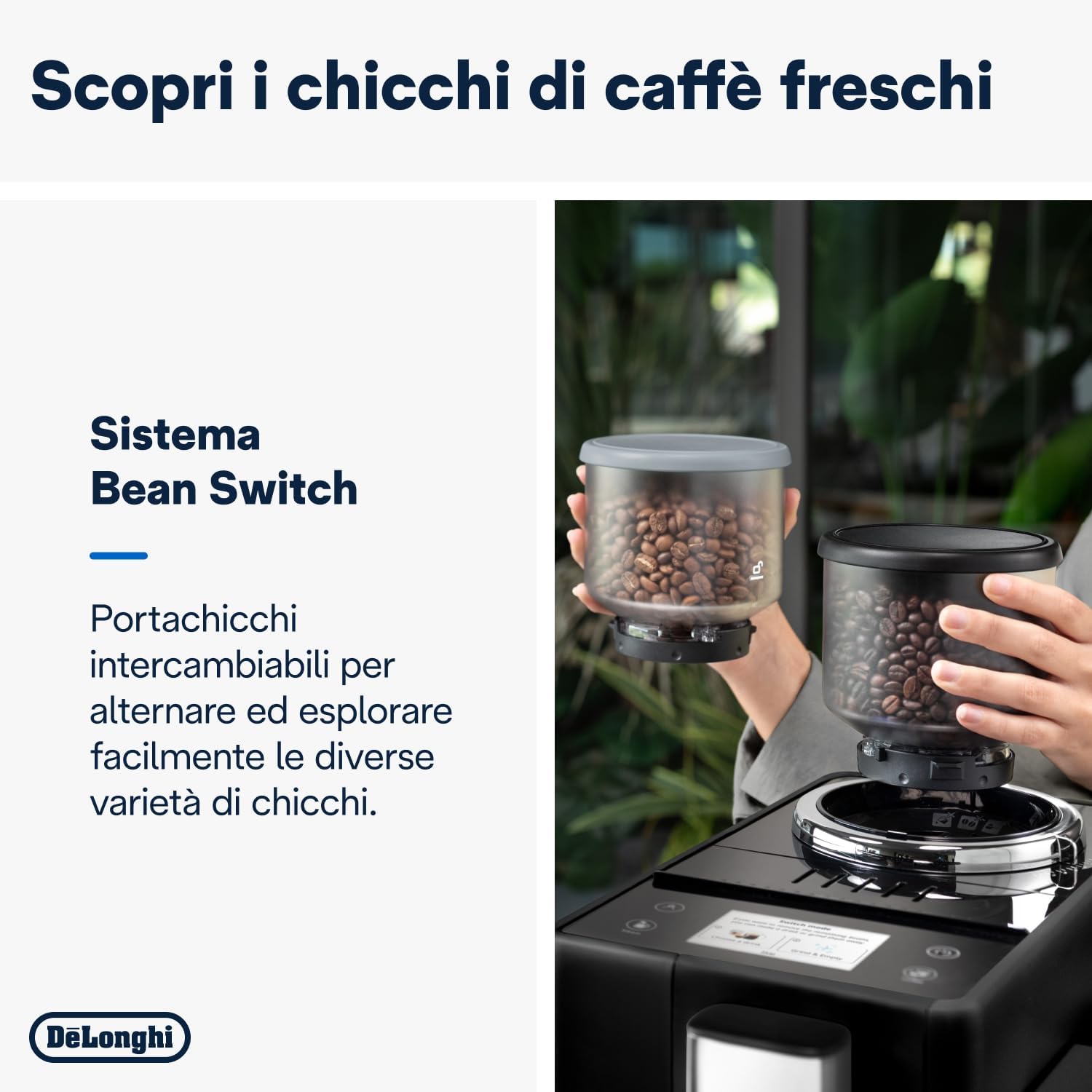
Image: The innovative Bean Switch system with two interchangeable bean containers, allowing users to easily switch between different coffee bean varieties.
5. First Use Cycle
After filling the water tank and bean container, plug in the machine. Follow the on-screen instructions for the initial setup and rinsing cycle. This primes the internal circuits and prepares the machine for brewing.
Operating the Machine
1. 3.5-inch Full-Touch Display
The intuitive 3.5-inch full-touch display is your control center. It features interactive animations and guides you through the coffee preparation process. Simply touch the desired beverage icon to start brewing.

Image: The 3.5-inch full-touch display, offering an engaging user experience with interactive animations and easy beverage selection.
2. One-Touch Coffee Drinks
The Rivelia offers up to 8 different one-touch coffee beverages, including Espresso, Coffee, Americano, and more. Place a cup under the coffee spouts and select your drink from the display.

Image: A variety of 8 unique coffee beverages, from rich espresso to refreshing iced coffee, all prepared with a single touch.
3. Using the Classic Milk Frother
For creamy cappuccinos, lattes, and other milk-based drinks, use the integrated classic milk frother. Fill a jug with cold milk, immerse the steam wand, and activate the steam function from the display. Move the jug to create rich, dense foam.

Image: The traditional milk frother in action, perfect for preparing creamy milk-based beverages or simply heating milk like a barista.
4. Coffee Routines and User Profiles
The new Coffee Routines feature learns your coffee preferences and adapts the menu throughout the day. You can also create up to four different user profiles to personalize and save your favorite drink settings, including strength, temperature, and volume.
Maintenance
Regular cleaning and maintenance ensure the longevity and optimal performance of your De'Longhi Rivelia coffee machine.
1. Daily Cleaning
- Drip Tray and Grounds Container: Empty and rinse the drip tray and coffee grounds container daily.
- Milk Frother: After each use, clean the steam wand with a damp cloth to remove any milk residue. Periodically disassemble and wash the frother components.
2. Weekly/Monthly Cleaning
- Bean Containers: Empty and clean the interchangeable bean containers regularly, especially when switching bean types.
- Brewing Unit: The brewing unit should be removed and rinsed under running water at least once a week. Allow it to air dry before reinserting.
3. Descaling
The machine will indicate when descaling is required. Follow the on-screen instructions and use a De'Longhi descaling solution to ensure proper cleaning and prevent limescale buildup.
4. Water Filter
If using a water filter, replace it as indicated by the machine or every two months to maintain water quality and reduce descaling frequency.
Troubleshooting
This section addresses common issues you might encounter with your coffee machine.
| Problem | Possible Cause | Solution |
|---|---|---|
| No coffee dispensed | Water tank empty; coffee beans empty; brewing unit clogged. | Fill water tank; fill bean container; clean brewing unit. |
| Coffee is too weak | Insufficient coffee dose; coarse grind setting. | Increase coffee strength setting; adjust grinder to a finer setting. |
| Milk not frothing properly | Milk frother clogged; cold milk not used; incorrect milk type. | Clean milk frother thoroughly; use fresh, cold milk; try different milk types (e.g., whole milk). |
| Machine displays 'Descale' | Limescale buildup. | Perform the descaling cycle as instructed in the manual. |
Specifications
Detailed technical specifications for the De'Longhi Rivelia EXAM440.35.B coffee machine.
| Feature | Detail |
|---|---|
| Brand | De'Longhi |
| Model Number | EXAM440.35.B |
| Color | ONYX BLACK |
| Product Dimensions (D x W x H) | 43 x 24.5 x 38.5 cm |
| Capacity | 1.4 Liters |
| Power / Wattage | 1450 Watts |
| Voltage | 240 |
| Material | Metal |
| Automatic Shutoff | Yes |
| Special Features | Milk Frother |
| Item Weight | 9.8 Kilograms |
| Coffee Maker Type | Espresso Machine |
| Recommended Uses | Home Use, Personal Use |

Image: Visual representation of the compact dimensions of the De'Longhi Rivelia EXAM440.35.B.
Warranty and Support
Your De'Longhi Rivelia EXAM440.35.B coffee machine comes with a standard manufacturer's warranty. For specific warranty terms and conditions, please refer to the documentation included with your product or visit the official De'Longhi website.
For technical assistance, spare parts, or service, please contact De'Longhi customer support. Have your model number (EXAM440.35.B) and purchase date ready when contacting support.
Extended protection plans may be available for purchase. Please check with your retailer for details on available extended warranty options.


