
Product Overview
The TEKA TCC 64310 TTC BK Vitroceramic Hob is designed for modern kitchens, offering intuitive control and efficient cooking. It features Touch Control technology with acoustic sensors for precise operation, a safety lock to prevent accidental changes, and a programmable timer for all cooking zones. The Power Plus function provides an extra boost for rapid heating, while its four High Light cooking zones accommodate various pot and pan sizes. The sleek ceramic glass surface ensures easy cleaning and adds a sophisticated touch to your countertop.
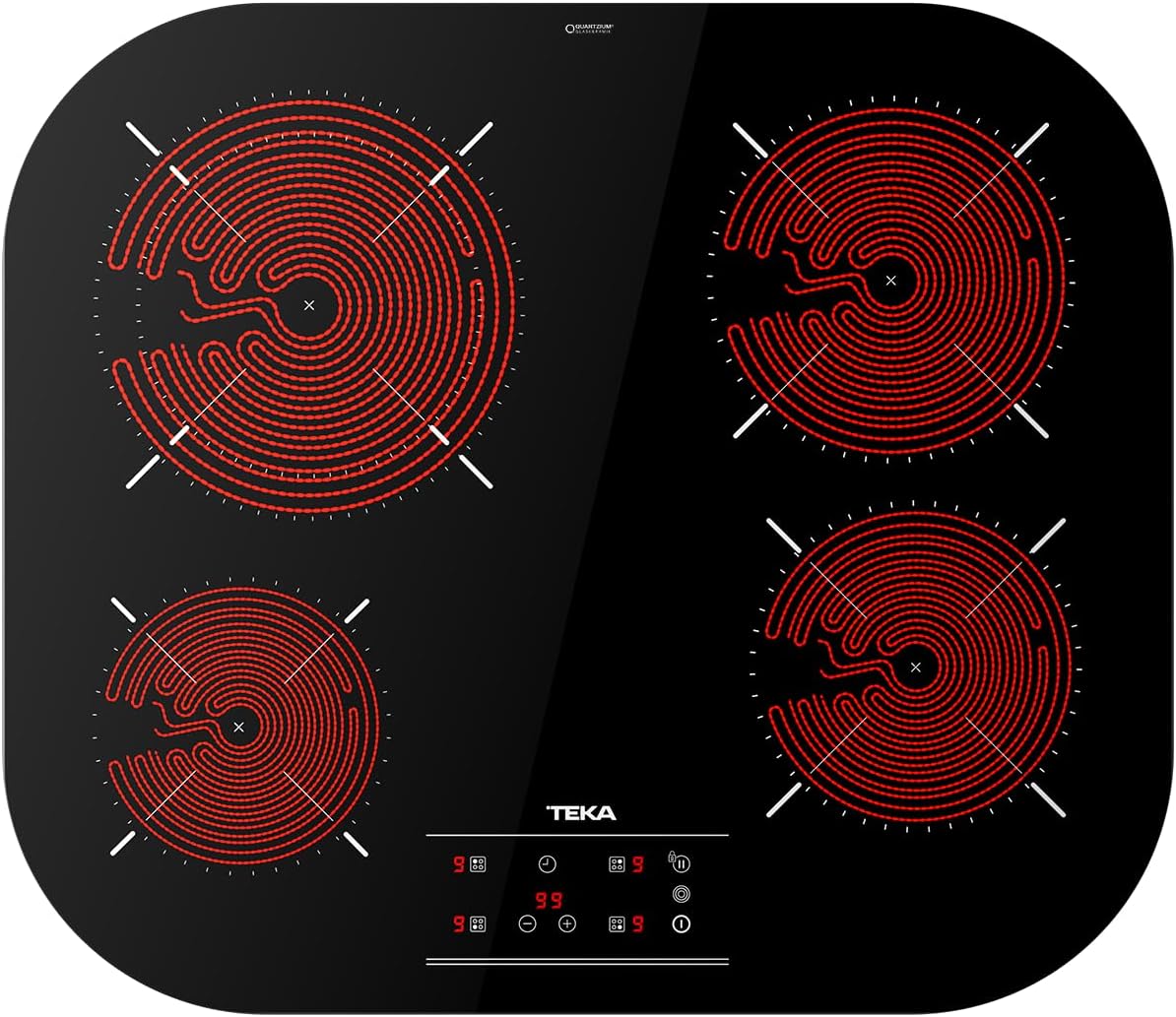
Image: Top-down view of the TEKA TCC 64310 TTC BK Vitroceramic Hob with its four heating zones illuminated, indicating active operation. The touch control panel is visible at the bottom center.
Safety Instructions
- Read all instructions carefully before installation and use.
- Ensure the appliance is installed by a qualified technician in accordance with local regulations.
- Do not touch hot surfaces. Always use oven mitts or pot holders.
- Supervise children closely when the appliance is in use.
- Never leave cooking unattended, especially when using high heat settings.
- Do not store flammable materials on or near the hob.
- Disconnect the appliance from the power supply before cleaning or maintenance.
- Avoid placing metal objects like knives, forks, spoons, and lids on the hob surface as they can get hot.
Setup and Installation
Unpacking
Carefully remove the hob from its packaging. Inspect for any damage during transit. Keep packaging materials for future transport or disposal.
Electrical Connection
The appliance must be connected to the mains electricity supply by a qualified electrician. Ensure the voltage and frequency match the specifications on the rating plate. The hob requires a dedicated circuit with appropriate fusing.
Mounting into Countertop
Ensure the countertop opening dimensions are accurate. Refer to the diagram below for precise measurements. The hob should be securely fitted and sealed to prevent moisture ingress.

Image: Detailed technical drawing illustrating the precise dimensions (in centimeters) required for cutting the countertop opening for the TEKA TCC 64310 TTC BK Vitroceramic Hob. Key measurements include 590mm width, 510mm depth, and corner radii of R140.
Operating Instructions
Touch Control Panel
The hob is operated via a sensitive touch control panel. Lightly touch the desired symbols to activate functions. An acoustic signal confirms each touch.

Image: A detailed view of the touch control panel on the TEKA TCC 64310 TTC BK Vitroceramic Hob, showing various symbols for power levels, timer, and special functions like Power Plus and safety lock.
Turning On/Off
- To turn on: Touch the power symbol (ⓘ).
- To turn off: Touch the power symbol again.
Selecting a Cooking Zone and Power Level
- Touch the symbol corresponding to the desired cooking zone.
- Use the '+' and '-' symbols to adjust the power level from 1 (low) to 9 (high).
Power Plus Function
The Power Plus function provides an immediate boost of power to a selected cooking zone for rapid heating, ideal for boiling water quickly. To activate, select a cooking zone and then touch the Power Plus symbol (P).
Image: A cooking pot on the TEKA TCC 64310 TTC BK Vitroceramic Hob, with steam visibly rising, demonstrating the rapid heating capability, likely due to the Power Plus function.
Timer Function
The integrated timer allows you to set cooking durations up to 99 minutes for individual zones or all zones simultaneously. An acoustic alarm will sound when the set time expires.
- To set: Select a cooking zone, then touch the timer symbol (⏱). Use '+' and '-' to adjust the time.
- To cancel: Set the timer to '00' or turn off the cooking zone.
Safety Lock
The safety lock prevents accidental operation or changes to settings, especially useful in households with children. To activate, touch and hold the lock symbol (🔒) until the indicator light appears. To deactivate, touch and hold the lock symbol again.
Maintenance and Cleaning
Regular cleaning and maintenance will ensure the longevity and optimal performance of your hob.
Daily Cleaning
- After each use, allow the hob to cool down.
- Wipe the ceramic glass surface with a damp cloth and a small amount of mild dish soap.
- Rinse with a clean damp cloth and dry thoroughly with a soft, clean cloth to prevent water spots.
Removing Stubborn Stains
- For burnt-on food or stubborn stains, use a specialized ceramic hob cleaner and a scraper designed for glass hobs.
- Apply the cleaner as per its instructions, then gently scrape off residues.
- Never use abrasive sponges, scouring pads, or harsh chemical cleaners as they can scratch or damage the surface.
Troubleshooting
| Problem | Possible Cause | Solution |
|---|---|---|
| Hob does not turn on. | No power supply; Safety lock activated. | Check circuit breaker/fuse; Deactivate safety lock by touching and holding the lock symbol. |
| Cooking zone not heating. | Incorrect pot/pan size; Zone not selected or power level too low. | Ensure cookware covers the zone; Select zone and increase power level. |
| Display shows "E" or error code. | Internal error; Overheating. | Turn off the hob, wait a few minutes, then restart. If error persists, contact customer support. |
| Hob makes unusual noises. | Normal operation (e.g., fan noise); Loose cookware. | Some noise is normal. Ensure cookware is stable on the surface. |
If the problem persists after attempting these solutions, please contact Teka customer support.
Specifications
| Feature | Detail |
|---|---|
| Brand | Teka |
| Model Number | 112540010 |
| Color | Black |
| Product Dimensions | 51 x 59 x 6 cm |
| Weight | 7.9 kg |
| Power | 6500 watts |
| Voltage | 230 Volts |
| Material | Ceramic |
| Special Features | Automatic, Touch Control, Power Plus, Safety Lock |
| Number of Heating Elements | 4 |
| Burner Type | Radiant |
Warranty and Support
This TEKA product comes with a standard manufacturer's warranty. Please refer to the warranty card included with your purchase for specific terms and conditions, including warranty period and coverage details.
For technical assistance, spare parts, or to schedule a service appointment, please contact Teka customer support. You can find contact information on the Teka official website or in the documentation provided with your appliance.
When contacting support, please have your model number (TCC 64310 TTC BK) and serial number ready. The serial number is typically located on a label on the underside of the hob or within the appliance compartment.
