1. Introduction
Thank you for choosing the De'Longhi Rivelia EXAM440.35.BG Automatic Coffee Machine. This appliance is designed to provide a premium coffee experience with ease of use and customizable options. Please read this manual carefully before using the appliance to ensure proper operation, maintenance, and safety.
2. Important Safety Instructions
Always follow basic safety precautions when using electrical appliances to reduce the risk of fire, electric shock, and injury to persons.
- Read all instructions before use.
- Do not touch hot surfaces. Use handles or knobs.
- To protect against fire, electric shock, and personal injury, do not immerse cord, plugs, or appliance in water or other liquid.
- Close supervision is necessary when any appliance is used by or near children.
- Unplug from outlet when not in use and before cleaning. Allow to cool before putting on or taking off parts, and before cleaning the appliance.
- Do not operate any appliance with a damaged cord or plug or after the appliance malfunctions, or has been damaged in any manner. Return appliance to the nearest authorized service facility for examination, repair, or adjustment.
- The use of accessory attachments not recommended by the appliance manufacturer may result in fire, electric shock, or personal injury.
- Do not use outdoors.
- Do not let cord hang over edge of table or counter, or touch hot surfaces.
- Do not place on or near a hot gas or electric burner, or in a heated oven.
- Always attach plug to appliance first, then plug cord into the wall outlet. To disconnect, turn any control to "off", then remove plug from wall outlet.
- Do not use appliance for other than intended use.
- Use extreme caution when disposing of hot steam.
3. Product Overview
The De'Longhi Rivelia EXAM440.35.BG is a compact automatic coffee machine featuring a 3.5-inch color touchscreen, a manual milk frother, and the innovative Bean Switch System for easily changing coffee bean varieties.

Figure 3.1: Front view of the De'Longhi Rivelia EXAM440.35.BG coffee machine in Sand Beige.
Key Components:
- 3.5" Full-Touch Color Display: For intuitive control and personalized coffee routines.
- Bean Switch System: Two interchangeable 250g bean containers for different coffee varieties.
- Manual Milk Frother: For preparing creamy milk foam for lattes and cappuccinos.
- Water Tank: Removable, 1.4-liter capacity.
- Drip Tray and Grounds Container: For collecting excess water and used coffee grounds.
- Coffee Spout: Adjustable height for various cup sizes.

Figure 3.2: The De'Longhi Rivelia series, showcasing various color options including Sand Beige.
4. Initial Setup
4.1 Unpacking and Placement
- Carefully remove the machine from its packaging.
- Place the machine on a stable, level surface, away from water splashes and heat sources.
- Ensure adequate space around the machine for ventilation and access to components.
4.2 Filling the Water Tank
- Remove the water tank from the side of the machine.
- Fill the tank with fresh, cold tap water up to the MAX level indicator.
- Replace the water tank securely into the machine.
4.3 Filling the Bean Container (Bean Switch System)
The Rivelia features two interchangeable bean containers. You can switch between them to enjoy different coffee varieties.
- Lift the lid of a bean container.
- Pour fresh coffee beans into the container. Do not overfill.
- Place the filled bean container onto the machine's bean hopper. Ensure it is seated correctly.
- To switch beans, simply lift the current container, replace it with another filled container, and the machine will detect the change.

Figure 4.1: The Bean Switch System with two interchangeable bean containers.

Figure 4.2: Illustration of filling the bean container with fresh coffee beans.
4.4 First Use and Rinsing Cycle
Before making your first coffee, perform a rinsing cycle to clean the internal circuits.
- Plug the machine into a power outlet.
- Turn on the machine using the power button.
- Follow the on-screen instructions for the initial setup, including language selection and water hardness.
- The machine will automatically perform a rinsing cycle. Place a container under the coffee spouts and hot water spout to collect the water.
- Once the rinsing cycle is complete, the machine is ready for use.
5. Operation
5.1 Using the 3.5" Full-Touch Color Display
The intuitive touchscreen allows you to select beverages, customize settings, and manage user profiles.

Figure 5.1: The 3.5-inch full-touch color display in use, showing beverage selection.
- Beverage Selection: Swipe through the menu to choose from 8 pre-programmed coffee recipes.
- Customization: Adjust coffee strength, temperature, and volume for each drink.
- User Profiles: Create up to 4 personalized user profiles to save your favorite settings. The machine adapts its menu based on your routine.
- Bean Adapt Technology: This technology automatically adjusts grinding parameters, dosage, and brewing temperature to optimize extraction for the selected coffee bean variety.
5.2 Preparing Coffee Beverages
- Ensure the water tank is filled and a bean container is in place.
- Place a cup under the coffee spouts.
- Select your desired beverage from the touchscreen menu.
- Adjust settings (strength, volume) if desired.
- Press the "Start" icon to begin brewing.

Figure 5.2: A selection of coffee drinks, including espresso, americano, and milk-based beverages.
5.3 Using the Manual Milk Frother
The integrated steam wand allows you to manually froth milk for creamy cappuccinos and lattes.
- Fill a milk jug with cold milk (dairy or non-dairy).
- Position the steam wand into the milk, just below the surface.
- Activate the steam function via the touchscreen.
- Move the jug up and down to create desired foam texture.
- Once frothed, turn off the steam function and clean the wand immediately.

Figure 5.3: Demonstrating the manual milk frother for creating creamy milk foam.
5.4 Hot Water Dispensing
The machine can also dispense hot water for teas or other hot beverages.
- Place a cup under the hot water spout (usually the steam wand).
- Select the hot water function from the touchscreen.
- Press "Start" to dispense hot water.
6. Cleaning and Maintenance
Regular cleaning ensures optimal performance and extends the lifespan of your coffee machine.
6.1 Daily Cleaning
- Drip Tray and Grounds Container: Empty and rinse daily. The machine will prompt you when the grounds container needs emptying.
- Water Tank: Rinse daily and refill with fresh water.
- Coffee Spouts: Wipe with a damp cloth.
- Milk Frother: After each use, wipe the steam wand with a damp cloth and purge steam briefly to clear any milk residue.
6.2 Weekly Cleaning
- Brew Unit: Remove the brew unit (refer to the machine's internal instructions for removal) and rinse it thoroughly under running water. Allow it to air dry before reinserting.
- Bean Containers: Empty and clean the bean containers, especially when switching bean types, to prevent oil buildup.
6.3 Descaling
The machine will indicate when descaling is required. Use only De'Longhi descaling solution and follow the on-screen instructions precisely. Descaling regularly prevents limescale buildup and maintains coffee quality.
7. Troubleshooting
This section addresses common issues you might encounter with your De'Longhi Rivelia EXAM440.35.BG.
| Problem | Possible Cause | Solution |
|---|---|---|
| Machine does not turn on. | Not plugged in; power outlet faulty. | Check power cord connection; try a different outlet. |
| "Fill Water Tank" message appears, but tank is full. | Water tank not inserted correctly; sensor issue. | Remove and reinsert the water tank firmly. Ensure the float in the tank moves freely. |
| Coffee is too weak or watery. | Grind setting too coarse; insufficient coffee dose; old beans. | Adjust grind setting finer; increase coffee strength via menu; use fresh beans. |
| Milk frother not producing foam. | Steam wand blocked; milk not cold enough; incorrect milk type. | Clean steam wand thoroughly; use cold milk; ensure milk is suitable for frothing. |
| Touchscreen unresponsive or scratched. | Temporary software glitch; physical damage. | Restart the machine. If scratched, contact customer support for service options. Avoid abrasive cleaners. |
8. Technical Specifications
| Feature | Detail |
|---|---|
| Brand | De'Longhi |
| Model Number | EXAM440.35.BG |
| Color | Sand Beige |
| Dimensions (L x W x H) | 43 x 24.5 x 38.5 cm |
| Weight | 9.8 Kilograms |
| Water Tank Capacity | 1.4 Liters |
| Power | 1450 Watts |
| Voltage | 240 Volts |
| Material | Metal |
| Special Features | 4 user profiles, 8 coffee beverages, Bean Switch System, Integrated steam wand, Coffee routines, Bean Adapt Technology |
| Automatic Shut-off | Yes |
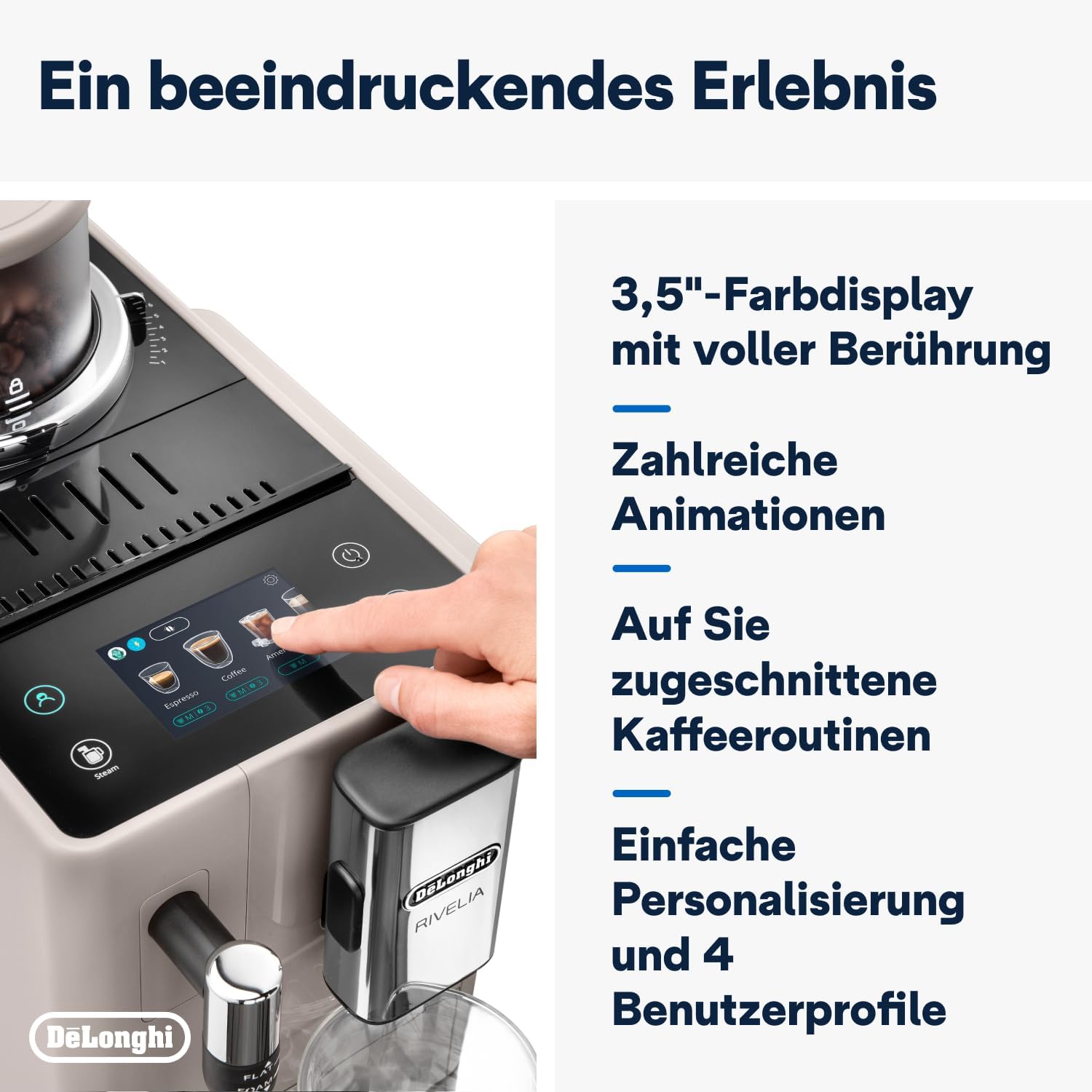
Figure 8.1: Product dimensions: 245mm (width) x 430mm (depth) x 385mm (height).
9. Warranty and Support
9.1 Warranty Information
Your De'Longhi Rivelia EXAM440.35.BG coffee machine comes with a standard manufacturer's warranty. Please refer to the warranty card included in your product packaging for specific terms and conditions, including the warranty period and coverage details. Keep your proof of purchase for warranty claims.
9.2 Customer Support
For technical assistance, spare parts, or service, please contact De'Longhi customer support. You can find contact information on the official De'Longhi website or in the documentation provided with your appliance.
- Online Support: Visit the official De'Longhi website for FAQs, troubleshooting guides, and product registration.
- Telephone Support: Contact numbers are typically listed in your warranty booklet or on the brand's website.


