
1. Introduction
This manual provides essential instructions for the installation, operation, and maintenance of your POWLAND 6.5KW Solar Hybrid Inverter Charger. This advanced system converts 48V DC power from batteries and solar panels into 120V AC power, suitable for various household appliances. It features a built-in 120A MPPT charge controller and supports parallel operation for increased power capacity. Please read this manual thoroughly before installation and use to ensure safe and efficient operation.
2. Safety Information
WARNING: Electrical shock hazard. Installation and servicing must be performed by qualified personnel only.
- Ensure all wiring is correctly sized and installed according to local electrical codes.
- Disconnect all power sources (solar, battery, utility) before performing any maintenance or wiring.
- Do not operate the inverter if it is damaged or appears to be malfunctioning.
- Keep the inverter in a well-ventilated area, free from flammable materials.
- Do not expose the inverter to rain, snow, or liquids.
- Ensure proper grounding of the inverter.
- Wear appropriate personal protective equipment (PPE) during installation and servicing.
3. Product Overview
The POWLAND 6.5KW Solar Hybrid Inverter Charger is designed for reliable power conversion and management in solar energy systems. It integrates an inverter, solar charger, and battery charger into a single unit.
Key Features:
- Hybrid Grid-Load with Anti-Backflow Mode: Utilizes an external CT sensor to prevent reverse current flow into the grid while simultaneously powering loads and feeding excess energy to the grid.
- High Power Output: Provides 6500W of continuous AC power with 120Vac±5% output voltage regulation.
- Integrated MPPT Charge Controller: Features a built-in 120A MPPT charge controller with a Max PV Array Open Circuit Voltage of 300VDC and an MPPT voltage range of 90-260Vdc.
- Scalable Parallel Operation: Up to 6 units can be connected in parallel to achieve a massive 39kW output, supporting both single-phase (120V) and split-phase (120V/240V) configurations.
- Wide Battery Compatibility: Works seamlessly with 48V lead-acid and LiFePO4 batteries, including a battery activation function for dormant lithium batteries.
- Intelligent LCD Display: Provides real-time monitoring of system status and allows for user-friendly parameter adjustments.
- Comprehensive Protections: Includes PV reverse current protection, over-temperature, overload, short-circuit protection, and adaptive cooling fans for safe operation.
- Grid and Generator Backup: Automatically switches to grid or generator power when needed and restarts when AC power resumes.
- Optional WiFi Monitoring: A separate WiFi module (not included) can be purchased for remote monitoring via a mobile application.

Figure 3.1: Front view of the POWLAND 6.5KW Solar Hybrid Inverter Charger, showing the LCD display and ventilation.

Figure 3.2: Overview of the inverter's comprehensive protection features, including short circuit, overcurrent, overvoltage, undervoltage, overload, reverse charging, over-temperature, and overcharge prevention.

Figure 3.3: The 6500W AC output of the inverter is compatible with a wide range of household appliances, demonstrating its versatility for home power needs.

Figure 3.4: The inverter supports various 48V battery types, including SLD, FLD, AGM, GEL, and LiFePO4 (LI), and features a battery activation function.
4. Setup and Installation
Proper installation is critical for the safe and efficient operation of your inverter. It is recommended that installation be performed by a qualified electrician.
4.1 Site Selection
- Install the inverter indoors in a dry, cool, and well-ventilated area.
- Avoid direct sunlight, high temperatures, and high humidity.
- Ensure sufficient clearance around the unit for proper airflow and heat dissipation.
- Mount the inverter vertically on a sturdy wall.
4.2 Wiring Connections
Follow the wiring diagrams carefully. All connections must be secure and properly insulated.
- Battery Connection: Connect the 48V battery bank to the inverter's battery terminals. Ensure correct polarity (positive to positive, negative to negative). Use appropriately sized cables.
- PV Array Connection: Connect the solar panel array to the PV input terminals. Verify that the PV array's open circuit voltage and current are within the inverter's specifications.
- AC Input Connection: Connect the utility grid or generator to the AC input terminals.
- AC Output Connection: Connect your household loads to the AC output terminals.
- Grounding: Connect the inverter's ground terminal to a reliable earth ground.
- CT Sensor (for Anti-Backflow): Install the external Current Transformer (CT) sensor as per the diagram for grid-tied operation with anti-backflow functionality.

Figure 4.1: Basic connection diagram illustrating the wiring for mains power, generator, solar panels, battery, and home loads to the inverter.
4.3 Parallel Operation
The inverter supports parallel operation of up to 6 units for increased power output. This allows for single-phase (120V) or split-phase (120V/240V) configurations.

Figure 4.2: Diagrams showing parallel connections for 2, 3, and 6 inverters to achieve higher power outputs (up to 39000W) in single-phase configurations.
5. Operating Instructions
After successful installation, you can power on and configure your inverter.
5.1 Initial Power-Up
- Ensure all wiring connections are correct and secure.
- Turn on the battery breaker.
- Turn on the PV array breaker.
- Turn on the AC input breaker (if connected to utility/generator).
- Turn on the inverter's main power switch.
- The LCD display will illuminate, and the inverter will begin its startup sequence.
5.2 LCD Display and Settings
The LCD display provides real-time system information and allows you to adjust various operating parameters. Refer to the on-screen menu for navigation and setting changes.
5.3 Charging Modes
The inverter offers four selectable charging modes:
- Mains First: Prioritizes charging from the utility grid/generator. Solar power is used if mains are unavailable.
- Solar First: Prioritizes charging from solar panels. Mains power is used as a backup if solar power is insufficient.
- Hybrid Charge: Uses both solar and mains power to charge batteries, optimizing charging efficiency.
- Only Solar: Charges batteries exclusively from solar power.
5.4 Output Modes
The inverter offers four selectable output modes:
- Solar First: Prioritizes power from solar panels to loads. Battery and mains are used as backup.
- Mains First: Prioritizes power from the utility grid/generator to loads. Battery and solar are used as backup.
- Inverter First: Prioritizes power from the battery to loads. Mains and solar are used as backup.
- Hybrid Output: Dynamically switches between solar, battery, and mains to power loads based on availability and user settings.
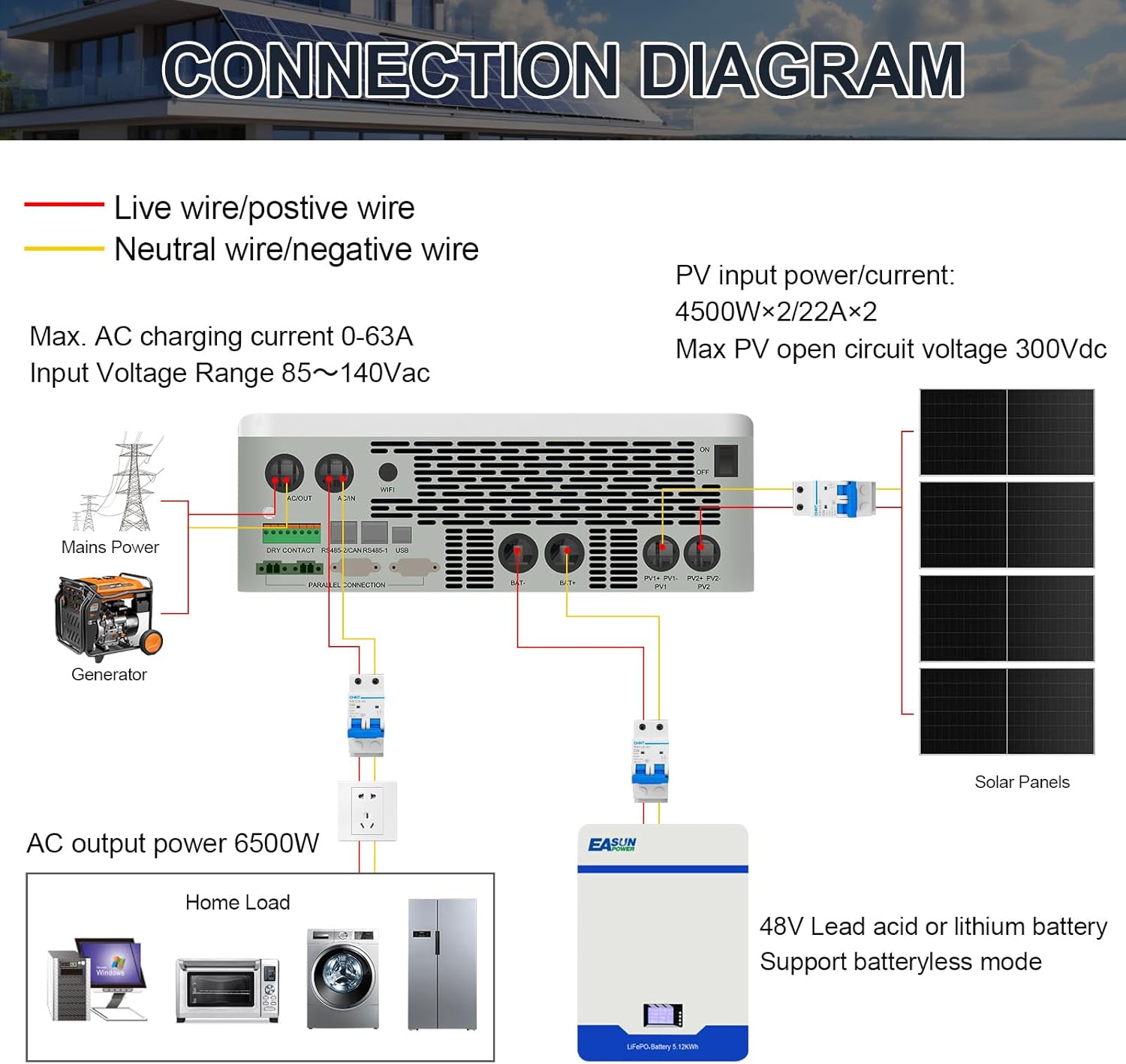
Figure 5.1: Visual representation of the four charging modes (Mains First, Solar First, Hybrid Charge, Only Solar) and four output modes (Solar First, Mains First, Inverter First, Hybrid Output).
6. Maintenance
Regular maintenance ensures the longevity and optimal performance of your inverter.
- Cleaning: Periodically clean the exterior of the inverter and ensure ventilation openings are free from dust and debris. Use a dry cloth.
- Connections Check: Annually inspect all electrical connections for tightness and signs of corrosion. Tighten any loose connections.
- Battery Inspection: Follow the manufacturer's recommendations for battery maintenance. Check battery terminals for corrosion and ensure proper ventilation if using lead-acid batteries.
- Environmental Check: Ensure the installation environment remains within specified temperature and humidity ranges.
CAUTION: Disconnect all power sources before performing any maintenance.
7. Troubleshooting
This section provides solutions to common issues. For problems not listed here, contact technical support.
| Problem | Possible Cause | Solution |
|---|---|---|
| Inverter does not power on | No battery power; Battery switch off; Loose battery connections; Inverter switch off. | Check battery voltage; Ensure battery switch is ON; Verify battery connections; Turn on inverter switch. |
| No AC output | Overload; Short circuit; Low battery voltage; AC output breaker tripped. | Reduce load; Check for short circuits; Charge batteries; Reset AC output breaker. |
| PV Overvoltage error | Solar panel array voltage exceeds inverter's maximum PV input. | Reconfigure solar panel array to reduce voltage (e.g., remove panels from series connection) or ensure correct panel selection. |
| Batteries not charging from PV | PV input voltage too low/high; PV connections loose; Solar panels shaded; MPPT controller fault. | Check PV voltage and current; Verify PV wiring; Clear shading; Contact support if MPPT fault persists. |
| Inverter randomly stops AC output | Temporary overload; Internal protection triggered; Communication issue. | Check for temporary high loads; Monitor error codes on LCD; Perform a factory reset if necessary. If issue persists, contact support. |
8. Technical Specifications
| Feature | Specification |
|---|---|
| Model | 6.5KW Hybrid Inverter Charger |
| Rated Output Power | 6500W |
| Output Voltage Regulation | 120Vac ±5% |
| Max PV Array Open Circuit Voltage | 300VDC |
| PV Operating Voltage Range | 120-300Vdc |
| MPPT Voltage Range | 90-260Vdc |
| Max PV Input Current | 22A |
| Max AC Input Voltage | 140Vac |
| Max AC Charging Current | 0-63A |
| Input Voltage Range (AC) | 85~140Vac |
| Battery Voltage | 48V (Lead-Acid/LiFePO4) |
| Product Dimensions | 13.7 x 5.2 x 16 inches |
| Item Weight | 22 pounds |
| Parallel Capability | Up to 6 units (39kW) |
9. Warranty and Support
For warranty information, technical assistance, or service inquiries, please contact POWLAND customer support. Keep your purchase receipt and product serial number readily available when contacting support.
For the latest information and support resources, please visit the official POWLAND website or contact your local distributor.


