
Introduction
This manual provides comprehensive instructions for the installation, operation, maintenance, and troubleshooting of your HisoHu 30 Inch Under Cabinet Range Hood. Please read this manual thoroughly before installation and use to ensure proper function and safety.

Image: Front view of the HisoHu 30 Inch Under Cabinet Range Hood, showcasing its sleek black stainless steel design and control panel.
Setup and Installation
The HisoHu range hood is designed for under-cabinet mounting. Ensure you have all necessary components and tools before beginning installation.
Included Components:
- Instruction Manual
- Mounting Screws
- Remote Control (Note: Air Outlet Adapter is NOT included)
Pre-Installation Considerations:
- Ensure the cabinet width is 36 inches or larger for proper fitment.
- The recommended hood height above the cooking surface is between 24 inches and 32 inches.
- This unit is designed for ducted ventilation.

Image: Diagram illustrating the recommended installation dimensions, including hood height above the cooking surface and required cabinet width.

Image: Technical drawing showing detailed measurements of the range hood for precise installation planning.
Refer to the included Instruction Manual for detailed step-by-step installation procedures and safety guidelines.
Operating Instructions
Your HisoHu range hood offers multiple control options for convenience and efficiency.
Control Methods:
- Touch Control Panel: Located on the front of the hood for direct access to all functions.
- Gesture Sensing Control: Wave your hand across the two sensing points to adjust fan speed without touching the panel, keeping it clean during cooking.
- Remote Control: For convenient operation from a distance.

Image: A hand demonstrating the gesture control feature of the range hood, showing how to adjust settings without physical contact.
Fan Speed Settings:
The range hood features 4-speed settings to accommodate various cooking needs, from light simmering to heavy frying.
- Speed 1-2: Ideal for light cooking and maintaining a quiet kitchen environment (35 to 60 dB).
- Speed 3-4: Provides maximum suction (900 CFM) for rapid smoke and odor removal during intensive cooking.
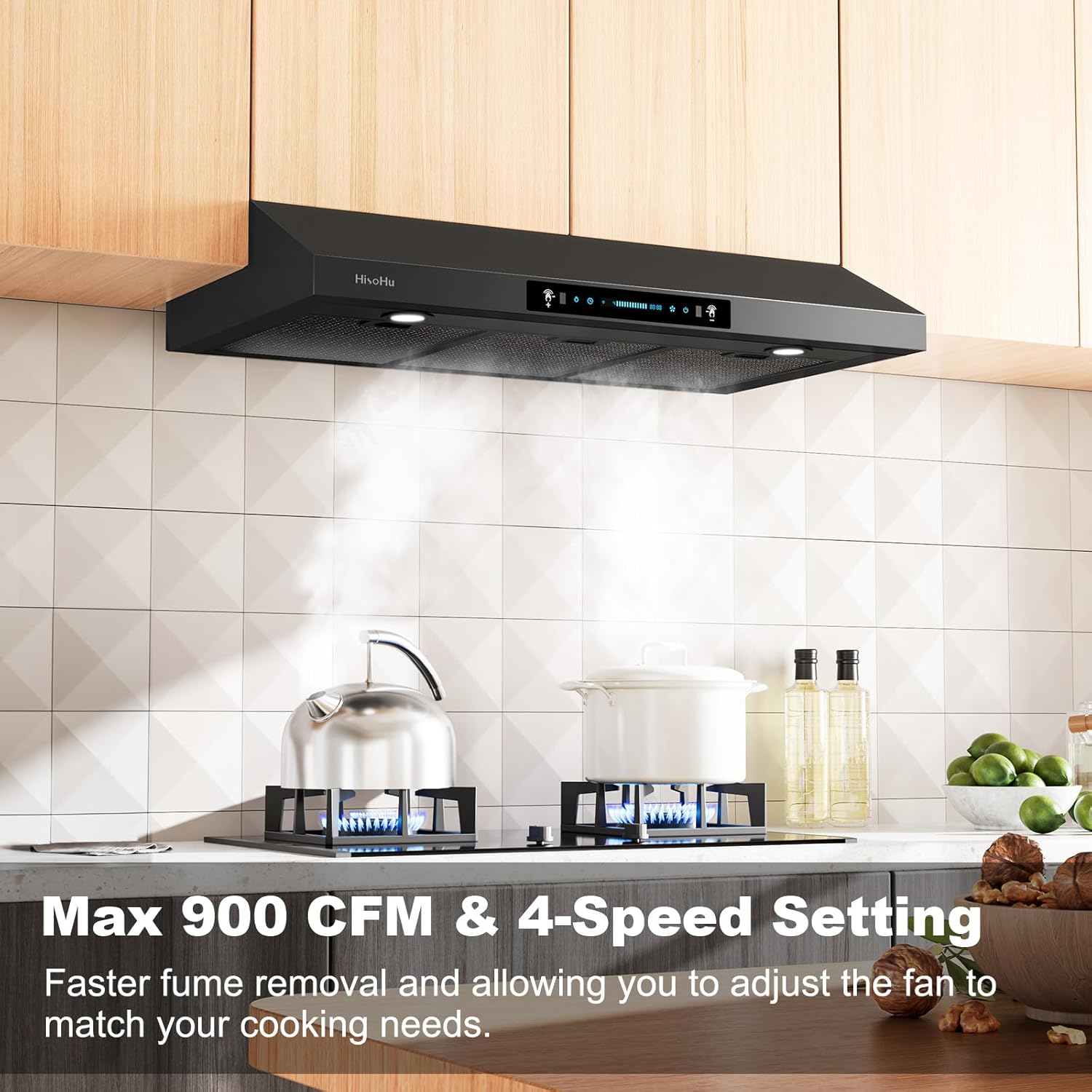
Image: The range hood actively extracting steam from a stovetop, illustrating its 900 CFM suction power and multi-speed capability.

Image: A noise meter displaying the low decibel level of the range hood, emphasizing its quiet operation at lower speeds.
Dimmable LED Lighting:
The integrated 4500K LED light allows you to adjust illumination to your preference, providing clear visibility over your cooking area.

Image: The range hood's LED lights brightly illuminating a stovetop, demonstrating the effective lighting feature.
Delay Shutdown Function:
Utilize the delay shutdown function to automatically remove lingering fumes after cooking, ensuring a fresh kitchen environment.
Maintenance
Regular maintenance ensures the longevity and optimal performance of your range hood.
Cleaning:
- Wipe the exterior stainless steel surfaces with a soft cloth and mild detergent. Avoid abrasive cleaners.
- Clean the mesh filters regularly to maintain optimal airflow and suction. Refer to the main instruction manual for filter removal and cleaning procedures.
Filter and Light Replacement:
HisoHu provides free replacement of accessories such as filters and lights when needed. Contact customer service for assistance.
Troubleshooting
If you encounter issues with your range hood, refer to the following common problems and solutions:
| Problem | Possible Cause | Solution |
|---|---|---|
| Fan is not operating or has low suction. | Power supply issue, clogged filters, motor malfunction. | Check power connection. Clean or replace filters. Contact customer service if problem persists. |
| Excessive noise or vibration. | Improper installation, loose parts, motor issue. | Ensure secure mounting. Check for loose screws or components. Lower fan speed if noise is only at highest settings. |
| Gesture control is unresponsive or inconsistent. | Obstruction, sensor dirty, environmental interference. | Ensure clear path to sensors. Clean sensor area. Try using touch panel or remote control. |
| LED lights are not working. | Bulb failure, electrical connection issue. | Check connections. Contact customer service for replacement lights. |
For further assistance, please contact HisoHu customer service.
Specifications
| Feature | Detail |
|---|---|
| Brand | HisoHu |
| Model Number | C02-30inch-Black |
| Product Dimensions | 49.91 x 90.67 x 15.24 cm (19.65 x 35.70 x 6.00 inches) |
| Item Weight | 13.91 kg (30.67 lbs) |
| Material | Stainless Steel |
| Colour | C02-30inch-black |
| Controls Type | Touch, Gesture Sensing, Remote |
| Number of Speeds | 4 |
| Air Flow Capacity | 900 Cubic Feet Per Minute (CFM) |
| Noise Level | 35 to 60 dB (up to 64 dB at highest setting) |
| Light Source Type | Dimmable LED (4500K) |
| Filter Type | Mesh |
| Ventilation Type | Ducted |
| Voltage | 110 Volts |
| UPC | 765373202429 |
Customer Support
For any questions, technical assistance, or replacement parts (such as filters and lights), please contact HisoHu customer service. Our professional and friendly customer service team is always online to assist you.
Contact Email: support@amazon-saleservice.com
Please have your model number (C02-30inch-Black) and purchase details ready when contacting support.


