
Introduction
Thank you for choosing the RAF 10 Liter Digital Touch Screen Air Fryer R.5339. This appliance is designed to provide a healthier way to cook your favorite foods, using rapid air circulation technology to fry, bake, grill, and roast with little to no oil. Please read this manual thoroughly before first use to ensure safe and optimal operation. Keep this manual for future reference.
Important Safety Instructions
- Always ensure the voltage indicated on the appliance matches your local mains voltage before connecting.
- Do not immerse the appliance, cord, or plug in water or any other liquid to prevent electric shock.
- Keep the appliance out of reach of children and pets. Close supervision is necessary when the appliance is used near children.
- Do not operate the appliance if the plug, power cord, or the appliance itself is damaged. Contact authorized service personnel for repair.
- Place the air fryer on a stable, heat-resistant surface, away from walls and other appliances, to allow for proper air circulation.
- Do not block the air inlet or outlet vents during operation.
- The surfaces may become hot during use. Use oven mitts when handling hot components.
- Unplug the appliance from the outlet when not in use and before cleaning. Allow it to cool down completely before handling or storing.
- Do not use accessories or parts not recommended by the manufacturer, as this may cause hazards or injuries.
Product Overview
The RAF Air Fryer R.5339 consists of the main unit, a removable cooking basket, and a digital touch control panel. Familiarize yourself with these components before use.
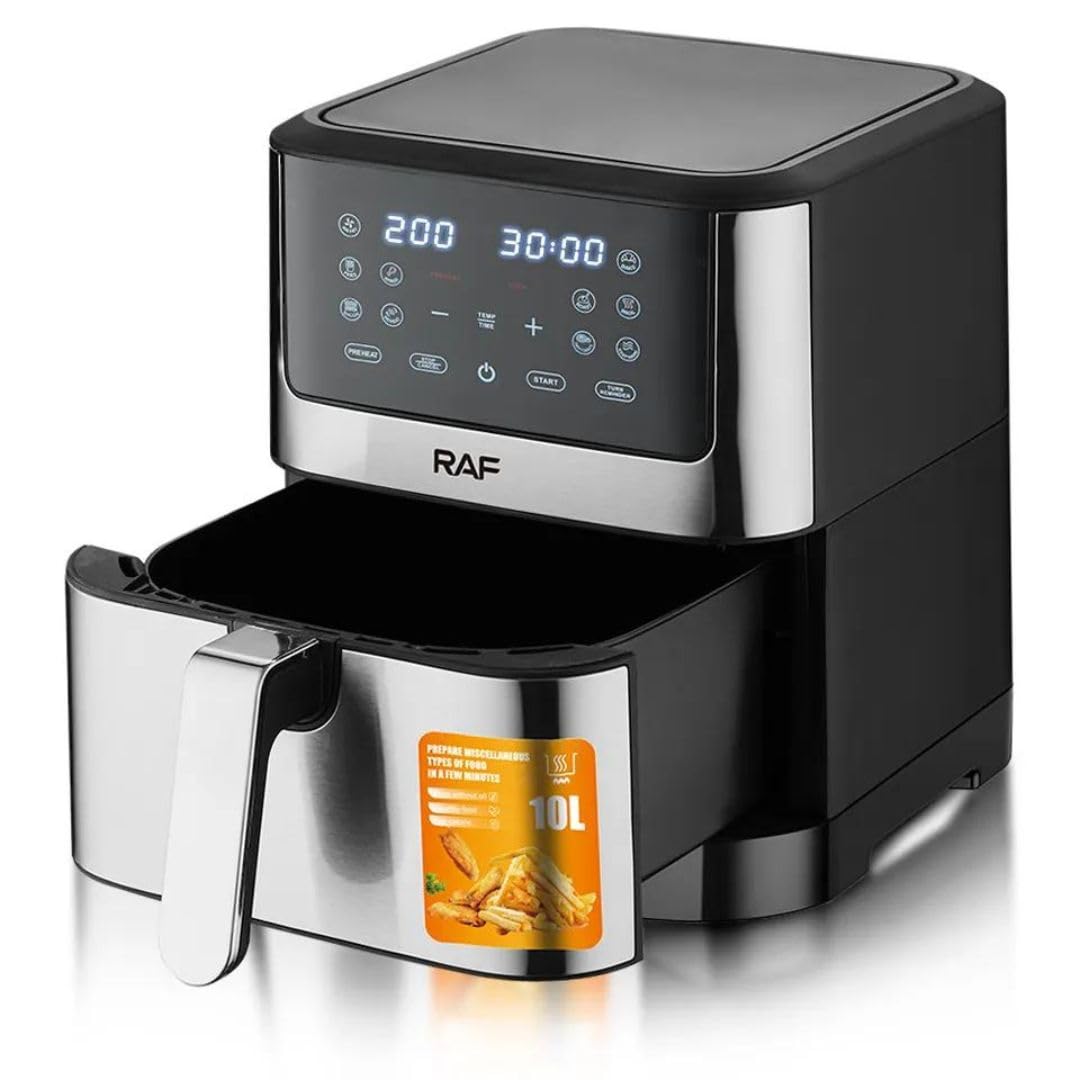
Figure 1: Front view of the RAF R.5339 Air Fryer, showing its silver and black design with a digital touch screen panel and a pull-out basket handle.
Control Panel
The digital touch screen allows for easy adjustment of cooking settings and selection of preset programs.
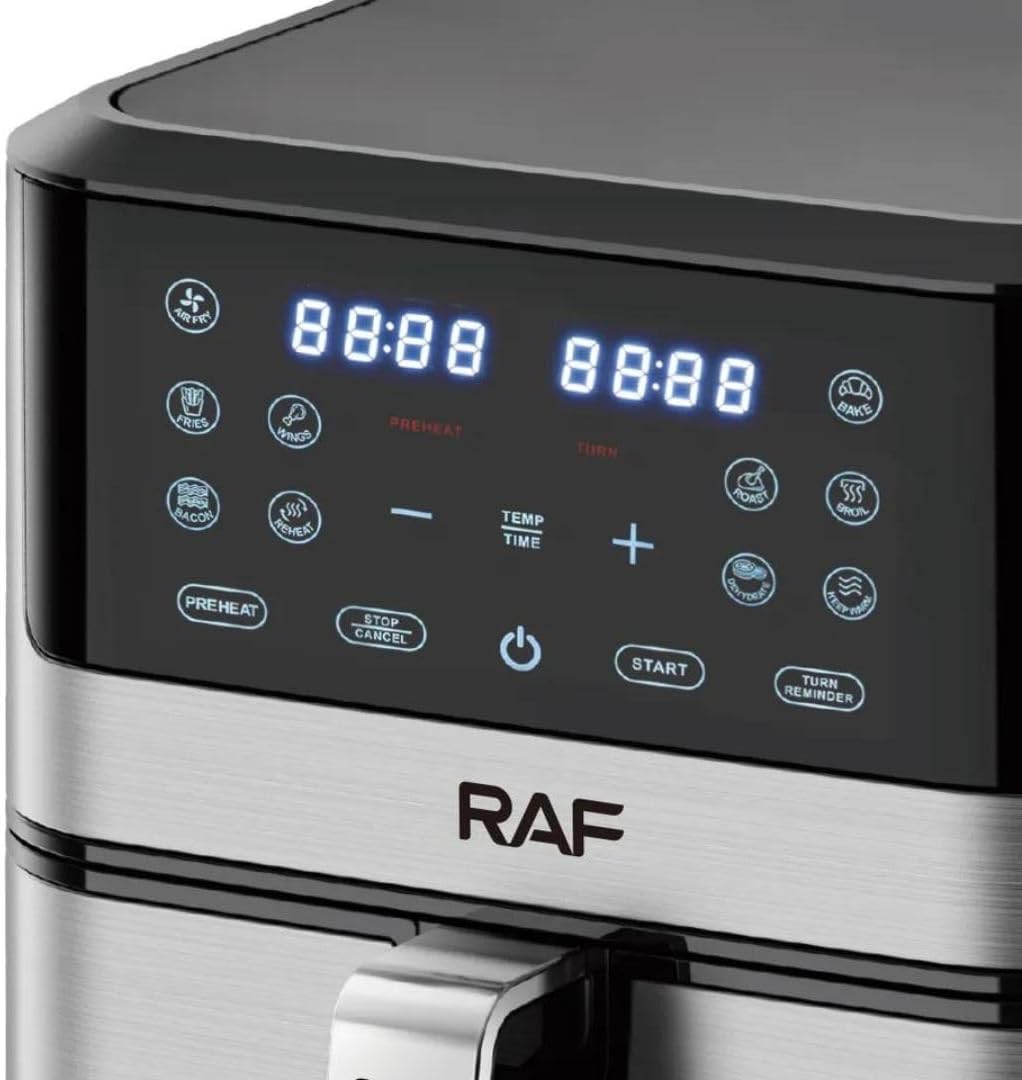
Figure 2: Close-up of the digital touch control panel of the RAF Air Fryer, displaying time and temperature settings, along with various cooking preset icons and control buttons like Preheat, Stop/Cancel, Power, Start, and Turn Reminder.
Setup
- Unpack: Carefully remove all packaging materials and promotional labels from the air fryer.
- Clean: Wipe the exterior of the appliance with a damp cloth. Wash the cooking basket and any removable accessories with warm, soapy water. Rinse thoroughly and dry completely.
- Placement: Place the air fryer on a flat, stable, heat-resistant surface. Ensure there is at least 10 cm (4 inches) of clear space around the back and sides, and above the appliance for adequate ventilation.
- Power Connection: Plug the power cord into a grounded electrical outlet. The appliance is now ready for use.
Operation
Basic Operation
- Power On: Plug in the air fryer. The power button will illuminate. Touch the power button to turn on the digital display.
- Load Food: Pull out the cooking basket using the handle. Place your food inside the basket. Do not overfill.
- Select Cooking Mode: You can choose from preset programs or manually set the time and temperature.
- Start Cooking: Press the Start button to begin the cooking cycle.
- Pause/Stop: During cooking, you can press the Stop/Cancel button to pause or end the cooking cycle.
Using Presets
The air fryer comes with several pre-programmed settings for common foods. Simply touch the icon corresponding to your desired food type. The air fryer will automatically set the optimal time and temperature.

Figure 3: Top view of the RAF Air Fryer, illustrating various cooking presets with recommended time and temperature ranges for different food types like fries, chicken, fish, and cake.
Manual Time and Temperature Setting
To manually adjust settings:
- After powering on, use the 'TEMP' and 'TIME' buttons to toggle between temperature and time adjustment.
- Use the '+' and '-' buttons to increase or decrease the temperature (typically 80°C to 200°C) or time (typically 1 to 60 minutes).
- Press Start to begin cooking with your custom settings.
Preheat Function
Some recipes may require preheating. Touch the 'PREHEAT' button on the control panel. The air fryer will heat to a default temperature (e.g., 180°C) for a short period. Once preheated, add your food and start the main cooking cycle.
Shake/Turn Reminder
For even cooking, especially with smaller items like fries, the air fryer may beep during the cooking cycle to remind you to shake or turn the food. Pull out the basket, shake or turn the food, and then reinsert the basket to resume cooking.
Cleaning and Maintenance
Regular cleaning ensures optimal performance and extends the life of your air fryer.
- Unplug and Cool: Always unplug the air fryer and allow it to cool down completely before cleaning.
- Clean Basket and Pan: The cooking basket and pan are dishwasher safe. Alternatively, wash them with hot water, dish soap, and a non-abrasive sponge. For stubborn residue, soak them in hot water for about 10 minutes.
- Clean Interior: Wipe the interior of the appliance with a damp cloth. Do not use abrasive cleaners or steel wool.
- Clean Exterior: Wipe the exterior with a damp cloth. Do not use harsh chemicals or abrasive materials.
- Storage: Ensure all parts are clean and dry before storing the air fryer in a cool, dry place.
Troubleshooting
| Problem | Possible Cause | Solution |
|---|---|---|
| Air fryer does not turn on. | Appliance is not plugged in or power outlet is not working. | Ensure the power cord is securely plugged into a working electrical outlet. |
| Food is not cooked evenly. | Basket is overloaded or food was not shaken/turned. | Do not overload the basket. Shake or turn food halfway through cooking. |
| White smoke coming from the appliance. | Grease residue from previous use or fatty food being cooked. | Clean the basket and pan thoroughly after each use. For fatty foods, drain excess oil from the pan. |
| Food is not crispy. | Not enough oil (if required) or incorrect temperature/time. | Lightly brush or spray food with oil. Adjust temperature or cooking time as needed. |
Specifications
| Feature | Specification |
|---|---|
| Brand | RAF |
| Model | R.5339 |
| Capacity | 10 Liters |
| Power | 1800W |
| Voltage | 220V |
| Control Method | Touch Screen Digital Control |
| Material | Aluminum |
| Color | Silver |
| Dimensions (D x W x H) | 30 x 30 x 35 cm |
| Special Features | Temperature Control, Scratch-resistant, Dishwasher Safe components, 360° Air Circulation, 80% Less Oil Cooking |
Warranty and Support
For warranty information or technical support, please refer to the warranty card included with your purchase or contact the retailer where the product was purchased. Keep your proof of purchase for any warranty claims.


