
Haofy Haofyo7tri8pa5y
Contents
Haofy Electric Bicycle Pedal Assist Sensor User Manual
Model: Haofyo7tri8pa5y
1. Introduction
This manual provides detailed instructions for the installation, operation, and maintenance of your Haofy Electric Bicycle Pedal Assist Sensor. This sensor is designed to enhance your electric bicycle's pedal-assist system, making your riding experience more efficient and enjoyable.
2. Product Features
- Premium Material and Craftsmanship: Constructed from high-quality steel with fine machining and precise assembly for reliable performance.
- Easy Installation and Upgrade: Designed for straightforward installation and use, serving as a seamless upgrade for your electric bicycle.
- Labor-Saving Pedal Operation: Features a 1:1 assist sensor that integrates with pedal-assisted electric drive systems, reducing pedaling effort.
- Wide Compatibility: Suitable for most electric bicycles available on the market.
- Hall Sensor Advantages: Incorporates a Hall sensor offering compact size, lightweight design, long durability, anti-shock, anti-corrosion, and dustproof properties.
3. Package Contents
Please verify that all components are present and undamaged upon opening the package.
- 1 x Pedal Assist Sensor (Hall Sensor unit with cable)
- 1 x Magnetic Disc (with 5 magnets)

Image: The complete package contents including the Hall sensor unit with its cable and the separate magnetic disc.
4. Setup and Installation
Proper installation is crucial for the optimal performance of your pedal assist sensor. If you are unsure about any step, please consult a professional bicycle technician.
4.1 Tools Required
- Crank puller (if needed to remove crank arm)
- Bottom bracket tool (if needed to remove bottom bracket)
- Hex keys / Allen wrenches
- Cable ties (for securing cables)
4.2 Installation Steps
- Prepare the Bicycle: Ensure your electric bicycle is turned off and the battery is removed for safety. Place the bicycle on a stand or in a stable position.
- Access the Bottom Bracket: Depending on your bicycle's design, you may need to remove the left crank arm and potentially the bottom bracket to access the area where the magnetic disc will be installed.
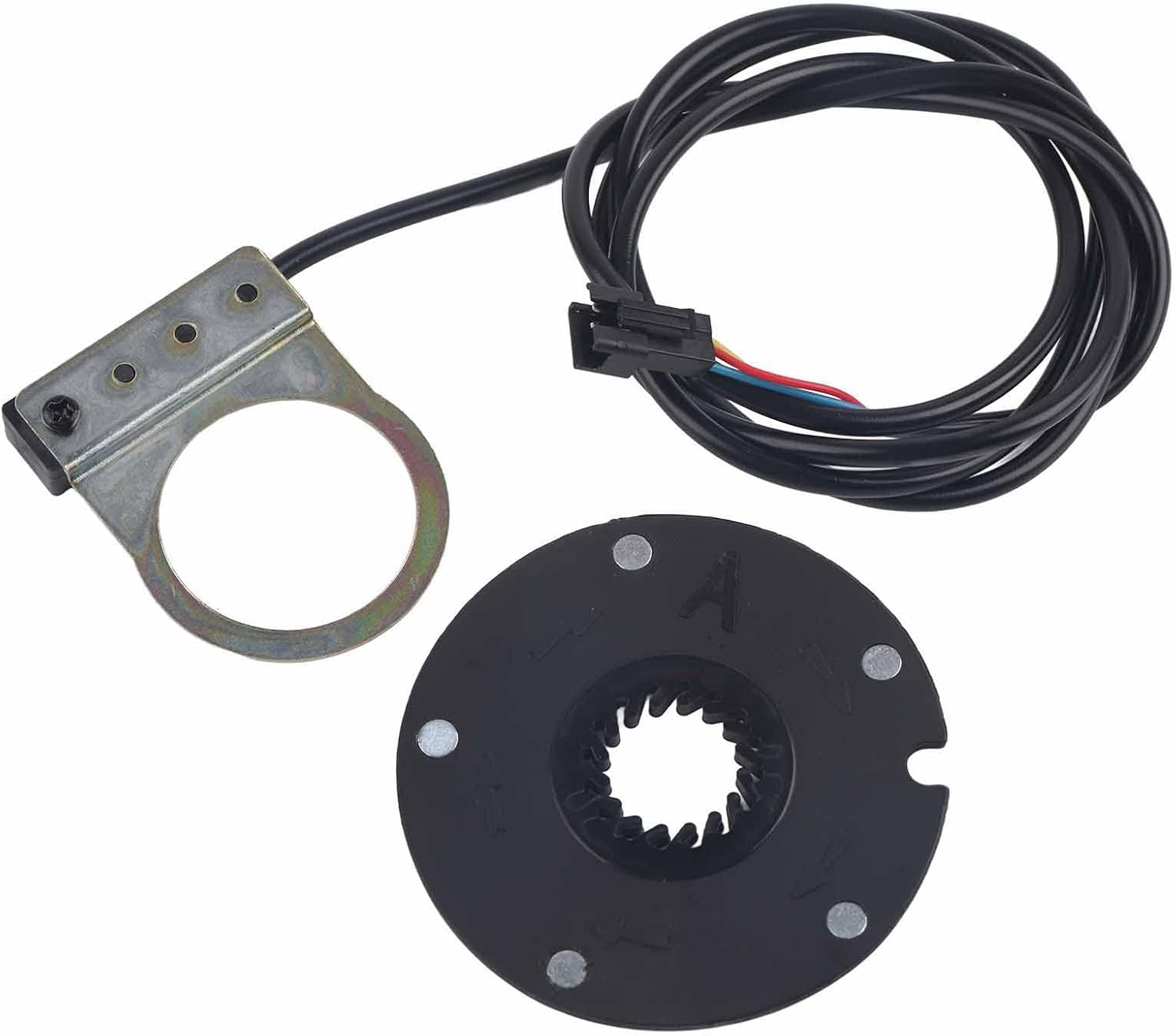
Image: Close-up of the magnetic disc, showing the central spline and magnet positions.
- Install the Magnetic Disc: Slide the magnetic disc onto the bottom bracket spindle. Ensure the side with the magnets faces the sensor unit. The disc should fit snugly against the bottom bracket.

Image: Another view of the magnetic disc, highlighting its design for spindle attachment.
- Mount the Hall Sensor: Attach the Hall sensor unit to the bicycle frame near the magnetic disc. The sensor should be positioned so that the magnets on the disc pass directly in front of the sensor's detection area with a small gap (typically 1-3mm). Use the included bracket or appropriate mounting hardware.

Image: The Hall sensor unit, showing its mounting bracket and electrical connector.
- Connect the Wiring: Connect the sensor's cable to the corresponding port on your electric bicycle's controller. Ensure the connection is secure and waterproof if applicable. Route the cable neatly along the frame using cable ties to prevent snagging or damage.

Image: Both the Hall sensor and magnetic disc components laid out, illustrating their relationship.
- Reassemble and Test: Reinstall any removed components (crank arm, bottom bracket). Reattach the battery and power on the electric bicycle. Rotate the pedals to verify that the pedal assist system engages correctly. Adjust the sensor's position if necessary to achieve proper detection.

Image: The Hall sensor and magnetic disc shown together, indicating how they interact when installed.
5. Operating Instructions
The Haofy Pedal Assist Sensor works in conjunction with your electric bicycle's controller to provide assistance based on your pedaling activity.
- Activation: Once installed and connected, the sensor automatically detects pedal rotation. When you begin pedaling, the sensor sends a signal to the e-bike controller.
- Assistance Levels: The level of assistance provided is typically controlled by your e-bike's display unit or control panel. Refer to your e-bike's main manual for adjusting assist levels.
- Smooth Engagement: The 1:1 assist system ensures a smooth and natural power delivery, making your ride feel effortless.
- Disengagement: Assistance will cease when you stop pedaling or apply the brakes (if your e-bike has brake cut-off sensors).
6. Maintenance
Regular maintenance ensures the longevity and reliable performance of your pedal assist sensor.
- Cleaning: Periodically wipe the sensor and magnetic disc with a clean, damp cloth to remove dirt and debris. Avoid using harsh chemicals or abrasive materials.
- Inspection: Regularly check the sensor's mounting for tightness and ensure the cable is not pinched or damaged. Verify that the gap between the sensor and the magnetic disc remains consistent.
- Cable Management: Ensure all cables are securely fastened and away from moving parts or potential snagging points.
- Environmental Protection: While the sensor is designed to be dustproof and anti-corrosion, prolonged exposure to extreme weather conditions should be minimized.
7. Troubleshooting
If you encounter issues with your pedal assist sensor, refer to the following common problems and solutions:
| Problem | Possible Cause | Solution |
|---|---|---|
| No pedal assist |
|
|
| Intermittent assist |
|
|
| Assist engages without pedaling |
|
|
8. Specifications
| Attribute | Detail |
|---|---|
| Brand | Haofy |
| Model Number | Haofyo7tri8pa5y |
| Type | Hall Sensor Pedal Assist System |
| Magnet Quantity | 5 PCs |
| Material | Steel |
| Dimensions (Magnetic Disc) | Dia. 6.5 cm / 2.56 inch |
| Weight (Approx.) | 50 g |
| Compatibility | Most electric bicycles on the market |
9. Warranty and Support
For warranty information and technical support, please refer to the following:
- Return Policy: This product is subject to a 30-day return/replacement policy from the date of purchase.
- Manufacturer: Haofy
- Contact Support: For further assistance, please contact the seller directly through the platform where the product was purchased or visit the official Haofy store page: Haofy Store.
Documents and downloads
Ask a question about this manual
Ask about setup, troubleshooting, compatibility, parts, safety, or missing instructions. Manuals+ will review the question and use this page’s manual context to help answer it.