
1. Product Overview
The Xoopar Octopus Gamma is a versatile 4-in-1 multi-connector USB hub with an integrated 3000mAh power bank. Designed for convenience and portability, it allows you to charge various devices simultaneously and provides a power boost when an external power source is unavailable. This product is made from recycled plastic and features a compact, lightweight design.

Image 1.1: The Xoopar Octopus Gamma with its four distinct connectors: Lightning, USB-C, Micro USB, and USB-A.

Image 1.2: Key features of the Octopus Gamma, including recycled plastic construction, readiness for use, dual charging capability, and its 4-in-1 multi-adapter functionality.
2. Setup
The Xoopar Octopus Gamma is designed for immediate use. No complex setup is required. Simply identify the appropriate connector for your device.
2.1 Identifying Connectors
The device features four types of connectors:
- Lightning: For Apple devices (iPhone, iPad, AirPods).
- USB-C: For modern Android phones, tablets, and other USB-C compatible devices.
- Micro USB: For older Android phones, power banks, and various accessories.
- USB-A: The standard USB connector for connecting to power adapters, computers, or other USB-A ports.
Image 2.1: Detailed view of the Octopus Gamma's connectors, clearly indicating Lightning, USB-C, Micro USB, and USB-A ports.
3. Operating Instructions
3.1 Charging Your Devices
- Identify the correct connector for your device (Lightning, USB-C, or Micro USB).
- Plug the appropriate connector into your device's charging port.
- Connect the USB-A end of the Octopus Gamma to a power source. This can be a wall adapter, computer USB port, or car charger.
- Your device will begin charging. The Octopus Gamma can charge up to two devices simultaneously if connected to a sufficient power source.

Image 3.1: The Octopus Gamma actively charging a smartphone, illustrating its function as a portable power source.
3.2 Using the Integrated Power Bank
The Octopus Gamma includes a 3000mAh internal battery for portable charging when no external power source is available.
- Ensure the internal power bank is charged (see Section 3.3).
- Plug the appropriate connector (Lightning, USB-C, or Micro USB) into your device.
- The Octopus Gamma will automatically begin supplying power from its internal battery to your device.
- The power bank can provide a significant boost to your smartphone's battery, helping to prevent power loss during travel or emergencies.
3.3 Recharging the Octopus Gamma Power Bank
The internal power bank of the Octopus Gamma recharges automatically when the USB-A connector is plugged into an external power source and you are simultaneously charging another device. This ensures the power bank is always ready for use.
- Connect the USB-A end of the Octopus Gamma to a wall adapter, computer, or other USB-A power source.
- Connect one of the output connectors (Lightning, USB-C, or Micro USB) to a device you wish to charge.
- The Octopus Gamma will charge your device and its internal power bank simultaneously.
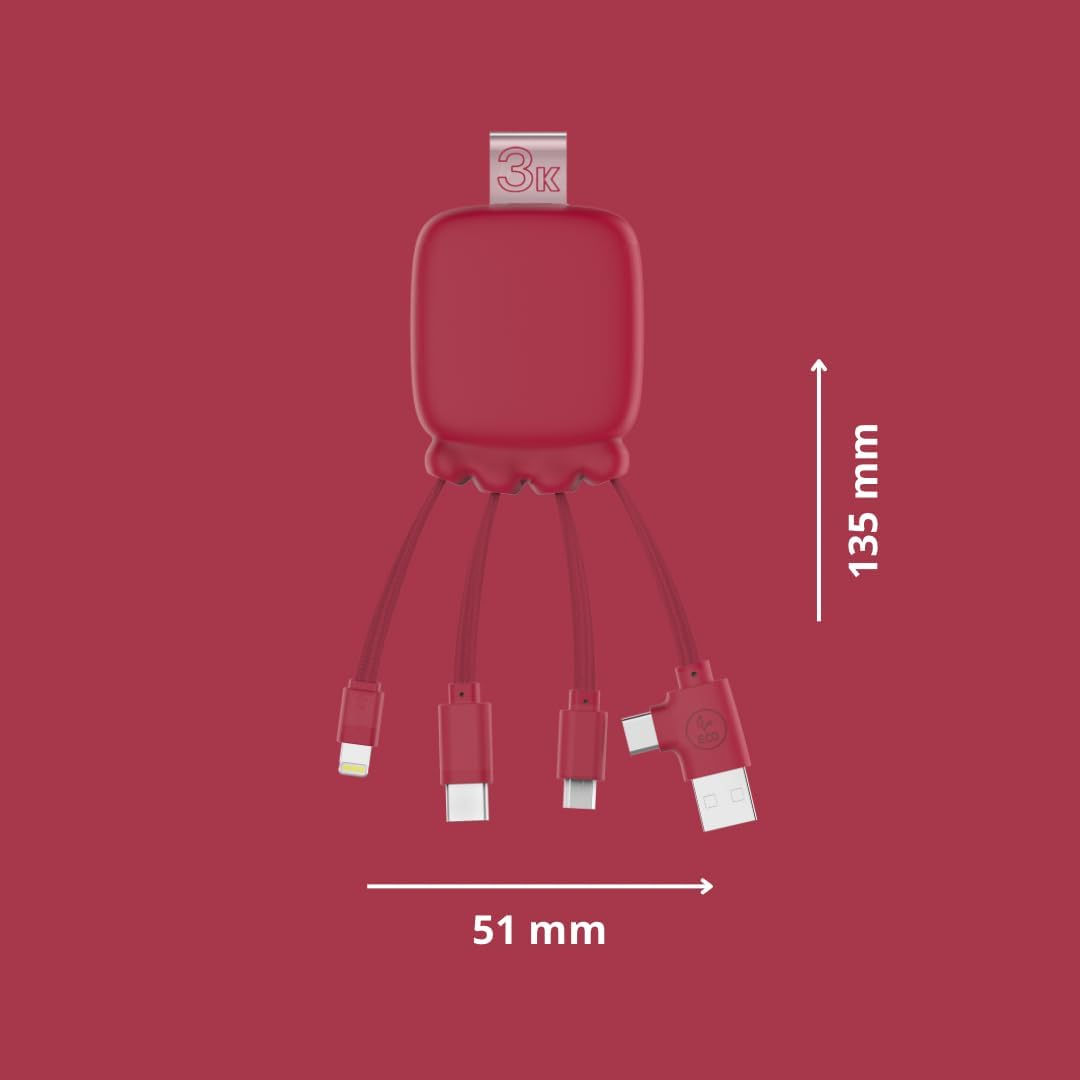
Image 3.2: The Octopus Gamma connected to a power strip, demonstrating simultaneous charging of both the connected device and the internal power bank.

Image 3.3: The Octopus Gamma in a typical use environment, connected to a laptop, alongside a keyboard and smartphone.
4. Maintenance
To ensure the longevity and optimal performance of your Xoopar Octopus Gamma, follow these maintenance guidelines:
- Cleaning: Wipe the device with a soft, dry cloth. Avoid using harsh chemicals or abrasive materials.
- Storage: Store the device in a cool, dry place away from direct sunlight and extreme temperatures.
- Handling: Avoid excessive bending or pulling of the cables to prevent damage to the connectors or internal wiring.
- Battery Care: For optimal battery life, avoid fully discharging the internal power bank frequently. Recharge it regularly.
5. Troubleshooting
| Problem | Possible Cause | Solution |
|---|---|---|
| Device not charging. | Incorrect connector used. Power source issue. Internal power bank depleted. | Ensure the correct connector is firmly plugged into your device. Try a different USB-A port or wall adapter. Recharge the Octopus Gamma by connecting its USB-A end to a power source. |
| Slow charging. | Low power output from source. Charging multiple devices. | Use a higher-wattage power adapter. Charge devices one at a time for faster charging. |
| Octopus Gamma not recharging. | Faulty USB-A connection. Power source issue. | Ensure the USB-A connector is securely plugged into a working power source. Try a different USB-A port or wall adapter. |
6. Specifications
| Feature | Detail |
|---|---|
| Model Name | Gamma RP |
| Model Number | XP61075 |
| Connectors | Lightning, Micro USB, USB Type A, USB Type C |
| Power Bank Capacity | 3000 mAh |
| Battery Type | Lithium-polymer |
| Weight | 70 Grams |
| Dimensions (L x W x H) | 13.5 x 5.1 x 1.7 cm |
| Special Features | Fast Charging, Lightweight, Recycled Plastic Construction |
| Compatible Devices | Smartphones, Tablets, Laptops, Speakers, Earphones (Universal compatibility) |
| Manufacturer | XOOPAR |
| Country of Origin | China |

Image 6.1: Dimensions of the Octopus Gamma, showing its compact size.
7. Warranty and Support
7.1 Warranty Information
The Xoopar Octopus Gamma (Model XP61075) comes with a 2-year manufacturer's warranty. This warranty covers defects in materials and workmanship under normal use. Please retain your proof of purchase for warranty claims.
The warranty does not cover:
- Damage caused by misuse, abuse, accident, or neglect.
- Unauthorized repairs or modifications.
- Normal wear and tear.
7.2 Customer Support
For technical assistance, warranty claims, or any questions regarding your Xoopar Octopus Gamma, please contact Xoopar customer support through their official website or the retailer where the product was purchased.
You can visit the official Xoopar store for more information: Xoopar Official Store
