
Anchilly 758226302926
Heavy Duty Power Switch Box Instruction Manual
Brand: Anchilly | Model: 758226302926
Introduction
This manual provides detailed instructions for the safe and effective use of your Anchilly Heavy Duty Power Switch Box. Designed for industrial and automotive applications, this 30A, 3.7Kw ON/OFF push button control switch box offers reliable power management. Please read this manual thoroughly before installation and operation to ensure proper functionality and safety.
Product Overview and Features
The Anchilly Heavy Duty Power Switch Box is a robust control unit built for demanding environments. Its key features include:
- 1PC ON OFF Power Push Button Control Switch Box 30A 3.7Kw
- Voltage/Current: 380VAC 30A
- Easy ON/OFF push button control for convenient operation
- Durable construction with high-quality materials
- Total Size (Approx.): 105 x 63 x 54mm / 4.13" x 2.48" x 2.12" (L*W*H)

Figure 1: Front view of the Heavy Duty Power Switch Box, showing the red 'OFF' and black 'ON' push buttons clearly labeled. The grey metal casing indicates its robust design.
Setup and Installation
WARNING: Installation should only be performed by qualified personnel. Ensure all power is disconnected before beginning any wiring or installation work to prevent electric shock or damage to equipment.
Wiring Instructions
The switch box features screw terminals for secure electrical connections. Follow these steps for wiring:
- Open the switch box cover by unscrewing the retaining screws.
- Identify the input and output terminals. The switch is designed for 3-phase (3P) 30A 3.7KW applications.
- Carefully strip the insulation from your power cables to the appropriate length for the screw terminals.
- Insert the stripped wires into the corresponding terminals and tighten the screws firmly to ensure a secure connection. Avoid overtightening.
- Ensure no loose strands of wire are present that could cause a short circuit.
- Once wiring is complete, replace the cover and secure it with the screws.

Figure 2: Internal view of the switch box, revealing the robust screw terminals designed for secure electrical connections. The internal mechanism of the push buttons is also visible.
Mounting
The switch box is designed for surface mounting. It includes pre-drilled mounting holes with a diameter of 4mm (0.16"). Use appropriate fasteners (not included) for your mounting surface to secure the box firmly in place. Ensure the mounting location is stable, dry, and free from excessive vibration.
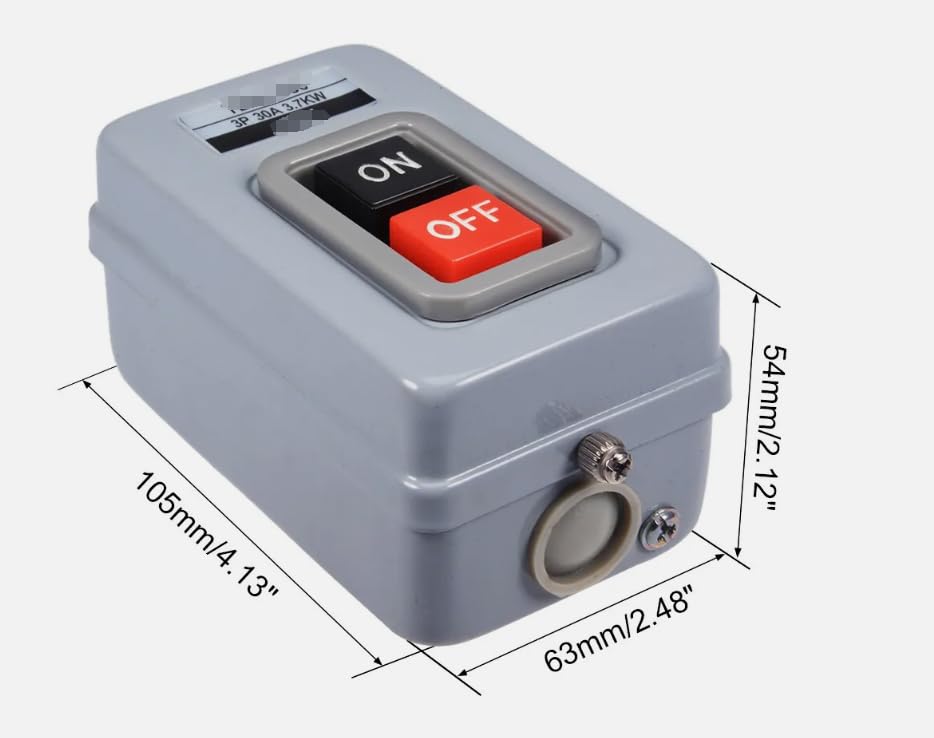
Figure 3: Dimensional drawing of the switch box, indicating its length (105mm/4.13"), width (63mm/2.48"), and height (54mm/2.12"). This image is useful for planning installation space.
Operating Instructions
Operating the Heavy Duty Power Switch Box is straightforward:
- To turn the connected device ON, firmly press the black button labeled "ON".
- To turn the connected device OFF, firmly press the red button labeled "OFF".
The push buttons provide a tactile response, indicating activation or deactivation of the power circuit.
Maintenance
To ensure the longevity and reliable performance of your power switch box, consider the following maintenance tips:
- Cleaning: Periodically wipe the exterior of the switch box with a clean, dry cloth. Avoid using abrasive cleaners or solvents.
- Inspection: Regularly inspect the wiring connections for any signs of loosening or corrosion. Ensure the mounting remains secure.
- Environmental Conditions: Ensure the switch box is not exposed to excessive moisture, dust, or extreme temperatures beyond its operating limits.
CAUTION: Always disconnect power before performing any internal inspection or maintenance.
Troubleshooting
If you encounter issues with your power switch box, refer to the following common problems and solutions:
- Device does not turn ON:
- Check the main power supply to the switch box.
- Verify all wiring connections are secure and correct.
- Ensure the 'ON' button is fully depressed.
- Device does not turn OFF:
- Ensure the 'OFF' button is fully depressed.
- Inspect the internal mechanism for any obstructions (only by qualified personnel with power disconnected).
- Switch box feels hot:
- Immediately disconnect power. This could indicate an overload or a faulty connection.
- Verify the connected load does not exceed the switch's 30A/3.7Kw rating.
- Check for loose or corroded wiring connections.
If problems persist after troubleshooting, contact a qualified electrician or the manufacturer for assistance.
Specifications
| Specification | Value |
|---|---|
| Operation Mode | Manual |
| Current Rating | 30 Amps |
| Operating Voltage | 380 Volts |
| Contact Type | Normally Open |
| Connector Type | Screw Terminal |
| Circuit Type | 1-way |
| Actuator Type | Push Button |
| Contact Material | Stainless Steel |
| Package Dimensions | 4.7 x 2.7 x 2 inches |
| Item Weight | 8.8 ounces |
| Model Number | 758226302926 |
| Manufacturer | Anchilly |
| Date First Available | July 31, 2023 |
Warranty and Support
Specific warranty information for this product is not provided within this manual. For details regarding warranty coverage, terms, and conditions, please refer to the product packaging or contact Anchilly customer support directly. For technical assistance or further inquiries, please reach out to the manufacturer's official support channels.
Ask a question about this manual
Ask about setup, troubleshooting, compatibility, parts, safety, or missing instructions. Manuals+ will review the question and use this page’s manual context to help answer it.