
LESHP 13703202A22
LESHP Home Security Camera User Manual
Model: 13703202A22
Introduction
This manual provides comprehensive instructions for the installation, operation, and maintenance of your LESHP Home Security Camera. This camera offers clear picture quality and easy installation, making it a practical battery-powered network camera for various surveillance needs.
Safety Information
Please read and understand all safety precautions before operating the device.
- Do not place the camera near high-temperature conditions.
- Do not dispose of the camera in fire.
- Ensure proper ventilation around the device.
- Use only the specified power adapter for charging.
- Keep out of reach of children.
Product Overview
The LESHP Home Security Camera is designed for both indoor and outdoor use, featuring a robust design and advanced functionalities.

Figure 1: Front view of the LESHP Home Security Camera, showing the lens and motion sensor.

Figure 2: Detailed views highlighting the camera lens, adjustable mounting bracket, and passive infrared (PIR) motion sensor.
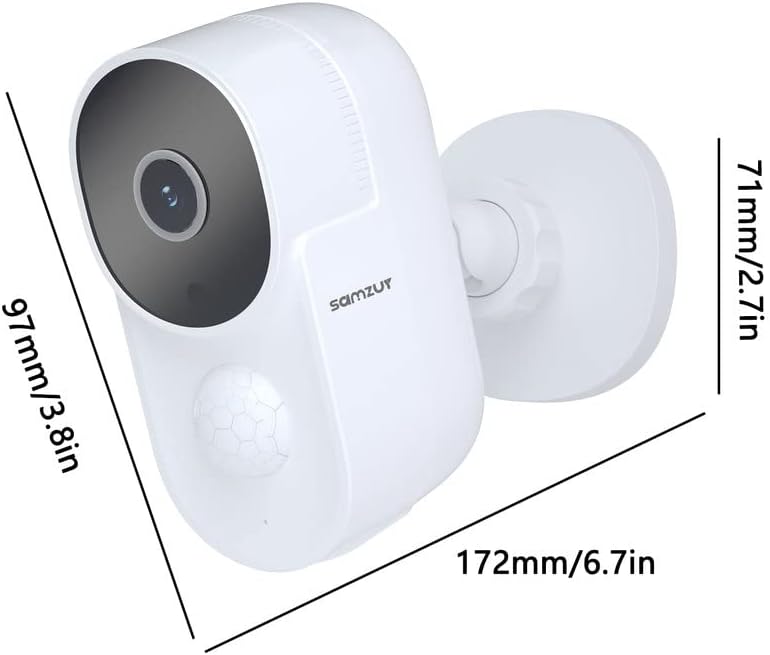
Figure 3: Dimensions of the camera, approximately 97mm (3.8in) in height, 71mm (2.7in) in width, and 172mm (6.7in) in length including the mount.
Key Features:
- Rechargeable Lithium Battery: Large capacity for extended battery life.
- Alarm Function: Supports human body detection for real-time and accurate alerts.
- Duplex Audio: Built-in microphone and speaker for clear two-way communication.
- Large Memory Support: Supports Security Digital card (up to 128GB) and cloud storage.
- Waterproof (IP65): Designed to withstand various weather conditions.
- Night Vision: Equipped with infrared light emitting diodes for clear vision in low light.
Specifications
| Feature | Detail |
|---|---|
| Image Sensor | 1/3" Color CMOS |
| Resolution | 1080P (1920*1080), 720P (1280*720) |
| Field of View | 120° |
| Focal Length | 2.5mm |
| Infrared Distance | 10 meters |
| Video Encoding | H.264 |
| Frame Rate | 25fps |
| Audio | Built-in microphone and speaker, PCM/G, two-way audio |
| Storage | Security Digital card (max 128G), Cloud storage |
| WIFI | 802.11b/g/n |
| Wireless Security | WEP, WPA, WPA2 |
| Remote Access | P2P |
| PIR Detection Range | 8 meters |
| Battery | 3.7V/10000mAh (2pcs 21700) |
| Battery Standby Time | 12 months |
| Battery Life (typical) | 5 months (10 triggers/day) |
| Power Supply | DC5V/1A |
| Working Temperature | -20°C to 50°C (-4°F to 122°F) |
| Working Humidity | 20% to 85% (non-condensing) |
| Waterproof Rating | IP65 |
| Dimensions | 60*54*106mm (2.36*2.13*4.17 inches) |
| Weight | 1.17 pounds |
Setup Guide
1. Charging the Battery
Before initial use, fully charge the camera's built-in 10000mAh lithium battery. Connect the camera to a DC5V/1A power source using the provided charging cable. The indicator light will show charging status (e.g., red for charging, blue for fully charged).

Figure 4: Illustration of the camera's large 10000mAh rechargeable battery capacity and its 2.4G Wi-Fi connectivity.
2. App Installation and Account Setup
Download the official LESHP security camera application from your smartphone's app store (compatible with Android and iOS devices). Follow the on-screen instructions to create an account and log in.
3. Connecting to Wi-Fi
- Open the app and select "Add Device" or similar option.
- Power on the camera. The indicator light will flash, indicating it's ready for pairing.
- Follow the app's instructions to connect the camera to your 2.4GHz Wi-Fi network. (Note: 5.0GHz Wi-Fi is not supported).
- Once connected, the indicator light will turn solid blue.
4. Mounting the Camera
The camera comes with a wall mount. Choose a suitable location for installation, ensuring a clear field of view and good Wi-Fi signal strength. Mark the drilling points, drill holes, insert wall plugs, and secure the mounting bracket with screws. Attach the camera to the bracket and adjust the angle as needed.

Figure 5: Examples of suitable installation locations for the camera, including residential homes and commercial buildings.
5. Inserting a Security Digital Card (Optional)
If you wish to store recordings locally, insert a Security Digital card (up to 128GB, not included) into the designated slot on the camera. Ensure the camera is powered off before inserting or removing the card.
Operating Instructions
1. Live View and Recording
Open the LESHP app on your smartphone. Select your camera from the device list to access the live video feed. From the live view interface, you can manually start/stop recording, take screenshots, and access playback of recorded footage.
2. Two-Way Audio Communication
The camera supports duplex audio, allowing you to communicate with visitors or deter intruders. While in live view, tap the microphone icon in the app to speak, and the sound will be transmitted through the camera's speaker. You will also hear audio from the camera's built-in microphone.

Figure 6: Demonstration of the two-way audio feature, enabling clear communication with individuals near the camera.
3. Motion Detection and Alerts
The camera features human body detection. When motion is detected within the PIR sensor's 8-meter range, the camera will automatically start recording and send an alert notification to your smartphone. You can adjust sensitivity settings within the app.
4. Night Vision
The camera automatically switches to infrared night vision mode in low-light conditions, providing clear black and white video up to 10 meters. This ensures continuous surveillance day and night.
5. Cloud Storage (Optional)
In addition to Security Digital card storage, the camera supports cloud storage services. Refer to the app for details on activating and managing cloud storage plans.
Maintenance
1. Battery Management
To maximize battery life, ensure the camera is fully charged before deployment. The battery life is approximately 5 months with 10 triggers per day. Recharge the camera when the battery level is low, indicated by the app or camera's indicator light.
2. Cleaning
Periodically clean the camera lens and body with a soft, dry cloth. Do not use harsh chemicals or abrasive cleaners. Ensure the camera is powered off before cleaning.
3. Weather Protection
The camera has an IP65 waterproof rating, meaning it is protected against dust and low-pressure water jets. While designed for outdoor use, avoid submerging the camera in water or exposing it to extreme weather conditions beyond its operating temperature range (-20°C to 50°C).

Figure 7: The camera's IP65 weatherproof rating ensures durability against various environmental elements like rain, snow, and extreme temperatures.
Troubleshooting
- Camera not connecting to Wi-Fi:
Ensure your Wi-Fi network is 2.4GHz. Check Wi-Fi signal strength at the camera's location. Restart your router and the camera. Re-enter Wi-Fi password carefully in the app.
- Poor image quality:
Clean the camera lens. Ensure there are no obstructions in front of the lens. Check network stability for live view issues. For night vision, ensure no strong light sources are directly facing the camera.
- Battery draining quickly:
Frequent motion detections and live view access can consume more battery. Reduce motion detection sensitivity if alerts are excessive. Ensure the camera is fully charged.
- No motion detection alerts:
Check motion detection settings in the app. Ensure the PIR sensor is not obstructed. Verify app notification permissions on your smartphone.
- Two-way audio not working:
Check microphone and speaker settings in the app. Ensure your phone's volume is up. Verify network connection stability.
Warranty and Support
This product is covered by a manufacturer's warranty. For specific warranty terms and conditions, please refer to the documentation included with your purchase or contact LESHP customer support directly. For technical assistance, troubleshooting not covered in this manual, or warranty claims, please visit the official LESHP website or contact their customer service department.
LESHP Official Store: Visit LESHP Store on Amazon