
BOTHSTAR YJ42
User Manual
Double Sided Keyless Door Knob Lock with Fingerprint and Keypad
Brand: BOTHSTAR | Model: YJ42
1. Introduction
Thank you for choosing the BOTHSTAR Double Sided Keyless Door Knob Lock. This advanced smart lock provides secure and convenient access control for both interior and exterior doors. With multiple unlocking methods including fingerprint, keypad code, and traditional key, it offers enhanced security and flexibility for homes, offices, and various other settings. This manual will guide you through the installation, setup, operation, and maintenance of your new smart doorknob.

Figure 1.1: BOTHSTAR Double Sided Keyless Door Knob Lock (Satin Nickel)
2. Important Safety Information
- Read all instructions carefully before installation and use.
- Do not attempt to disassemble or modify the lock. This may cause damage and void the warranty.
- Keep backup keys in a secure location outside the property.
- Ensure proper battery installation and replace batteries when the low battery voice prompt is activated.
- This product is designed for specific door thickness and backset. Verify compatibility before installation.
- While the lock is IPX6 waterproof, avoid prolonged submersion or direct high-pressure water spray.
3. Package Contents
Carefully unpack the box and ensure all components are present and in good condition. If any items are missing or damaged, please contact customer support.
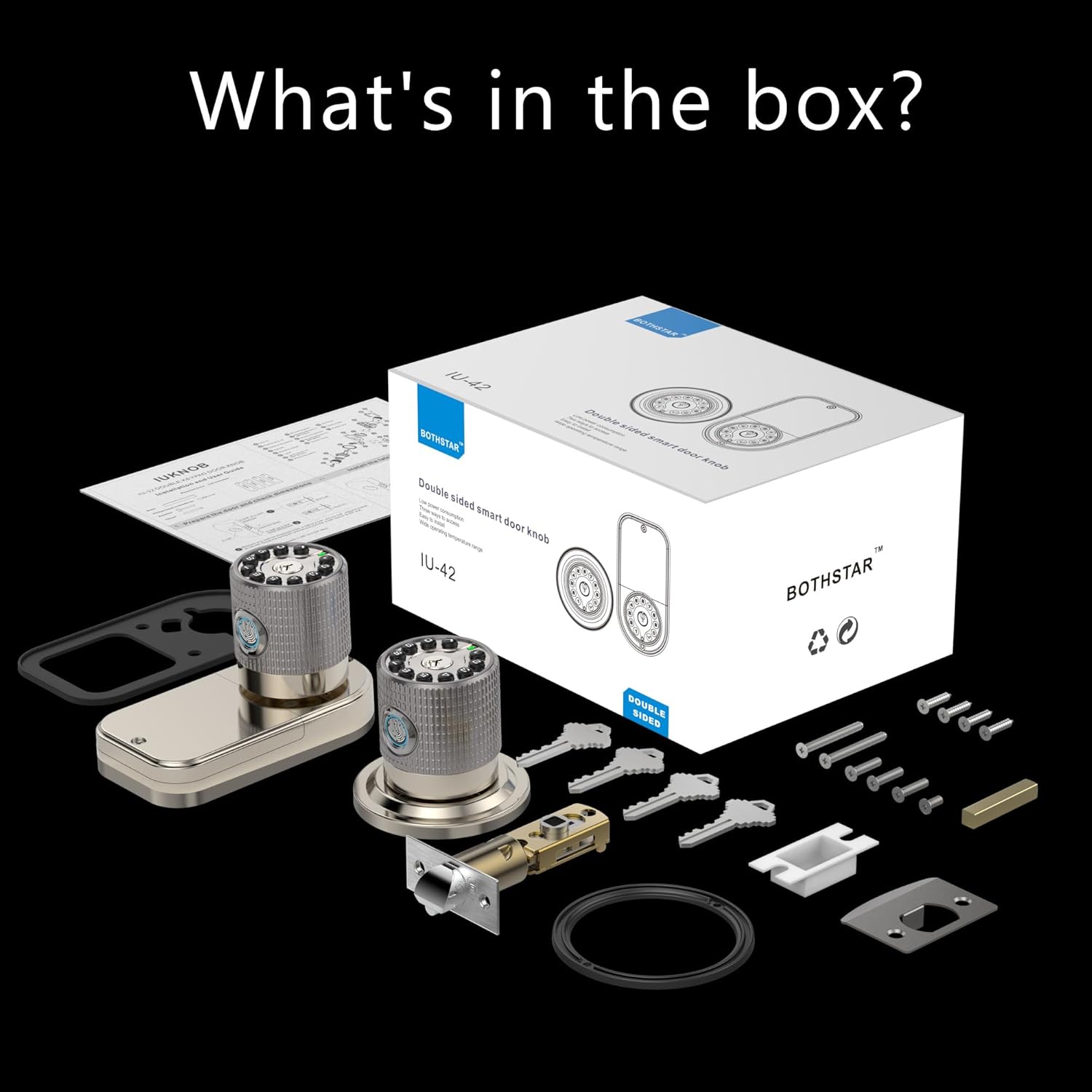
Figure 3.1: What's in the box?
- Double Sided Fingerprint Door Knob (Exterior)
- Double Sided Fingerprint Door Knob (Interior)
- Adjustable Latch (2-3/8" or 2-3/4")
- Strike Plate
- Mounting Screws and Hardware
- Physical Keys (Set of 4)
- Installation Template
- User Manual
4. Installation Guide
Before beginning installation, ensure your door meets the following specifications:
- Door Thickness: 1-1/4" to 3-7/8" (32mm to 98mm)
- Backset: Adjustable for 2-3/8" (60mm) or 2-3/4" (70mm)

Figure 4.1: Door thickness and latch dimensions
Installation Steps:
- Prepare the Door: If replacing an existing lock, remove it. Use the provided template to mark and drill holes if installing on a new door.
- Install the Latch: Insert the latch into the door edge. Ensure the latch bolt faces the correct direction (slanted side towards the door frame). Secure with screws.
- Install the Exterior Knob: Feed the cable from the exterior knob through the door hole. Align the knob with the latch and secure it.
- Install the Interior Knob: Connect the cable from the exterior knob to the interior knob. Align the interior knob with the mounting plate and secure it with screws.
- Insert Batteries: Open the battery cover on the interior knob and insert 4 AAA batteries (not included), ensuring correct polarity.
- Test Operation: After installation, test the mechanical operation of the latch and knobs.
5. Initial Setup and Programming
The BOTHSTAR smart lock offers multiple functions for enhanced security and convenience.

Figure 5.1: Multi-function & Security Features
5.1 Adding Fingerprints (Up to 100)
- Press the 'Set' button on the interior knob. The lock will prompt for administrator fingerprint.
- Place your finger on the fingerprint sensor. The lock will beep and prompt you to lift and place your finger multiple times for a complete scan.
- Once successfully registered, the lock will confirm with a voice prompt.
- Repeat for additional fingerprints.
5.2 Adding User Codes (Up to 50)
- Press the 'Set' button. Enter the administrator code (default is 123456) followed by '#'.
- Press '1' to add a user code.
- Enter your desired 6-10 digit user code, then press '#'.
- Re-enter the same user code and press '#' to confirm.
- The lock will confirm successful addition.
5.3 Setting Auto-Lock Function
The auto-lock feature can be set to automatically lock the door after a specified delay (2 seconds to 12 hours).
- Press the 'Set' button. Enter the administrator code followed by '#'.
- Press '3' to enter auto-lock settings.
- Enter the desired delay time in seconds (e.g., '5' for 5 seconds) or hours (e.g., '12H' for 12 hours), then press '#'.
- The lock will confirm the setting.
6. Operation
The BOTHSTAR smart lock provides convenient access from both sides of the door.

Figure 6.1: Double-sided access with multiple unlock methods
6.1 Unlocking with Fingerprint
- Place a registered finger on the fingerprint sensor.
- The lock will verify the fingerprint (approx. 0.25s) and unlock.
- Turn the knob to open the door.
6.2 Unlocking with Keypad Code
- Enter a registered user code on the keypad.
- Press the '#' key.
- The lock will verify the code and unlock.
- Turn the knob to open the door.
6.3 Unlocking with Physical Key
- Insert the physical key into the keyhole.
- Turn the key to unlock the door.
- Turn the knob to open the door.
6.4 Locking the Door
- Automatic Lock: If auto-lock is enabled, the door will lock automatically after the set delay once closed.
- Manual Lock: Press and hold the '#' key on the keypad for 2 seconds to manually lock the door.
7. Maintenance
7.1 Battery Replacement
- The lock will provide a voice prompt when batteries are low.
- Open the battery cover on the interior knob.
- Replace all 4 AAA batteries with new, high-quality alkaline batteries. Ensure correct polarity.
- In case of completely dead batteries, the lock can be temporarily powered via a 5V USB-C cord for emergency access.
7.2 Cleaning
- Clean the lock surface with a soft, damp cloth.
- Do not use abrasive cleaners, solvents, or harsh chemicals, as these can damage the finish and electronic components.
- Keep the fingerprint sensor clean and dry for optimal performance.
8. Troubleshooting
| Problem | Possible Cause | Solution |
|---|---|---|
| Lock does not respond. | Dead batteries. | Replace batteries. Use USB-C for emergency power. |
| Fingerprint not recognized. | Finger is wet/dirty, sensor is dirty, or fingerprint not registered correctly. | Clean finger and sensor. Re-register fingerprint if necessary. |
| Keypad code not working. | Incorrect code entered, code not registered, or keypad malfunction. | Verify code. Re-register code. Check for keypad damage. |
| Lock does not auto-lock. | Auto-lock feature disabled or incorrect delay set. | Check auto-lock settings and enable/adjust as needed. |
| Lock makes unusual noises. | Mechanical obstruction or internal issue. | Check for obstructions around the latch. If problem persists, contact support. |
9. Product Specifications
| Feature | Specification |
|---|---|
| Brand | BOTHSTAR |
| Model Name | YJ42 LOCK |
| Lock Type | Combination Lock |
| Special Features | Double sided fingerprint, Double sided keypad |
| Material | Zinc Alloy, Metal Handle |
| Color | Satin Nickel |
| Product Dimensions | 8 x 4 x 4 inches |
| Item Weight | 3.58 pounds (1.63 Kilograms) |
| Door Thickness Compatibility | 1-1/4" to 3-7/8" |
| Latch Bolt Specifications | 2-3/8" or 2-3/4" adjustable |
| Power Source | 4 x AAA Batteries (not included) |
| Emergency Power | 5V USB-C |
| Waterproof Rating | IPX6 |
| Operating Temperature | -22°F to +176°F (-30°C to +80°C) |
| Fingerprint Capacity | 100 |
| User Code Capacity | 50 |
10. Warranty and Support
BOTHSTAR provides a comprehensive warranty and dedicated customer support for your smart lock.
Warranty Information:
- Free Replacement: Enjoy a free replacement for your product within 1 year from the date of purchase.
- Lifetime After-Sales Customer Service: We are committed to providing support for the lifetime of your product.
Technical Support:
For any technical assistance, troubleshooting, or warranty claims, please contact our 24/7 online technical support. Refer to the contact information provided on the product packaging or the official BOTHSTAR website.
Related documentsYJ42

Ask a question about this manual
Ask about setup, troubleshooting, compatibility, parts, safety, or missing instructions. Manuals+ will review the question and use this page’s manual context to help answer it.