Introduction
This manual provides detailed instructions for the safe and efficient operation of your Haisito P30 30 Amp Smart Battery Charger. Please read this manual thoroughly before use and retain it for future reference.
Product Overview
The Haisito P30 is a versatile 6V/12V/24V smart battery charger, maintainer, and desulfator designed for various battery types, including Lithium, LiFePO4, and Lead-Acid (AGM, Gel, SLA, MF, Flooded, VRLA, Wet batteries). It features one-button start, adjustable current levels, pulse repair mode, trickle charge function, and multiple safety protections.

Image: The Haisito P30 Smart Battery Charger with its digital display and battery clamps.
Safety Information
Always prioritize safety when operating battery charging equipment. Failure to follow safety guidelines can result in injury or damage to property.
- Ensure proper ventilation during charging to prevent gas buildup.
- Wear eye protection and gloves when handling batteries.
- Do not smoke or allow sparks or flames near the battery or charger.
- Connect the charger to the battery terminals correctly (positive to positive, negative to negative) before plugging into a power outlet.
- Disconnect the power cord from the outlet before disconnecting the battery clamps.
- Avoid overcharging; the P30 features automatic full charge stop protection.
- The charger includes built-in protections against overvoltage, short circuit, overcurrent, and overheating.
Setup
- Unpack the Charger: Remove the Haisito P30 charger and all accessories from the packaging.
- Inspect for Damage: Check the charger, cables, and clamps for any signs of damage. Do not use if damaged.
- Connect Battery Clamps: Plug the battery clamp cable into the designated port on the charger. Ensure a secure connection.
- Connect Power Cable: Plug the AC power cable into the charger.
- Prepare Battery: Ensure the battery terminals are clean and free of corrosion.

Image: The Haisito P30 charger demonstrating its portable design with foldable handles, storage clips for cables, and integrated harness storage.
Operating Instructions
1. Connecting to a Battery
- Connect the red positive (+) clamp to the positive (+) battery terminal.
- Connect the black negative (-) clamp to the negative (-) battery terminal.
- Plug the charger's AC power cable into a suitable electrical outlet. The charger will display "OFF" until connected to a battery.
- The charger will automatically detect the battery voltage (6V, 12V, or 24V) and begin the charging process.
Video: A demonstration of connecting the Haisito Smart Battery Charger to a battery, showing the automatic detection of voltage and the display of charging information.
2. Selecting Charging Mode and Current
The P30 charger features a one-button start and a clear LCD display. Use the "Mode Selection" button to cycle through different battery types and adjust the charging current.
- Battery Types: The charger supports Lithium, LiFePO4, and Lead-Acid (AGM/GEL/SLA/MF/FLOODED/VRLA/Wet) batteries. The charger automatically identifies the battery type.
- Adjustable Current: For 12V batteries, you can select from LOW (3A), MEDIUM (15A), or HIGH (30A) charging currents. For 6V and 24V batteries, the current adjusts automatically (6V/10A Max, 24V/16A Max). Select the appropriate current based on your battery's capacity and charging requirements.

Image: The Haisito P30 charger's display showing the three-speed current selection (Low 3A, Medium 15A, High 30A) and the Repair Mode option.
3. Understanding the LCD Display
The large LCD provides real-time information about the charging process:
- Charge Current: Displays the current charging amperage.
- Charge Voltage: Shows the current battery voltage.
- Battery Voltage: Indicates the detected battery voltage (6V, 12V, 24V).
- Charge Quantity: Displays the amount of charge delivered (AH).
- Inside Temperature: Shows the internal temperature of the charger.
- FUL: Indicates the battery is fully charged.
- OFF: Indicates the charger is powered on but not connected to a battery.
- End: Indicates the repair process has ended.

Image: A close-up of the Haisito P30's LCD display, showing various charging parameters like charge current, voltage, temperature, and status indicators.
Maintenance Functions
1. Trickle Charge & Maintainer
Once a battery is fully charged, the P30 automatically switches to trickle charge mode. This function maintains the battery at an optimal charge level without overcharging, making it suitable for long-term storage and battery maintenance.
2. Pulse Repair Mode (Desulfator)
The Pulse Repair mode is designed to activate and restore older, sulfated batteries. This process can help improve battery performance and extend its lifespan. To use, select the "Repair" mode on the charger. The display will show "End" when the repair process is complete.
Troubleshooting
- Charger displays "OFF" when connected to battery: Ensure battery clamps are securely connected to the correct terminals (positive to positive, negative to negative). Check if the AC power cable is properly plugged into the outlet.
- Charging not starting: Verify the battery type is compatible with the charger. Ensure the battery is not severely damaged or completely dead (below minimum voltage for detection).
- Charger overheating: The charger has built-in temperature protection. If it overheats, it will reduce current or stop charging. Ensure adequate ventilation around the charger.
- Display shows error code: Refer to the specific error code in the full product manual (if available) or contact customer support.
Specifications
- Model: H-30 (P30)
- Input Voltage: 100-240V AC
- Output Voltage: 6V / 12V / 24V DC (Automatic Detection)
- Max Output Current: 6V/10A, 12V/30A, 24V/16A
- Adjustable Current (12V): LOW (3A), MEDIUM (15A), HIGH (30A)
- Supported Battery Types: Lithium, LiFePO4, Lead-Acid (PB/AGM/GEL/EFB, MF, FLOODED, VRLA, SLA, Wet batteries)
- Operating Temperature: -10°C (14°F) to 40°C (104°F)
- Protection Features: Temperature protection, low voltage protection, overvoltage protection, short circuit protection, overcurrent protection, electrostatic spark protection, reverse polarity protection, full charged stop protection.
- Product Dimensions: 8.4 x 10.4 x 6 inches
- Item Weight: 3.54 pounds
- Certifications: UL
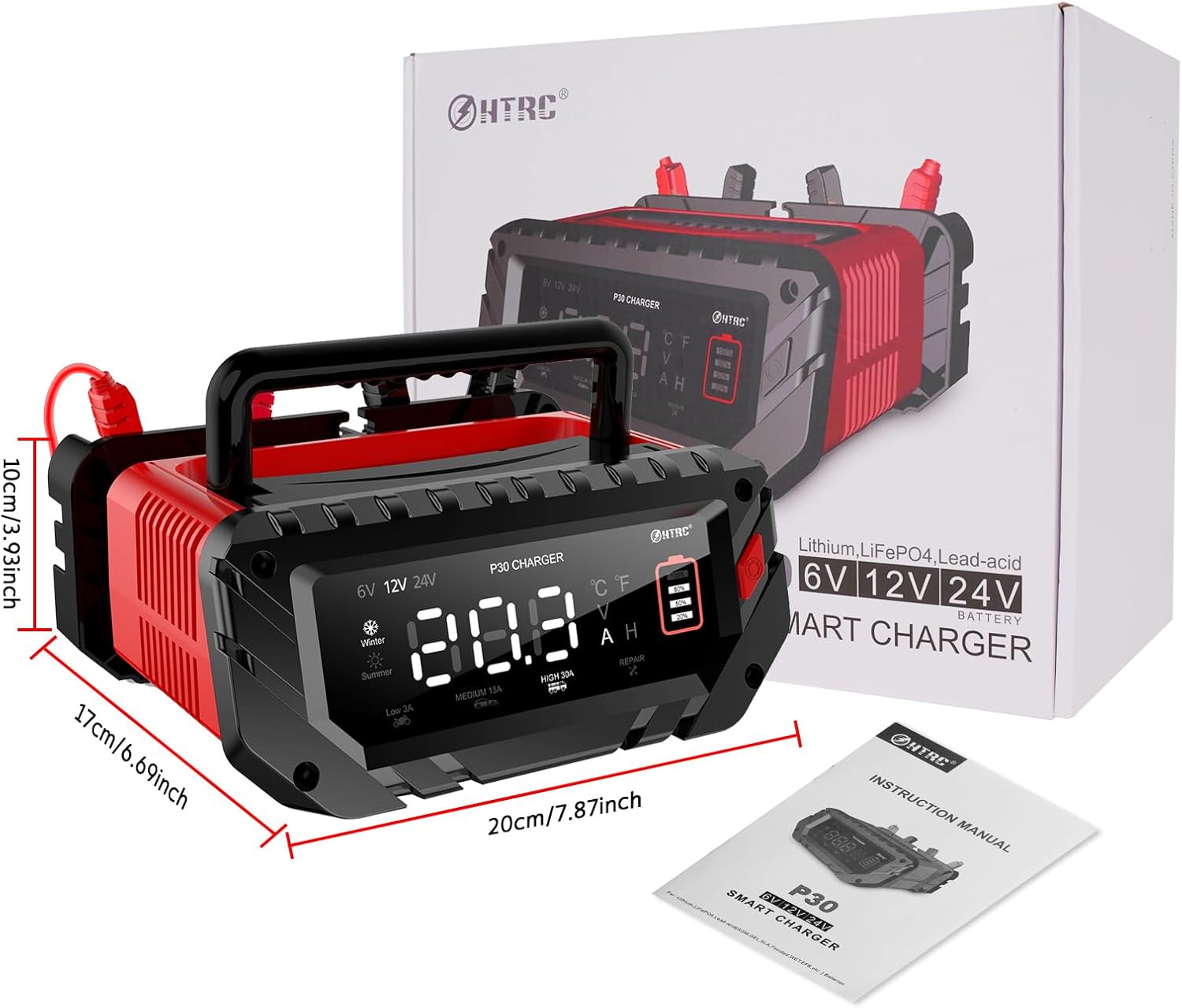
Image: The Haisito P30 charger shown with its packaging and instruction manual, highlighting its compact dimensions.
Warranty and Support
For warranty information or technical support, please refer to the contact details provided in your product packaging or visit the official Haisito website. Protection plans are available for purchase separately.
Manufacturer: Haisito
Date First Available: August 3, 2023


