
1. Introduction
Thank you for choosing the DYNASONIC Dynapro 12 Portable Audio System. This manual provides essential information for the safe and efficient operation of your device. Please read it thoroughly before use and retain it for future reference.

Image 1.1: Front view of the DYNASONIC Dynapro 12 Portable Audio System.
2. Safety Information
To ensure safe operation and prevent damage, observe the following precautions:
- Do not expose the unit to rain or moisture.
- Do not block ventilation openings.
- Avoid placing the unit near heat sources or in direct sunlight.
- Use only attachments/accessories specified by the manufacturer.
- Disconnect the power cord during lightning storms or when unused for long periods.
- Refer all servicing to qualified service personnel.
3. Package Contents
Verify that all items are present in the package:
- DYNASONIC Dynapro 12 Portable Audio System
- Wireless Microphone
- Wired Microphone
- Tablet Stand
- Remote Control
- Charging Cable

Image 3.1: The Dynapro 12 speaker shown with its included accessories.
4. Product Overview
The DYNASONIC Dynapro 12 is a versatile portable audio system designed for various applications. It features a 12-inch speaker, integrated wheels, and an extendable handle for easy transport.

Image 4.1: The Dynapro 12 features an extendable handle and wheels for convenient portability.
5. Setup
5.1 Initial Charging
Before first use, fully charge the internal battery using the provided charging cable. Connect the cable to the power input on the rear panel and plug it into a standard electrical outlet. The charging indicator will illuminate.
5.2 Connecting Devices
The rear panel provides various input options for audio sources and microphones.

Image 5.1: Detailed view of the rear control panel with inputs for USB, SD, microphones, and instruments.
5.3 Attaching the Tablet Stand
The included tablet stand can be mounted on top of the speaker for convenient viewing of mobile devices.
- Locate the mounting points on the top of the speaker.
- Securely attach the tablet stand to these points.
- Place your smartphone or tablet into the stand.

Image 5.2: The Dynapro 12 with a tablet securely placed on the integrated stand.
6. Operating Instructions
6.1 Power On/Off
Press the power button on the rear panel to turn the unit on or off.
6.2 Bluetooth Connectivity
- Turn on the Dynapro 12.
- Activate Bluetooth on your mobile device.
- Search for 'DYNASONIC' in your device's Bluetooth settings.
- Select 'DYNASONIC' to pair. A confirmation sound will indicate successful pairing.
6.3 USB/SD Playback
- Insert a USB drive or SD card into the corresponding slot on the rear panel.
- The system will automatically switch to USB/SD mode and begin playing compatible audio files.
- Use the control buttons on the rear panel or remote control to navigate tracks and adjust volume.
6.4 FM Radio
- Press the 'Mode' button on the rear panel or remote control to select FM Radio mode.
- Press the 'Play/Pause' button to initiate an automatic scan for available stations.
- Use the 'Previous/Next' buttons to switch between saved stations.
6.5 Microphone Usage
Connect the wired microphone to the designated input. For the wireless microphone, ensure it is powered on and paired according to its specific instructions. Adjust microphone volume and echo effects using the controls on the rear panel.

Image 6.1: The Dynapro 12 can be used with instruments like guitars.
6.6 TWS (True Wireless Stereo) Function
The TWS function allows you to pair two Dynapro 12 speakers for a stereo audio experience.
- Ensure both Dynapro 12 speakers are powered on and in Bluetooth mode, but not connected to any device.
- On one speaker (this will be the master), press and hold the TWS button (refer to the rear panel diagram for location).
- The speakers will attempt to pair with each other. A confirmation sound will indicate successful TWS pairing.
- Now, connect your mobile device to the master speaker via Bluetooth. Audio will play in stereo through both speakers.

Image 6.2: Visual representation of two Dynapro 12 speakers connected via TWS for stereo sound.

Image 6.3: The Dynapro 12 is suitable for various social gatherings and events.
7. Maintenance
Proper maintenance ensures the longevity of your audio system:
- Cleaning: Use a soft, dry cloth to clean the exterior. Do not use abrasive cleaners or solvents.
- Storage: Store the unit in a cool, dry place away from direct sunlight and extreme temperatures.
- Battery Care: For optimal battery life, avoid fully discharging the battery frequently. Charge it regularly, even if not in use for extended periods.
8. Troubleshooting
If you encounter issues, refer to the following table:
| Problem | Possible Cause | Solution |
|---|---|---|
| No power | Battery discharged; Power cable not connected | Charge the battery; Ensure power cable is securely connected |
| No sound | Volume too low; Incorrect input mode; Device not paired (Bluetooth) | Increase volume; Select correct input mode; Re-pair Bluetooth device |
| Bluetooth connection unstable | Device too far; Interference | Move device closer; Avoid obstacles; Turn off other wireless devices |
| Microphone not working | Microphone off; Volume too low; Incorrect input | Ensure microphone is on; Increase microphone volume; Check microphone input connection |
9. Specifications
Detailed technical specifications for the DYNASONIC Dynapro 12:
| Feature | Specification |
|---|---|
| Model Number | DYNAPRO-12 |
| Brand | DYNASONIC |
| Power Output | 700 Watts |
| Speaker Type | Multimedia |
| Connectivity Technology | Bluetooth, USB |
| Special Features | TWS Technology, FM Radio, USB/SD Playback, Microphone Inputs |
| Recommended Use | Smartphone, Tablet |
| Frequency Response | 30 KHz |
| Product Dimensions (L x W x H) | 40 x 61 x 36 cm |
| Item Weight | 8 Kilograms |
| Battery | 1 Lithium-ion (included) |
| Material | Polyvinyl Chloride (PVC) |
| Color | Black |
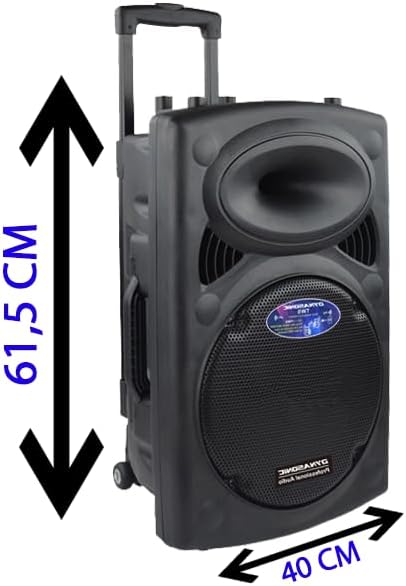
Image 9.1: Dimensions of the Dynapro 12 speaker.
10. Warranty and Support
DYNASONIC products are designed for reliability and performance. For warranty information, please refer to the documentation included with your purchase or visit the official DYNASONIC website. For technical support or service inquiries, please contact our customer service team through the contact details provided on the product packaging or website.