Introduction
The KETOTEK KT3400-US is a multi-functional digital humidity and temperature controller designed to provide precise environmental management. This device allows you to control humidifiers, dehumidifiers, heaters, and coolers based on set humidity and temperature parameters. It is suitable for a wide range of applications including greenhouses, mushroom cultivation, incubators, reptile enclosures, and general household use.
Key Features:
- Four Operation Modes: Humidification, Dehumidification, Heating, Cooling.
- Temperature and Humidity Alarm Function.
- Temperature and Humidity Calibration.
- Data Memory Function (retains settings after power failure).
- Switchable Temperature Unit: ℃ / ℉.
- Key Tone Settings.
- Fault Indication Function.
Product Overview

Front view of the KETOTEK KT3400-US Humidity Controller, showing the main unit with integrated power outlet and the external humidity/temperature sensor.
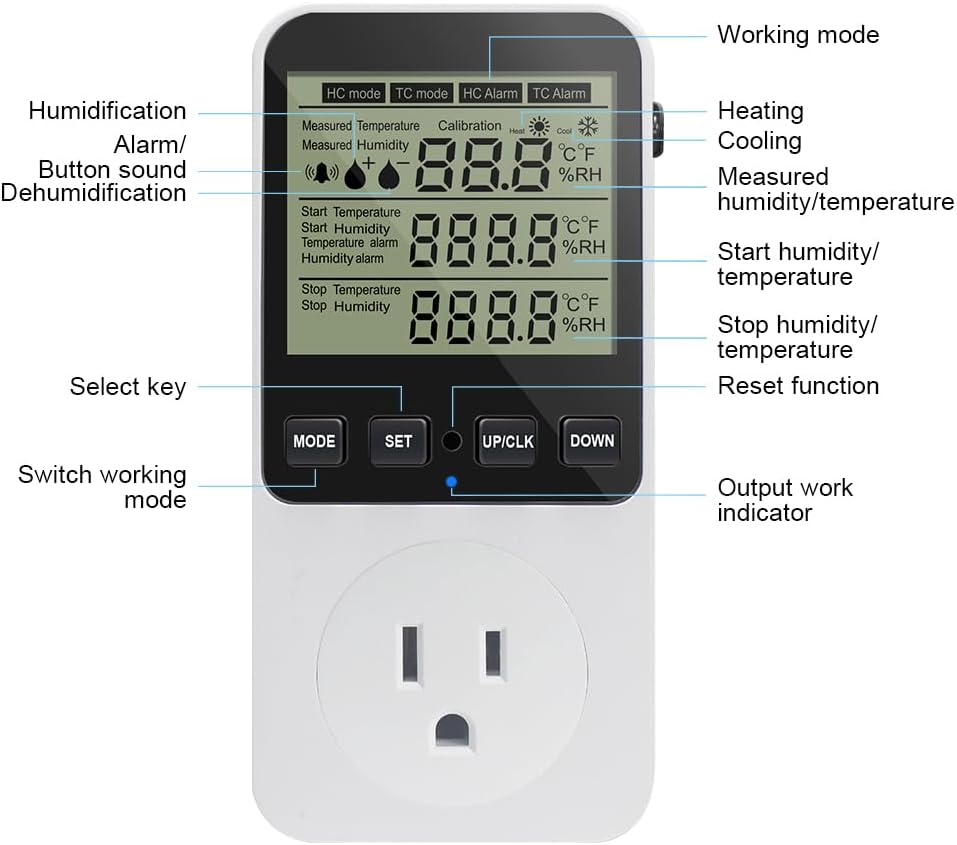
Detailed diagram illustrating the display elements and control buttons of the KT3400-US controller. Key elements include the working mode indicator, measured humidity/temperature, start/stop humidity/temperature, and control buttons (MODE, SET, UP/CLK, DOWN).
The controller consists of a main unit with a digital display and an integrated power outlet, and an external sensor for accurate humidity and temperature readings. The display shows current readings, set points, and operational status. The buttons on the front panel allow for easy navigation and setting adjustments.
Specifications
| Feature | Detail |
|---|---|
| Model Number | KT3400-US |
| Voltage | 120 Volts |
| Humidity Control Range | 20% ~ 95% RH |
| Temperature Control Range | -10℃ ~ 50℃ / 14℉ ~ 122℉ |
| Display Type | LCD |
| Item Weight | 9.1 ounces |
| Package Dimensions | 6.14 x 3.27 x 3.27 inches |
| Material | ABS |
| Country of Origin | China |
Setup
Follow these steps for initial setup of your KETOTEK Humidity Controller:
- Unpack the Device: Carefully remove the controller and sensor from its packaging.
- Connect the Sensor: The external humidity and temperature sensor is permanently attached to the main unit. Ensure the sensor cable is not damaged.
- Position the Sensor: Place the sensor in the area where you wish to monitor and control humidity/temperature. Ensure it is not directly exposed to water or extreme conditions that could affect its readings. The sensor cable length is approximately 300cm (9.8 feet).
- Plug in the Controller: Insert the controller's plug into a standard 120V AC power outlet. The display will illuminate, indicating the device is powered on.
- Connect Appliance: Plug your humidifier, dehumidifier, heater, or cooler into the outlet on the front of the controller.

Diagram showing the physical dimensions of the controller and its external sensor, including the sensor cable length.

An example of the controller in operation, with the sensor placed inside a terrarium to regulate its internal environment.
Operating Modes
The KT3400-US offers four distinct operating modes to suit various environmental control needs:
- Humidification Mode (HC mode): Used to increase humidity. The connected device (humidifier) will turn on when the measured humidity falls below the 'Start Humidity' setting and turn off when it reaches the 'Stop Humidity' setting.
- Dehumidification Mode (HC mode): Used to decrease humidity. The connected device (dehumidifier) will turn on when the measured humidity rises above the 'Start Humidity' setting and turn off when it falls to the 'Stop Humidity' setting.
- Heating Mode (TC mode): Used to increase temperature. The connected device (heater) will turn on when the measured temperature falls below the 'Start Temperature' setting and turn off when it reaches the 'Stop Temperature' setting.
- Cooling Mode (TC mode): Used to decrease temperature. The connected device (cooler) will turn on when the measured temperature rises above the 'Start Temperature' setting and turn off when it falls to the 'Stop Temperature' setting.

Visual representation of the display for Temperature Control, Temperature Alarm, Humidity Control, and Humidity Alarm modes.
To switch between modes, press the MODE button. The display will cycle through the available modes (HC mode, TC mode, HC Alarm, TC Alarm).
Settings and Calibration
Setting Start and Stop Values:
- Press the SET button once. The 'Start Humidity' or 'Start Temperature' value will flash. Use the UP/CLK or DOWN buttons to adjust the value.
- Press SET again to move to the 'Stop Humidity' or 'Stop Temperature' value. Adjust using UP/CLK or DOWN.
- Press SET a third time to confirm and save the settings.
Humidity/Temperature Calibration:
- To perform real-time calibration, press and hold the UP/CLK and MODE buttons simultaneously.
- The display will show the calibration value. Use UP/CLK or DOWN to adjust the offset. Humidity correction range: -10~10%RH. Temperature correction range: -9.9~9.9℃.
- Press and hold the MODE button to save the calibration and exit.
Alarm Function Settings:
- In HC Alarm or TC Alarm mode (cycle with MODE button), press SET to adjust the alarm threshold.
- When the measured humidity/temperature exceeds the set alarm value, the controller will sound an alarm.
Temperature Unit Switch (℃ / ℉):
- While in TC mode, press and hold the UP/CLK button to toggle between Celsius (℃) and Fahrenheit (℉).
Key Tone Settings:
- To enable or disable the button sound, press and hold the DOWN and MODE buttons simultaneously.
Reset Function:
- To reset the controller to factory default settings, locate the small reset hole on the side of the device. Use a thin, pointed object (like a paperclip) to press the reset button inside the hole.
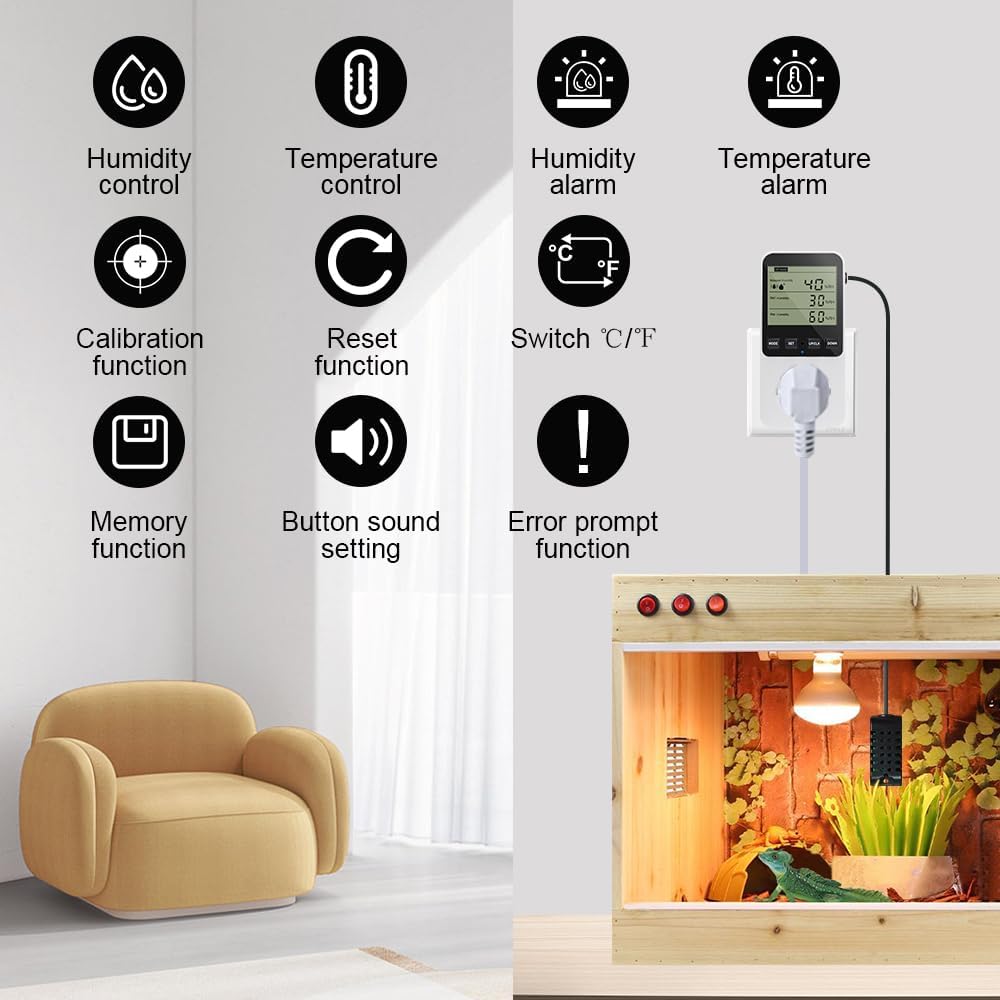
An overview of the controller's capabilities, including humidity/temperature control, alarm functions, calibration, reset, memory, button sound settings, and error prompts.
Applications
The KETOTEK KT3400-US Humidity Controller is highly versatile and can be used in various environments requiring precise humidity and temperature regulation:
- Greenhouses: Maintain optimal humidity and temperature for plant growth.
- Mushroom Cultivation: Create ideal conditions for mushroom fruiting.
- Incubators: Ensure stable temperature and humidity for hatching eggs.
- Pet Reptile Enclosures: Regulate the environment for reptiles and amphibians.
- Aquaculture: Control conditions in aquatic environments.
- Household Use: Manage humidity in basements, attics, or living spaces to prevent mold or dryness.

Illustrations of the controller being used in a greenhouse, a home living space, for incubation, and for breeding reptiles.
Troubleshooting
This section addresses common issues and their potential solutions:
- Display shows 'HHH' or 'LLL': This indicates that the measured data is out of the controller's measurable range. Ensure the sensor is placed within the specified operating conditions.
- Display shows 'Err': This typically means the sensor is not connected properly or there is a short circuit in the sensor cable. Check the sensor connection and inspect the cable for any damage.
- Connected appliance not turning on/off:
- Verify that the controller is powered on and the display is active.
- Check if the appliance itself is functioning correctly when plugged directly into a wall outlet.
- Ensure the 'Start' and 'Stop' humidity/temperature settings are configured correctly for your desired operation mode (humidification, dehumidification, heating, cooling).
- Confirm that the current measured humidity/temperature is within the range that should trigger the appliance.
- Inaccurate readings:
- Perform a humidity/temperature calibration as described in the 'Settings and Calibration' section.
- Ensure the sensor is not obstructed, dirty, or exposed to direct drafts/heat sources that could skew readings.
If you encounter issues not listed here or if the problem persists, please refer to the 'Warranty and Support' section for assistance.
Maintenance
To ensure the longevity and accurate performance of your KETOTEK Humidity Controller, follow these maintenance guidelines:
- Cleaning: Wipe the main unit and sensor with a soft, dry cloth. Do not use abrasive cleaners, solvents, or immerse the device in water.
- Sensor Care: Keep the sensor clean and free from dust, debris, or moisture buildup, which can affect accuracy. Avoid bending or kinking the sensor cable excessively.
- Storage: If storing the device for an extended period, unplug it from the power outlet and store it in a cool, dry place away from direct sunlight and extreme temperatures.
- Environmental Conditions: Operate the controller within its specified temperature and humidity ranges to prevent damage.
Warranty and Support
KETOTEK products are designed for reliability and performance. For specific warranty information regarding your KT3400-US Humidity Controller, please refer to the warranty card included with your purchase or visit the official KETOTEK website.
If you require technical assistance, have questions about product operation, or need to report a defect, please contact KETOTEK customer support through the following channels:
- Email: Refer to your product packaging or the official KETOTEK website for the most current support email address.
- Website: Visit the KETOTEK official website for FAQs, troubleshooting guides, and contact forms.
Please have your model number (KT3400-US) and purchase information ready when contacting support to ensure a prompt resolution.


