
DYNASONIC DYNAPRO10
DYNASONIC Dynapro 10 Portable Speaker Instruction Manual
Model: DYNAPRO10 | Brand: DYNASONIC
1. Introduction
This manual provides detailed instructions for the safe and efficient operation of your DYNASONIC Dynapro 10 Portable Speaker. Please read this manual thoroughly before using the product and retain it for future reference. The Dynapro 10 is a versatile portable audio system designed for various applications, featuring Bluetooth, USB/SD playback, FM radio, and microphone inputs.
2. Safety Instructions
- Do not expose the unit to rain or moisture to prevent fire or electric shock.
- Do not open the casing. There are no user-serviceable parts inside. Refer all servicing to qualified personnel.
- Ensure proper ventilation. Do not block ventilation openings.
- Avoid placing the unit near heat sources such as radiators, heat registers, stoves, or other apparatus (including amplifiers) that produce heat.
- Protect the power cord from being walked on or pinched, particularly at plugs, convenience receptacles, and the point where they exit from the apparatus.
- Unplug this apparatus during lightning storms or when unused for long periods of time.
- Use only attachments/accessories specified by the manufacturer.
- Do not use the speaker at excessively high volumes for extended periods, as this may cause hearing damage.
3. Package Contents
Verify that all items listed below are included in your package:
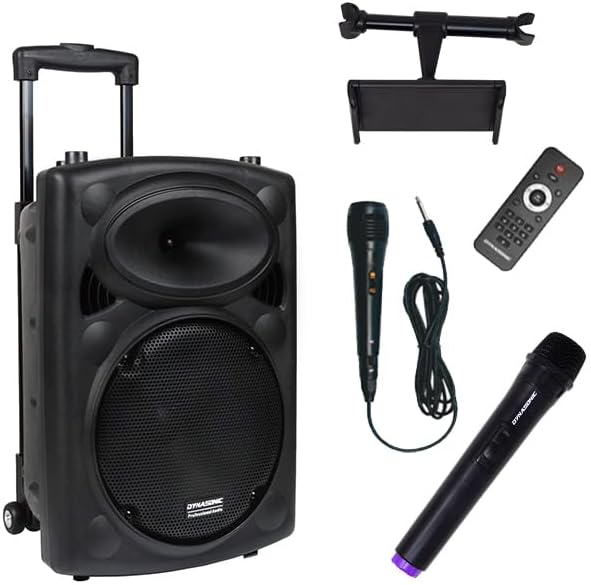
- DYNASONIC Dynapro 10 Portable Speaker
- Wireless Microphone
- Wired Microphone
- Tablet Stand
- Remote Control
- Charging Cable
- Headset Microphone
4. Product Overview
4.1 Front View

4.2 Rear Control Panel
The rear panel houses all essential controls and input/output ports for the speaker system.

4.3 Tablet Stand Integration

5. Setup
5.1 Initial Charging
Before first use, fully charge the speaker's internal battery. Connect the provided charging cable to the speaker's power input and a suitable power outlet. The charging indicator will illuminate. A full charge typically takes 4-5 hours.
5.2 Positioning the Speaker
Place the speaker on a stable, flat surface. For optimal sound dispersion, position it in an open area, away from walls or corners that might obstruct the sound.
5.3 Attaching the Tablet Stand
Insert the tablet stand into the designated slots on top of the speaker. Ensure it is securely fastened before placing a tablet on it.
6. Operating Instructions
6.1 Power On/Off
Locate the power switch on the rear control panel. Flip it to the "ON" position to power on the speaker. Flip it to "OFF" to power off.
6.2 Bluetooth Connectivity
- Turn on the speaker. The display will indicate Bluetooth mode or you can select it using the Mode button.
- Enable Bluetooth on your mobile device (smartphone, tablet, etc.).
- Search for "DYNASONIC DYNAPRO10" in your device's Bluetooth settings.
- Select the speaker to pair. A confirmation sound will indicate successful pairing.
6.2.1 TWS (True Wireless Stereo) Function
The TWS function allows you to pair two Dynapro 10 speakers for a stereo audio experience.
- Ensure both Dynapro 10 speakers are powered on and in Bluetooth mode.
- On one speaker (this will be the primary speaker), press and hold the TWS button (if available) or the Bluetooth pairing button until you hear a pairing tone.
- The two speakers will automatically connect to each other.
- Once connected, pair your mobile device to the primary speaker as described in section 6.2.

6.3 USB/SD Playback
Insert a USB flash drive or SD card (with MP3 audio files) into the respective slot on the rear control panel. The speaker will automatically switch to USB/SD mode and begin playback. Use the control panel or remote to navigate tracks and adjust volume.
6.4 FM Radio
Press the Mode button to select FM radio. Use the scan button to automatically search and save available radio stations. Use the previous/next buttons to cycle through saved stations.
6.5 Microphone and Instrument Inputs
Connect the wired microphone or an instrument (e.g., guitar) to the designated input jacks on the rear panel. Adjust the individual volume knobs for microphones and instruments, as well as the master volume. The Echo knob can be used to add reverberation to microphone vocals.
7. Maintenance
7.1 Cleaning
Wipe the speaker's exterior with a soft, dry cloth. Do not use abrasive cleaners, waxes, or solvents. Ensure no liquids enter the speaker grilles or control panel openings.
7.2 Storage
When not in use for extended periods, store the speaker in a cool, dry place, away from direct sunlight and extreme temperatures. It is recommended to fully charge the battery every 3-6 months to maintain its lifespan.
8. Troubleshooting
| Problem | Possible Cause | Solution |
|---|---|---|
| No power | Battery drained; Power cable not connected | Charge the speaker; Ensure power cable is securely connected. |
| No sound | Volume too low; Incorrect input mode; Device not paired (Bluetooth) | Increase master volume and source volume; Select correct input mode (Bluetooth, USB, FM); Re-pair Bluetooth device. |
| Bluetooth not connecting | Speaker not in pairing mode; Device too far; Interference | Ensure speaker is in Bluetooth pairing mode; Move device closer to speaker; Avoid obstacles between devices. |
| Microphone not working | Microphone volume low; Microphone not connected properly; Battery low (wireless mic) | Increase microphone volume knob; Ensure microphone is fully plugged in; Replace batteries in wireless microphone. |
| Poor FM radio reception | Weak signal; Antenna not extended | Relocate the speaker; Extend the telescopic antenna fully. |
9. Specifications
| Model | DYNAPRO10 |
| Brand | DYNASONIC |
| Output Wattage | 500 Watts |
| Speaker Amplification Type | Active |
| Connectivity Technology | Bluetooth, USB |
| Audio Input | Microphones (wired/wireless), Musical Instruments |
| Compatible Devices | Guitar, Headset, Smartphone, Tablet |
| Power Source | Battery Powered |
| Battery Type | Lithium Ion (1 included) |
| Battery Life | Approximately 4-5 hours |
| Material | Polypropylene (PP) |
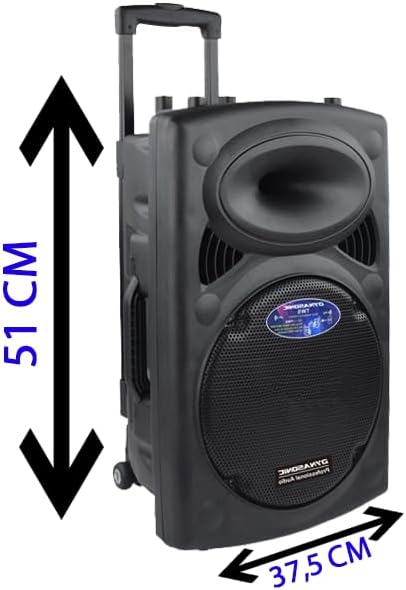
| Product Dimensions (L x W x H) | 51 x 34 x 37 cm |
| Item Weight | 6.57 Kilograms |
10. Warranty and Support
For warranty information and technical support, please refer to the warranty card included with your product or visit the official DYNASONIC website. Keep your purchase receipt as proof of purchase for any warranty claims.
Official Website: www.dynasonic.es
For customer service inquiries, please contact your retailer or the DYNASONIC support team.
Ask a question about this manual
Ask about setup, troubleshooting, compatibility, parts, safety, or missing instructions. Manuals+ will review the question and use this page’s manual context to help answer it.