
Easyfone KW2
Easyfone Trackino KW2 4G Kids Smart Watch Phone User Manual
Model: KW2
1. Introduction
The Easyfone Trackino KW2 is a 4G Kids Smart Watch Phone designed to provide a safe and reliable communication solution for children aged 4 and above. It combines essential features such as safe calling, GPS tracking, and parental controls, offering peace of mind for parents while giving children a sense of independence. This manual provides comprehensive instructions for setup, operation, maintenance, and troubleshooting to ensure optimal use of your device.
2. What's in the Box
Upon unboxing your Easyfone Trackino KW2, please verify that all the following items are included:
- Trackino KW2 Kids Smart Watch
- User Manual
- Charging cable
- Built-In SpeedTalk SIM Card and Activation Guide Card

This image displays the Easyfone Trackino KW2 smartwatch, its charging cable, a SpeedTalk SIM card with activation guide, and the user manual, all neatly arranged as they would appear upon unboxing.
3. Setup Guide
Follow these steps to set up your Easyfone Trackino KW2 smartwatch:
- Charge the Watch: Before first use, fully charge the smartwatch using the provided charging cable. Connect the magnetic end of the cable to the charging port on the watch and the USB end to a compatible power adapter.
- SIM Card Activation: The watch comes with a pre-installed SpeedTalk SIM card. Refer to the included Activation Guide Card for instructions on activating your Easyfone exclusive plan. This plan is necessary for calling, texting, and GPS features. You can visit SpeedTalk Mobile Easyfone Activation Page for more details.
- Download the 'Trackino' App: On your smartphone, download the 'Trackino' management application. This app is available for both Android and iOS devices. The activation guide card includes a QR code for easy download.
- Pair the Watch with the App: Open the 'Trackino' app on your smartphone. Follow the in-app instructions to pair your Easyfone Trackino KW2 smartwatch. This typically involves scanning a QR code displayed on the watch screen or entering a unique device ID.
- Set Up Contacts and SOS: Once paired, use the 'Trackino' app to manage contacts. You can add up to 15 parent-managed contacts and set up SOS contacts for quick emergency calls.

This image illustrates the watch's calling feature and the parent-managed contact list within the 'Trackino' app, highlighting the ease of making and receiving calls.
4. Operating the Smartwatch
The Easyfone Trackino KW2 offers a range of functionalities designed for children's safety and communication:
- 4G Safe Calling: Make and receive calls only from parent-approved contacts. Parents can restrict unknown calls through the app. The watch also features an SOS button for quick connection to emergency contacts.
- GPS Tracking & Customizable Safe Zones: Track your child's location in real-time using the 'Trackino' app. Set up custom GPS SafeZones, and receive notifications when your child enters or leaves these designated areas.
- Voice Chat & SMS: Children can send and receive voice messages and pre-set emojis. The watch supports SMS messages.
- Camera: The built-in camera allows children to capture photos.
- Steps Counter: Monitor daily activity with the integrated steps counter.
- School Mode: Activate School Mode via the app to limit watch functions during school hours, ensuring no distractions.
- Alarms: Set alarms for various activities to help children develop good habits.
- Voice Record: The watch includes a voice recording function.
- Add Friends: Children can add other KW2 watch users as friends by touching their watches together.
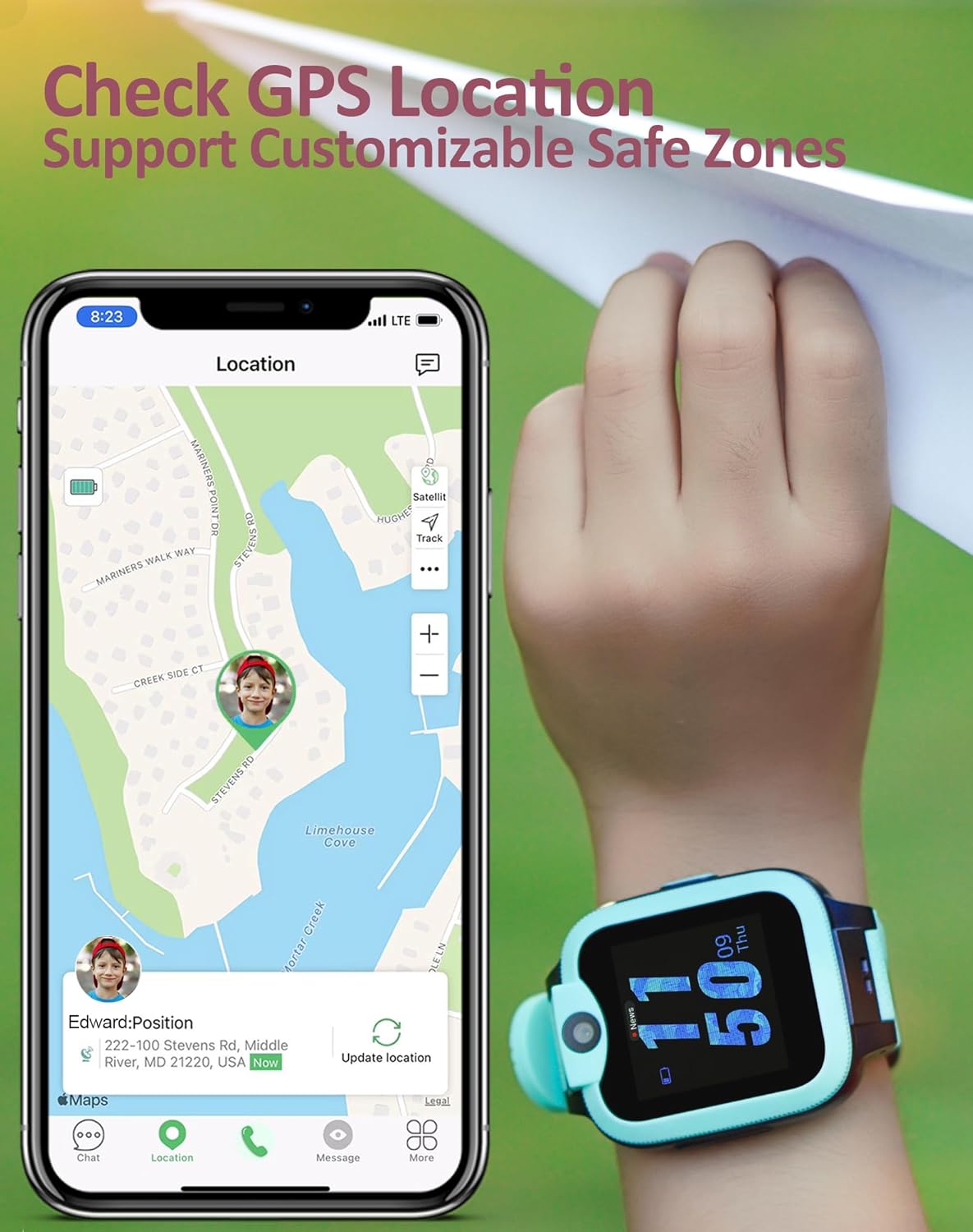
This image demonstrates the accurate GPS location tracking and the customizable safe zones feature, allowing parents to monitor their child's whereabouts.

This image highlights the chat and messaging function, enabling children to communicate using voice messages and pre-set emojis.

This image illustrates the step counter feature on the watch and the corresponding activity tracking data available in the companion app.
5. Parental Controls
The Easyfone Trackino KW2 is designed with robust parental control features, all managed through the 'Trackino' app:
- Contact Management: Parents have full control over who their child can call and who can call their child. Only pre-approved numbers can communicate with the watch.
- Remote Monitoring: Access real-time location tracking, set up and manage safe zones, and receive alerts when your child enters or leaves these areas.
- School Mode Scheduling: Schedule specific times when the watch functions are limited to prevent distractions during school or study hours.
- SOS Functionality: Program emergency contacts that the child can call with a single press of the SOS button. Parents receive immediate alerts.
- No Third-Party Apps: For enhanced safety, the Easyfone Trackino KW2 does not allow the installation of third-party applications.
6. Maintenance
To ensure the longevity and optimal performance of your Easyfone Trackino KW2 smartwatch, follow these maintenance guidelines:
- Cleaning: Wipe the watch regularly with a soft, dry cloth. For stubborn dirt, a slightly damp cloth can be used, followed by immediate drying.
- Water Resistance: The watch is IP-68 water resistant, meaning it can withstand splashes and brief immersion. However, for call quality reasons, it is not recommended to wear this watch for swimming or prolonged water exposure.
- Charging: Use only the provided charging cable. Avoid using damaged cables or chargers. Ensure the charging contacts on the watch and cable are clean and dry before charging.
- Storage: Store the watch in a cool, dry place away from direct sunlight and extreme temperatures.
- Battery Care: To prolong battery life, avoid fully discharging the battery frequently. Charge the watch when the battery level is low.

This image visually confirms the watch's durability, showing it in a sandy environment, highlighting its dustproof and IP-68 water-resistant capabilities.
7. Troubleshooting
If you encounter issues with your Easyfone Trackino KW2, refer to the following common troubleshooting steps:
| Problem | Possible Cause | Solution |
|---|---|---|
| Watch not turning on | Low battery; Power button not pressed long enough | Charge the watch for at least 30 minutes. Press and hold the power button for 5-10 seconds. |
| Cannot make/receive calls | SIM card not activated; No network signal; Number not in approved contacts | Ensure SIM is activated and plan is active. Check network coverage. Verify contact is added to the approved list in the 'Trackino' app. |
| Inaccurate GPS location | Poor GPS signal (indoors/dense areas); Watch not connected to network | Move to an open area for better signal. Ensure watch has active network connection. Location updates may be delayed due to connectivity. |
| App cannot bind/connect to watch | Incorrect QR code/ID; Watch not powered on; Network issue | Ensure watch is on and displaying the correct binding QR code. Check your phone's internet connection. Try restarting both devices. |
| Short battery life | Frequent usage; High network activity; Background processes | Reduce frequent calls/GPS updates. Ensure watch is not constantly searching for signal in poor coverage areas. |
If the problem persists after trying these solutions, please refer to the support section for further assistance.
8. Specifications
| Feature | Detail |
|---|---|
| Model Number | KW2 |
| Screen Size | 1.4 Inches |
| Operating System | Easyfone OS |
| Memory Storage Capacity | 1 GB |
| RAM Memory Installed Size | 48 MB |
| Battery Type | 1 Lithium Polymer battery (included) |
| Battery Life (Working Time) | Up to 2 days |
| Battery Life (Standby Time) | Up to 5-7 days |
| Connectivity Technology | Bluetooth, 4G Cellular |
| GPS | True |
| Water Resistance | IP-68 (Dustproof & Water Resistant) |
| Item Weight | 7 ounces |
| Package Dimensions | 3.94 x 3.9 x 2.83 inches |
| Manufacturer | Shen Zhen Yixun Electronic Technology Co., Ltd |
9. Warranty and Support
Specific warranty details for the Easyfone Trackino KW2 are not provided in the product information. Please refer to the product packaging or the official Easyfone website for warranty terms and conditions.
For technical support, troubleshooting assistance beyond this manual, or inquiries regarding your device, please contact Easyfone customer service through their official channels. Contact information can typically be found on the product packaging, the Easyfone website, or within the 'Trackino' application.
Related documentsKW2

Ask a question about this manual
Ask about setup, troubleshooting, compatibility, parts, safety, or missing instructions. Manuals+ will review the question and use this page’s manual context to help answer it.