
Introduction
This manual provides instructions for the Leadleds Programmable Bluetooth LED Display, model LLD-B1272RGB-1. This versatile LED sign allows for custom messages, animations, and graphics to be displayed via a smartphone application, making it suitable for various applications such as vehicles, retail stores, and events. Please read this manual thoroughly before use to ensure proper operation and longevity of your device.
Package Contents
Please check the package contents upon opening to ensure all items are present:
- 1 x Leadleds Programmable Bluetooth LED Display
- 2 x Suction Cups
- 1 x USB Power Cable (10-foot)
- 1 x User Manual
Specifications
| Brand | Leadleds |
| Model Number | LLD-B1272RGB-1 |
| Dimensions (L x W) | 9 x 2 inches (approx. 22.9 x 5.1 cm) |
| Color | RGB (Full Color) |
| Pixel Resolution | 12 x 72 dots |
| Material | Plastic (Industrial Grade ABS Frame) |
| Mounting Type | Window Mount (Suction Cups) |
| Item Weight | 0.18 kg |
| Light Type | SMD LED |
| Orientation | Horizontal |
| Operating Voltage | DC 5V |
| Connectivity | Bluetooth 5.0 |
| Supported Systems | Android and iOS |
| Supported Languages | English, Chinese, Russian, French, Spanish, Portuguese, German, Japanese, Korean, Italian, etc. |
| UPC | 824382251375 |
Setup
1. Mounting the LED Display
Attach the two provided suction cups to the back of the LED display. Ensure they are securely fastened. Mount the display onto a clean, smooth surface such as a car window or glass. The suction cups feature buckles that allow for 180-degree rotation to achieve the desired viewing angle.

Image: The LED display showing its industrial-grade ABS frame and two suction cups for mounting.
2. Power Connection
Connect the provided USB power cable to the LED display. The display requires a DC 5V power source. You can use a power bank, an AC/DC adapter (recommended output DC 5V=1000mA), or a car cigarette lighter charger. Note: Power adapters and car chargers are not included.

Image: Diagram illustrating the dimensions of the LED display and various compatible 5V 2A power supply options, including power bank, adapter, and car cigarette lighter supply.
3. App Installation
Download the dedicated control application on your smartphone. The app is compatible with both Android and iOS devices. Search for the app name (usually indicated in the included user manual or on the product packaging) in your device's app store.

Image: The LED display showing a "WELCOME" message, with icons indicating compatibility with Android and iOS devices via Bluetooth.
4. Bluetooth Connection
Once the app is installed, open it and follow the in-app instructions to connect to your LED display via Bluetooth. Important: Do not attempt to connect the LED display directly through your smartphone's Bluetooth settings. Always connect via the dedicated application to ensure proper functionality and message transmission. Maintain a distance of within 16 feet (approximately 5 meters) between your smartphone and the LED display for a stable connection.
Operating Instructions
1. Creating and Editing Messages
Open the control app. You can input custom text messages in multiple languages, including English, Chinese, Russian, French, Spanish, Portuguese, German, Japanese, Korean, and Italian. The app allows you to customize text color, font, size, and display effects.
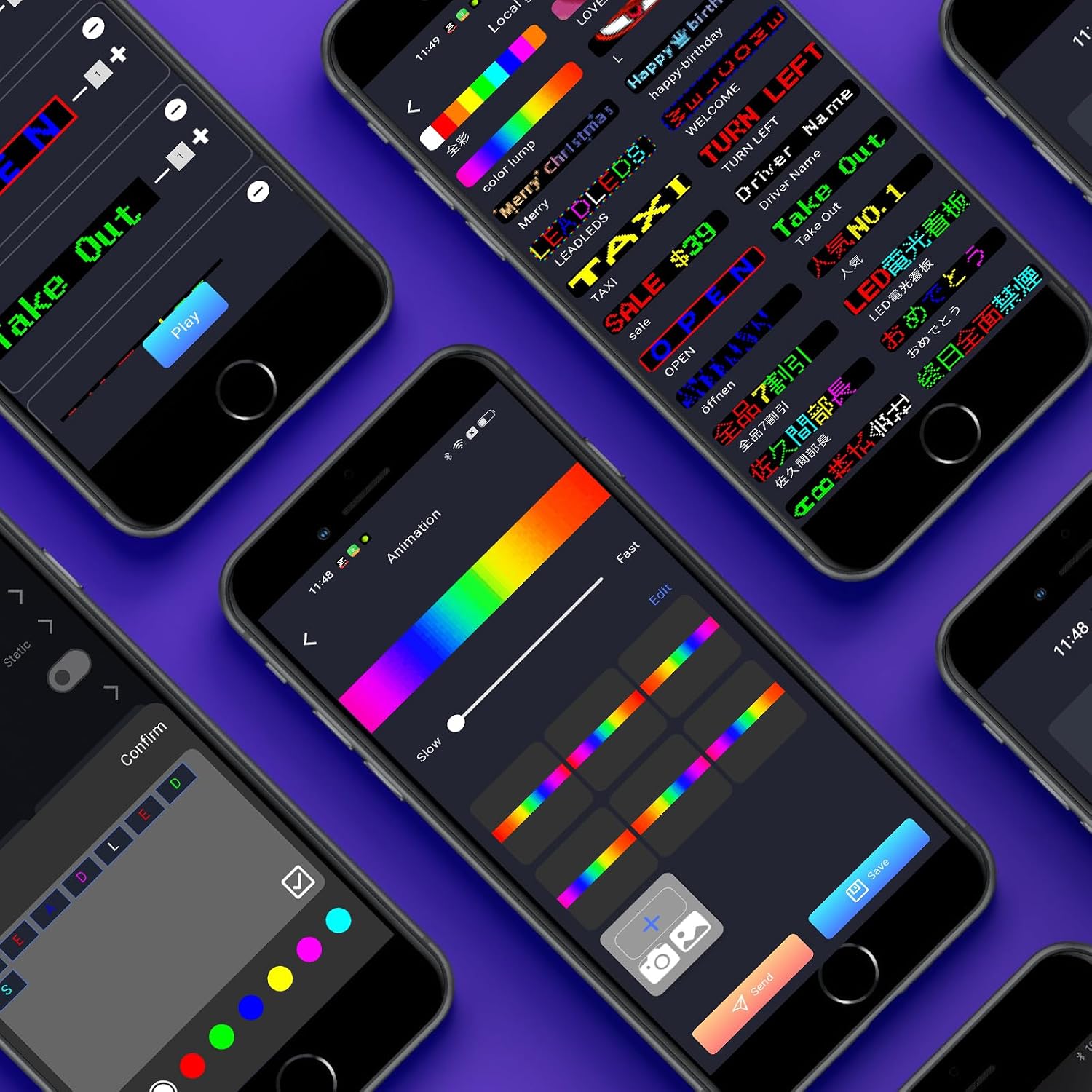
Image: A smartphone screen displaying the app interface, showing options for editing text, selecting colors, and adjusting animation speed for the LED display.
2. Selecting Display Modes and Effects
The display supports 8 different modes:
- Right: Text scrolls from right to left.
- Left: Text scrolls from left to right.
- Snowflake: Text appears with a snowflake effect.
- Picture: Displays pre-set or custom graphics.
- Laser: Text appears with a laser-like effect.
- Static: Text remains stationary.
- Up: Text scrolls upwards.
- Down: Text scrolls downwards.
You can also program animations, custom graffiti, and utilize a music equalizer display. The app provides options for adjusting brightness, screen on/off, mirror effect, and 180-degree rotation of the display content.

Image: Multiple LED displays showing different content, including a music equalizer, a "WELCOME" message, animated graphics, and a "THANKS" message, demonstrating the variety of display options.

Image: A smartphone screen showing the app's settings menu, with options for brightness adjustment, screen switch, mirror switch, and rotation (0°, 180°, and their mirror effects).
3. Sending Content to the Display
After creating and customizing your message or animation, use the "Send" or "Confirm" button within the app to transmit the content to the LED display. The display will update instantly.
Maintenance
1. Cleaning
To clean the LED display, gently wipe the surface with a soft, dry cloth. Avoid using abrasive cleaners or solvents that could damage the screen or frame.
2. Operating Environment
The recommended operating temperature for the LED display is between -17.8°C and 90°C (0°F to 194°F). Do not use the device above this temperature range. If exposed to strong direct sunlight, it is advisable to place the unit indoors or in a shaded area to prevent overheating and potential damage.
3. Rest Periods
To ensure optimal performance and extend the lifespan of the LED display, it is recommended to allow the device to rest for a period after 2-3 hours of continuous operation.
Troubleshooting
| Problem | Possible Cause | Solution |
|---|---|---|
| Screen is off or displays lines. | Incorrect operating voltage. | Ensure the LED display is powered by a stable DC 5V source. Using an incorrect voltage can cause display issues. |
| Cannot connect via Bluetooth or send messages. | Incorrect Bluetooth connection method or device is out of range. | Connect the LED display's Bluetooth only through the dedicated smartphone application, not directly through your phone's system Bluetooth settings. Ensure your phone is within 16 feet (5 meters) of the display. |
| Display content is not clear or appears distorted. | Environmental factors or display settings. | Adjust the brightness settings in the app. If in strong direct sunlight, move the display indoors or to a shaded area. Ensure the display is within the recommended operating temperature range. |
Safety Information
- Always use a DC 5V/2A power source for the LED display. Using an incompatible power supply may damage the device or pose a safety risk.
- Do not expose the device to temperatures outside the recommended operating range of -17.8°C to 90°C (0°F to 194°F).
- Avoid prolonged exposure to strong direct sunlight, especially in high temperatures, as this can lead to overheating.
- Allow the device to rest after 2-3 hours of continuous use to prevent overheating and ensure longevity.
- Keep the device away from water and other liquids.
- Do not attempt to disassemble or repair the device yourself. Contact customer support for assistance.
Warranty and Support
For any inquiries, technical support, or assistance with your Leadleds Programmable Bluetooth LED Display, please contact our customer service. We aim to respond to all queries within 24 hours.
While specific warranty details are not provided in this manual, please retain your proof of purchase for any warranty claims.