
sunvito X6
sunvito Bone Conduction Headphones User Manual
Model: X6 | Brand: sunvito
1. Introduction
Thank you for choosing sunvito Bone Conduction Headphones. These innovative headphones transmit sound through your cheekbones, allowing you to enjoy audio while remaining aware of your surroundings. Designed for versatility, they are ideal for various activities including swimming, running, cycling, and daily use.
This manual provides detailed instructions on how to set up, operate, and maintain your headphones to ensure optimal performance and longevity.

Image: sunvito Bone Conduction Headphones, showcasing their waterproof design.
2. Key Features
- Bone Conduction Technology: Delivers sound through vibrations, keeping your ears open to ambient sounds for enhanced safety.
- IP68 Waterproof Rating: Fully submersible, suitable for swimming up to 2 meters deep for 4 hours.
- Built-in 32GB Memory: Store thousands of songs for MP3 playback, essential for underwater use where Bluetooth signals cannot transmit.
- Bluetooth 5.3 Connectivity: Provides stable and efficient wireless connection for everyday use.
- Long Battery Life: Up to 8 hours of music playback on a single 2-hour charge.
- Lightweight and Comfortable: Weighing only 28 grams (1 ounce), designed for extended wear without discomfort.
- Magnetic Charging: Secure and convenient charging interface.

Image: Open-ear design allows awareness of surroundings, enhancing safety during outdoor activities.

Image: IP68 waterproof rating ensures reliable performance even during swimming.
3. Package Contents
Please check the box for the following items:
- sunvito Bone Conduction Headphones (Model X6)
- Magnetic Charging Cable
- User Manual (this document)
4. Product Overview
Familiarize yourself with the main components and controls of your sunvito headphones:
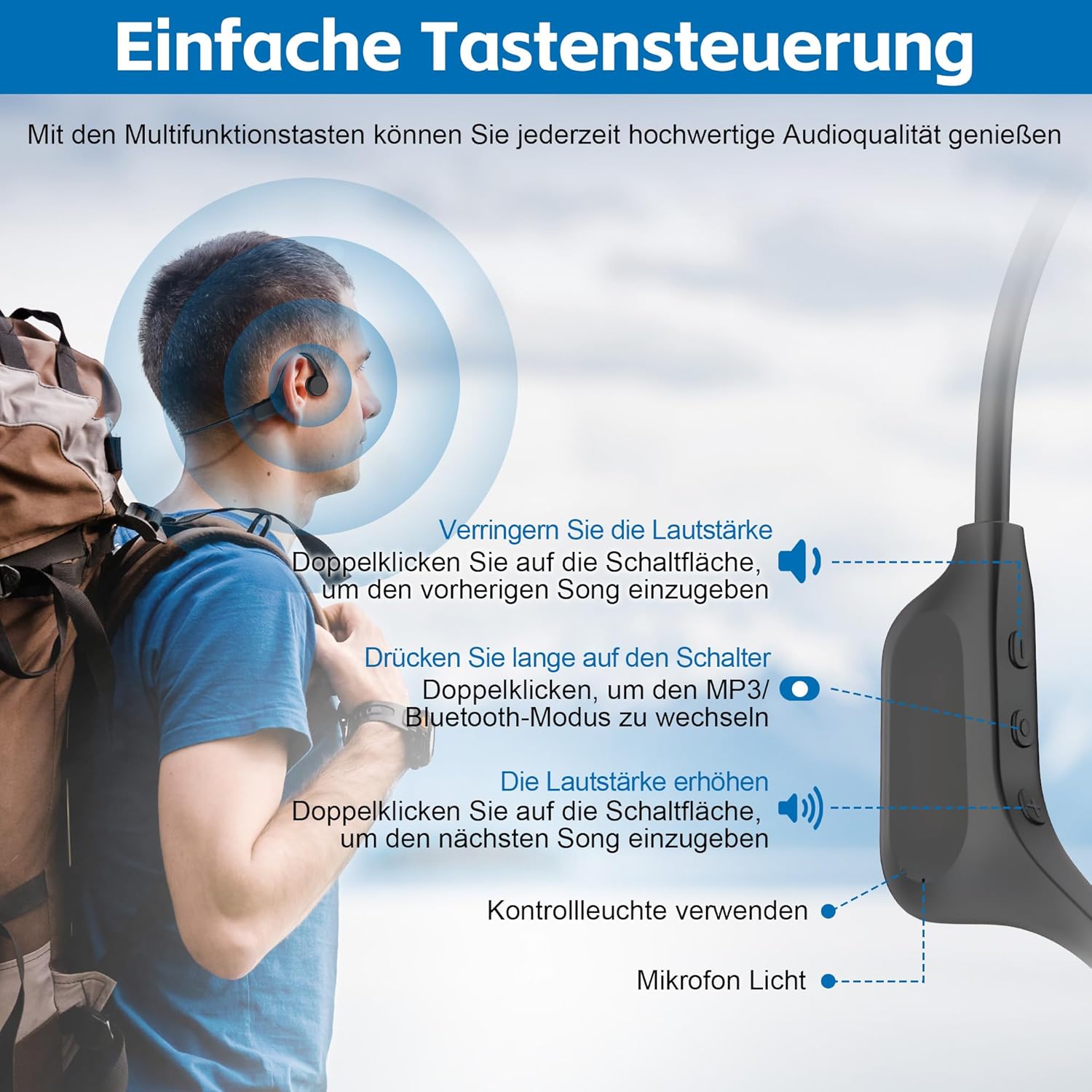
Image: Detailed view of the headphone controls and components.
- Left Button: Volume Down / Previous Song (double-click)
- Middle Button: Power On/Off (long press) / Play/Pause (tap) / Switch Mode (double-click)
- Right Button: Volume Up / Next Song (double-click)
- Indicator Light: Shows status (power, pairing, charging)
- Microphone: For calls
- Magnetic Charging Port: For charging and data transfer
5. Setup
5.1 Charging the Headphones
Before first use, fully charge your headphones. Connect the magnetic charging cable to the charging port on the headphones and plug the USB end into a power source (e.g., computer USB port, wall adapter).
- Charging Time: Approximately 2 hours for a full charge.
- Battery Life: Up to 8 hours of continuous playback.

Image: Magnetic charging port.

Image: Charging and battery life indication.
5.2 Bluetooth Pairing
To connect your headphones to a Bluetooth-enabled device:
- Ensure the headphones are charged and powered off.
- Press and hold the Middle Button for approximately 3-5 seconds until the indicator light flashes blue and red, indicating pairing mode.
- On your device (smartphone, tablet, computer), enable Bluetooth and search for new devices.
- Select "sunvito X6" from the list of available devices.
- Once connected, the indicator light will turn solid blue.

Image: The headphones feature an upgraded Bluetooth 5.3 chip for stable connectivity.
6. Operating Instructions
6.1 Basic Controls
| Function | Button Action |
|---|---|
| Power On/Off | Long press Middle Button |
| Play/Pause | Tap Middle Button |
| Volume Up | Tap Right Button |
| Volume Down | Tap Left Button |
| Next Song | Double-click Right Button |
| Previous Song | Double-click Left Button |
| Answer/End Call | Tap Middle Button |
| Reject Call | Long press Middle Button |
| Switch Bluetooth/MP3 Mode | Double-click Middle Button |
7. MP3 Mode for Swimming
When using the headphones for swimming or other underwater activities, Bluetooth connectivity is not reliable due to water interference. For these scenarios, utilize the built-in 32GB MP3 player.
7.1 Loading Music
- Connect the headphones to your computer using the magnetic charging cable.
- The headphones will be recognized as a removable disk (USB drive).
- Drag and drop your desired MP3 audio files directly into the headphone's storage.
- Safely eject the device from your computer before disconnecting.
7.2 Using MP3 Mode
- Double-click the Middle Button to switch to MP3 mode. The indicator light will change to confirm the mode.
- Ensure a swimming cap is worn to help secure the headphones during vigorous activity.
- Note: Volume control in MP3 mode might differ or be fixed depending on the firmware version.

Image: The headphones are designed to withstand water immersion, perfect for aquatic sports.
8. Maintenance
- Cleaning: After each use, especially after swimming, wipe the headphones clean with a soft, dry cloth. Pay particular attention to the magnetic charging contacts to prevent corrosion.
- Drying: Ensure the headphones are completely dry before charging to prevent damage to the charging port.
- Storage: Store the headphones in a cool, dry place away from direct sunlight and extreme temperatures.
- Avoid Impact: Do not drop or subject the headphones to strong impacts, as this may damage internal components.

Image: The headphones are suitable for a wide range of activities, from mountaineering to daily work.
9. Troubleshooting
If you encounter issues with your headphones, please refer to the following common problems and solutions:
| Problem | Possible Cause | Solution |
|---|---|---|
| Headphones won't power on | Low battery; Power button not pressed long enough | Charge the headphones fully; Press and hold the Middle Button for 3-5 seconds |
| Cannot pair via Bluetooth | Headphones not in pairing mode; Device Bluetooth off; Too far from device | Ensure headphones are flashing blue/red; Turn on device Bluetooth; Move closer to device (within 10 meters) |
| No sound in MP3 mode underwater | Not in MP3 mode; No music loaded; Volume too low | Double-click Middle Button to switch to MP3 mode; Connect to PC and load MP3 files; Adjust volume if possible |
| Headphones not recognized by computer | Loose connection; Driver issue; Water on charging contacts | Ensure cable is securely connected; Try a different USB port/computer; Clean and dry charging contacts thoroughly |
| Sound quality is poor | Improper fit; Volume too high/low; Source audio quality | Adjust placement on cheekbones; Optimize volume; Use high-quality audio files |
10. Specifications
| Feature | Detail |
|---|---|
| Model Name | X6 |
| Brand | sunvito |
| Connectivity Technology | Wireless (Bluetooth) |
| Wireless Communication Technology | Bluetooth 5.3 |
| Audio Driver Type | Bone Conduction Driver |
| Built-in Memory | 32GB |
| Water Resistance Level | IP68 Waterproof |
| Battery Life | 8 Hours |
| Charging Time | 2 Hours |
| Item Weight | 28 Grams (0.988 ounces) |
| Material | Acrylonitrile Butadiene Styrene (ABS), Silicone, Thermoplastic Elastomer (TPE) |
| Ear Placement | Open Ear |
| Control Type | Media Control (Buttons) |
| Recommended Uses | Calling, Cycling, Running, Skateboarding, Snowboarding, Music, Sport, Travel |
11. Warranty and Support
sunvito products are manufactured to the highest quality standards. For warranty information, technical support, or customer service inquiries, please refer to the contact details provided on the product packaging or visit the official sunvito website. Please retain your proof of purchase for warranty claims.